
That small ribbon cable connecting your GPU to your motherboard might just be the most underestimated component in your entire build. When it fails under load, or delivers inconsistent power to a graphics card running around the clock, the consequences range from frustrating crashes to permanent hardware damage. If you’re sourcing PCI-E riser cards in South Africa, you already know the stakes are high, and the local market doesn’t always make the decision easy.
You’re right to be cautious. The jump from Gen 3 to Gen 4 and now Gen 5 risers has introduced real compatibility headaches, and pairing the wrong riser with a high-draw GPU in a mining rig or a performance gaming setup isn’t a mistake you want to make twice. Power delivery integrity and signal stability aren’t marketing language; they’re the difference between a rig that runs profitably and one that doesn’t run at all.
This guide cuts through the confusion. You’ll learn exactly how to match PCIe riser versions to your hardware, what to look for in power delivery ratings, and how to source reliable components with nationwide delivery across South Africa. Whether you’re building out a multi-GPU mining frame or upgrading a gaming workstation, the right information here will protect your investment.
Key Takeaways
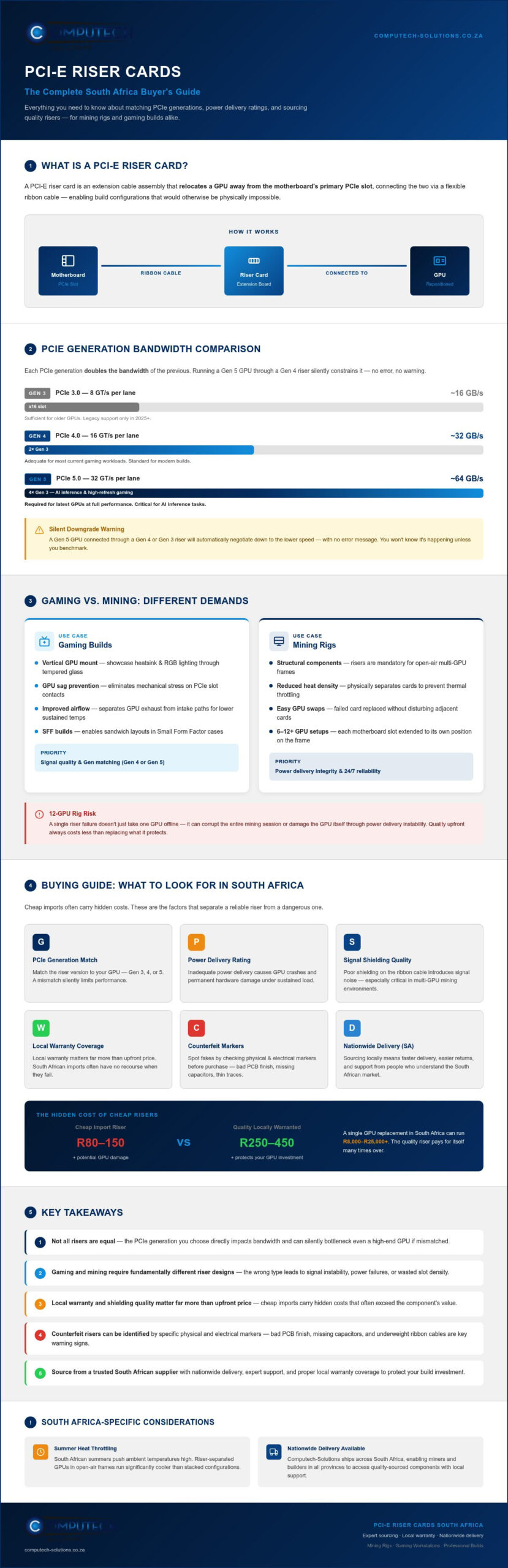
- Not all risers are created equal — the PCIe generation you choose directly impacts bandwidth availability and can silently bottleneck even a high-end GPU if mismatched.
- Gaming and mining builds require fundamentally different riser designs, and selecting the wrong type for your use case leads to signal instability, power delivery failures, or wasted slot density.
- When sourcing pci-e riser cards in South Africa, local warranty coverage and shielding quality matter far more than the upfront price — cheap imports often carry hidden costs.
- Identifying counterfeit or low-quality risers comes down to a few specific physical and electrical markers that this guide will show you how to spot before you buy.
- Computech-Solutions offers nationwide delivery and expert technical support, making it a practical local partner for both mining rig builds and gaming workstation upgrades.
What is a PCI-E Riser Card and Why Do You Need One?
A PCI-E riser card is an extension cable assembly that relocates a GPU away from the motherboard’s primary PCIe slot, connecting the two via a flexible ribbon cable. That’s the simple definition. The practical reality is that this small component unlocks build configurations that would otherwise be physically impossible, and it serves two very different markets with very different demands.
On one side, you have gamers and system builders who want their high-end graphics cards mounted vertically for display purposes or positioned to improve airflow within their chassis. On the other, you have crypto miners running open-air frames with six, eight, or more GPUs drawing power around the clock. Both groups depend on riser cards, but the performance requirements, failure tolerances, and quality thresholds differ significantly between them.
The Role of Risers in Modern Gaming
Modern tempered glass cases have made GPU presentation a genuine design consideration. A vertical mount via a riser card lets you showcase the heatsink and lighting of a flagship graphics card rather than hiding it behind a shroud. Beyond aesthetics, risers solve a real engineering problem: GPU sag. High-end cards have grown heavy enough to stress PCIe slot contacts over time, and a riser with a proper bracket eliminates that mechanical load entirely.
Airflow is the other functional argument. In traditional horizontal layouts, a GPU exhausts heat directly into the intake path of the card below it. A vertical mount, or a riser-enabled repositioned card in a sandwich-layout Small Form Factor build, allows system designers to create cleaner intake and exhaust separation. The result is lower sustained temperatures under gaming loads.
Why Crypto Miners Depend on Quality Risers
For mining operations, risers aren’t optional accessories. They’re structural components. A single mining motherboard typically has six PCIe slots at most, and risers allow each GPU to be physically separated on an open-air frame rather than stacked in a conventional case. This separation does two critical things:
- Reduces heat density: Individual GPU temperatures drop when cards aren’t sharing confined airspace, which matters significantly during South African summers when ambient temperatures can push thermal throttling thresholds.
- Simplifies maintenance: A failed GPU on a riser-connected frame can be swapped without disturbing adjacent cards, minimising downtime on a running rig.
Sourcing reliable pci-e riser cards in South Africa becomes a serious operational decision at this scale. A single riser failure in a 12-GPU rig doesn’t just take one card offline; it can corrupt the entire mining session or, in a worst case, damage the GPU itself through power delivery instability. The upfront cost of quality components is always cheaper than the cost of replacing what they protect.
Computech-Solutions supports both use cases with nationwide delivery, making it a practical option whether you’re building a single vertical-mount gaming workstation or commissioning a multi-GPU mining frame from anywhere in South Africa.
Technical Specifications: Bandwidth, Generations, and Power
Choosing a riser card by price alone is a fast route to hardware problems you won’t immediately be able to diagnose. The specification that actually determines whether your GPU performs at its rated capacity is PCIe generation, and in 2026, the gap between getting this right and getting it wrong has never been wider.
Gen 4 vs. Gen 5: Which Bandwidth Do You Need?
PCIe Gen 3 delivers 8 GT/s per lane, translating to roughly 1 GB/s of usable bandwidth per lane in a x16 slot. Gen 4 doubles that to 16 GT/s, and Gen 5 doubles it again to 32 GT/s. For a GPU operating at x16, that means Gen 5 provides approximately 64 GB/s of theoretical bidirectional bandwidth. The practical implication is straightforward: running a Gen 5 GPU through a Gen 4 riser constrains the interface to Gen 4 speeds, which is sufficient for most current gaming workloads but becomes a genuine bottleneck in AI inference tasks and high-refresh-rate gaming scenarios where frame data throughput is continuous and high-volume.
Backward compatibility does exist. A Gen 5 card will negotiate down to Gen 4 or Gen 3 when connected through an older riser, but it does so automatically and silently. You won’t get an error message. You’ll simply get reduced performance and, in some cases, increased latency that’s difficult to attribute without a diagnostic tool. Always match your riser generation to your motherboard’s PCIe slot specification, and confirm your GPU BIOS settings aren’t manually locked to a lower link speed before assuming the riser is at fault.
Signal integrity compounds this issue with longer cables. A Gen 5 signal at 32 GT/s is significantly more sensitive to impedance mismatches and electromagnetic interference than Gen 3 signals. Cheap, unshielded ribbon cables introduce crosstalk that causes packet retransmission, which registers as latency spikes rather than outright failures. Gold-plated contacts reduce oxidation-related resistance at connection points, which is particularly relevant in South Africa’s coastal humidity environments. These aren’t premium features; they’re engineering requirements for stable high-frequency signalling.
Safe Powering Practices for South African Users
Power delivery is where riser cards fail most often, and the South African context adds a layer of risk that most international guides don’t address. Load shedding creates repeated hard restarts, and each power restoration event sends a surge through connected hardware before PSU protection circuits fully engage. A riser drawing power through a SATA connection during one of these events is a serious liability. SATA connectors are rated for 54W; a riser under GPU load can demand considerably more. The connector physically cannot handle that current safely, and the result is either a melted connector or an unstable voltage rail that corrupts GPU memory operations.
The industry standard is a 6-pin PCIe power connector sourced directly from your PSU. It’s rated for 75W and carries a dedicated ground path that SATA connections lack. For high-draw GPUs in a multi-card rig, some builders use dual 6-pin connections per riser for additional headroom. Before finalising any rig configuration, calculate your total system wattage across all GPUs, risers, and the motherboard, then target a PSU rated for at least 20% above that figure to maintain stable rail voltages under sustained load.
Sourcing correctly specified pci-e riser cards in South Africa means confirming power rating documentation before purchase, not after a failure. If you’re commissioning a multi-GPU build and want technical guidance on matching riser specifications to your PSU and GPU combination, Computech-Solutions’ expert support team can help you build a stable, correctly matched configuration from the start.
Gaming vs. Mining: Choosing the Right Riser for Your Use Case
The riser card market splits cleanly into two design philosophies, and buying the wrong type for your build doesn’t just waste money; it creates instability that’s genuinely difficult to trace back to the source. Gaming builds and mining rigs have opposing priorities, and the hardware reflects that.
Gaming risers are built around flexible ribbon cables with high-frequency signal shielding. The goal is preserving PCIe signal integrity across a short, controlled distance inside an enclosed chassis. Mining risers take a completely different approach, using a USB 3.0-style cable to connect a x1 plug to a x16 slot adapter. This design trades raw signal performance for something miners care about more: physical flexibility and slot density. You can run six or more GPUs off a single board without the cards interfering with each other thermally or mechanically.
Thermal management is where South African operators face a challenge that most international guides don’t account for. Ambient temperatures in Gauteng or the Western Cape interior regularly exceed 35°C during summer, and a GPU running a mining algorithm at 100% load in that environment is already working close to its thermal ceiling. Riser placement directly affects whether cards can breathe. In open-air mining frames, spacing GPUs at least 5cm apart via risers allows individual heatsinks to draw fresh ambient air rather than recirculating exhaust heat from adjacent cards. That spacing, enabled entirely by the riser cable length you select, is the difference between stable long-term operation and thermal throttling that silently kills your hashrate.
The Vertical GPU Mount: Aesthetics and Airflow
Vertical mounting via a flexible riser ribbon solves GPU sag and improves display, but cable length selection is non-negotiable. A 200mm cable suits most mid-tower chassis; shorter 100mm cables work in compact builds but leave no margin for routing. The critical mistake builders make is mounting the card too close to the tempered glass panel. Less than 20mm of clearance between the GPU heatsink and the glass creates a dead-air zone that traps heat, raising temperatures by a measurable margin under sustained load. Confirm your bracket supports the physical width of modern triple-slot GPUs before ordering, as older brackets designed for dual-slot cards will misalign the PCIe connector under the weight of a current-generation card.
Mining Riser Kits: Stability for High-Density Rigs
Current-generation mining riser kits include the x1-to-x16 adapter board, a USB 3.0 extension cable, and a power input board. When sourcing pci-e riser cards in South Africa, the two components that separate reliable kits from unreliable ones are capacitor quality and status indicators. Solid polymer capacitors on the adapter board filter the voltage ripples that are endemic to multi-GPU power environments, particularly during the hard restarts that load shedding forces on South African rigs. Electrolytic capacitors in the same position fail faster under heat and ripple stress. LED status indicators on the power board provide immediate visual confirmation of whether a riser is receiving stable power, which cuts troubleshooting time dramatically when you’re managing a high-density frame and need to isolate a fault without pulling cards.
Dust accumulation is an underappreciated durability factor in South African open-air mining environments. Connectors without gold plating oxidise faster in humid coastal regions and accumulate resistive dust layers in dry inland areas. Both conditions increase contact resistance and introduce the same voltage instability that solid capacitors are designed to suppress. Selecting components built for sustained 24/7 operation in variable environments isn’t a premium consideration; it’s a baseline requirement for any serious mining operation.
Computech-Solutions supports both gaming and mining builds with nationwide delivery, providing a practical local sourcing option for operators who need correctly specified components without the risk of importing unverified stock.
Buying Guide: What to Look for in South Africa
Price is the wrong starting point when sourcing pci-e riser cards in South Africa. The components that fail first are almost always the ones that looked like good value at checkout. Understanding what separates a reliable local purchase from a costly import mistake comes down to four specific factors: warranty coverage, shielding quality, cable specification, and access to technical support when something goes wrong.
Local warranty coverage is the most undervalued differentiator in this market. An overseas import might arrive at a lower unit cost, but when a riser fails three months into a mining operation, you’re facing international return shipping, extended replacement timelines, and no local recourse. A component backed by a South African supplier means a real return path and a replacement timeline measured in days, not weeks. For a mining rig generating revenue around the clock, that distinction has direct financial consequences.
Shielding quality is where clone products expose themselves. Genuine risers use foil or braided shielding around the ribbon cable to contain electromagnetic interference generated by adjacent power cables and GPU fans. A clone riser skips this shielding to cut manufacturing costs, and the result is crosstalk that registers as intermittent errors rather than a clean failure. Physically, you can identify inadequate shielding by the feel of the cable: genuine shielded cables have a consistent, slightly rigid texture across their length. Thin, floppy cables with visible foil only at the connector ends are a reliable indicator of a cost-cut product.
Cable length and flexibility matter more than most buyers anticipate. A 200mm ribbon cable fits the majority of mid-tower gaming builds, but compact sandwich-layout cases often require 100mm cables with tighter bend radii. Confirm your case’s PCIe slot-to-bracket distance before ordering, and check that the cable’s minimum bend radius won’t stress the connector housing in your specific layout. A riser that’s physically strained at installation will fail at the connector point under thermal cycling.
Nationwide Delivery and Logistics
Riser cards are fragile at their connector points, and transit handling across long distances introduces real risk. When ordering, confirm that your supplier uses protective packaging with anti-static shielding and rigid outer packaging, not just a padded envelope. Delivery timelines to major centres like Johannesburg, Cape Town, and Durban are typically shorter than to outlying regions, so factor lead time into your build schedule if you’re operating outside a primary hub.
Local Support and Troubleshooting
A local expert contact resolves ‘Code 43’ or ‘No Display’ riser errors faster than any forum thread. These errors typically trace back to one of three causes: a negotiated link speed mismatch, a power delivery fault on the riser board, or a driver conflict with the USB controller chip on mining-style adapters. Isolating which cause applies requires systematic testing, and having a knowledgeable local contact who understands your specific hardware configuration cuts that process significantly. For downtime-sensitive mining operations, local RMA support isn’t a convenience; it’s an operational necessity that directly protects your revenue continuity.
Computech-Solutions provides nationwide delivery and expert technical support for mining and gaming hardware builds. Contact the Computech-Solutions team to confirm component compatibility and get your order moving with the right specifications from the start.
Secure Your Build with Computech-Solutions
Every decision in a high-stakes hardware build eventually comes down to one question: who do you trust to supply the components that everything else depends on? For builders sourcing pci-e riser cards in South Africa, the answer needs to be a local partner with verified inventory, real technical depth, and a delivery network that reaches your location on a schedule your build can rely on. Computech-Solutions is a Pretoria-based online retailer built around exactly that proposition, serving both mining operators and gaming builders with nationwide delivery and specialist support.
The inventory extends well beyond risers. Computech-Solutions stocks laptop batteries across all major brands, including Acer, Apple, ASUS, Dell, HP, Lenovo, Samsung, Sony, and Toshiba, alongside laptop chargers, adapters, LCD replacement panels, desktops, and laptops. For builders who want a single trusted source for both their GPU infrastructure and their supporting hardware, that breadth matters. A mining operation running on a laptop-based management console, or a gaming workstation that needs a battery replacement alongside a riser upgrade, can source everything through one checkout and one delivery.
Why Choose Us for Your PC Components?
Technical advice is where most online retailers fall short. Computech-Solutions positions itself differently, offering expert support on component compatibility questions that generic storefronts can’t answer. If you’re uncertain whether your motherboard’s PCIe slot specification aligns with a riser’s signal requirements, or if you need guidance on power delivery configuration for a multi-GPU frame, that’s exactly the kind of question the technical team is equipped to resolve before you commit to an order. Getting the specification right upfront is always faster and cheaper than diagnosing a mismatch after delivery.
The focus is on reliable, high-quality components, both generic and brand-name, selected to reduce the operational disruptions that bad hardware causes. That philosophy is consistent across every product category, and it’s the reason the business has built a reputation for dependable sourcing in a market where counterfeit and underspecified components are a genuine risk.
Ready to Upgrade Your Rig?
Your build timeline shouldn’t stall because of a sourcing gap. Nationwide delivery means builders in Johannesburg, Cape Town, Durban, and outlying regions can order with confidence and plan their installation schedules around a reliable lead time. Whether you’re commissioning a multi-GPU mining frame or fitting a vertical mount into a gaming workstation, the right components are available through a single, straightforward online process.
Don’t let a specification question delay your project. View our range of high-performance hardware and contact the technical team directly for personalised advice on your specific build requirements.
Build Smarter, Source Locally, Run Reliably
Getting your riser selection right comes down to three things: matching your PCIe generation to your hardware, choosing a design built for your specific use case, and sourcing from a supplier who can back the component with real local support. Cutting corners on any one of these creates problems that are expensive to trace and even more expensive to fix.
For South African builders, the operational context matters. Load shedding, variable ambient temperatures, and the cost of downtime on a revenue-generating rig make component quality a financial decision, not just a technical one. PCI-E riser cards in South Africa need to be sourced from a supplier who understands that context and stocks components built to perform under it.
Computech-Solutions delivers nationwide, provides expert technical support for both crypto mining and gaming builds, and stocks hardware matched to 2026 performance standards. Your build doesn’t have to wait on an overseas shipment or an uncertain return process.
Shop our full range of PCIe riser cards and computer hardware and get your build moving with the right components from day one.
Frequently Asked Questions About PCI-E Riser Cards in South Africa
Do PCIe riser cards reduce GPU performance?
A correctly matched riser card introduces no meaningful performance reduction for gaming workloads. The practical caveat is generation matching: a Gen 5 GPU running through a Gen 3 riser will negotiate down to Gen 3 speeds automatically, without any error notification. For standard gaming, this bandwidth reduction is rarely noticeable. For AI inference tasks or scenarios with sustained, high-volume frame data throughput, the mismatch becomes measurable.
Signal integrity on the cable itself also matters. A shielded, correctly specified riser maintains the same electrical characteristics as a direct slot connection. An unshielded or poorly manufactured cable introduces crosstalk that registers as latency spikes rather than clean, diagnosable failures, which makes the performance loss harder to attribute to the riser specifically.
Is it safe to use a SATA power adapter for my PCIe riser?
No. SATA connectors are rated for 54W and lack the dedicated ground path that a 6-pin PCIe power connector provides. A riser under active GPU load can demand considerably more than that rating, and the result is either a melted connector or an unstable voltage rail. This risk is compounded in South Africa by load shedding, where repeated hard restarts send power surges through connected hardware before PSU protection circuits fully engage.
Always power your riser directly from a 6-pin PCIe connector sourced from your PSU. For high-draw GPUs in multi-card configurations, some builders use dual 6-pin connections per riser for additional current headroom. The cost difference between a SATA adapter and a proper PCIe power connection is negligible compared to the cost of a damaged GPU.
What is the difference between a Gen 3 and Gen 4 riser cable?
The core difference is signal frequency and the engineering required to maintain integrity at that frequency. Gen 3 operates at 8 GT/s per lane, while Gen 4 doubles that to 16 GT/s. A Gen 4 riser cable requires tighter impedance tolerances, higher-quality shielding, and gold-plated contacts to prevent the signal degradation that becomes significant at higher frequencies. Physically, a genuine Gen 4 cable feels more structured than a Gen 3 equivalent because the shielding material adds measurable stiffness.
Backward compatibility means a Gen 4 riser will function in a Gen 3 slot, but the reverse creates the silent performance constraint described above. If your motherboard supports Gen 4 PCIe slots and you’re running a current-generation GPU, a Gen 4 riser is the correct specification. Buying a Gen 3 riser to save cost on a Gen 4 system leaves bandwidth on the table from day one.
Can I use a PCIe riser for 24/7 crypto mining?
Yes, but only if the riser is specifically rated for continuous operation. Mining risers using USB 3.0-style extension cables with x1-to-x16 adapter boards are designed for this environment, but the quality of the capacitors on the adapter board determines long-term reliability. Solid polymer capacitors handle the voltage ripple and thermal cycling of 24/7 operation significantly better than electrolytic alternatives, which degrade faster under sustained heat and load.
For South African mining operators, sourcing pci-e riser cards in South Africa from a supplier with local warranty support is an operational necessity, not a preference. A riser failure in a running rig costs more in downtime than the price difference between a quality component and a cheap import. Computech-Solutions offers nationwide delivery and expert technical support for mining hardware builds, making it a practical local option for operators who need verified components on a reliable schedule.
How do I know which cable length I need for my vertical GPU mount?
Measure the distance between your motherboard’s PCIe slot and the vertical bracket’s mounting position inside your chassis before ordering. A 200mm cable suits most standard mid-tower builds and provides enough slack for clean routing without straining the connector. Compact sandwich-layout cases typically require 100mm cables, but the tighter bend radius demands a cable with a flexible, high-quality jacket that won’t stress the connector housing under thermal cycling.
The clearance between your GPU heatsink and the tempered glass panel is the other measurement that matters. Less than 20mm of clearance creates a dead-air zone that traps heat against the heatsink. Confirm your bracket accommodates the physical width of your specific GPU, as older dual-slot brackets will misalign the PCIe connector under the weight of a current triple-slot card.
Are PCIe risers compatible with all motherboards?
Risers are broadly compatible with any motherboard that has a PCIe slot, but two compatibility checks matter before you order. First, confirm the PCIe generation of the slot you’re connecting through and match it to your riser specification. Second, for mining-style x1-to-x16 USB adapter risers, verify that your motherboard’s BIOS supports x1 slot operation in the relevant slot, as some boards require a setting change to enable PCIe bifurcation or to allow x1 devices to operate in x16 physical slots.
Older motherboards with PCIe 2.0 slots will negotiate down with a Gen 3 or Gen 4 riser, which is functional but limits bandwidth. If you’re building on a current-generation platform, always confirm the slot specification in your motherboard’s documentation rather than assuming all slots on the board share the same generation rating, as secondary slots are often wired at x4 or x1 speeds regardless of their physical size.
What should I do if my PC doesn’t detect the GPU through the riser?
Start by isolating the fault systematically. Seat the GPU directly into the motherboard slot without the riser and confirm it’s detected. If it is, the issue is in the riser chain. Check the power connection first: confirm you’re using a 6-pin PCIe connector, not a SATA adapter, and that the connection is fully seated on both the riser board and the PSU end. A partially seated power connector is a common cause of detection failures that’s easy to overlook.
If power delivery is confirmed, check the USB cable connection between the x1 plug and the x16 adapter board on mining-style risers. A loose connection here produces exactly the same symptom as a dead riser. Driver conflicts with the USB controller chip on the adapter are the third common cause; updating or rolling back your chipset drivers resolves this in most cases. If the GPU still isn’t detected after these steps, the riser board itself may be faulty and requires replacement.
Where can I get nationwide delivery for computer parts in South Africa?
Computech-Solutions is a Pretoria-based online retailer offering nationwide delivery across South Africa for IT hardware, including components relevant to mining and gaming builds. The business stocks laptop batteries across major brands including Acer, Apple, ASUS, Dell, HP, Lenovo, Samsung, Sony, and Toshiba, alongside laptop chargers, LCD replacement panels, desktop computers, and laptops, making it a practical single-source option for builders who need multiple components delivered together.
For builders in outlying regions beyond primary centres like Johannesburg, Cape Town, and Durban, confirming lead times with the Computech-Solutions team before finalising your build schedule is the practical approach. Expert technical support is available for component compatibility questions, which is particularly useful when sourcing pci-e riser cards in South Africa and needing to confirm that your specific GPU, motherboard, and PSU combination is correctly matched before your order ships.
