
You’re mid-report when the lights flicker and the hum of the office stops. Instead of a seamless transition to battery power, your Samsung laptop screen goes black instantly. For many South African professionals, a dead battery turns every load shedding schedule into a race against time. Finding a reliable samsung laptop battery replacement south africa is no longer just about convenience; it’s a critical step in protecting your hardware from the risks of sudden power loss and motherboard instability.
We understand the confusion caused by conflicting part numbers and the fear of purchasing a component that might fail. This guide provides a definitive roadmap to restoring your laptop’s portability while ensuring total technical compatibility. You’ll learn how to identify the exact specifications your hardware requires, distinguish high-quality cells from inferior imitations, and implement maintenance strategies that extend battery life despite an unstable grid. From decoding voltage requirements to securing a solid warranty, we provide the technical clarity you need to make a confident investment in your machine’s longevity.
Key Takeaways
- Recognize early warning signs like casing bulging and software alerts to prevent permanent hardware damage.
- Locate your specific battery part number and model sticker to guarantee technical compatibility and avoid motherboard risks.
- Navigate the market by choosing high-quality generic components that meet or exceed original performance standards.
- Secure a samsung laptop battery replacement south africa with expert technical support and nationwide delivery to any province.
- Implement professional maintenance and installation practices to safeguard your new battery against the impact of local power fluctuations.
Identifying the Need for a Samsung Laptop Battery Replacement
Your Samsung laptop is engineered for mobility, but that portability relies entirely on the health of its internal lithium-ion cells. When a battery begins to fail, the symptoms often start as minor inconveniences before escalating into hardware risks. Identifying these signs early allows you to plan for a samsung laptop battery replacement south africa before a total failure compromises your work or damages your motherboard.
Common Symptoms of a Failing Samsung Battery
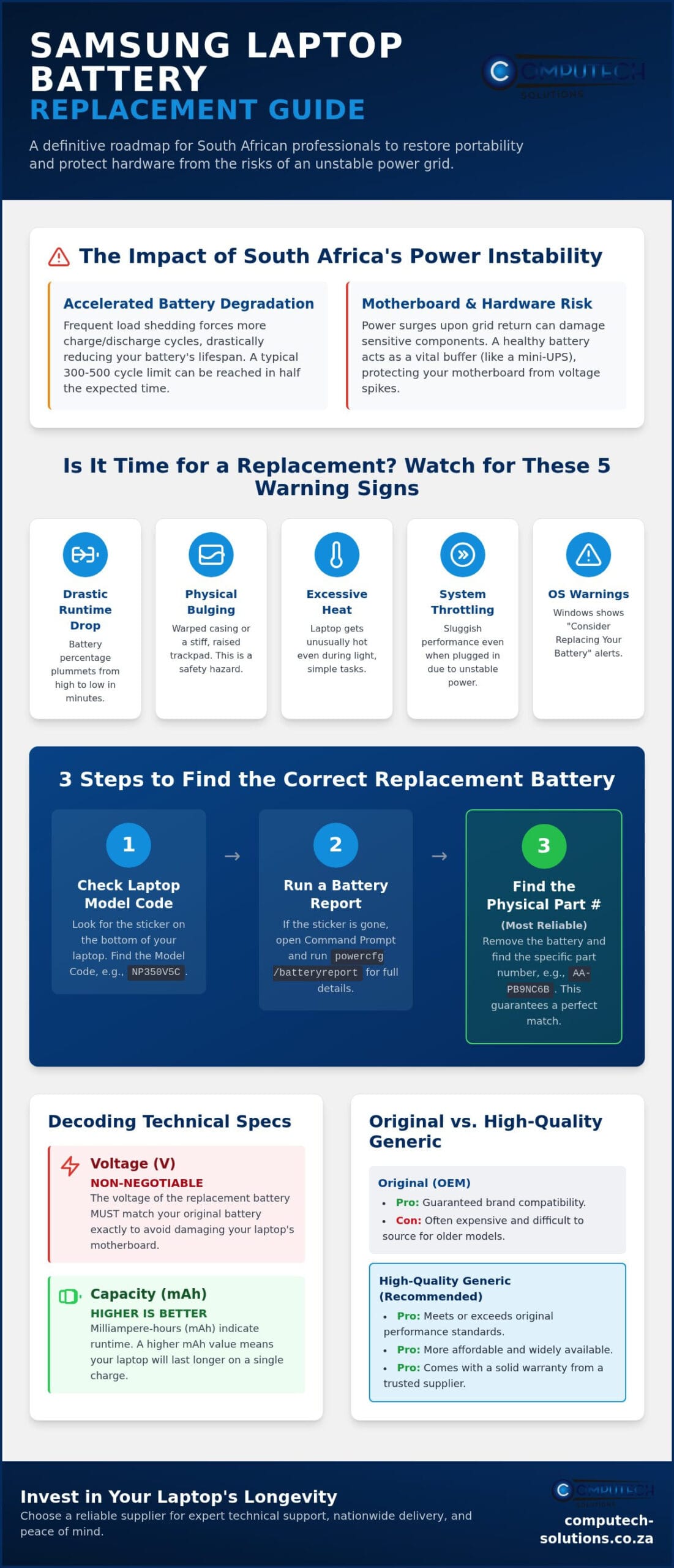
The most immediate sign of trouble is a drastic reduction in runtime. If your laptop drops from 80% to 10% in a matter of minutes, the cells can no longer hold a stable charge. You should also watch for physical and software indicators:
- Physical Deformation: If your trackpad feels stiff or the bottom casing appears slightly warped, the battery may be bulging. This is a serious safety hazard and requires immediate professional attention.
- Excessive Heat: Batteries generate heat during use, but a failing unit often becomes hot even during light tasks. This puts unnecessary thermal stress on other internal components.
- Windows Battery Reports: Modern versions of Windows will display a “Service Battery” or “Consider Replacing Your Battery” warning in the system tray. You can also generate a detailed health report via the Command Prompt to see the current full charge capacity versus the original design capacity.
- System Throttling: Samsung laptops often reduce CPU performance when they detect an unstable power source. If your machine feels sluggish even when plugged in, a degraded battery might be failing to provide the peak voltage required for high-performance tasks.
The Impact of South African Power Instability
The local power environment creates unique challenges for hardware longevity. Frequent load shedding accelerates battery degradation because it forces the laptop through more discharge cycles than it would encounter on a stable grid. Most lithium-ion batteries are rated for approximately 300 to 500 full charge cycles. Under heavy load shedding, you may reach this limit in half the time expected by the manufacturer.
Furthermore, the return of power often brings voltage spikes. While your charger provides some protection, a healthy battery acts as a secondary buffer for the motherboard. A dead or bypassed battery leaves your sensitive internal circuits more vulnerable to these surges. Investing in a samsung laptop battery replacement south africa isn’t just about regaining 4 hours of unplugged use; it’s a strategic move to create a “UPS” effect that protects your data and your hardware from sudden grid failures. Maintaining a functional battery ensures that even if the lights go out, your system has the time to shut down safely without corrupting the operating system.
How to Find the Correct Battery for Your Samsung Model
Identifying the right component is the first step in a successful samsung laptop battery replacement south africa. Searching by general marketing names is a common mistake. For example, a “Samsung Series 3” laptop could have several different internal configurations depending on its release year. To ensure a perfect fit, you must rely on the specific Model Code found on the sticker at the bottom of your device, such as NP350V5C or NP300E5C.
If the sticker on your laptop’s base is missing or unreadable, you can use software to find the necessary technical specifications. Windows includes a built-in utility that generates a comprehensive health and hardware report. Open the Command Prompt as an administrator and type powercfg /batteryreport. This command creates an HTML file in your system folder that lists the manufacturer’s part number and the original design capacity of the cells currently installed.
Locating the Physical Part Number
The most reliable way to confirm compatibility is to check the battery itself. If your Samsung notebook has a removable battery, shut down the system and slide the release latches to remove the unit. Look for a printed label containing a code that typically starts with an “AA-” prefix. Common examples include AA-PB9NC6B or AA-PLZW6FC. This alphanumeric string is the unique identifier used by suppliers to match the correct replacement to your hardware. If you’re struggling to identify these codes, you can message our technical support team on WhatsApp for expert assistance with model matching.
Matching Voltage and Capacity (mAh)
When you browse for a replacement, you’ll see two primary specifications: Voltage (V) and Capacity (mAh). Matching the voltage is non-negotiable for safety and hardware integrity. Most Samsung batteries operate at 11.1V, 11.4V, or 14.8V. Installing a high-voltage battery into a low-voltage system can cause immediate, irreversible damage to the motherboard’s charging circuits.
Capacity, measured in mAh (milliampere-hour), dictates how long the laptop runs on a single charge. You might find replacements with a higher mAh than your original battery, which is a common way to upgrade performance. A higher mAh is generally safe as long as the voltage matches exactly. Choosing a higher capacity simply means the battery contains more energy cells, providing longer periods of productivity during power outages.
Evaluating Replacement Options: Original vs. High-Quality Generic
When you begin searching for a samsung laptop battery replacement south africa, you’ll likely encounter a choice between Original Equipment Manufacturer (OEM) parts and generic alternatives. In the current South African market, finding brand-new OEM batteries for older Samsung Series notebooks is increasingly difficult. Samsung has transitioned its hardware focus over the years, meaning many “original” batteries sitting on retail shelves are actually old stock with degraded chemical health. This makes high-quality generic replacements the most viable and strategic option for most users.
The reliability of a replacement depends on the quality of its internal cells and the sophistication of its control board. A professional-grade replacement isn’t just a power source; it’s a regulated component that must communicate perfectly with your laptop’s BIOS. Choosing a replacement that has been vetted for the local market ensures that the hardware can handle the specific demands of our power grid, especially the frequent transitions between AC and battery power.
Why High-Quality Generics are the Practical Choice
High-quality generic batteries aren’t “cheap imitations” when sourced from professional IT partners. These units utilize A-grade lithium-ion cells that often match the original specifications for run-time and cycle life. They offer a superior price-to-performance ratio, allowing you to restore a legacy Samsung laptop to full mobility without spending more than the machine’s current market value. The key is ensuring the battery includes essential safety features like Integrated Circuit (IC) chips. These chips provide overcharge protection and short-circuit prevention, which are vital when dealing with the frequent power cycles common in South Africa. Reputable retailers vet these suppliers to ensure the internal components meet international safety standards before they reach your doorstep.
Avoiding “Grey Market” and Counterfeit Risks
Avoiding unregulated online marketplaces is critical for hardware safety. “Grey market” batteries often lack the necessary safety certifications and use recycled or low-grade cells to keep costs down. These inferior products pose genuine risks, including thermal runaway (fire) or sending incorrect voltages to your motherboard. A price that seems too good to be true usually indicates a lack of internal safety components. Buying from a dedicated South African specialist ensures you receive a product that has been tested for the local environment. A local warranty is your strongest protection here. If a battery fails prematurely or doesn’t hold its expected charge, having a partner within South Africa makes the return process seamless. It eliminates the logistical nightmare of international shipping and provides a clear line of accountability for your purchase.
Safe Installation and Battery Care in South Africa
Installing your new battery correctly is just as important as choosing the right model. Whether your Samsung device uses an external clip-in unit or an internal “built-in” battery, following a standardized procedure prevents accidental damage to the charging port or motherboard. This phase is the final step in completing your samsung laptop battery replacement south africa project safely and ensuring your hardware remains stable under local power conditions.
Installation Procedure for Samsung Laptops
Before you begin, ensure your laptop is completely powered down and the AC adapter is unplugged. For older Samsung models with external batteries, the process is straightforward: slide the release latches, remove the old unit, and click the new one into place. However, modern Samsung Ultrabooks and Series 7 or 9 models typically feature internal batteries that require opening the chassis. You’ll need a Philips #00 precision screwdriver and a plastic pry tool (spudger).
Avoid using metal tools inside the case, as these can cause short circuits. Once the back cover is removed, locate the battery connector and gently unplug it from the motherboard before loosening any screws. When installing the replacement, verify the connector is seated firmly and flush against the socket. A loose connection can cause intermittent charging or “battery not detected” errors in Windows. If you feel uncomfortable opening your specific model, contact our technical support team via WhatsApp for step-by-step guidance.
Maintenance Tips for Longevity
Once installed, you must calibrate the new cells. This “first charge” ritual involves charging the battery to 100% without interruption and then letting it discharge to approximately 10% before plugging it back in. This process synchronizes the battery’s internal controller with the Windows power management system, ensuring accurate percentage readings. To maximize the lifespan of your samsung laptop battery replacement south africa, follow these local best practices:
- Avoid Deep Discharges: Lithium-ion cells degrade faster if they’re frequently drained to 0%. During load shedding, try to shut down your laptop once the battery hits 15% to 20%.
- Manage Thermal Stress: South African summers can push internal hardware temperatures to extremes. Always use your laptop on a hard, flat surface to keep the cooling vents clear. Heat is the primary enemy of battery chemistry.
- Shield Against Grid Spikes: When the power returns after a blackout, the initial surge can damage sensitive charging circuits. Use a high-quality surge protector and, if possible, wait a few minutes after the lights come back on before plugging your charger into the wall.
By treating the battery as a precision component rather than a simple consumable, you’ll maintain high performance and avoid the frustration of premature failure. Consistent care is the most effective way to protect your investment in a high-quality replacement.
Reliable Technical Support and Nationwide Delivery
Finding the right part shouldn’t be a gamble. Computech-Solutions simplifies the process by bridging the gap between technical complexity and operational efficiency. When you need a samsung laptop battery replacement south africa, you require a partner that understands the urgency of technical disruptions. We provide a streamlined procurement process that ensures your hardware remains functional regardless of your location. Our technical team is available to verify compatibility before you commit to a purchase, eliminating the risk of receiving an incompatible part or one that might compromise your motherboard.
Nationwide Service You Can Rely On
Our logistics network covers every province in South Africa, from major urban hubs to outlying regions. Whether you’re managing a corporate fleet in Sandton or need a single unit in a remote town, our nationwide delivery model ensures your replacement arrives at your door. The online checkout is designed for speed and security, allowing you to secure the components you need without unnecessary delays. We support both individual users and large-scale business operations, providing a consistent standard of quality that alleviates the stress of hardware failure. This reliable delivery infrastructure is backed by a commitment to stocking parts that meet or exceed OEM standards, ensuring your machine’s longevity.
Beyond Batteries: A Holistic Approach to IT
A battery is just one part of a broader hardware strategy. At Computech-Solutions, we view ourselves as a total solution provider for IT hardware. Beyond providing a samsung laptop battery replacement south africa, we offer a comprehensive range of components to keep your mobile office running. This includes high-quality laptop chargers, adapters, and LCD replacement panels for various major brands like Dell, HP, and Lenovo. Our expertise in power solutions, including solar-integrated IT setups, allows us to advise on the best ways to protect your equipment from the grid’s instability. We provide the technical clarity needed to maintain operational uptime in a challenging power environment. You can Find your Samsung battery at Computech-Solutions and restore your system’s mobility today.
Securing Your Machine’s Future Mobility
Restoring your Samsung laptop’s performance requires more than just a quick purchase; it’s about technical precision and proactive care. By accurately identifying your battery part number and implementing disciplined charging habits during load shedding, you protect your hardware from premature degradation. High-quality replacement cells provide the stability your device needs to withstand the unique pressures of the South African power grid.
Choosing a professional partner ensures you receive expert technical support for model matching and fast nationwide shipping across every province. We specialize in components that meet or exceed OEM standards, giving you the confidence that your new hardware will perform reliably when the lights go out. Don’t let a failing battery dictate your productivity or risk your motherboard’s safety with inferior imitations.
Take the final step toward complete hardware independence today. Browse Samsung Replacement Batteries with Nationwide Delivery and speak with our experts to secure the perfect samsung laptop battery replacement south africa for your specific model. Your machine’s portability is just a few clicks away.
Frequently Asked Questions
How much does a Samsung laptop battery replacement cost in South Africa?
Pricing for a samsung laptop battery replacement south africa depends on your specific model and the required cell capacity. We don’t provide fixed price lists because import costs and model availability change frequently. High-quality generic replacements usually offer a more practical financial path than searching for rare OEM parts. You should request a custom quote using your part number to get the most accurate current rate for your hardware.
Can I replace a built-in Samsung laptop battery myself?
You can replace an internal battery if you have the correct precision tools and follow a careful procedure. Most modern Samsung laptops require a Philips #00 screwdriver and a plastic pry tool to open the chassis without causing damage. If you’re uncomfortable handling sensitive internal electronics or connectors, it’s safer to consult a professional technician. This prevents accidental short circuits or static discharge that could harm your motherboard.
How do I know which Samsung battery model I need?
You can find the required model by checking the sticker on the bottom of your laptop or the label on the battery itself. Look for an alphanumeric part number that typically begins with an “AA-” prefix, such as AA-PB9NC6B. If the labels are unreadable, using the Windows powercfg utility provides a digital hardware report. Our technical support team can also assist with model matching to ensure you receive a compatible replacement.
Does load shedding damage my laptop battery?
Load shedding damages batteries by forcing them through frequent, deep discharge cycles that accelerate chemical degradation. Most lithium-ion cells are rated for a specific number of cycles; frequent power outages hit this limit much faster than usual. Additionally, the voltage surges that occur when power returns can damage internal charging circuits. Using a high-quality surge protector and shutting down at 15% charge helps mitigate these risks.
How long does a replacement Samsung battery typically last?
A high-quality replacement battery typically lasts between two to three years, or approximately 300 to 500 full charge cycles. This lifespan depends heavily on your usage patterns and environmental conditions. In the South African climate, keeping your laptop cool and avoiding total battery depletion during power outages will help you reach the upper end of this estimate. Consistent maintenance ensures the internal cells remain stable for as long as possible.
Is it better to buy an original Samsung battery or a generic one?
High-quality generic batteries are often the best choice because original OEM parts for legacy Samsung models are increasingly scarce. Modern generic units use A-grade cells that match original performance standards. If you buy from a reputable specialist that provides integrated safety features and a local warranty, a generic battery is a reliable solution. It restores your laptop’s mobility without the high cost or availability issues associated with original parts.
Do you deliver laptop batteries to rural areas in South Africa?
We provide nationwide delivery that reaches every province, including rural areas and smaller towns across South Africa. Our logistics network ensures that technical disruptions are resolved quickly, regardless of your geographic location. Once you place an order through our secure checkout, we dispatch your samsung laptop battery replacement south africa via reliable couriers to your doorstep. This national reach makes us a dependable partner for users outside major urban centers.
What is the warranty on a replacement laptop battery?
All replacement batteries include a standard warranty that protects you against manufacturing defects or unexpected failure. This local support ensures you have a direct line of accountability and a simple return process if the hardware doesn’t meet performance standards. We prioritize high-quality cells from vetted suppliers to ensure our components are reliable. This commitment to quality alleviates the stress of technical disruptions and secures your long-term IT investment.
