
In South Africa, a laptop battery is no longer just a hardware component. It is your essential load-shedding insurance policy. You have likely experienced the frustration of your device dying the moment the power goes out, leaving you stranded mid-task. Finding a reliable laptop battery replacement shouldn’t feel like a gamble with your expensive hardware. Whether you are confused by the difference between a Model Number and a Part Number or you are worried about the safety of generic alternatives, your goal is simple. You need consistent power that lasts through every stage of the schedule.
We understand that technical specifications like Voltage and Watt-hours can feel overwhelming when you just want your computer to work. This guide provides the clarity you need to restore four or more hours of battery life with confidence. We will show you how to identify the correct specs for your device, whether you use an Acer, Dell, or HP, and explain the mandatory 2026 e-waste regulations. You will learn how to choose a high-quality replacement from a national supplier and ensure your laptop remains a productive tool rather than a desktop-bound liability.
Key Takeaways
- Identify critical failure signals like the “plugged in, not charging” error and sudden percentage drops before your hardware fails during a power outage.
- Learn how to locate the specific battery Part Number (P/N) on your physical hardware to avoid common compatibility mistakes.
- Navigate the choice between OEM and high-quality generic options to find a laptop battery replacement that balances cost with long-term reliability.
- Prepare for a safe installation by identifying the correct precision tools needed for both internal and external battery designs.
- Implement professional maintenance habits to extend your battery’s lifespan and ensure consistent performance through every load-shedding cycle.
Signs You Need a Laptop Battery Replacement in 2026
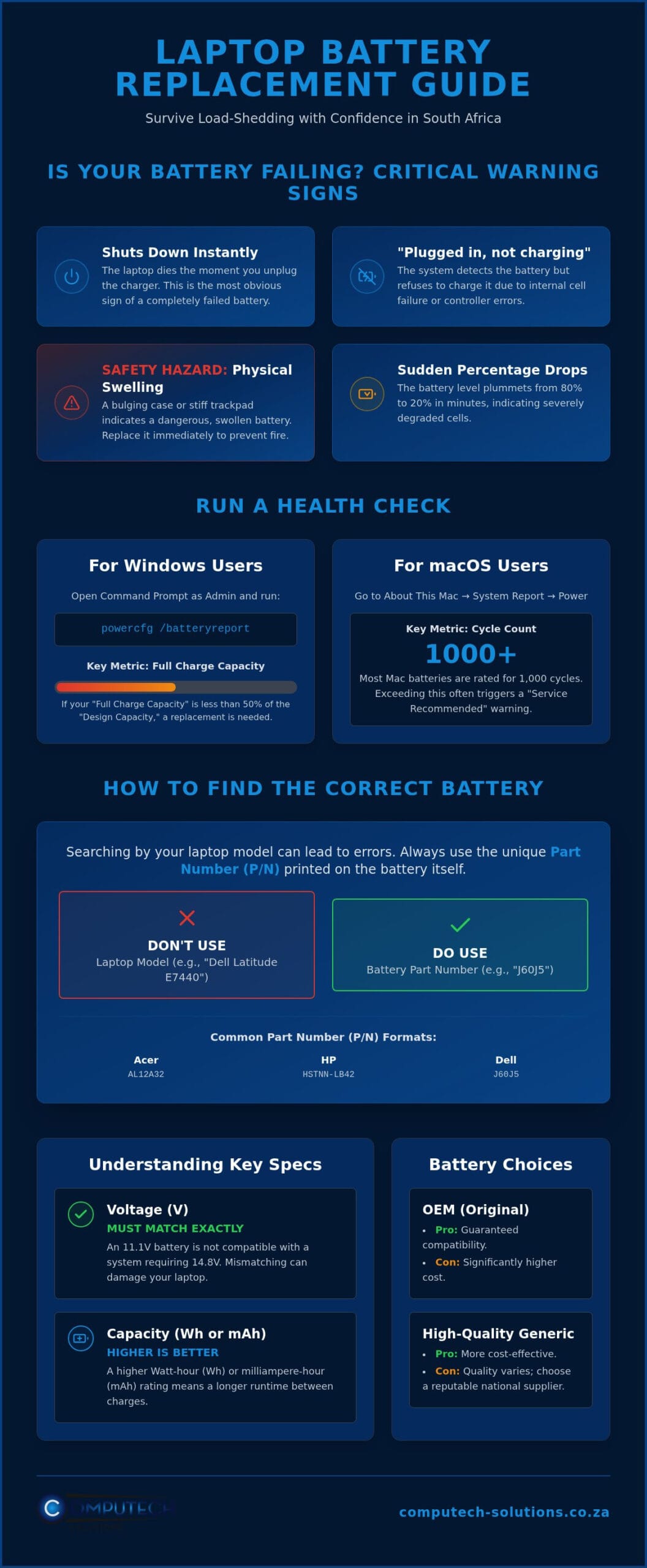
Your laptop should be a mobile workstation, not a desktop tethered to a wall. If your device shuts down the second you unplug the charger, you’ve essentially lost the primary benefit of owning a laptop. This immediate failure is the most obvious indicator that a laptop battery replacement is overdue. You might also notice the “Plugged in, not charging” status in your taskbar. This occurs when the battery’s internal controller detects a critical failure or a cell that can no longer hold a voltage high enough to register as a functional charging state.
Watch your battery percentage closely during daily use. If it drops from 80% to 20% in just a few minutes, the internal resistance of the cells has increased significantly. Even more concerning is physical swelling. If your trackpad feels stiff to click or your laptop casing appears to bulge, the battery has likely off-gassed due to age or extreme heat. This is a safety hazard. Swollen batteries can puncture and catch fire, so you must address this hardware failure immediately to protect your device and yourself.
Software Diagnostics for Windows and macOS
Windows users can run a precise health check without third-party software. Open the Command Prompt as an administrator and type powercfg /batteryreport. This command generates an HTML file that compares your “Design Capacity” to your “Full Charge Capacity.” If the full charge capacity is less than 50% of the original design capacity, your runtime will be halved, and performance will become unpredictable. On a MacBook, navigate to System Report under the “About This Mac” menu and select “Power.” Check the “Cycle Count” listed there. Most modern Mac batteries are rated for 1,000 cycles. Once you exceed this threshold, the macOS operating system will often trigger a “Service Recommended” warning.
The Impact of Heat and Frequent Power Cycles
The South African climate presents unique challenges for portable electronics. High ambient temperatures during summer months accelerate the chemical aging process within the cells. Understanding how lithium-ion batteries work helps explain why heat is so damaging; high temperatures cause the internal electrolyte to break down, leading to permanent capacity loss.
Load shedding compounds this issue by forcing frequent deep discharges. Running your battery to 0% and then immediately rapid-charging it puts immense strain on the hardware. Thermal throttling occurs when the system reduces processor speed to compensate for excessive heat generated by a failing or inefficient battery cell. Consistent exposure to these conditions means a laptop battery replacement is often necessary every two to three years for professional users who rely on their devices during power outages.
How to Identify Your Laptop Battery Model and Part Number (P/N)
Searching for a laptop battery replacement by the laptop model alone often leads to incorrect purchases. Manufacturers like Dell or HP frequently release the same laptop model with different internal battery configurations based on the screen resolution or storage type. For instance, a Dell Latitude E7440 might require a 3-cell or a 4-cell battery depending on its original build. To ensure a perfect fit, you must identify the unique Part Number (P/N) printed directly on the battery casing.
Finding this number usually requires removing the battery or the back cover of your device. Look for a label with a barcode and a string of alphanumeric characters. Common formats include:
- Acer: Look for prefixes like AL or AS (e.g., AL12A32).
- HP: Search for codes starting with HSTNN or a 6-digit spare part number (e.g., HSTNN-LB42).
- Dell: Identify the 5-digit “Type” code (e.g., J60J5).
When comparing models, prioritize the Voltage (V). A battery rated at 11.1V is not compatible with a system designed for 14.8V. However, the capacity, measured in Watt-hours (Wh) or milliampere-hours (mAh), can vary. A higher Wh rating simply means a longer runtime. If you’re unsure about compatibility, you can contact our technical support team for a free verification before you buy.
Finding the P/N Without Opening the Laptop
If your battery is internal and you don’t have the tools to open the casing yet, you can use software diagnostics. Tools like HWInfo or BatteryInfoView read the metadata stored on the battery’s controller chip. This data often includes the manufacturer name and the specific model ID. Alternatively, visit the manufacturer’s support portal and enter your laptop’s Serial Number or Service Tag. This usually provides a detailed bill of materials for your specific unit. Always cross-reference this information with expert guidance on battery safety and care to ensure you’re handling the hardware correctly.
Brand-Specific Identification Tips
Each manufacturer uses a unique nomenclature. For Lenovo users, the key identifier is the FRU (Field Replacement Unit) number. This is typically found near the barcode and is the most reliable way to source a laptop battery replacement for ThinkPad or Ideapad series. Apple MacBooks use “A” numbers (e.g., A1405) located on the bottom of the laptop chassis in very small print. While the “A” number identifies the battery model, you should also know your MacBook’s year and size to be 100% certain. Mastering these identification codes eliminates the risk of ordering the wrong part and facing unnecessary downtime.
Original vs. High-Quality Replacement Batteries: Making an Informed Choice
Choosing between an Original Equipment Manufacturer (OEM) component and a high-quality generic alternative is a pivotal decision for your laptop battery replacement. OEM batteries are produced by the same factories that manufactured your laptop’s original parts. While they offer guaranteed compatibility, they often come with a significant price premium that doesn’t always translate to better performance. High-quality generic replacements have become the standard for professional users in South Africa because they provide the same runtime and safety features at a more accessible price point.
The core difference lies in the quality of the internal cells. Premium replacements utilize Grade A cells, which are brand new and tested for consistent discharge rates. You should be wary of extremely cheap, unbranded options found on marketplace sites. These often contain refurbished cells salvaged from old hardware. These used cells lack the chemical stability required for long-term use and often fail within months. Investing in a premium laptop battery replacement ensures you receive a product with a full lifecycle, typically offering 300 to 500 charge cycles before any noticeable degradation occurs.
Safety Standards and Certifications
Safety is a non-negotiable factor when dealing with lithium-ion technology. Cheap, uncertified batteries lack the protective circuitry needed to prevent motherboard shorts or thermal runaway. When sourcing a part, verify that it carries CE, RoHS, and UL certifications. These markings confirm the battery has passed rigorous international testing for fire safety and environmental impact. Computech-Solutions only stocks high-grade replacement cells that meet these stringent requirements, providing a reliable partner for your hardware needs. Proper maintenance is also vital; following Dell’s official guide to battery care can help you maximize the lifespan of your new component, regardless of its brand.
Compatibility and Firmware Issues
Modern laptops are sophisticated machines that communicate constantly with their power source. Some manufacturers, particularly Apple, use proprietary firmware “locks” to discourage the use of third-party parts. A high-quality generic battery must include a chipset that correctly identifies itself to the laptop’s BIOS. Without this, your laptop might refuse to charge the battery or fail to show an accurate percentage. A smart battery controller is essential for modern hardware because it regulates voltage and communicates real-time health data directly to your operating system. This ensures that your device remains stable during the transition from AC power to battery mode when load shedding hits.
Safe Installation and Battery Care During Load Shedding
Performing a laptop battery replacement is a manageable task for most users, provided you have the correct tools and follow a structured process. For older laptops with external batteries, the process involves sliding a spring-loaded latch and swapping the units. However, modern ultra-books from brands like Dell, HP, and Apple feature internal batteries. These require you to remove the bottom chassis plate using a precision screwdriver set. You will typically need Phillips, Torx, or Pentalobe bits, depending on your specific manufacturer. Before touching any internal components, touch a grounded metal object to discharge static electricity. This prevents accidental damage to the motherboard or sensitive traces.
Once you have opened the casing, carefully disconnect the battery cable from the motherboard connector before unscrewing the battery itself. After installing your new unit, you must calibrate the system. This involves charging the battery to 100%, letting it rest for two hours while plugged in, and then discharging it completely to 0%. This process synchronizes the “smart” battery controller with the operating system, ensuring your remaining time estimates are accurate. If you encounter any resistance or feel unsure about the internal layout of your device, message our technical support team for real-time guidance on your specific model.
Survival Tips for Load Shedding
South Africa’s frequent power cycles require a proactive approach to power management. During Stage 4 or higher load-shedding cycles, set your Windows “Battery Saver” or macOS “Low Power Mode” to trigger at 50% rather than the default 20%. This provides a significant buffer if an outage lasts longer than expected. Never leave your laptop at 0% charge during an extended eight-hour outage. Deep discharges are the primary cause of premature cell failure, as the voltage can drop below a level that the charger can recover. Additionally, always use a high-quality surge protector. When the grid returns, the initial voltage spike can damage the battery’s charging controller, leading to the “plugged in, not charging” errors discussed earlier.
Long-Term Maintenance for Maximum Lifespan
To maximize the return on your laptop battery replacement, follow the “40-80 Rule.” Lithium-ion cells are happiest when maintained between 40% and 80% capacity. Constant charging to 100% creates chemical stress and heat, which shortens the battery’s lifespan. If you use your laptop as a permanent desktop replacement, consider removing the battery if it’s an external model, or using manufacturer software to limit the maximum charge level. Periodically cleaning the battery contacts with a small amount of isopropyl alcohol prevents electrical resistance. This ensures a clean flow of power and reduces heat buildup at the connection point, keeping your hardware running efficiently for years.
Reliable Laptop Battery Replacement Solutions Across South Africa
Computech-Solutions serves as a specialized partner for professionals and home users requiring a high-quality laptop battery replacement. We maintain an extensive inventory of power solutions for major brands, including Acer, HP, Dell, Lenovo, and Apple. Our operation is designed to alleviate the stress of technical disruptions by providing a reliable supply chain for both original and high-grade generic parts. We recognize that finding the correct component in a sea of unverified marketplaces can be risky. By positioning ourselves as a dedicated national hardware supplier, we ensure that every client receives a part that meets strict performance standards.
Our technical support team provides an essential layer of security before you finalize your purchase. As analyzed in our identification guide, matching Part Numbers and voltages is critical for system stability. We offer expert verification to confirm compatibility, ensuring you don’t experience the frustration of receiving an incompatible part. This comprehensive service model extends to our logistics network. We provide nationwide delivery across South Africa from our central hub, typically getting your device back to full operational capacity within a few business days. We understand that in a professional environment, every hour of downtime represents a loss in productivity.
Beyond Batteries: A Complete Power Solution
A successful laptop battery replacement is often only one part of maintaining a healthy device. If your battery failed due to voltage spikes or poor charging habits, your current power cable might also be compromised. You can find a compatible laptop charger through our online store to ensure your new battery receives a clean, stable current. For those looking to refresh their entire mobile workstation, we also supply laptop LCD replacement panels and desktop computers. In an environment where load shedding is a constant factor, integrating these components with home solar backup systems creates a resilient professional setup that remains immune to grid instability.
How to Order Your Replacement Today
Ordering the correct part is a streamlined process designed for efficiency. Start by using the search bar on our website to enter your battery Part Number (P/N) or laptop model. If you’re still unsure after identifying your hardware specs, you can contact our technical team directly via WhatsApp. Simply send a photo of your battery label, and our experts will verify the exact match for your hardware. Once confirmed, our secure checkout process and nationwide shipping logistics take over. We prioritize rhythmic efficiency in our warehouse to ensure that your order is processed and dispatched quickly, minimizing your downtime and restoring your mobile freedom.
Restore Your Laptop’s Mobile Freedom Today
Navigating the technical details of a laptop battery replacement doesn’t have to be a source of operational stress. You now have the tools to identify your specific Part Number and the knowledge to distinguish between Grade A cells and inferior refurbished alternatives. By implementing a disciplined charging routine and utilizing surge protection, you can ensure your hardware survives the rigorous demands of South Africa’s power grid.
As specialists in Acer and other major brand replacements, Computech-Solutions provides the technical expertise needed to verify compatibility before you commit to a purchase. We offer nationwide delivery across South Africa to ensure you receive your power solution without unnecessary delays. Our team is ready to assist you in selecting the definitive hardware for your specific model. Find Your Exact Laptop Battery Replacement Here. Don’t let power outages dictate your productivity. With the right hardware and care, your laptop will remain a reliable tool through every cycle.
Frequently Asked Questions
How much does a laptop battery replacement cost in South Africa?
Industry averages for a laptop battery replacement vary significantly based on the brand and model year. High-performance gaming rigs and premium ultrabooks typically command higher prices due to complex internal designs and higher cell density. Standard office laptops are generally more affordable, though you should also account for potential diagnostic fees if you choose professional installation rather than a DIY approach.
Can I replace my laptop battery myself if it is built-in?
You can replace a built-in battery yourself if you have a precision screwdriver set and follow a structured guide. Most modern laptops require removing the bottom cover to access the internal connector and mounting screws. If you feel uncomfortable handling delicate ribbon cables or small internal components, seeking professional technical assistance is a safer alternative to prevent accidental motherboard damage.
Will using a generic battery void my laptop warranty?
Using a high-quality generic battery may affect your manufacturer warranty if the component is cited as the direct cause of a hardware failure. For devices that are already out of their standard warranty period, premium generics offer a reliable and cost-effective way to restore mobility. Always verify that any replacement part meets international safety certifications to minimize operational risks to your hardware.
How long should a new replacement laptop battery last per charge?
A new replacement should typically provide between three and five hours of runtime under standard office workloads. This duration depends heavily on your laptop’s Watt-hour (Wh) rating and your power management settings. High-drain activities like video editing, gaming, or high screen brightness will naturally deplete the cells much faster than basic web browsing or document editing.
Why is my new laptop battery not charging to 100%?
This issue often stems from a lack of initial calibration or a “battery health” setting within your BIOS or operating system. New batteries require a full 100% to 0% cycle to synchronize the internal controller with your laptop’s software. Some modern devices also include power management features that intentionally cap charging at 80% to extend the chemical lifespan of the lithium-ion cells.
Does load shedding damage my laptop battery?
Frequent power outages accelerate battery degradation through excessive heat and deep discharge cycles. If a battery is left at 0% for several hours during an extended outage, the cells may lose the ability to hold a charge entirely. Using a high-quality surge protector is essential to prevent damage to the battery’s charging controller when the grid returns after a scheduled outage.
Where can I find the Part Number (P/N) on my battery?
The Part Number is printed on the physical label of the battery, usually near the manufacturer logo or a barcode. Look for specific alphanumeric codes like “HSTNN” for HP, “J60J5” for Dell, or “AL” prefixes for Acer models. If the label is damaged or illegible, hardware monitoring software can often retrieve this specific metadata directly from the battery’s internal controller chip.
Is it safe to buy a replacement laptop battery online?
It is safe to buy a laptop battery replacement online if you choose a specialist supplier with a verified track record and physical presence in South Africa. Look for retailers that offer nationwide delivery and expert technical support to confirm compatibility before you finalize your order. Reliable suppliers will also provide clear warranty terms and ensure their stock meets international safety standards.
