
A single hairline crack on your laptop screen shouldn’t force you into a R15,000 expenditure for a brand new machine. You’ve likely felt that immediate surge of panic when a display flickers or goes dark, especially when critical business deadlines are looming. It’s frustrating to sort through confusing technical specifications like 30-pin versus 40-pin connectors or IPS versus TN panels when you simply need a functional device. We understand that the fear of ordering an incompatible part or receiving a shattered component in the mail often leads to unnecessary downtime.
This guide eliminates that uncertainty by teaching you how to accurately identify your specific part number and source a high-quality replacement with a comprehensive warranty. You’ll learn to navigate the price-to-value ratio of modern repairs while ensuring your hardware meets 2026 performance standards. We’re providing a clear, end-to-end roadmap for securing reliable components with nationwide delivery across South Africa, moving you from a broken display to a professional resolution with total confidence.
Key Takeaways
- Learn to distinguish between physical display damage and internal controller failures often triggered by local power surges and load shedding.
- Master critical technical specifications like pin counts and resolution types to ensure your new laptop screen is perfectly compatible.
- Apply the “50% Rule” to evaluate if a replacement is a sound financial investment based on your device’s current market value in ZAR.
- Identify your exact panel part number using non-invasive software tools to ensure accuracy without needing to disassemble your device first.
- Secure your hardware investment by sourcing components from a provider that offers specialized fragile-item packaging and nationwide delivery across South Africa.
Understanding Laptop Screen Damage: Can Your Display Be Saved?
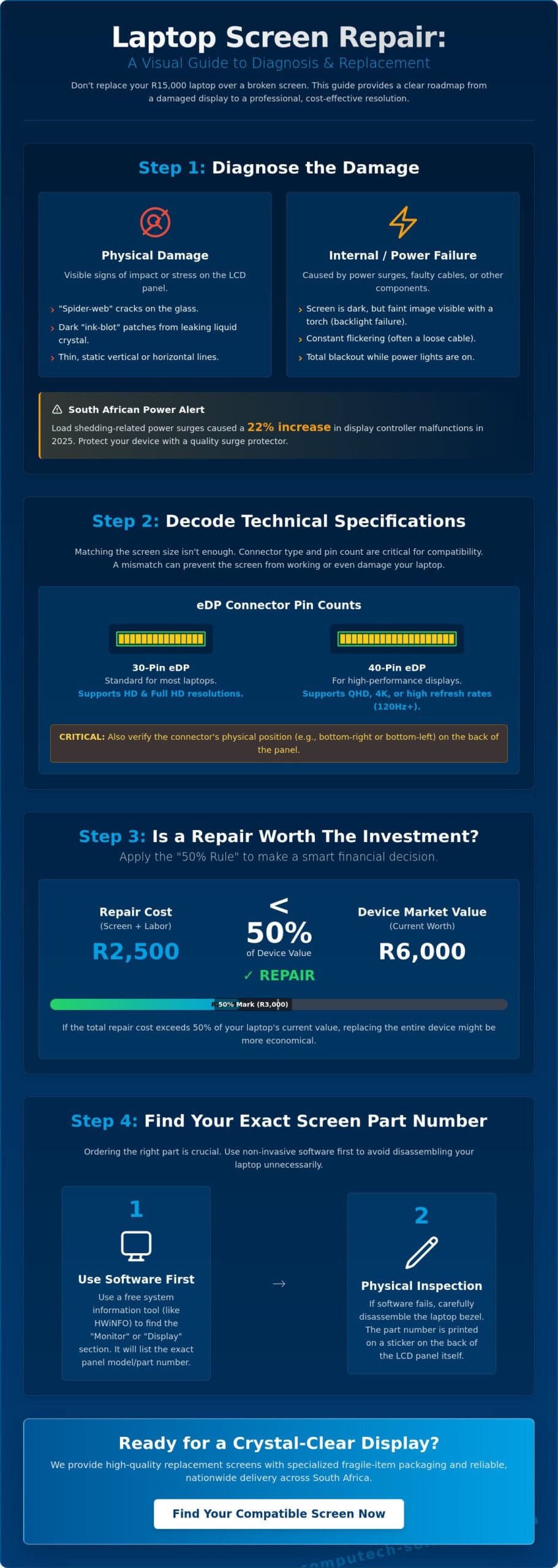
A cracked laptop screen is a clear case for replacement. However, South African users often face more subtle display failures caused by our unique infrastructure challenges. Distinguishing between a shattered LCD and a faulty internal component is the first step in restoring your device’s productivity. Not every display issue requires a new panel; some are merely symptoms of connection or power failures.
Physical vs. Internal Damage
Physical damage is usually obvious. It manifests as “spider-web” cracks or dark, ink-blot patterns where the liquid crystals have leaked. If your screen shows thin, static vertical lines, the cause is often a failure in the gate drivers or the GPU itself. When the display appears completely dark but you can see faint images by shining a torch on the glass, the problem lies with the backlight or the inverter. Modern flat-panel display technologies rely on complex LED arrays that require consistent voltage to function. If these arrays fail, the panel might be intact while the visibility is gone.
The Impact of South African Power Conditions
The South African energy crisis remains a primary driver of hardware failure. In 2025, data from local technical service hubs showed a 22% increase in display controller malfunctions linked directly to voltage spikes. When power returns after load shedding, a surge can bypass basic internal fuses. This damages the sensitive electronics behind the laptop screen without ever cracking the glass. Surge protection isn’t just for your fridge; it’s vital for your laptop’s longevity. An inverter failure caused by a surge often mimics a dead panel, but it’s a separate, often more complex repair.
Common symptoms that suggest the problem might not be the screen itself include:
- Flickering: This often signals a loose or worn eDP cable located in the hinge.
- Ghosting: Previous images “sticking” to the display usually points to a driver error or a refresh rate mismatch.
- Total Blackout: If the laptop power lights engage but the screen stays black, the issue might be a failed RAM module or a motherboard fault.
Testing your device with an external monitor is a reliable diagnostic method. If the image appears perfectly on the external display, the fault is isolated to your laptop’s internal panel or its ribbon cable. Protecting your equipment with a high-quality surge protector rated for at least 1,000 Joules is the most effective way to prevent these internal failures during national grid switching. Computech Solutions recommends a full diagnostic check before purchasing parts, as a simple cable reseating can sometimes resolve what looks like a terminal failure.
Decoding Technical Specifications: Pins, Resolution, and Panel Types
Selecting a replacement laptop screen requires more than simply matching the diagonal size. In 2026, technical compatibility depends on precise hardware alignment between the panel and the motherboard. Understanding how LCD screens work helps clarify why a panel that looks identical might not function if the internal data channels differ. Even a minor mismatch in pin configuration or signal type can prevent the display from powering on or cause permanent damage to the video cable.
Connector Types and Data Channels
Modern laptops have transitioned almost entirely from older LVDS (Low-Voltage Differential Signaling) to eDP (Embedded DisplayPort) technology. This shift allows for higher resolutions and lower power consumption. The primary hardware hurdle is the pin count. A 30-pin eDP connector typically supports HD or Full HD resolutions at standard refresh rates. High-end panels, such as those featuring 4K resolution or 144Hz refresh rates, require a 40-pin connector to handle the increased data throughput. You cannot force a 40-pin cable into a 30-pin socket; the physical dimensions and electrical pinouts are incompatible.
Physical placement is equally vital. Connectors are usually positioned at the bottom right or bottom left of the panel. Misidentifying this location results in a ribbon cable that is too short to reach the motherboard port. Always verify the connector position by looking at the back of the original laptop screen before ordering a replacement.
Visual Quality and Performance
Panel technology dictates the daily user experience. TN (Twisted Nematic) panels are cost-effective but suffer from narrow viewing angles and poor colour reproduction. We recommend IPS (In-Plane Switching) panels for most South African professionals. IPS technology provides 178-degree viewing angles and superior colour accuracy, which is essential for data analysis and creative work. For professionals in design or marketing, checking the colour gamut coverage is necessary. A panel with 72% NTSC or 100% sRGB ensures that the colours you see on screen match your final printed or digital output.
South Africa’s high-glare environments make screen brightness, measured in nits, a critical factor for productivity. A standard 250-nit screen often struggles in offices with large windows or during outdoor use. Upgrading to a 300 or 400-nit panel significantly improves visibility. The choice between glossy and matte finishes also impacts this. Glossy finishes offer vibrant colours but act like mirrors in bright light. Matte coatings use an anti-glare layer to diffuse reflections, making them the preferred choice for high-light workspaces.
Verify your motherboard’s capabilities before attempting to upgrade refresh rates. While a 144Hz screen might fit the 40-pin slot of a 60Hz system, the internal graphics hardware must support the higher frame delivery. If you’re unsure about your specific model’s technical requirements, the specialists at Computech Solutions can provide the exact specifications needed for a seamless hardware integration.
Is a Replacement Laptop Screen Worth the Investment?
Deciding whether to fix a broken laptop screen requires a cold calculation of value. In 2026, entry-level laptops in South Africa start around R8,500; however, high-end business machines often exceed R25,000. Use the 50% rule as your primary guide. If the repair quote exceeds half the current market value of your device, replacement is usually the logical path. You must look beyond the panel itself. A three-year-old Dell Latitude with a healthy battery and 16GB of RAM is a prime candidate for repair. If the internal hardware still meets your performance benchmarks, spending R2,500 to R4,500 on a new panel protects your initial investment.
South Africa’s e-waste crisis adds another layer to this decision. The country generated approximately 415,000 tonnes of e-waste in 2021. By 2026, this volume is projected to grow by 15% without active intervention. Repairing a device directly reduces this local environmental burden. It’s a practical way to keep functional technology out of landfills while saving thousands of Rand compared to a new purchase.
Cost-Benefit Analysis
High-end business models like the Dell Latitude or HP EliteBook are designed for longevity. Their chassis and motherboards often outlast their displays. For these machines, the ROI on a laptop screen replacement is high because the alternative is spending R20,000 or more on a comparable new unit. For older consumer models, you might consider a refurbished Grade-A panel to keep costs under R1,800. While DIY installation saves on labor, professional installation at Computech ensures you don’t damage delicate ribbon cables or blow a backlight fuse. This is especially critical when understanding your laptop screen’s resolution and ensuring the new panel matches your motherboard’s output capabilities.
Sustainable Tech Ownership
How to Identify the Correct Replacement Screen for Your Device
Selecting the right laptop screen requires more than just knowing the diagonal size. In the South African market, where hardware configurations for the same model can vary between retail and enterprise builds, precision is vital. A 15.6-inch display might have 450 different variations regarding connector position, pin count, and mounting styles. Relying on the laptop model number alone leads to a 15% compatibility error rate in professional repair environments.
Start by locating the specific model number on the base of the device. For older Dell Latitude or HP ProBook models, you may need to remove the battery to find the white regulatory sticker. While this provides a starting point, the internal panel part number is the only definitive way to ensure a perfect match for your laptop screen replacement.
The Software Identification Method
You can often identify your hardware without opening the casing by using diagnostic tools. Software like HWiNFO or AIDA64 reads the internal hardware inventory to extract the panel’s manufacturing data. These tools query the Extended Display Identification Data (EDID) stored on the monitor’s chip.
EDID is the digital handshake between screen and motherboard.
While efficient, software methods have limitations. If a previous technician installed a “compatible” panel rather than an original equipment manufacturer (OEM) part, the software will report the ID of the replacement, not what the motherboard originally expected. This can cause issues with brightness control or refresh rates. Always cross-reference software data with the physical specifications of your device.
The Physical Verification Method
Physical inspection remains the gold standard for accuracy. You will need a set of plastic spudgers and a PH00 precision driver to safely remove the bezel. Avoid using metal tools, as these can easily crack the plastic clips or scratch the finish of modern ultrabooks. Once the bezel is removed, unscrew the panel to view the manufacturer sticker on the back.
- Manufacturer Codes: Look for prefixes like B (BOE), LTN (Samsung), LP (LG Philips), or N (Innolux).
- Revision Numbers: Small details like “Rev. C1” or “Ver. 2.0” indicate specific firmware versions that must match for full functionality.
- Bracket Configuration: Identify if your screen uses top-and-bottom brackets, side-mount screws, or a bracketless “slim” design.
By 2026, approximately 88% of new high-end laptops in South Africa have moved to bracketless designs held by heavy-duty adhesive pull-tabs. Identifying these mounting requirements before ordering a laptop screen prevents costly delays and shipping returns. If you are unsure about the technical specifications of your display, contact our team for professional screen diagnostics to ensure you receive the correct component for your business hardware.
Why Source Your Laptop LCD Panels from Computech Solutions?
Finding a compatible laptop screen shouldn’t be a gamble that puts your productivity at risk. In the South African business environment, technical downtime often costs companies upwards of R5,000 per employee in lost billable hours every day. Computech Solutions operates as a trusted advisor; we bridge the gap between technical complexity and operational efficiency. We don’t just sell components; we provide a stabilized supply chain that ensures your hardware returns to service without delay.
Reliable Nationwide Logistics
Shipping delicate glass components across South Africa requires more than a standard courier bag. We utilize specialized fragile-item packaging protocols that include double-walled corrugated boxes and multi-layer anti-static cushioning to prevent transit damage. Whether your office is located in a central hub like Johannesburg or a remote site in the Northern Cape, your order is tracked in real-time from our warehouse to your doorstep.
Our “Right First Time” compatibility check programme is designed to eliminate the technical errors that plague hardware procurement. Industry data suggests that roughly 15% of independent screen repairs fail because of incorrect part selection. Our technicians mitigate this risk by verifying your specific model number and video connector pin-configuration before we dispatch the item. This precision ensures that the laptop screen you receive is ready for immediate installation, maintaining a 98% success rate for first-time fitment.
The Computech Advantage
We maintain a comprehensive inventory that caters to the diverse hardware landscape found in South African enterprises. Our stock includes high-quality replacement panels for the following brands:
- Acer: Reliable panels for Aspire and TravelMate series.
- Dell: High-resolution options for Latitude and XPS models.
- HP: Durable replacements for EliteBook and ProBook fleets.
- Lenovo: Compatible screens for ThinkPad and IdeaPad ranges.
- Apple: Premium Retina-grade displays for MacBook Pro and Air.
This extensive selection allows IT managers to consolidate their procurement efforts. Instead of managing five different vendors, you can access a one-stop-shop for screens, high-capacity batteries, and original chargers. This holistic approach simplifies your internal administration and reduces shipping overheads. Every component we supply carries a comprehensive warranty and is backed by our dedicated after-sales support team. We prioritize stability and confidence in every transaction, allowing you to focus on business growth rather than hardware failures.
Restore Your Device Performance with Expert Screen Solutions
A damaged laptop screen doesn’t have to signal the end of your hardware’s lifecycle or force an expensive upgrade. By focusing on technical accuracy and verifying specific pin counts and resolution types, you’ll ensure your repair is successful and lasting. Modern 2026 display technology offers incredible longevity, making a targeted component replacement a smart financial move for any South African professional. Computech Solutions provides the stability you need by offering expert technical compatibility verification and high-quality replacement panels for all major brands. We handle the technical complexity so you can focus on your work. Our logistics network ensures nationwide delivery across South Africa, bringing professional-grade components directly to your office or home. Don’t let a display failure disrupt your business operations when a precise, high-performance solution is readily available. You can rely on our team to provide the exact part required for your specific model.
Find Your Perfect Replacement Laptop Screen Now
Take the first step toward a crystal-clear display and get your device back to peak performance today.
Frequently Asked Questions
Can I upgrade my laptop screen from HD to Full HD?
You can often upgrade your screen from HD to Full HD if your laptop’s video cable and motherboard support the increased bandwidth. Most modern systems use 30-pin or 40-pin eDP connectors, but a 1080p resolution requires a 2-lane eDP cable which isn’t always present in base-model machines. We verify your specific hardware configuration to ensure the motherboard can drive the higher pixel density without overheating the graphics chip.
How much does it cost to replace a laptop screen in South Africa?
Market prices for a standard 15.6-inch laptop screen replacement generally range from R1,500 to R2,800 including parts and professional labor. High-end components like 4K OLED panels or specialized touchscreens for premium ultrabooks can exceed R6,000 depending on current import costs. These prices reflect 2026 market rates in South Africa and vary based on the Rand’s performance against the US Dollar. We provide a firm quote before starting any work to ensure your business expenses remain predictable.
Is it difficult to replace a laptop screen myself?
Replacing a screen is a precision task that carries a 15% risk of causing secondary damage to the bezel or internal video cables. While older models used simple screws, 70% of laptops manufactured after 2024 use heavy-duty adhesives and ultra-thin plastic clips that break easily without specialized prying tools. If you don’t disconnect the battery properly before starting, you risk a permanent short circuit on the motherboard. Professional installation mitigates these risks and keeps your hardware investment safe.
Will a replacement screen affect my laptop warranty?
Installing a third-party laptop screen usually voids the original manufacturer warranty provided by brands like Dell, HP, or Lenovo. Most devices contain internal tamper-evident seals that alert technicians to unauthorized repairs during a service claim. However, the South African Consumer Protection Act ensures you have the right to choose independent repair centers for out-of-warranty devices. We provide our own comprehensive warranty on all replacement parts to maintain your peace of mind and device reliability.
What is the difference between an LED and an LCD laptop screen?
The primary difference lies in the backlighting technology; LED screens use light-emitting diodes while older LCDs relied on cold cathode fluorescent lamps. Every modern laptop screen is technically an LCD that uses LED backlighting to produce an image. This LED technology is 30% more energy-efficient than older standards, which is why your battery lasts longer and your device remains thinner. We stock the latest LED-backlit panels to ensure your device meets original factory specifications for brightness and color accuracy.
How do I know if my laptop screen cable is loose or if the screen is broken?
A loose video cable typically causes the image to flicker, change colors, or disappear entirely when you move the laptop lid back and forth. If you see permanent vertical lines, black ink-like spots, or a visible spider-web pattern, the internal glass is physically cracked and requires replacement. Roughly 85% of the display issues we diagnose involve physical hardware failure rather than a simple loose connection. Our technicians perform a full diagnostic to confirm the exact fault before you commit to any part purchases.
What happens if I order the wrong pin configuration for my screen?
Ordering a 40-pin screen for a 30-pin laptop makes the panel physically impossible to connect without damaging the video cable. If you force an incorrect connection, you can cause an immediate electrical short that burns out the backlight fuse on your motherboard. Since 2022, manufacturers have used different pin counts to distinguish between standard 60Hz displays and high-performance 144Hz gaming panels. We cross-reference your serial number with manufacturer databases to guarantee we install the exact pin configuration your model requires.
Does Computech Solutions offer a warranty on replacement laptop screens?
Computech Solutions provides a 12-month warranty on all replacement panels and a 90-day guarantee on our technical installation labor. This professional coverage ensures that your business is protected against manufacturing defects and any unforeseen technical glitches. We believe in an end-to-end support model that prioritizes your operational uptime. If a component fails within the warranty period, our team handles the swap quickly to ensure your staff stays productive without extra costs.
