
Imagine you’re mid-task, relying on your machine to finish a critical business proposal, when load shedding begins. The second the plug comes out, your screen goes black. It is a common frustration for the thousands of South African professionals who depend on mobile hardware to bypass the national grid’s instability. If your device cannot survive a standard two-hour power cut, it is time to consider a professional laptop battery replacement to safeguard your productivity.
You shouldn’t have to tether yourself to a desk or live in fear of a sudden shutdown that could corrupt your data. We understand that finding the right part feels daunting when you are faced with conflicting part numbers and varying voltage ratings. This expert-led checklist simplifies the process by showing you exactly how to diagnose a failing cell before it reaches a critical state. You will gain the technical clarity needed to distinguish between expensive OEM parts and reliable high-quality generics. We are providing a clear roadmap to restore your laptop’s mobility and protect your device from the risks of sub-standard components.
Key Takeaways
- Identify the specific diagnostic signs that indicate your hardware is failing versus simple charging port or cable issues.
- Navigate the technical complexities of a laptop battery replacement by verifying part numbers and voltage to ensure full device compatibility.
- Protect your hardware from the unique challenges of the South African power grid, specifically mitigating the impact of frequent load shedding cycles.
- Compare original manufacturer parts against high-quality generic alternatives to find the most cost-effective and reliable solution for your operational needs.
- Implement professional calibration techniques immediately after installation to sync your new battery with your operating system and extend its lifespan.
Is It Time for a Laptop Battery Replacement? The Diagnostic Checklist
Modern Acer laptops rely on Lithium-ion (Li-ion) technology to balance weight and power. These components have a finite lifespan, typically maintaining peak efficiency for 2 to 4 years. Most batteries are rated for approximately 300 to 500 full charge cycles. Once you surpass this threshold, chemical degradation reduces the capacity to hold a charge. If your device displays the “Plugged In, Not Charging” status, it’s often a sign that the internal battery controller has failed or the cells can no longer accept a current. While sometimes caused by a faulty DC jack or a damaged power brick, a battery that stays at 0% while plugged in usually requires a laptop battery replacement.
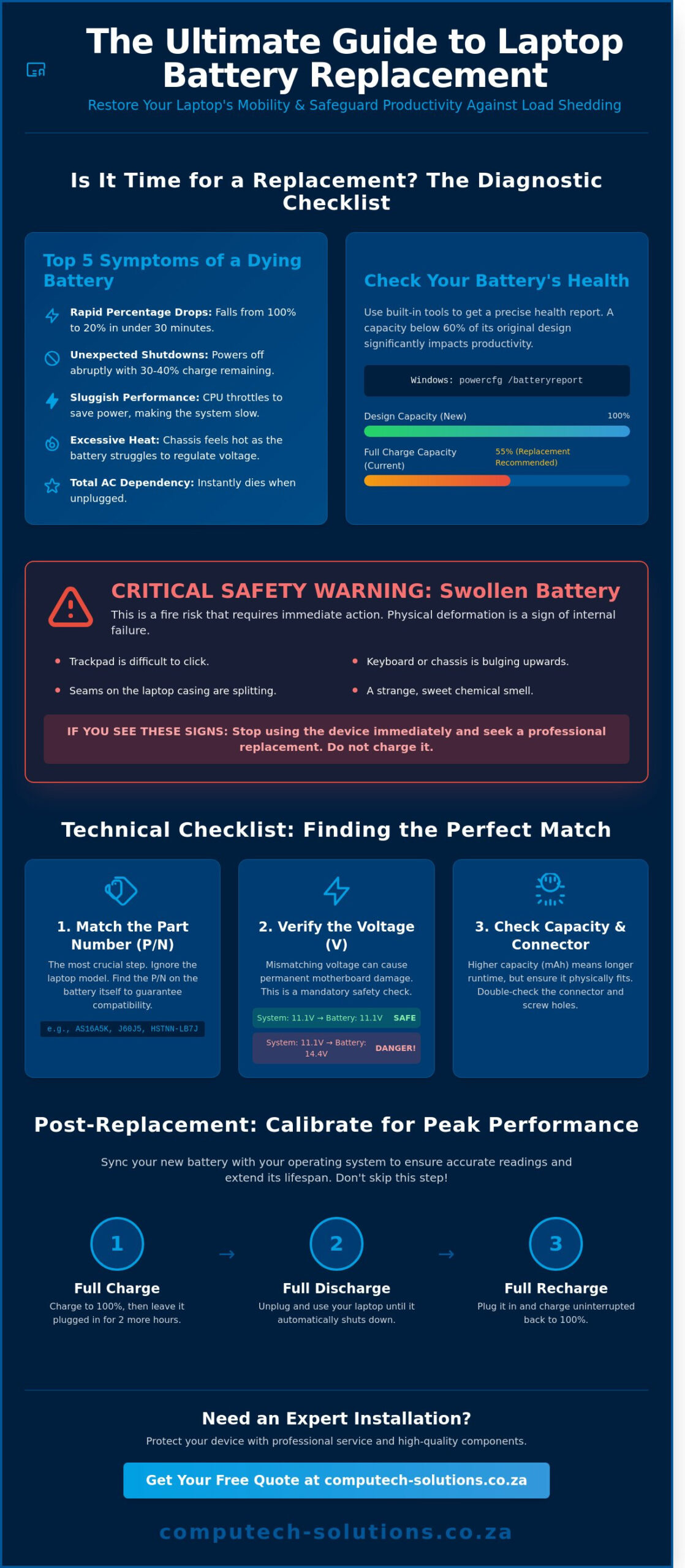
You don’t have to guess about your hardware’s health. Windows users can generate a detailed diagnostic report by opening the Command Prompt and typing “powercfg /batteryreport”. This document provides a specific comparison between the “Design Capacity” and the “Full Charge Capacity”. If the latter is less than 60% of the original factory spec, your productivity will suffer. For those using MacOS, holding the Option key while clicking the Apple menu allows you to view “System Information” and check the “Power” section for a specific cycle count and condition rating.
Top 5 Symptoms of a Dying Battery
- Rapid percentage drops: Your battery life falls from 100% to 20% in under 30 minutes of standard use.
- Unexpected shutdowns: The laptop loses power abruptly when the indicator still shows 30% or 40% remaining charge.
- Sluggish performance: Many Acer systems throttle the CPU speed to 1.0GHz or lower to prevent the system from drawing more power than a weak battery can provide.
- Excessive heat: The underside of the chassis feels hot during basic tasks like document editing because the battery is struggling to regulate voltage.
- Total AC dependency: The laptop turns off the instant you unplug the charger.
The “Swollen Battery” Emergency
Physical deformation is a critical safety hazard that requires immediate attention. You might notice your trackpad becoming difficult to click or the keyboard frame curving upward. These are clear signs that internal gases have built up due to age or localized overheating. A swollen battery is a fire risk; it can cause a thermal runaway event if the casing is punctured. If you see these signs, stop using the device and seek a professional laptop battery replacement immediately. In South Africa, these units are classified as hazardous e-waste. Never discard them in general household refuse. Instead, use dedicated e-waste collection points at retailers like Makro or Incredible Connection to comply with the National Environmental Management: Waste Act.
Technical Checklist: Finding the Perfect Match for Your Device
Finding the exact Part Number (P/N) is the only way to ensure a successful laptop battery replacement. Searching by the laptop model name alone leads to a high rate of compatibility errors because manufacturers frequently update internal components mid-cycle. You’ll find this alphanumeric code labeled as “Battery Model” or “Replacement Part Number” on the battery casing itself. Matching this specific string ensures the firmware on the battery communicates correctly with your Acer’s BIOS.
Voltage verification is the next critical step. You must match the voltage (V) rating of your original unit. While 10.8V and 11.1V components are generally compatible due to their cell configuration, installing a 14.4V battery into a system designed for 10.8V can cause permanent motherboard failure. These differences aren’t always visible from the outside, so checking the label is mandatory for safety. Capacity is measured in milliamp-hours (mAh) or Watt-hours (Wh). A higher mAh rating means longer runtimes, but you must check the physical dimensions. High-capacity cells often require a larger housing that might protrude from the bottom of your chassis.
Physical connector layout is the final hardware hurdle. Even if the electrical specs match, a slight offset in the plastic guide rails or the pin configuration will prevent the battery from seating. Check the alignment of screw holes and the length of the ribbon cable if you’re dealing with an internal model.
Decoding the Battery Label
On Acer devices, look for a code starting with “AS” or “AL” followed by several digits. Dell batteries usually use a five-character “Type” identifier like “J60J5,” while HP uses a “Spare” part number system. A Watt-hour is the standard unit of energy capacity that tells you how much power the battery can deliver over one hour. Always check the manufacture date on the label. Batteries sitting in “new old stock” for over 24 months undergo chemical degradation that reduces their effective lifespan before you even install them in your machine.
Internal vs. External Batteries
Older laptops featured “Quick-Release” batteries that you could swap in seconds using a sliding latch. Modern Acer ultrabooks use internal batteries that require removing the entire bottom chassis. To perform this swap, you’ll need a set of Phillips #00 or Torx precision drivers. If you find the battery is secured with industrial adhesive rather than screws, seek professional assistance. Puncturing a lithium-ion cell during a forced removal creates a significant fire risk. For businesses managing a fleet of devices, sourcing a reliable hardware partner ensures you receive certified components that meet South African safety standards.
The Load Shedding Factor: Battery Health in South Africa
Load shedding isn’t just a daily annoyance; it serves as a primary catalyst for hardware failure in South African homes and offices. During 2023, the country faced over 6,900 hours of power interruptions. This constant switching between AC power and battery storage forces your Acer to cycle through its limited lifespan much faster than manufacturer estimates suggest. If you find your device dying before a two-hour slot ends, it’s a clear indicator that you need a laptop battery replacement to maintain productivity.
The “Deep Discharge” trap is particularly dangerous during Stage 4 or Stage 6 schedules. When you allow your battery to hit 0% frequently, you cause permanent chemical damage to the lithium-ion cells. If the internal voltage drops below a specific threshold, the battery’s protection circuit may trigger a permanent “fail-safe” mode, rendering the unit unchargeable. Treating your laptop as a temporary UPS is a viable strategy, but you must manage the load to ensure you never reach a total shutdown.
Surge protection is your second line of defense. When the grid comes back online, the initial rush of electricity often carries high-voltage spikes. These surges can degrade the charging controller on your motherboard or the battery’s internal management system. We recommend unplugging your device five minutes before power is scheduled to return to avoid these peaks.
Optimising Cycles During Power Outages
Efficiency is the key to surviving long outages. You should adjust your Windows power plans to “Battery Saver” as soon as load shedding starts. This reduces the CPU power draw and dims the display, which are the two highest consumers of energy. Heat remains a silent killer during South African summers, where ambient temperatures often exceed 30 degrees Celsius. High heat combined with rapid discharge causes the battery to swell and lose capacity. Using high-quality laptop chargers is essential, as cheap replacements often lack the ripple filtration needed to keep battery temperatures stable during heavy use.
Managing Battery Health Long-Term
The 20-80% rule is the gold standard for lithium-ion longevity. Keeping your laptop at 100% while plugged in 24/7 creates high voltage stress that wears out the chemistry. Many modern Acer models allow you to limit the maximum charge to 80% through the Acer Care Center or BIOS settings. This simple change can double the time you have before a laptop battery replacement becomes necessary. Every full discharge cycle brings a battery closer to its end-of-life. By staying within the 20% to 80% range, you reduce the depth of discharge and keep the internal resistance low, ensuring your laptop stays powered through the next scheduled outage.
Original vs. Generic: A Buyers Quality Checklist
Selecting the right component for a laptop battery replacement involves weighing upfront costs against long-term reliability. OEM (Original Equipment Manufacturer) parts are produced by the brand’s approved factories, ensuring 100% compatibility with Acer’s specific power management firmware. While these parts offer the lowest technical risk, they often carry a price tag 35% to 50% higher than aftermarket options. High-quality generic batteries provide a viable alternative for budget-conscious users, provided they meet specific technical benchmarks.
You must learn to spot counterfeit batteries. These units often mimic the branding of original Acer parts but lack essential safety certifications. A common red flag is a price that seems too good to be true. In the South African market, a genuine replacement typically starts around R1,100, while dangerous counterfeits often retail for less than R450. These “fakes” lack essential thermal sensors. Without these sensors, the battery cannot communicate with the laptop to stop charging when it overheats, which can lead to chassis swelling or internal hardware damage.
Evaluating Generic Battery Quality
The internal components define the lifespan of an aftermarket battery. Premium generics utilize Grade A cells, which maintain 80% of their capacity after 300 charge cycles. In contrast, budget alternatives often use recycled or B-grade cells that fail within 90 days. You should ensure the battery includes an Integrated Circuit (IC) protection chip. This hardware prevents overcharging and short circuits, protecting your motherboard from electrical surges. For a detailed breakdown of what you should pay, consult the Laptop and Solar Battery Price Guide for current market rates.
The Warranty Checklist
A robust warranty is your primary defense against manufacturing defects. In South Africa, reputable suppliers offer a standard 6 to 12-month warranty on components used for a laptop battery replacement. You should clarify what a “Limited Warranty” covers before purchasing. Most policies cover “Dead on Arrival” units or sudden hardware failure; they rarely cover natural capacity loss due to heavy usage. Local support is vital. If a battery fails, shipping it back to an international seller often costs more than the battery itself. Working with a local provider ensures you have access to technical support and faster turnaround times for replacements.
Ready to restore your device’s mobility with a reliable power source? View our range of certified laptop power solutions today.
Post-Replacement Checklist: Calibration and First Steps
Completing a laptop battery replacement is only the first stage of restoring your Acer device’s mobility. To ensure the new component delivers its rated 4 to 6 hours of runtime, you must synchronize it with Windows or your specific operating system. This initial setup phase prevents the “plugged in, not charging” errors that often plague uncalibrated hardware. The first 24 hours are the most critical period for the chemical health of the new lithium-ion cells.
How to Calibrate Your New Battery
Calibration ensures the digital sensor inside the battery communicates accurately with your laptop motherboard. Follow these three steps immediately after your laptop battery replacement is finished:
- Step 1: Charge the laptop to 100% capacity. Leave it connected to the power adapter for at least two additional hours to ensure the cells are fully saturated and stable.
- Step 2: Unplug the device and use it for standard tasks until it reaches a critical low level. Ensure your power settings are configured to hibernate the system automatically at 5%.
- Step 3: Once the laptop shuts down, connect the charger and power it back to 100% without any interruption. This process resets the digital gauge so your battery percentage remains accurate.
Software plays a vital role in hardware longevity. Outdated BIOS versions often cause charging inefficiencies or incorrect thermal readings. Visit the Acer support portal and enter your serial number to check for firmware updates. Manufacturers frequently release patches that optimize power distribution and voltage regulation. If your system runs on obsolete firmware, the battery might degrade 15% faster due to inefficient power cycling.
Disposing of your old lithium-ion battery in general waste is hazardous and violates South African environmental regulations. These components contain heavy metals that contaminate soil and groundwater. Take your old battery to dedicated e-waste collection points at retailers like Makro or Incredible Connection. Organizations such as Desco Electronic Recyclers provide certified disposal services across Gauteng, the Western Cape, and KwaZulu-Natal to ensure your e-waste is processed responsibly.
Final Maintenance Tips
Heat is the primary enemy of battery health. Don’t use your laptop on soft surfaces like beds, pillows, or blankets. These materials block the cooling vents and cause internal temperatures to spike above 35 degrees Celsius, which permanently reduces cell capacity. Periodically clean the battery contacts with a dry, lint-free cloth or compressed air to maintain a clear electrical path.
If you encounter persistent power issues or need specific advice on Acer or Dell models, contact Computech Solutions. We provide professional technical support and end-to-end hardware services for the South African business community. Our team ensures your equipment remains a reliable asset rather than a source of technical downtime.
Secure Your Power Against the Next Outage
Navigating a laptop battery replacement doesn’t have to be a technical burden. You’ve now identified the critical signs of failure, such as physical swelling or rapid discharge, and understand how to match voltage and capacity specifications for your specific model. Since the CSIR reported that South Africans faced 335 days of load shedding in 2023, maintaining battery health is a functional necessity for business continuity. Standard lithium-ion units generally provide 300 to 500 full charge cycles before performance degrades, making proactive maintenance essential for any professional toolkit.
Computech Solutions serves as your trusted advisor for all power requirements. We provide high-quality replacement parts for all major brands, ensuring your hardware meets original manufacturer standards. Our team offers expert technical support to guide your selection, and we facilitate nationwide delivery across South Africa to get you back online quickly. Don’t let a failing cell disrupt your workflow or risk your hardware’s safety. Take control of your device’s uptime today.
Find Your Replacement Laptop Battery at Computech-Solutions
Your path to a reliable, mobile workstation starts with the right components. We’re here to ensure your technology remains as resilient as your business demands.
Frequently Asked Questions
How long should a new laptop battery last per charge?
A new Acer battery typically provides 4 to 7 hours of runtime under standard office workloads. High performance tasks like video editing or gaming reduce this to approximately 2 hours. Battery life depends on the specific cell capacity and your power management settings. You’ll maximize efficiency by keeping screen brightness at 50% and closing background applications that drain resources.
Can I use my laptop while it is charging?
You can safely use your laptop while it’s connected to a power source. Modern lithium-ion systems use bypass circuitry to power the components directly once the battery reaches full capacity. This prevents overcharging and manages heat effectively. It’s a standard practice in South African business environments where constant uptime is required for productivity throughout the workday.
Is it cheaper to replace a laptop battery or buy a new laptop?
A laptop battery replacement is significantly more cost-effective than purchasing a new machine. A high-quality replacement battery generally costs between R800 and R2,500 in the South African market. In contrast, a new mid-range business laptop starts at roughly R8,500. Choosing a replacement extends your current hardware’s lifespan by 2 to 3 years, providing a better return on your initial technology investment.
Will a generic battery void my laptop warranty?
Using a generic or third-party battery often voids your manufacturer’s warranty. Brand agreements, such as those from Acer, typically stipulate that only original equipment manufacturer (OEM) parts maintain the 12-month or 36-month protection plan. We recommend using certified parts to ensure safety and compatibility. This approach protects your hardware from voltage irregularities that generic cells might cause during operation.
How much does a laptop battery replacement cost in South Africa?
In South Africa, a professional laptop battery replacement service typically ranges from R850 for older external models to R2,800 for high-end internal units. These prices include the component and often a 6-month warranty on the part. Labor costs for internal installations usually add R350 to R550 to the total. Prices vary based on current exchange rates and specific model availability in local distribution hubs.
Why does my laptop say “battery not detected” after replacement?
A “battery not detected” error usually indicates a loose physical connection or a driver conflict. If you’ve just installed a new unit, shut down the device and ensure the connector is seated firmly against the motherboard. Sometimes the Battery Management System needs a reset. You can do this by uninstalling the ACPI Compliant Control Method Battery driver in the Device Manager and restarting your Windows system.
Can I leave my laptop plugged in all the time?
You can leave your laptop plugged in because modern devices stop charging once they hit 100% capacity. However, keeping a battery at maximum charge constantly can accelerate chemical aging. For the best longevity, try to discharge the battery to 20% at least once a week. Some Acer models include software that limits the maximum charge to 80%, which can increase the battery’s total lifespan by 50%.
What is the difference between a 4-cell and 6-cell battery?
The primary difference lies in the energy storage capacity and the physical weight. A 6-cell battery contains two more lithium-ion cells than a 4-cell version, offering approximately 30% to 50% more runtime per charge. While the 6-cell option provides longer untethered use, it adds roughly 150 grams to the device’s total weight. Your choice should depend on whether you prioritize portability or extended power for remote work.
