
You’re in the middle of a critical work task when your screen suddenly goes dark, leaving you stranded without a wall socket nearby. For many professionals, a failing toshiba laptop battery south africa has turned a once-mobile powerhouse into a stationary machine. It’s frustrating to manage the constant anxiety of sudden shutdowns or the technical confusion of matching specific part numbers and voltages.
We agree that finding a replacement feels risky when you’re trying to avoid low-quality components that might compromise your hardware. This guide provides the professional clarity you need to restore your laptop’s reliability. You’ll learn how to identify the exact battery part number, understand the benefits of high-quality generic replacements, and implement a maintenance strategy built for South Africa’s current load reduction environment. We’ll move quickly from technical specs to practical solutions so your device stays powered when it matters most.
Key Takeaways
- Recognize critical performance indicators like rapid charge depletion and system status messages that signal an immediate need for hardware intervention.
- Master the process of matching part numbers and voltage requirements to source the correct toshiba laptop battery south africa for your specific model.
- Assess the price-to-performance ratio of generic replacements while identifying the safety certifications required for reliable operation.
- Implement strategic charging habits and surge protection techniques to extend your battery’s lifespan during localized power disruptions.
- Leverage expert technical support and nationwide delivery to minimize downtime and ensure a seamless hardware upgrade.
Signs Your Toshiba Laptop Battery Needs Immediate Replacement
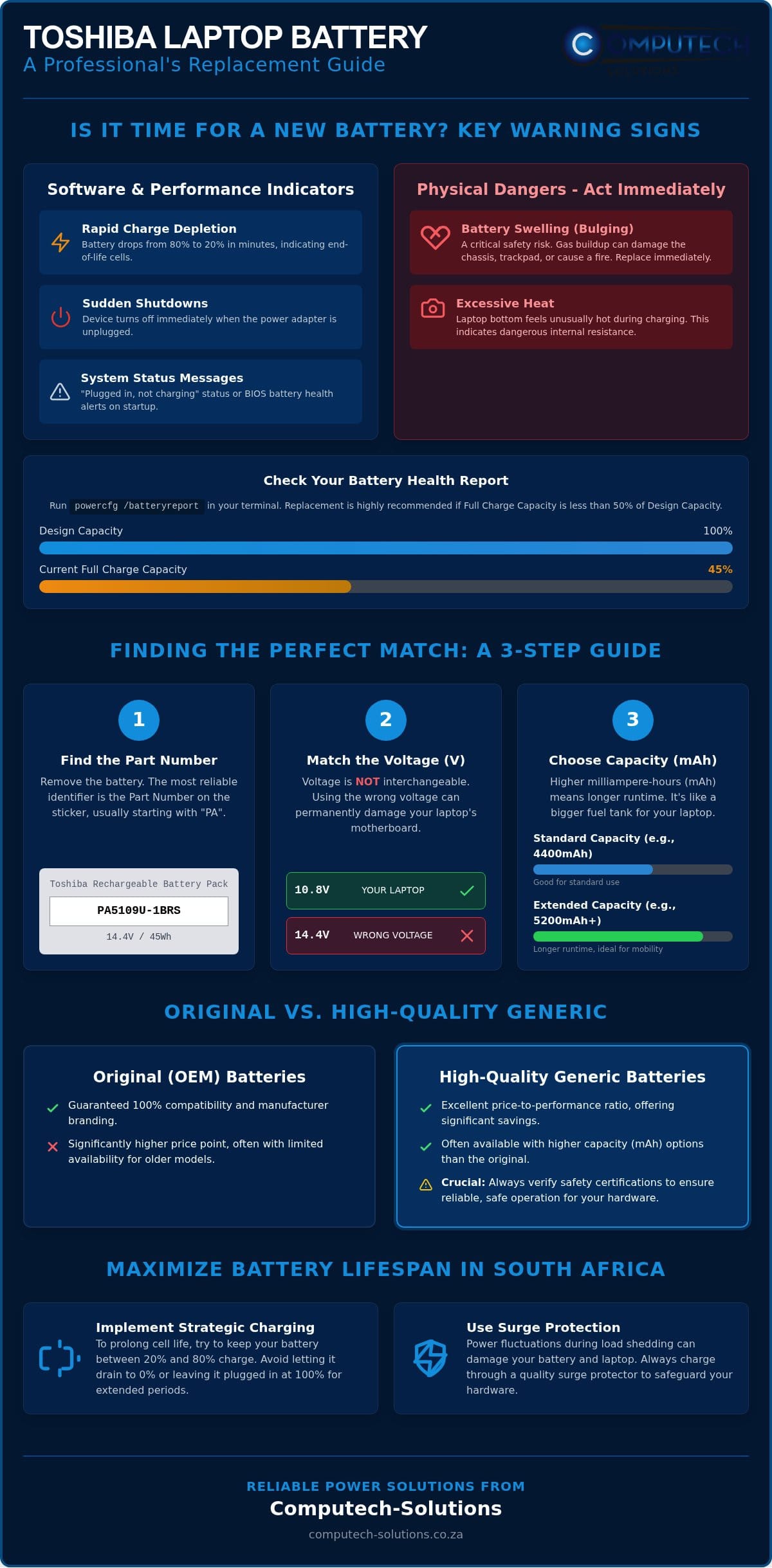
Identifying a failing battery early prevents data loss and potential hardware damage. Most users first notice a sharp decline in runtime as the primary symptom. If your laptop drops from 80% to 20% in minutes while you’re simply browsing the web, the internal cells have likely reached their end-of-life. This instability is a clear signal that searching for a new toshiba laptop battery south africa is now a priority for maintaining your daily productivity.
Another common indicator is the “Plugged in, not charging” status message in the Windows system tray. This often points to a communication failure between the motherboard and the battery’s internal management system. While it can occasionally be a software glitch, it usually indicates that the battery can no longer hold a charge safely. When your device shuts down immediately after pulling the power adapter, the laptop power systems are confirming that the battery is no longer functional as a portable power source.
Software Indicators and Battery Health Reports
Windows provides a built-in diagnostic tool to quantify this degradation. By running the “powercfg /batteryreport” command in your terminal, you’ll receive a detailed log of your battery’s history. Pay close attention to the “Designed Capacity” versus the “Full Charge Capacity.” If the full charge capacity is less than 50% of the original design, your runtime will be severely limited. Toshiba laptops also feature pre-boot BIOS warnings. If you see a battery health alert during the startup sequence, don’t ignore it. These messages are triggered by hardware sensors that detect critical cell failure or cycle count limits.
Physical Warning Signs You Should Not Ignore
Physical symptoms are the most urgent. Heat is the primary enemy of lithium-ion technology. If the bottom of your laptop feels excessively hot during a standard charge, the internal resistance of the cells has increased to dangerous levels. Even more serious is battery swelling. This occurs when gas builds up inside the battery casing due to chemical breakdown. You might notice your trackpad becoming difficult to click or the bottom cover of the laptop starting to bulge or warp. A swollen toshiba laptop battery south africa is a significant safety risk that can lead to permanent chassis damage or fire. Replacing the unit immediately is the only professional course of action to protect your investment.
Identifying the Correct Toshiba Battery for Your Model
Finding the right toshiba laptop battery south africa requires more than just knowing your laptop’s model name. While “Toshiba Satellite” or “Tecra” provides a starting point, these families contain hundreds of variations with different power requirements. To ensure a perfect fit, you must look at the specific hardware identifiers printed on the battery itself. Relying solely on the laptop’s external branding often leads to purchasing a unit with the wrong physical dimensions or connector alignment.
Finding Your Battery Part Number (PA Number)
The most reliable way to identify your battery is by its Part Number, which almost always begins with the letters “PA” followed by several digits. For example, a common model is the PA5109U-1BRS. To find this, shut down your laptop, disconnect the charger, and remove the battery from its bay. The number is usually located on a white or silver sticker near the regulatory logos. If the sticker is worn or missing, you can often find the part number in your user manual or by entering your serial number on a support portal. If you’re still unsure, you can contact our technical support team to verify the compatibility before you buy.
Voltage and Capacity: What You Need to Know
Voltage is a critical specification that you cannot ignore. Most Toshiba batteries operate at either 10.8V or 14.4V. These are not interchangeable. Installing a 14.4V battery into a system designed for 10.8V can cause permanent damage to your motherboard’s power rails. Always match the voltage exactly as listed on your original unit. This precision is vital because the dangers of counterfeit batteries often include incorrect voltage labeling, which poses a serious risk to your hardware.
Capacity, measured in milliampere-hours (mAh), is more flexible. Think of mAh as the size of your fuel tank. A higher mAh rating, such as 5200mAh compared to 4400mAh, will provide longer runtime without damaging your laptop. This capacity is determined by the number of cells inside:
- 3-cell: Lightweight but offers limited runtime; best for occasional mobile use.
- 6-cell: The standard balance of weight and performance for most Toshiba models.
- 9-cell: Larger and heavier, often protruding from the back, but offers maximum endurance.
Before finalizing your purchase, compare the physical connector and mounting tabs of the new unit with your old one. Even if the part number matches, verifying the physical alignment ensures the battery seats correctly in the chassis. This attention to detail ensures your toshiba laptop battery south africa provides a secure and reliable power connection for years to come.
Original vs. Generic Toshiba Replacement Batteries in South Africa
Choosing between an original manufacturer component and a third-party alternative is a common dilemma for South African laptop users. While original batteries offer guaranteed compatibility, they often come with a premium price tag that may not align with the remaining value of an older laptop. High-quality generic options have become the standard for a toshiba laptop battery south africa because they provide a balanced price-to-performance ratio. These units are engineered to meet the same physical and electrical specifications as the original parts, ensuring your device operates without interruption.
Computech-Solutions specializes in sourcing generic batteries that utilize premium lithium-ion cells. We prioritize hardware that adheres to international safety standards, including CE and RoHS certifications. These labels represent a commitment to electrical stability and environmental safety. By focusing on units that include essential safety features like over-voltage and thermal protection, we ensure the replacement hardware behaves predictably during various charging cycles.
The Benefits of High-Quality Generic Replacements
One of the primary advantages of opting for a generic replacement is the significant cost savings. You can often restore your laptop’s portability for a fraction of the cost of an OEM unit. This is particularly beneficial for businesses managing a fleet of older Toshiba Satellite or Tecra models where original parts are no longer in production. Modern generic batteries aren’t just budget-friendly; they’re built to last. Many utilize advanced cell technology that matches the cycle life of original components. This availability ensures that perfectly functional hardware doesn’t end up in a landfill simply because a battery has been discontinued by the manufacturer.
Evaluating Warranty and Support
A battery is only as good as the support behind it. When you’re searching for a toshiba laptop battery south africa, a local warranty is a non-negotiable requirement. International warranties often involve expensive shipping costs and long wait times that leave you without a working device for weeks. We provide a localized support model that prioritizes quick resolution and technical assistance. If you’re unsure about the installation process or need to verify compatibility details from previous sections, our expert technical support is available to guide you. This professional partnership is backed by our nationwide delivery service, which ensures your replacement hardware reaches you anywhere in South Africa with rhythmic efficiency. By choosing a reliable local partner, you eliminate the operational risks associated with unverified international sellers.
Maximizing Battery Life During Load Shedding and Power Surges
While national load shedding has been suspended for over 434 consecutive days as of July 2026, grid instability through localized load reduction continues to impact users in high-density areas. These power fluctuations pose a direct threat to the chemical health of your toshiba laptop battery south africa. Maintaining hardware reliability in this environment requires a proactive approach that combines smart software management with physical electrical protection. Even when the grid is stable, the heat generated during rapid charging cycles can accelerate cell degradation if not managed correctly.
Optimizing your Windows power settings is the most immediate way to extend your runtime during a localized outage. You can configure “Battery Saver” mode to activate automatically when your charge drops below 30%. This setting reduces background synchronization and dims the display, which are the two primary power consumers. By minimizing the energy demand on the cells, you reduce the heat generated during discharge, effectively preserving the battery’s internal chemistry for the long term.
Charging Strategies for an Unstable Grid
Modern lithium-ion cells perform best when kept between 20% and 80% charge. Keeping your laptop permanently plugged in at 100% during periods of high ambient temperature or grid spikes causes unnecessary stress on the battery’s voltage regulators. Conversely, frequent deep discharges where the laptop shuts down at 0% can cause permanent capacity loss. If you know a scheduled load reduction period is approaching, charge your device to 100% just before the event, but avoid leaving it at maximum capacity for weeks at a time. This balanced approach ensures your toshiba laptop battery south africa remains ready for emergencies without sacrificing its total lifespan.
Hardware Protection from Power Surges
The most dangerous moment for your hardware isn’t when the power goes out, but when it returns. The “power return” surge can deliver a massive spike of voltage that overwhelms standard laptop chargers and damages the internal battery management system. A surge protector acts as a critical barrier by diverting excess electrical voltage away from the laptop’s DC circuit during sudden grid spikes. If you are using a home solar or backup inverter system, ensure it provides a “Pure Sine Wave” output. Modified sine wave inverters can cause electrical noise that disrupts the charging logic of sensitive Toshiba hardware.
Protecting your investment from South Africa’s unique power challenges is essential for maintaining a mobile workstation. If your current unit has already suffered from grid-related damage, you can browse our range of Toshiba replacement batteries to restore your device’s original performance. Combining high-quality hardware with these maintenance strategies ensures your laptop stays operational regardless of local infrastructure challenges.
Why Choose Computech-Solutions for Your Toshiba Battery
Computech-Solutions positions itself as a reliable partner for professionals and businesses requiring high-performance hardware. We understand that a toshiba laptop battery south africa is more than a simple component; it’s the lifeline of your mobile productivity. Our commitment to quality is grounded in a rigorous selection process for generic replacement batteries. We only stock units that have undergone comprehensive electrical testing to ensure they meet the stability requirements of modern Toshiba laptops. This specialized focus allows us to provide a total solution that addresses the operational risks associated with unverified hardware.
Our inventory covers a broad spectrum of legacy and current models. Whether you’re maintaining a single personal device or managing a corporate fleet of Tecra or Satellite Pro laptops, our stock availability ensures minimal disruption to your workflow. We prioritize technical features that translate directly to business outcomes, such as high-density cells for extended runtime and integrated protection circuits that shield your device from the grid instability discussed in earlier sections. By focusing on high-quality generic components, we offer a definitive replacement strategy that balances cost efficiency with technical reliability.
Seamless Online Shopping and National Delivery
Our operations are centralized through a Pretoria-based hub, allowing us to maintain rhythmic efficiency in our logistics. This strategic location enables nationwide delivery across South Africa, reaching every province with consistent speed. Once you finalize your checkout, you’ll receive a tracking number that allows you to monitor your order’s journey from our warehouse to your doorstep. We’ve streamlined the procurement process to ensure that urgent replacements reach you without unnecessary delays. To provide further peace of mind, we maintain clear return policies that prioritize client satisfaction and hardware reliability.
Technical Support You Can Rely On
Technical confusion often leads to incorrect purchases, especially when dealing with varied voltage and part number requirements. Our team of sophisticated experts remains approachable and ready to assist you in identifying obscure part numbers or verifying compatibility. We bridge the gap between technical complexity and practical efficiency. If you’re struggling to locate a specific “PA” number or need to confirm if a 6-cell or 9-cell configuration is appropriate for your chassis, our support desk provides the professional clarity you need. We invite you to browse our full range of Toshiba batteries today to secure a definitive power solution for your device. By choosing a specialized national retailer, you ensure that your hardware remains a reliable asset in any power climate.
Restore Your Laptop’s Mobility and Reliability
A failing battery doesn’t have to mean the end of your device’s professional utility. By correctly identifying your “PA” part number and matching voltage requirements, you can successfully navigate the technical complexities of hardware replacement. Integrating high-quality generic cells into your workstation provides a cost-effective way to bypass OEM support limitations while maintaining essential safety standards. It’s also vital to apply the charging strategies discussed to protect your hardware from the ongoing challenges of localized load reduction and power surges.
Computech-Solutions remains your dedicated partner in maintaining operational efficiency across the country. Our Pretoria-based hub ensures that every toshiba laptop battery south africa we ship meets rigorous quality benchmarks before reaching your doorstep. We provide expert technical support for precise model matching and offer nationwide delivery to minimize your downtime. You don’t have to settle for a tethered workstation when a reliable power solution is readily available.
Find Your Replacement Toshiba Battery Now and return to a workflow that isn’t dictated by the location of the nearest wall socket. We’re here to ensure your hardware stays as mobile and resilient as your business demands.
Frequently Asked Questions
How long does a Toshiba laptop battery typically last?
A Toshiba laptop battery typically lasts between two and four years, which equates to roughly 300 to 500 full charge cycles. This lifespan depends heavily on environmental factors like heat and how frequently you discharge the unit during power outages. If you notice a significant drop in runtime before this period, it’s likely due to the chemical stress of high-temperature operation or frequent deep discharges during localized outages.
Can I use my Toshiba laptop without the battery plugged in?
You can operate your Toshiba laptop using only the power adapter, but it removes the safety net during power fluctuations. Without a battery, your system will shut down instantly if the grid fails or if a load reduction event occurs. This can lead to data corruption or hardware damage. Keeping a functional toshiba laptop battery south africa installed acts as a built-in uninterruptible power supply for your critical work.
Are generic batteries safe for my Toshiba Satellite or Tecra?
High-quality generic batteries are safe for Satellite and Tecra models provided they carry essential certifications like CE and RoHS. These units are engineered to match the electrical specifications of the original hardware. We ensure that our generic replacements include over-voltage and thermal protection circuits to maintain the same level of safety you expect from an OEM component while offering significantly better value for older machines.
What is the difference between a 6-cell and a 9-cell battery?
The primary difference lies in the energy capacity and the physical dimensions of the unit. A 9-cell battery contains more internal lithium-ion cells than a 6-cell version, providing roughly 30% to 50% more runtime. However, the 9-cell version is physically larger and heavier. It often protrudes from the bottom or back of the laptop chassis, which can change the ergonomics and weight of your portable device.
How do I find my Toshiba laptop battery part number?
Your battery part number is usually found on the manufacturer’s sticker and typically begins with the prefix “PA.” Common examples include formats like PA5109U-1BRS. If the sticker is damaged or unreadable, you can identify the correct toshiba laptop battery south africa by checking your system information in the BIOS or contacting our technical support team with your specific laptop model number for a precise match.
Does Computech-Solutions deliver to rural areas in South Africa?
We provide nationwide delivery across South Africa, including remote and rural locations in every province. Our logistics network is designed to reach clients wherever they are situated, ensuring that you can receive a replacement battery regardless of your geographic location. We use reliable courier partners to maintain a consistent delivery schedule from our Pretoria hub directly to your business or home doorstep.
How should I store my laptop battery if I am not using it?
Store your battery in a cool, dry environment with a charge level between 40% and 50%. Storing a battery at 0% can lead to a deep discharge state that prevents it from ever charging again, while 100% storage can accelerate chemical degradation. We recommend checking the charge level every three months to ensure it remains within the optimal range for maintaining long-term cell health.
Why is my new Toshiba battery not charging to 100%?
New batteries often require a calibration cycle or may be restricted by specific power management settings in Windows. If your charge stops at 80%, check if your Toshiba power utility has a battery life extender mode active. Otherwise, perform a full charge to 100% followed by a discharge to 5% to help the laptop’s internal sensor accurately gauge the new cell’s total capacity and chemical potential.
