
Would you commit to the high cost of a brand new machine if a strategic component upgrade could double the life of your current device? Most South Africans currently face the dual challenge of a volatile economy and the persistent threat of load shedding, which aggressively shortens the lifespan of even the most premium hardware. It’s a stressful cycle that often leads to unnecessary spending on replacement units when a professional repair is the more efficient path for your budget.
We provide the stability and technical expertise you need to break that cycle. This guide focuses on troubleshooting common laptop hardware issues while offering a clear roadmap for device longevity in 2026. You’ll discover how to identify failing components, from batteries to LCD panels, and implement power management strategies that protect your hardware from grid instability. We preview the essential steps to sourcing reliable, brand-specific parts with nationwide delivery; ensuring your laptop remains a high-performance asset without the need for a total system overhaul.
Key Takeaways
- Understand the economic advantages of component-level repairs over purchasing new units in the current South African market.
- Gain a clear framework for troubleshooting common laptop hardware issues to distinguish between minor glitches and necessary hardware upgrades.
- Learn how to mitigate the impact of load shedding on your device through strategic battery replacements and specialized power management.
- Identify high-impact performance upgrades, such as SSDs and RAM, that can extend your laptop’s professional lifespan through 2026.
- Discover how to source compatible, brand-specific replacement parts with the benefit of expert technical support and nationwide delivery.
What are Laptop Solutions and Why Do They Matter in 2026?
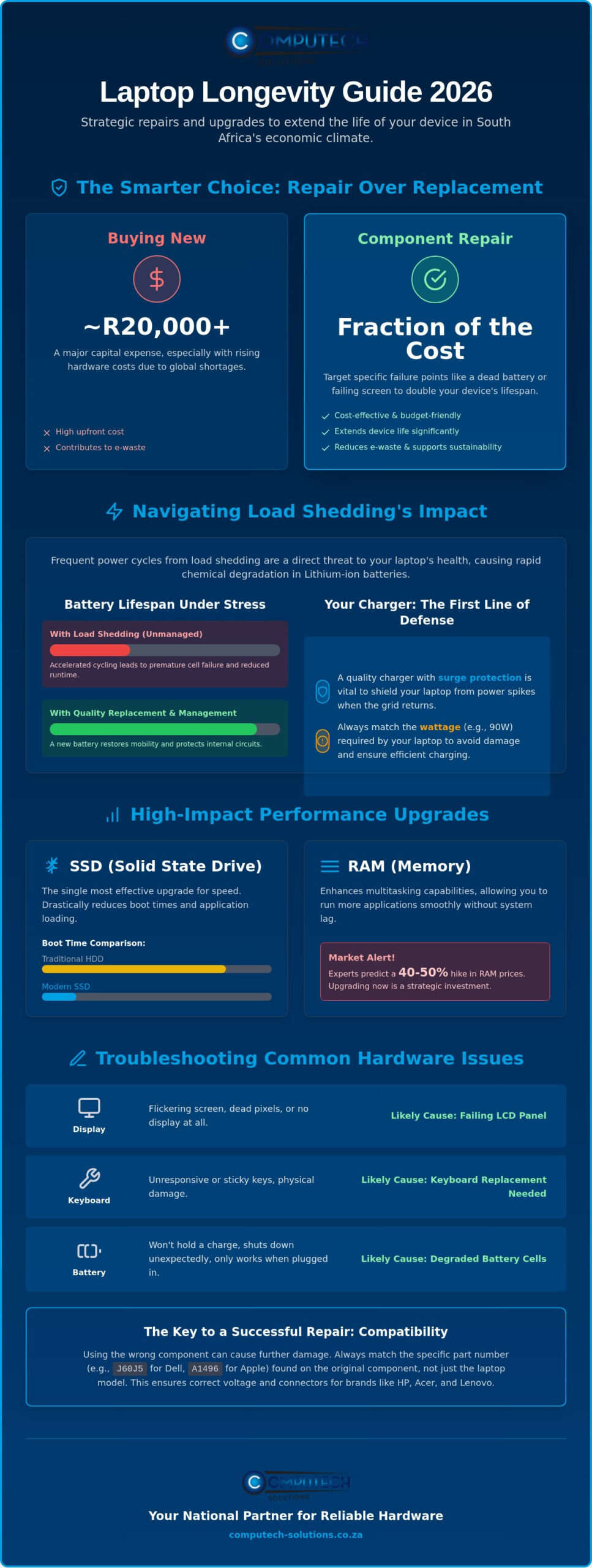
In 2026, the South African technology market faces a significant economic squeeze. With the global memory crisis driving up the cost of new units and some experts predicting a 40-50% hike in RAM prices, purchasing a new laptop has become a major capital expense rather than a simple upgrade. This is where comprehensive laptop solutions become critical. These solutions aren’t just about fixing a broken part; they represent a holistic strategy that merges hardware replacement, performance optimization, and power management into a single operational goal.
Effective troubleshooting allows you to pinpoint exactly which component has reached its end of life. Instead of discarding a R20,000 machine because of a flickering screen or a dead battery, you can target the specific failure point. This approach is essential for South African professionals who rely on their devices to survive frequent power cycles and the physical wear of a mobile work environment. By focusing on repair and upgrades, you ensure your technology remains an asset rather than a recurring debt.
The Shift from Disposal to Durability
Modern hardware is increasingly designed for modularity, allowing for the easy replacement of batteries, LCD panels, and keyboards. This shift reduces e-waste and supports the growing Right to Repair movement, which helps moderate costs across the industry. Choosing high-quality replacement parts extends the life of your device while maintaining its resale value. Laptop solutions are the strategic maintenance of hardware to ensure operational continuity.
Identifying Your Laptop’s Needs
Differentiating between software lag and hardware failure is the first step in troubleshooting common laptop hardware issues effectively. While a slow boot might be software related, a battery that won’t hold a charge or a keyboard with unresponsive keys requires a technical intervention. Physical signs like dead pixels on an LCD or a laptop that only runs when plugged in are clear indicators that a component replacement is overdue.
Compatibility is the most important factor when selecting hardware for brands like Acer, Dell, HP, and Lenovo. Using a part that doesn’t perfectly match your model’s voltage or connector type can lead to further damage. This is why expert technical support is vital; it ensures you select the correct component the first time. We provide the technical guidance needed to match your specific brand requirements with reliable hardware, ensuring your device returns to peak performance without the risk of operational disruptions.
Power and Charging Solutions: Navigating Load Shedding
Load shedding isn’t just a daily inconvenience; it’s a direct threat to your laptop’s internal chemistry. Frequent power cycles force Lithium-ion batteries to switch between charging and discharging states multiple times a day. This accelerated cycling causes rapid chemical degradation, leading to reduced runtime and eventual cell failure. For South African users, troubleshooting common laptop hardware issues often begins with the power system, as it’s the first component to show signs of stress under unstable grid conditions.
When your device fails to hold a charge or shuts down unexpectedly, you need a systematic approach to identify the culprit. You can find detailed technical steps for Power and Charging Solutions if your system is plugged in but remains at 0%. If the hardware is physically degraded, replacement is the only reliable path to restore your device’s mobility and protect the internal circuitry from further damage.
Choosing the Right Replacement Battery
Finding a compatible match for Acer, Apple, or Dell laptops requires precision. Don’t rely solely on the laptop model name. Instead, check the battery casing for a specific part number like “J60J5” for Dell or “A1496” for Apple. Higher mAh (milliampere-hour) ratings generally provide longer runtimes, but they must match the original voltage requirements to prevent circuit damage. High-quality generic batteries offer a cost-effective way to revitalize older machines without the premium price tag of OEM components, provided they are sourced from a reputable supplier.
Chargers and Adapters: The First Line of Defence
Your charger acts as a sophisticated voltage regulator. Substandard alternatives often lack surge protection, which is vital when the grid returns after an outage. In 2026, USB-C and Type C universal charging have become the standard for most brands, including HP and Lenovo. However, you must still verify the wattage. A 45W charger cannot efficiently power a laptop designed for 90W, often leading to overheating or “plugged in, not charging” errors.
Maintaining battery health during extended outages involves keeping the device between 20% and 80% charge whenever possible. If you notice your current adapter feels excessively hot or the cable is frayed, it’s time to act before a short circuit occurs. You can browse our range of laptop chargers and adapters to ensure your device stays protected from power surges and remains operational through the next schedule.
Visual and Physical Solutions: LCDs and Keyboards
Physical damage to a display or a failing keyboard often feels like a terminal diagnosis for your device. It isn’t. Within the framework of troubleshooting common laptop hardware issues, visual faults are frequently isolated to the LCD panel itself rather than the internal graphics processor. A cracked screen resulting from a rough commute or a flickering display caused by a worn eDP ribbon cable can be resolved through a targeted component swap. This approach restores professional-grade visual clarity at a small fraction of the investment required for a new system.
Technical precision is the defining factor between a successful repair and a secondary failure. LCD installation involves more than just removing a bezel. It requires careful handling of the delicate connector pins and ensuring the display is correctly grounded to prevent static discharge. Commissioning a new panel also involves verifying the backlight functionality and checking for dead pixels before the final assembly is completed. By choosing a high-quality replacement panel, you bypass the need for a total system overhaul while maintaining the portability of your machine.
Understanding Laptop Display Technology
Selecting the right replacement requires a technical understanding of TN (Twisted Nematic), IPS (In-Plane Switching), and OLED technologies. TN panels are often found in entry-level machines and offer faster response times, while IPS panels provide superior color accuracy and wider viewing angles. When sourcing a part, you must verify the pin compatibility, usually 30-pin or 40-pin, and the physical alignment of the mounting brackets. A mismatch in these specifications will prevent the panel from fitting or communicating with the motherboard. While an external monitor is a viable temporary workaround, it isn’t a long-term solution for a mobile professional.
Input Solutions: Keyboards and Peripherals
A non-functional keyboard immediately halts productivity and compromises your device’s security. While a USB external keyboard provides a stop-gap, it eliminates the primary benefit of a laptop: its mobility. Full keyboard replacements are the only way to restore the original ergonomics of your device. In the South African market, you must pay close attention to regional layouts. Many devices sold locally utilize the UK layout with a vertical “Enter” key, while others use the US layout with a horizontal “Enter” key. Ensuring a perfect match is essential for the keys to seat correctly within the palm rest and for the ribbon cable to reach the motherboard connector without tension. Proper component fit maintains the physical integrity of the chassis and ensures your cooling system isn’t obstructed by a poorly seated part.
Performance Optimization: Upgrading for Speed and Longevity
Modern software demands are relentless. If your system hangs when opening simple applications, you’re likely facing a hardware bottleneck rather than a terminal failure. Performance optimization is a proactive part of troubleshooting common laptop hardware issues; it addresses the underlying hardware limitations before they lead to system instability. By strategically upgrading specific components, you can bypass the high cost of a new device while gaining the speed required for 2026 workflows.
The SSD Revolution
Most older laptops use mechanical hard drives (HDDs) that rely on spinning platters. These are prone to physical failure and slow data access. Replacing an HDD with a Solid State Drive (SSD) is the single most effective way to modernize a machine. An SSD upgrade typically offers a 5x to 10x speed increase over traditional hard drives. For laptops from the last three years, moving from a SATA SSD to an NVMe drive can further reduce latency, especially for data-heavy tasks. This single change can breathe new life into a 5-year-old machine, making it feel faster than it was on day one.
Memory and Multitasking
RAM acts as your system’s short-term workspace. In 2026, 8GB is the bare minimum for basic tasks, while 16GB has become the professional standard for multitasking. Before purchasing new modules, determine the maximum RAM capacity of your laptop motherboard and the number of available slots. It’s critical to match the memory frequency of your new module with the existing one to maintain system stability. Matching RAM modules for dual-channel performance provides significant benefits, as it allows the processor to access data across two channels simultaneously.
Performance isn’t just about speed; it’s about temperature. When troubleshooting common laptop hardware issues related to sudden shutdowns, thermal management should be your first priority. In South Africa’s warm climate, dust accumulation inside the chassis is a primary cause of hardware failure. High internal temperatures lead to thermal throttling, where the CPU slows down to prevent damage. Cleaning the cooling fans and re-pasting the processor is a vital hardware solution that prevents permanent silicon degradation. If you want to ensure your device remains at peak efficiency, you can source specialized components and performance laptops through our national network.
Computech-Solutions: Your National Partner for Reliable Hardware
Maintaining high-performance hardware requires more than just technical knowledge; it requires a reliable supply chain. When you’re troubleshooting common laptop hardware issues, the biggest obstacle isn’t often the repair itself, but finding the exact part that matches your model’s specifications. We bridge that gap by providing a stabilized inventory of professional-grade components designed to meet the demands of the South African business environment. Our role is to act as your technical partner, ensuring that every component you install contributes to the long-term stability of your device.
Our team offers expert technical support to ensure compatibility before you commit to a purchase. Whether you’re sourcing a high-capacity battery for a Dell Latitude or a replacement LCD panel for an ASUS Zenbook, our technical insights prevent the frustration of ordering incorrect hardware. This authoritative approach minimizes downtime and ensures that your technical interventions result in immediate growth in operational efficiency. We don’t just sell parts; we provide the peace of mind that comes with knowing your hardware is backed by professional expertise.
Seamless Online Procurement
Sourcing hardware shouldn’t be a logistical burden for your business. We’ve streamlined our online procurement process to ensure that individuals and procurement officers can find and secure parts with minimal friction. Every order includes national shipping and real-time tracking, providing the security needed when handling sensitive electronic components. You can explore our Acer Replacement Laptop Batteries for reliable power that keeps your mobile office functional during critical deadlines. Our national delivery network reaches every corner of South Africa, ensuring that reliable hardware is accessible regardless of your geographic location.
Total Power Solutions
A comprehensive laptop solution in 2026 must account for the reality of the South African energy grid. While troubleshooting common laptop hardware issues often points to failing internal batteries, the root cause is frequently external power instability. We offer a total solution model by integrating high-quality laptop hardware with solar and battery backup systems. This holistic strategy protects your devices from surge damage while ensuring your small office setup remains online during extended load shedding. Professional installation and commissioning of these power systems provide the definitive answer to the operational risks posed by an unstable grid, securing your productivity against external disruptions.
Securing Your Technical Future in 2026
Extending the life of your laptop in the current South African economy is a strategic necessity. By moving beyond simple repairs and adopting a holistic maintenance model, you ensure your device remains a reliable tool for professional growth. You’ve now learned how to identify specific failure points through troubleshooting common laptop hardware issues and the importance of brand-specific compatibility for long-term stability. We’ve also highlighted how specialized power solutions protect your hardware from the physical strain of load shedding.
Computech-Solutions provides the technical stability you need to maintain these systems. With expert technical support for all major brands and reliable nationwide delivery across South Africa, we ensure the right components reach you quickly. We specialize in load shedding power solutions that go beyond the internal battery, offering a total defense for your professional setup. Don’t let a failing component or a power surge dictate your productivity. Browse our full range of laptop solutions and nationwide hardware to keep your device performing at its peak. Your technology is an investment; it’s time to protect it.
Frequently Asked Questions
How do I know if my laptop battery needs to be replaced?
You can identify a failing battery when your operating system displays a “service battery” warning or if the device shuts down unexpectedly despite showing a remaining charge. Physical indicators like a bulging trackpad or a chassis that feels excessively hot during charging also signal that the internal cells have reached their limit. If your laptop only functions when the charger is connected, the battery has likely suffered a total cell failure.
Are generic laptop batteries safe to use with my Dell or HP laptop?
High-quality generic batteries are entirely safe provided they match the original manufacturer’s voltage and wattage specifications. We specialize in providing reliable replacement batteries for major brands like Dell, HP, and Acer that undergo rigorous testing for compatibility. These components offer a cost-effective alternative to OEM parts while maintaining the same safety standards and operational stability for your device.
Can I replace my laptop screen myself, or do I need a professional?
Replacing an LCD panel is a manageable DIY task if you have the correct tools and follow a systematic approach. You must ensure the replacement panel matches the pin count and mounting bracket alignment of your original screen. While the process requires technical precision to avoid damaging delicate ribbon cables, many users successfully restore their displays by following brand-specific guides and sourcing the correct hardware.
What is the best way to protect my laptop from load shedding damage?
The most effective protection involves using a high-quality surge protector combined with a portable power station or UPS to manage the transition between grid power and battery. This strategy is a vital part of troubleshooting common laptop hardware issues caused by the high-voltage spikes that often occur when the power returns. Keeping your battery between 20% and 80% charge also helps preserve its chemical health during frequent power cycles.
How much speed will an SSD upgrade actually add to my old laptop?
An SSD upgrade typically provides a 5x to 10x increase in data access speeds compared to a traditional mechanical hard drive. You’ll notice near-instant boot times and significantly faster application loading, even on machines that are several years old. This upgrade removes the primary performance bottleneck in older hardware, allowing the processor to function at its full potential without waiting for spinning platters.
Does Computech-Solutions deliver to remote areas in South Africa?
Yes, we provide nationwide delivery to every province in South Africa, including remote rural areas and small towns. We use secure, tracked shipping services to ensure that sensitive components like LCD panels and batteries arrive in perfect condition. Our logistics network is designed to support professionals and businesses across the country, regardless of their distance from major urban centers.
How do I find the correct charger for my laptop model?
You can find the correct charger by checking the output requirements, measured in Volts (V) and Amps (A), usually printed on the bottom of your laptop or the original power brick. It’s critical to match the voltage exactly, while the amperage of the new charger can be equal to or higher than the original. You must also verify that the connector tip matches your laptop’s charging port to ensure a secure and stable connection.
What is the warranty on replacement laptop components?
We provide a standard warranty on our replacement components to ensure you receive a part that meets our high quality-control standards. This coverage protects you against manufacturing defects in batteries, chargers, and LCD panels. Our technical support team is available to help you verify the specific warranty terms for your chosen part and assist with any compatibility questions during troubleshooting common laptop hardware issues.
