Description
Specifications
PART NAME: 0A001-00892000
OUTPUT: DC 19V-3.42 A
TOTAL OUTPUT: 65W
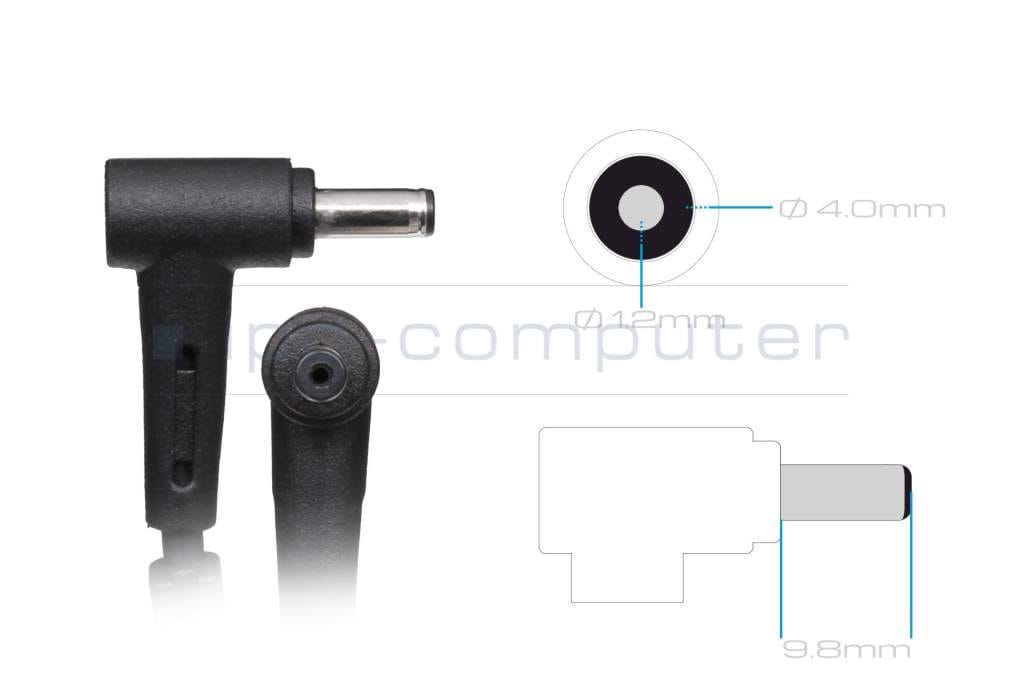
TIP PIN SIZE: 4.0MM * 1.2MM
Please confirm it is compatible with the tip size of your original adapter before purchasing. If you are not sure, please contact us!
Compatible Devices
- ZenBook UX31A
- ZenBook UX32A
- ZenBook UX331
- ZenBook UX333
- ZenBook UX430
- ZenBook UX433
- ZenBook UX434
- ZenBook UX533
- VivoBook S330
- VivoBook S430
- VivoBook S510
- VivoBook S530
- VivoBook X409
- VivoBook X412
- VivoBook X509
- VivoBook X512
- ExpertBook P1410
- ExpertBook P1510
- ExpertBook P1701
Tips for Choosing and Using a Replacement Charger
Always match the voltage and connector tip size to your original charger exactly – a mismatched voltage or tip can damage your device even if it appears to fit. A replacement rated at a higher wattage than the original is safe to use, since your device only draws the current it needs; never go lower than the original wattage.
Inspect the cable and connector tip periodically for fraying, bending or corrosion, and unplug the charger when it isn’t in use to help it last longer. If your laptop isn’t charging, check that the tip is fully and securely inserted before assuming the charger itself has failed.