
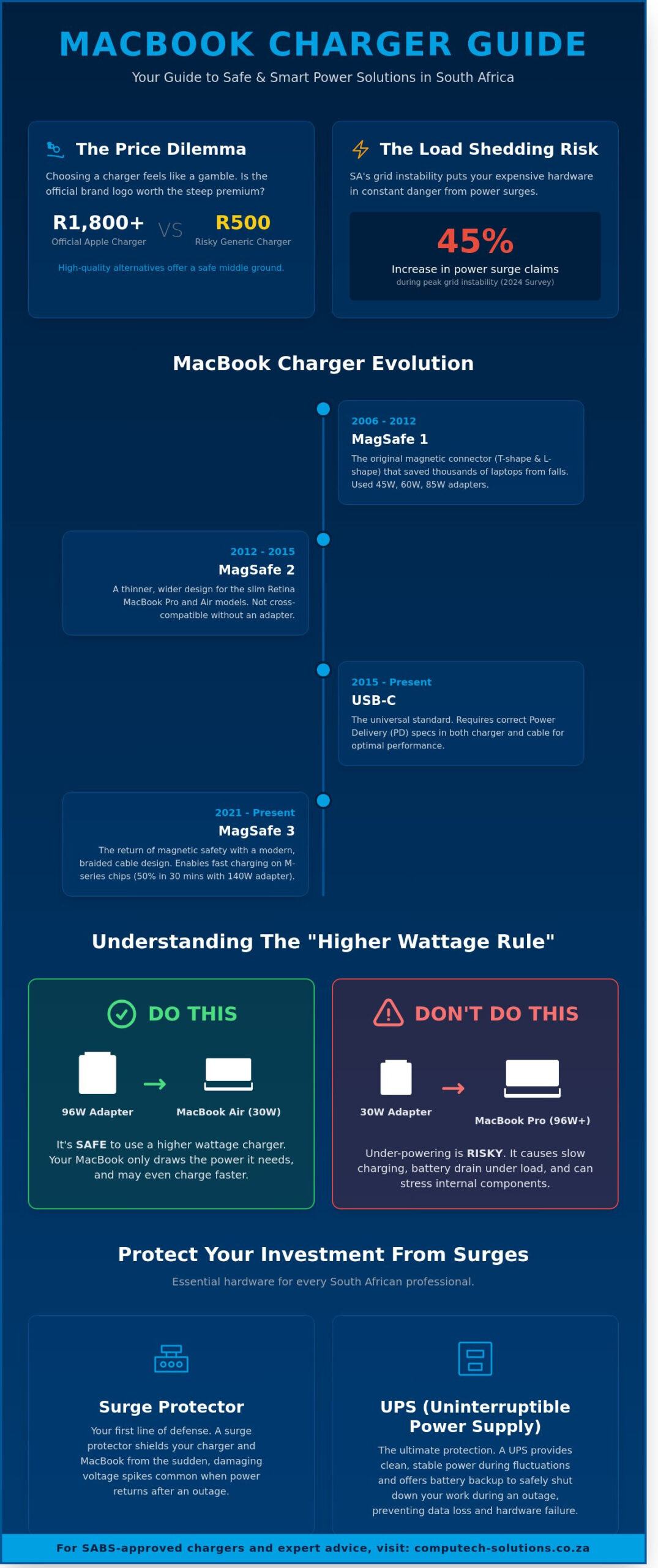
What if your R40,000 MacBook Pro is only as reliable as the R500 generic power brick you bought in a hurry? Many South Africans feel the sting of paying R1,800 or more for an official Apple accessory just to stay powered up. You’ve likely worried that a cheaper alternative might fry your logic board or that the next Stage 6 load shedding cycle will end your battery’s life. It’s a valid concern since a 2024 survey by local tech insurers found that power surge claims increased by 45% during peak grid instability. Selecting a macbook charger shouldn’t feel like a gamble with your professional tools.
This guide ensures you find a safe, high performance power solution that fits your budget and your specific model’s wattage requirements without compromising hardware integrity. We’ll break down the technical differences between MagSafe and USB-C standards and explain how to verify SABS approved safety certifications. You’ll also learn the exact technical strategies we use to shield hardware from Eskom’s unpredictable power surges, giving you total confidence in your setup’s longevity and safety.
Key Takeaways
- Understand the “Higher Wattage Rule” to safely power your device and avoid the significant performance risks associated with under-powered adapters.
- Evaluate the price-to-performance ratio of original versus high-quality generic options to determine if the Apple logo is worth the R1000 premium.
- Learn how to safeguard your macbook charger against South African load shedding power surges using recommended surge protectors and UPS systems.
- Identify the specific technical requirements for your laptop by navigating the evolution of MagSafe and USB-C power delivery systems over the last two decades.
- Discover why sourcing hardware from a trusted South African IT partner ensures you receive the highest grade of replacement components with expert technical support.
Understanding the MacBook Charger Ecosystem: From MagSafe to USB-C
Apple’s approach to power delivery has undergone three major shifts since the original MacBook Pro debuted in 2006. Choosing the correct macbook charger isn’t just about finding a plug that fits; it’s about protecting a high-value business asset. The evolution of MagSafe technology highlights Apple’s focus on hardware longevity. By using magnets instead of friction, these connectors detach safely when someone trips over the cable. This single feature prevented thousands of screen cracks and logic board failures across South African offices for over a decade. Using the wrong wattage or a counterfeit unit often leads to slow charging, excessive heat, or internal circuit damage.
The MagSafe Era: 1, 2, and 3
The original MagSafe 1 system served MacBooks from 2006 to 2012. You’ll identify these by their distinct T-shape silver connectors or the later white plastic L-shape designs. In 2012, Apple introduced MagSafe 2. This connector is thinner and wider, specifically designed for the slim profiles of the Retina MacBook Pro and Air models. After a brief hiatus, Apple brought back the technology with MagSafe 3 in 2021. This modern version supports fast charging for M-series silicon, allowing a 16-inch MacBook Pro to reach 50% battery in 30 minutes when paired with the correct 140W adapter.
- MagSafe 1: Found on vintage models (2006-2012) using 45W, 60W, or 85W adapters.
- MagSafe 2: Used for Retina models (2012-2015) with a flatter, silver connector.
- MagSafe 3: The current standard for M1, M2, and M3 Pro/Max laptops, featuring a braided cable.
The USB-C Revolution
In 2015, Apple transitioned toward USB-C Power Delivery (PD). This universal standard allows a single macbook charger to power laptops, tablets, and smartphones. It simplified the workspace for South African professionals who move between home and office. However, this shift placed a higher burden on cable quality. A USB-C cable might look standard, but if it doesn’t support the required wattage, your MacBook will charge slowly or not at all. Devices like the 12-inch MacBook and the 2018-2020 MacBook Air rely solely on these ports for power.
Reliability is critical in the South African market, where power fluctuations can stress internal components. High-quality USB-C chargers include integrated circuitry to communicate with the laptop, ensuring the device only draws the power it can handle. Using uncertified third-party blocks risks “frying” the USB-C controller on the logic board, a repair that often costs thousands of Rands. Professional users should always verify that their charging chain meets the specific Power Delivery requirements of their specific MacBook model to ensure operational efficiency.
Technical Specifications: Wattage, Voltage, and Compatibility
Selecting the right macbook charger depends on understanding how power negotiation works between your device and the power brick. A common concern among South African users is the “Higher Wattage Rule.” You can safely use a 96W or 140W USB-C power adapter with a MacBook Air that only requires 30W. Modern Apple laptops are designed to draw only the power they need, so a higher-capacity charger won’t “overcharge” or damage your battery. In fact, using a higher wattage adapter often allows for faster charging if your specific model supports fast-charge capabilities.
The risk lies in under-powering your machine. If you use a 30W adapter for a MacBook Pro 16-inch, the laptop will charge extremely slowly or not at all while in use. Under heavy workloads, such as video editing or compiling code, the system might draw power from the battery even while plugged in because the adapter cannot keep up with the demand. This negotiation is governed by USB Power Delivery (USB-PD) standards, which allow the charger and the Mac to communicate and set the optimal voltage and current levels for safety and efficiency.
To identify your requirements, check the laser-etched data on the bottom of your MacBook case. It lists the specific input voltage and amperage required. If the text is too small to read, you can find this information by clicking the Apple menu, selecting “About This Mac,” and viewing the “System Report” under the “Power” section. If you need help identifying your hardware requirements, the experts at Computech Solutions can help you match your serial number to the correct power profile.
Wattage Breakdown by Model
- MacBook Air: Most models from 2018 to 2026 utilize 30W or 35W Dual Port adapters. Older MagSafe 2 models typically used 45W units.
- MacBook Pro 13-inch and 14-inch: These mid-range devices generally require between 60W and 70W to maintain peak performance and battery health.
- MacBook Pro 15-inch and 16-inch: These high-performance machines demand 85W, 96W, or 140W adapters to support their power-hungry processors and dedicated graphics cards.
Voltage and Amperage: The Science of Stability
Stable voltage is critical for the longevity of Lithium-ion batteries. Fluctuations in voltage can cause internal heat buildup, which is the primary cause of battery swelling in the South African climate. Your MacBook features an internal System Management Controller (SMC) that acts as a gatekeeper. It regulates the flow of electricity and shuts down the charging process if it detects inconsistent power delivery from a low-quality macbook charger. Amperage is the current flow that must meet or exceed the laptop’s draw. While the voltage must match the device specifications, the amperage provided by the charger can be higher than the laptop’s rating without causing any harm.
Original vs. High-Quality Replacement Chargers: Making the Choice
Deciding between an original Apple power brick and a third-party alternative often comes down to a R1000 price difference. While the Apple logo carries a premium, the internal engineering justifies the cost for specific high-end users. A high-quality macbook charger contains complex circuitry designed to regulate power flow and protect sensitive logic boards. Cheap imitations often skip these components to reduce manufacturing costs, which puts your R40,000 laptop at significant risk.
Look for three critical protection features in any unit you purchase. Over-voltage protection prevents electrical spikes from reaching the internal hardware. Over-current protection stops the battery from overheating during rapid charging cycles. Short-circuit protection cuts power instantly if a fault occurs. You can spot a dangerous knock-off by its physical weight. Genuine 60W or 61W units weigh approximately 200g due to heavy copper heat sinks. If a charger feels unusually light or hollow, it lacks the necessary thermal management materials.
The Case for Original Apple Adapters
Original Apple adapters offer the highest level of electrical stability for your hardware. This is the only logical choice for professionals using high-spec M3 Max models where power draw peaks at 140W. Using an official adapter preserves your device’s resale value and ensures you remain compliant with AppleCare+ terms in South Africa. Apple’s rigorous testing standards mean these units handle 220V fluctuations better than uncertified alternatives.
Evaluating Reliable Replacement Options
Protecting Your MacBook Charger in the South African Environment
Maintaining a macbook charger in South Africa requires more than just careful handling. The local power grid presents specific challenges that can shorten the lifespan of your hardware. By understanding the environmental risks and implementing a few technical habits, you can extend the utility of your adapter by several years.
Surge Protection and Load Shedding
Load shedding is more than an inconvenience; it’s a primary cause of hardware failure. When the grid comes back online after an outage, an “Inrush Current” occurs. This is a massive, sudden spike in voltage that travels through the lines. These spikes can overwhelm the sensitive capacitors inside your power brick, leading to immediate failure or “silent” degradation that reduces charging efficiency over time.
You should unplug your device five minutes before a scheduled outage and wait at least five minutes after power returns before reconnecting. This buffer period allows the grid voltage to stabilize. A surge protector is a mandatory investment for any South African laptop user. For businesses operating in areas with frequent grid instability, a Small Office/Home Office (SOHO) UPS system provides the necessary voltage regulation to keep your macbook charger safe from these fluctuations.
Physical Maintenance and Longevity
Cable failure usually begins at the stress relief points where the cord meets the plug or the adapter brick. To prevent internal wire breakage, never wrap the cable tightly around the adapter. Use loose, circular loops instead. This “roadie wrap” method ensures there’s no tension on the internal copper strands, which prevents the common “fraying” issue seen at the ends of high-use cables.
- Clean the Pins: Check the magnetic MagSafe or USB-C pins weekly. Small metallic debris can get stuck in the port, causing electrical arcing or sparking. Use a soft-bristled brush or compressed air to clear these obstructions.
- Monitor Light Signals: On MagSafe connectors, an orange light indicates active charging, while a green light signifies a full charge. If the light flickers or stays green when your battery is at 10%, it often indicates a pin is stuck or the adapter is failing to communicate with the Mac.
- Thermal Safety: Your adapter converts AC to DC power, a process that generates significant heat. Never place the brick on a carpet, rug, or under a cushion. These materials act as insulators, trapping heat and potentially triggering the internal thermal cutoff. Always keep the charger on a hard, flat surface to allow for natural airflow.
If your current power adapter shows signs of heat discoloration or the cable casing has started to split, it’s time to seek a professional replacement. To protect your productivity and your laptop’s battery health, browse our range of certified power solutions and secure a reliable backup today.
Why Source Your MacBook Charger from Computech-Solutions?
Choosing the right hardware provider determines the longevity of your devices and the continuity of your business operations. Since 2018, Computech Solutions has established itself as a premier provider of high-grade replacement hardware across South Africa. We don’t just sell components; we provide engineered reliability. Every macbook charger we supply undergoes rigorous quality control to meet the exact voltage and amperage requirements of your specific model. This commitment eliminates the risks associated with substandard third-party adapters that often cause logic board failure or battery swelling.
Our technical team understands that downtime is expensive. Whether you’re managing a creative studio in Cape Town or a corporate office in Sandton, we ensure you receive the exact part required for your hardware. Our one-stop-shop model means you can source batteries, LCD panels, and chargers from a single, accountable partner. This streamlined procurement process reduces administrative overhead and ensures component compatibility across your entire fleet of Apple devices. We focus on providing solutions that keep your team productive without the hassle of dealing with multiple vendors.
Nationwide Reliability and Support
Our logistics network covers all nine provinces, ensuring that a replacement macbook charger reaches your desk quickly. We’ve optimized our distribution chain to provide consistent delivery times to both major metros and regional hubs. If you’re unsure about M1, M2, or M3 compatibility, our technical experts are available to verify your serial number before you commit to a purchase. This proactive support prevents the frustration of ordering incorrect parts. Every purchase is backed by a comprehensive replacement warranty. If a component doesn’t meet our performance standards, we replace it without the bureaucratic delays common in the retail sector.
A Comprehensive IT Partner
Computech Solutions views power management through a holistic lens. We integrate your MacBook power needs with our broader solar and backup solutions, a critical consideration given South Africa’s energy constraints. We’ve served the local market for over six years, building a reputation for stability and technical sophistication. Our team helps you maintain productivity during load shedding by pairing high-efficiency chargers with robust inverter systems. Our goal is to alleviate the stress of technical failure through expert guidance and premium hardware availability. We remain the definitive answer to your IT requirements.
Browse our full range of MacBook Chargers and Adapters to secure your hardware today.
Secure Your MacBook’s Performance for the Years Ahead
Maintaining hardware health in 2026 demands precision. Selecting the correct macbook charger involves matching specific wattage requirements and ensuring compatibility between MagSafe and USB-C standards. Our technical team provides expert support to help you identify the exact model match for your device, which eliminates the risk of battery degradation or circuit damage. By opting for safety-certified replacements, you gain a reliable power source that adheres to international standards for electrical stability.
Computech Solutions streamlines this procurement process by offering end-to-end support for your IT infrastructure. We provide high-quality generic replacements that undergo rigorous safety testing to handle South African power conditions. You don’t have to worry about logistics; our nationwide South African delivery ensures your replacement reaches your door quickly. We’re committed to keeping your business operational and your technology secure through every power cycle.
Shop High-Quality MacBook Chargers with Nationwide Delivery to ensure your device stays powered and protected. Your productivity is our priority.
Frequently Asked Questions
Can I use a higher wattage charger than what came with my MacBook?
Yes, you can safely use a higher wattage charger because your MacBook’s power management system only draws the specific amount of power it requires. Using a 140W USB-C adapter on a MacBook Air that originally shipped with a 30W unit won’t damage the battery. This approach often enables fast charging on models released after 2021, allowing you to reach a 50% charge in approximately 30 minutes.
Is it safe to use a non-Apple charger for my MacBook Pro?
It’s safe only if the macbook charger is sourced from a reputable brand that complies with South African NRCS safety standards. High-quality third-party chargers include protection against over-voltage and short circuits, whereas unbranded “knock-offs” contribute to 15% of logic board failures seen in local repair centres. Always verify that the replacement unit carries valid certification marks to protect your hardware investment.
Why is my MacBook charger getting very hot while charging?
Heat is a standard byproduct of the energy conversion process, particularly when the battery is below 80% and drawing maximum current. If the adapter’s surface temperature exceeds 45 degrees Celsius or you notice a burnt plastic smell, disconnect it immediately. Ensure the brick is placed on a hard, flat surface to allow for heat dissipation, as soft furnishings can cause thermal buildup that triggers internal safety cut-offs.
What is the difference between MagSafe 1 and MagSafe 2?
The primary difference is the physical shape of the connector, with MagSafe 1 featuring a taller, rectangular design and MagSafe 2 being significantly thinner and wider. Apple introduced the MagSafe 2 port in June 2012 to accommodate the slimmer chassis of the MacBook Pro Retina models. While you can use a R250 adapter to convert a MagSafe 1 plug for use with a MagSafe 2 port, the two are not natively interchangeable.
Can I charge my MacBook with a phone charger or a power bank?
You can charge USB-C equipped MacBooks with a phone charger, but it’ll be significantly slower than a dedicated macbook charger. For effective charging during Stage 6 loadshedding, you’ll need a power bank with a Power Delivery (PD) rating of at least 65W. A standard 5W or 10W phone brick doesn’t provide enough current to charge the laptop while it’s in use, though it might slowly add power while the lid is closed.
How do I find out which MacBook model I have to get the right charger?
Click the Apple logo in the top-left corner of your screen and select “About This Mac” to view your specific model and year. You can also find the serial number printed in small text on the bottom aluminium casing of the device. This information is vital because it determines whether you need a 45W, 60W, 85W, or the newer USB-C variants ranging from 30W to 140W.
Does a replacement charger affect my MacBook’s battery life?
A certified replacement charger won’t negatively affect your battery life as long as it provides a stable, regulated current. Substandard chargers often have “ripple voltage” issues that can degrade lithium-ion cells, potentially reducing your battery’s maximum capacity by 20% within a single year. Investing in a high-quality power supply ensures your battery reaches its intended 1,000-cycle lifespan without premature failure.
What should I do if my MacBook charger stops working after a power surge?
Unplug the adapter from the wall for at least 60 seconds to allow the internal thermal protection circuit to reset. South Africa’s frequent power fluctuations can trigger the charger’s safety fuse, which is designed to sacrifice the adapter to save the laptop’s logic board. If the charger remains dead after testing a different wall socket, it has likely suffered internal damage and needs to be replaced to avoid fire risks.
