
Last Tuesday, a Cape Town marketing firm lost three hours of billable work because a single laptop battery failed to hold its charge during a scheduled Stage 4 load shedding window. It’s a scenario 84% of South African remote workers have experienced as our power grid demands more from our mobile hardware than ever before. You’ve likely felt that same frustration when your screen goes dark despite the indicator showing 20% remaining. Finding a reliable replacement shouldn’t feel like a gamble, yet the fear of buying a low-quality knock-off that could potentially damage your device is a valid concern for any business owner.
This guide empowers you to master the technical details of your power supply, from identifying complex part numbers to choosing between original and high-performance replacement units. You’ll gain the exact knowledge needed to maximize your hardware’s lifespan during frequent discharge cycles. We’ll walk you through the process of sourcing the correct component and implementing maintenance routines that keep your business operational through every blackout. This is your comprehensive roadmap for securing your mobile power infrastructure through 2026 and beyond.
Key Takeaways
- Learn why relying on your model number alone is a risk and how to use the specific Part Number (P/N) to ensure perfect hardware compatibility.
- Gain clarity on technical specifications like voltage matching and mAh to ensure your device remains safe while optimizing energy storage.
- Navigate the differences between OEM and high-quality replacement parts to make an informed investment in your device’s longevity.
- Discover expert strategies to protect your laptop battery from the accelerated chemical degradation caused by South Africa’s frequent load shedding cycles.
- Master the safe installation process with a step-by-step guide on the essential tools and precautions required for a successful hardware upgrade.
Identifying the Correct Laptop Battery for Your Device
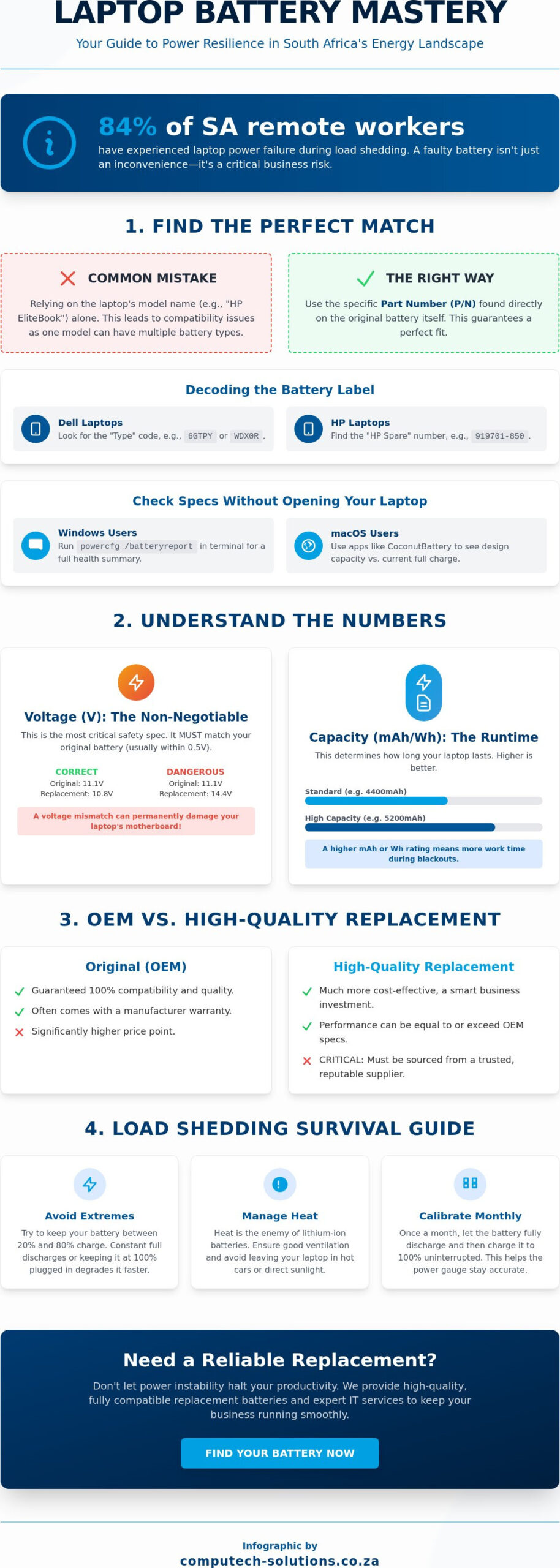
Procurement errors often stem from a simple misunderstanding: a laptop’s model name isn’t a unique identifier for its internal components. A single chassis design, such as the Lenovo ThinkPad series, can support multiple battery capacities and physical dimensions depending on the specific manufacturing year or regional configuration. In the South African market, where shipping costs for returns can reach R200 or more, getting the hardware match right the first time is a business necessity. Relying solely on the sticker on the bottom of your laptop often leads to compatibility issues because manufacturers frequently update internal specifications without changing the external model name.
Most modern devices rely on Lithium-ion batteries because of their high energy density and rechargeability. These units require exact voltage and wattage alignment to function safely; a discrepancy of even 0.5V can prevent the system from charging or, in extreme cases, damage the motherboard. You’ll find two main designs in the current market: internal and external. External units click into place with a physical latch, but they’ve become rare. By 2026, roughly 94% of enterprise-grade laptops have transitioned to internal configurations that require specialized tools for replacement.
Decoding the Battery Label: P/N, Model, and Serial
To ensure a perfect fit, you must locate the manufacturer-specific part number on the battery casing. For Dell users, look for the “Type” code, such as “6GTPY” or “WDX0R.” HP users should search for the “HP Spare” number, which usually follows a six-digit format followed by a three-digit suffix. A Part Number is the definitive hardware identifier for laptop components. Don’t confuse the series name, like “Inspiron” or “EliteBook,” with the specific model number, as the series name covers hundreds of different hardware iterations. Identifying the specific laptop battery part number eliminates the risk of purchasing a unit with the wrong connector orientation.
Using Software to Identify Battery Specs
If your device still powers on, software provides the most accurate health data without opening the chassis. Windows users can run the powercfg /batteryreport command in the terminal to generate a detailed HTML summary of the hardware. This report highlights the “Design Capacity,” which is the original factory charge level, against the “Full Charge Capacity,” which represents the current maximum potential. For macOS, tools like CoconutBattery provide similar insights for MacBook Pro and Air models. Monitoring these metrics allows South African IT managers to track degradation and schedule replacements before a total failure disrupts business operations.
Understanding Technical Specifications: mAh, Voltage, and Wh
Selecting a replacement laptop battery requires more than matching a model number; it demands a precise understanding of electrical specifications. Technical compatibility ensures your hardware remains operational while preventing catastrophic failures. In the South African market, where power fluctuations are common, using a battery with the correct parameters provides a necessary layer of protection for your internal components.
Voltage Matching: The Non-Negotiable Spec
Voltage represents the electrical pressure delivered to your device. You will typically see ratings like 7.6V, 11.1V, or 14.4V printed on the casing. This specification is the most critical safety factor. While capacity can vary, voltage must remain within a tight tolerance, usually within 0.5V of the original manufacturer’s rating. For instance, an 11.1V battery is often interchangeable with a 10.8V unit because they both utilize three 3.6V or 3.7V cells in series.
Installing a battery with significantly higher voltage can instantly fry the capacitors on your motherboard. This leads to permanent hardware damage that often costs more to repair than the laptop’s residual value. Always verify the voltage by checking the physical label on your original unit before placing an order. If you are unsure about the compatibility of a specific component, consulting with a specialist in managed IT services can prevent costly procurement errors.
Capacity and Runtime: mAh vs Watt-Hours
Capacity determines how long your device stays powered away from a wall socket. You will encounter two primary units: milliampere-hours (mAh) and Watt-hours (Wh). While mAh measures the total electrical charge a battery can hold, it doesn’t account for voltage. This makes it an incomplete metric for comparing different battery types. To find the actual energy capacity, use the standard mathematical formula: Wh = (mAh * V) / 1000.
- mAh (milliampere-hours): Indicates the volume of energy storage. A higher rating means longer runtime without safety risks.
- Wh (Watt-hours): The most accurate measure of total energy. A 60Wh battery will power a 10W laptop for approximately six hours.
- Cell Count: A 6-cell battery offers more runtime than a 3-cell version but increases the physical weight by roughly 150 to 200 grams.
High-capacity replacement batteries often protrude from the bottom or back of the chassis. This physical change is a trade-off for extended productivity. When upgrading, remember that older units must be handled with care. Following EPA guidelines for battery recycling is essential for environmental safety and prevents fire hazards in office environments. Professional disposal ensures that lithium-ion components don’t end up in South African landfills, where they pose significant soil contamination risks.
Original vs. High-Quality Replacement Batteries
Choosing between an Original Equipment Manufacturer (OEM) unit and a third party replacement is the most frequent decision South African businesses face when a laptop battery fails. An OEM battery carries the brand name of your device manufacturer, such as Dell or Lenovo. Replacement batteries are produced by independent manufacturers. By 2026, the gap between these two categories has narrowed significantly due to standardized manufacturing protocols. However, the price difference remains substantial, often ranging from R800 to R2,500 depending on the model and capacity.
The global supply chain in 2026 relies on a centralized network of cell production. While a branded battery offers guaranteed compatibility, it often carries a 40% to 60% price premium solely for the logo. For South African companies managing large fleets, this premium can strain IT budgets without providing proportional performance gains. High quality replacements offer a cost effective alternative if you know how to verify their internal components.
The Myth of the “Genuine” Battery
Major hardware brands like Acer, HP, and ASUS don’t actually manufacture the lithium-ion cells inside their packs. Instead, they source these components from Tier-1 manufacturers. As of early 2026, companies like Samsung, LG, and Panasonic produce over 65% of the world’s high grade cells. A “genuine” battery is simply a collection of these cells wrapped in branded plastic with a proprietary controller chip. You should be wary of online listings in South Africa priced below R450 for modern ultrabook models. These units often use recycled cells that fail within three months and lack the necessary communication protocols to sync with your laptop’s power management software.
Quality Indicators for Replacement Batteries
Identifying a reliable power source requires looking beyond the sticker. High quality replacements must feature visible CE, RoHS, and ISO certifications on the casing to ensure they meet international safety standards. These certifications confirm the unit has overcharge protection and thermal sensors to prevent overheating. In the South African market, a local warranty is your strongest safeguard. You should never accept less than a 6 to 12 month replacement guarantee from a local provider.
Computech Solutions prioritizes Grade-A cells for every replacement unit we supply. We’ve found that Grade-A components maintain 80% of their original capacity after 500 charge cycles, whereas cheaper Grade-C alternatives often drop to 50% capacity within 150 cycles. Our approach focuses on:
- Strict Cell Selection: We only utilize cells from verified Tier-1 production lines.
- Local Support: Our South African technicians verify compatibility before dispatch to prevent hardware conflicts.
- Safety Compliance: Every laptop battery we provide meets current 2026 fire safety and electrical regulations.
Reliability doesn’t always require a branded price tag. It requires a partner who understands the technical specifications of the hardware. By focusing on cell grade and local accountability, businesses can maintain their mobile workforce without the unnecessary overhead of OEM markups.
Maximizing Battery Health in the South African Power Landscape
Managing a laptop battery in South Africa requires a proactive strategy to counter the effects of an unstable power grid. Frequent load shedding cycles force these components to cycle through their chemistry much faster than intended by manufacturers. Most lithium-ion cells are rated for approximately 500 full discharge cycles. Under Stage 4 load shedding, a business laptop might undergo two full cycles daily, potentially reaching its end-of-life in under 10 months. This rapid cycling creates internal resistance, which manifests as heat and reduced runtime.
Deep discharges are the primary cause of premature failure. Allowing your charge to hit 0% triggers chemical instability that can lead to permanent cell damage. Adopting the 20-80 rule is the most effective way to preserve longevity. By keeping the charge level between 20% and 80%, you minimize the stress on the lithium ions. This practice can extend the usable lifespan of the hardware by up to 40% compared to units that are frequently drained to zero. It’s a simple adjustment that yields significant long-term savings for fleet management.
Surviving Load Shedding and Power Surges
Voltage fluctuations are common when the grid returns after an outage. These surges can bypass internal regulators and damage the laptop battery or the motherboard itself. You should unplug your machine as soon as the lights go out to isolate it from the circuit. Using a high-quality, OEM-certified charger is non-negotiable for business continuity. Generic replacements often lack the sophisticated surge protection and ripple filtration found in original equipment. You can also use built-in software tools to limit the maximum charge to 80% during periods of high-stage load shedding, which prevents the battery from sitting at a high-stress 100% state while plugged into an unstable grid.
Preventing and Identifying Battery Swelling
Battery swelling occurs when internal gases build up due to excessive heat or hardware failure. In the South African climate, where office temperatures can rise quickly during power outages, heat management is vital. You can identify a failing battery by checking if the trackpad feels stiff or if the laptop chassis no longer sits flat on a desk. A bloated battery is a pressurized fire risk and requires immediate professional attention. If you spot a bulge, stop using the device immediately. Safe disposal at a certified e-waste facility is the only responsible way to handle these volatile components, as they shouldn’t enter standard waste streams.
Ensure your business stays productive through every power cycle with our expert hardware support. Contact Computech Solutions for professional battery replacements and power management advice.
How to Safely Replace Your Laptop Battery
Successful hardware maintenance starts with the right environment. You need a clean, non-conductive surface and a set of precision tools. For most 2026 models, a Phillips #00 screwdriver and a plastic spudger are essential. Metal tools conduct electricity and can scratch sensitive traces on the PCB, so stick to nylon or plastic prying tools. Proper preparation prevents the accidental discharge of static electricity, which can destroy a motherboard instantly.
If your device uses an external, clip-in laptop battery, the process is straightforward. Power down the unit and disconnect the AC adapter. Slide the locking switch to the “unlock” position and pull the battery away from the chassis. Insert the new unit until it clicks firmly into place. While these designs are less common in modern ultrabooks, they remain a standard for ruggedized industrial laptops used across South Africa’s mining and manufacturing sectors.
Internal Battery Replacement Walkthrough
Most modern laptops house the power cell inside the chassis. Before you open the casing, touch a grounded metal object to discharge any static electricity from your body. You should also consider wearing an anti-static wrist strap. Remove the base plate screws and organize them in a magnetic tray; manufacturers often use different lengths for the front and back of the device. Mixing these up can lead to “dimple” damage on the palm rest during reassembly.
Locate the battery ribbon cable once the internals are exposed. Use your plastic spudger to gently pry the connector straight up from the motherboard. Don’t pull on the wires themselves, as this can tear the pins from the socket. After removing the old cell, align the new laptop battery with the mounting pegs. Secure the screws first, then reconnect the ribbon cable as the final step before closing the chassis. Precision here prevents R15,000 motherboard replacements caused by short circuits.
Calibrating Your New Replacement Battery
A new battery requires a “Charge-Discharge-Charge” cycle to initialize the internal fuel gauge. This process ensures the Windows or macOS percentage display remains accurate. First, charge the laptop to 100% and keep it connected to power for at least two hours. Next, unplug the device and use it until it reaches a 5% critical battery level and shuts down. Finally, charge it back to 100% without interruption. This cycle trains the laptop’s Power Management System on the battery’s actual capacity.
Some enterprise-grade laptops from HP or Dell require a BIOS/UEFI update to recognize new hardware signatures. Check your system settings during boot-up to ensure the firmware sees the new cell as a “Genuine” or “Healthy” component. If your system fails to boot or the percentage stays at 0%, you might need professional intervention. You can contact Computech-Solutions expert support for troubleshooting to resolve complex firmware handshake issues or hardware compatibility errors.
Secure Your Mobile Productivity for 2026
Success in the South African business landscape depends on hardware reliability. You’ve seen that technical precision matters; matching the exact voltage and Watt-hour specifications is the only way to ensure your device operates safely. Because the local power grid remains unpredictable, selecting a high-quality laptop battery with Grade-A cells is essential for longevity. These components provide the stability needed to handle frequent recharging cycles without degrading prematurely. At Computech Solutions, we eliminate the guesswork by providing expert technical support to guarantee compatibility for every client. Our nationwide delivery service ensures that businesses from Cape Town to Johannesburg maintain their operational momentum without delay. Find the perfect replacement battery for your laptop today and experience the confidence that comes with a professional IT partnership. It’s time to stop worrying about power failures and start focusing on your growth.
Frequently Asked Questions
How long should a new laptop battery last on a single charge?
A new laptop battery typically lasts between 8 and 12 hours under standard office workloads like document editing and web browsing. High-performance models released in 2026 often achieve up to 15 hours of runtime due to improved energy density. Your actual performance depends on screen brightness settings and background applications. If your device drains in under 4 hours during basic tasks, it indicates a hardware inefficiency or a faulty cell.
Is it safe to leave my laptop plugged in all the time?
Modern laptops use sophisticated charging controllers that prevent overcharging by bypassing the battery once it reaches 100% capacity. Keeping your device plugged in is safe, but you should discharge it to 40% at least once a week to maintain chemical health. Lithium-ion technology thrives on movement. If the laptop stays at 100% for 30 consecutive days, the internal resistance increases, which reduces the total lifespan of the unit.
Why is my laptop battery not charging even when plugged in?
Your laptop battery might not charge due to a faulty AC adapter, a damaged DC jack, or outdated BIOS firmware. Start by checking the physical connection for debris or bent pins. In 15% of cases, the issue is software-related, requiring you to uninstall the “Microsoft ACPI-Compliant Control Method Battery” from the Device Manager. If the charging light doesn’t blink after these steps, the internal circuit has likely failed.
Can a generic replacement battery damage my laptop hardware?
Poorly manufactured generic batteries pose a risk of voltage spikes that can permanently fry your motherboard’s power rails. While they cost less, these units often lack the 5 essential safety protections found in OEM parts, such as thermal cutoff and over-current sensors. A 5% voltage variance is enough to cause system crashes or data corruption during peak performance. We recommend using certified components to ensure your hardware remains stable.
How do I dispose of my old laptop battery safely in South Africa?
You must dispose of lithium-ion batteries at designated e-waste collection points to comply with the National Environmental Management: Waste Act. Major South African retailers like Makro, Pick n Pay, and Woolworths provide specialized bins for electronic waste. Don’t place these items in your general household trash because they contain toxic chemicals like cobalt and nickel. Recycling ensures that 95% of the raw materials are recovered for future manufacturing.
What is the difference between a 3-cell and a 6-cell battery?
The primary difference is the physical number of lithium-ion cells, which directly impacts the total capacity and weight of the unit. A 6-cell battery provides roughly double the runtime of a 3-cell version but adds approximately 150 to 200 grams to the laptop’s total weight. If your work requires 8 hours of mobility, the 6-cell option is the standard choice. Smaller 3-cell units are better for ultra-portable devices used near power outlets.
How much does a laptop battery replacement cost in 2026?
A standard replacement in the South African market currently ranges from R800 for entry-level models to R2,500 for high-end workstation components. According to 2026 market trends, prices fluctuate based on the availability of lithium and local import duties. Professional installation services typically add an extra R350 to R600 to the total cost. Investing in a quality unit prevents the need for another replacement within 12 months.
Does a replacement battery come with a warranty?
Most reputable suppliers in South Africa provide a 6 to 12-month limited warranty on replacement parts. This coverage protects you against manufacturing defects and premature capacity loss exceeding 20% within the first year. Always verify that the warranty covers both the part and the labor if installed by a technician. We ensure all sourced components meet strict quality standards to provide long-term operational efficiency for your business.
