
The suspension of national load shedding hasn’t stopped the 9.01% municipal tariff hike arriving this July, making your choice of load shedding solutions for home office setups a matter of financial health rather than just basic uptime. With Eskom’s 2026 winter outlook still warning of potential Stage 6 interruptions if unplanned breakdowns exceed 16,000MW, the risk to your productivity remains a tangible threat. You’ve likely felt the frustration of a laptop dying mid-session or the uncertainty of which inverter size actually keeps a dual-monitor setup running during localized load reduction.
It’s time to move past temporary fixes and implement a professional, “set and forget” power strategy that secures your workflow. This guide promises to help you master your remote work environment by optimizing internal device health and scaling your external backup capacity. We’ll preview the most effective hardware configurations, explain how to meet SANS 10142-1 compliance standards, and provide clear runtime expectations so you can protect your expensive equipment and your professional reputation. Whether you’re upgrading your laptop battery or integrating a full solar system, these strategies ensure you stay online when the grid fails.
Key Takeaways
- Learn how to differentiate between essential loads and comfort loads to accurately size your backup power system for maximum efficiency.
- Identify the most reliable load shedding solutions for home office environments, ranging from short-term UPS bridges to long-duration inverter systems.
- Discover how frequent power switching accelerates hardware degradation and why high-performance replacement batteries are critical for device longevity.
- Understand the legal requirements for a Certificate of Compliance (CoC) to ensure your installation meets the SANS 10142-1 safety standards.
- Implement a tiered strategy that moves your workspace from simple crisis management to total energy independence and long-term cost savings.
Understanding Your Home Office Power Requirements
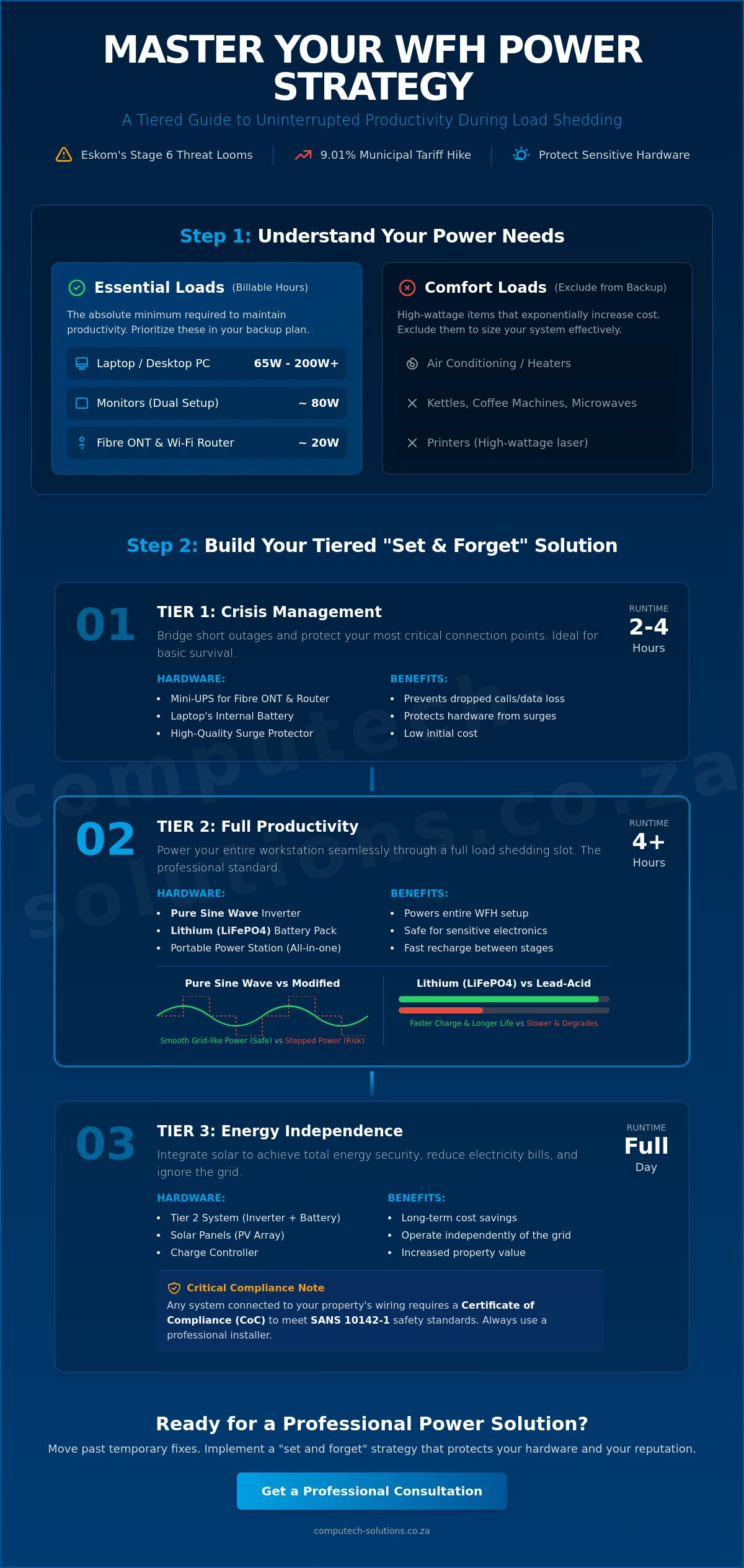
Designing effective load shedding solutions for home office use begins with a rigorous power audit. You can’t manage what you haven’t measured. In a professional remote work environment, your power needs fall into two distinct categories: the “Essential Load” and the “Comfort Load.” Your essential load consists of the absolute non-negotiables required to maintain billable hours, specifically your laptop or desktop, fibre ONT, and router. Comfort loads, such as air conditioning or high-end coffee machines, should be excluded from your backup calculations to avoid exponential increases in system costs. When Eskom’s unplanned breakdowns exceed 16,000MW, pushing the grid into Stage 4 or Stage 6, the frequency of outages leaves little room for error. A professional setup aims for “Total System Collapse” prevention, ensuring that your transition from grid to battery is seamless enough to prevent dropped VoIP calls or data loss.
Grid instability poses a direct threat to sensitive computer hardware. The sudden surge of electricity when power returns can be more damaging than the outage itself. Integrating a high-quality Uninterruptible Power Supply (UPS) provides the necessary buffer, filtering dirty power and protecting your motherboard’s delicate components. For professionals using high-performance laptops from brands like Dell, HP, or Lenovo, maintaining internal battery health is your first line of defense. Without a stable power strategy, frequent cycling will rapidly degrade these components, eventually requiring a full replacement to maintain your mobile productivity.
Calculating Your Wattage: The Home Office Audit
Your hardware choice dictates your energy footprint. A standard business laptop typically draws between 65W and 90W, while a robust desktop workstation can easily exceed 200W before you account for peripherals. If you’re running dual monitors, a printer, and a VoIP phone, your total draw might sit closer to 400W. The most critical, yet often overlooked, components are the fibre ONT and router. These low-wattage devices are the gatekeepers of your connectivity. Ensuring they’re powered by a dedicated mini-UPS or integrated into your larger backup system is the only way to stay online during a four-hour slot.
Load Shedding vs. Load Reduction: Why Intent Matters
The distinction between national load shedding and localized load reduction is vital for your battery strategy. While national shedding follows a predictable schedule, localized load reduction in high-density areas can be erratic. This unpredictability shortens the “recharge window,” the time your system has to recover before the next outage. Because of this, lithium-ion (LiFePO4) technology has become the professional standard. Unlike older lead-acid batteries, lithium charges significantly faster and handles the deep discharges common during Stage 6 cycles without losing capacity after a few months of use. Choosing the right load shedding solutions for home office setups means matching your battery chemistry to these demanding recharge cycles.
Comparing Backup Power Technologies for Remote Work
Selecting the right hardware is the bridge between a power audit and a functional workspace. For modern professionals, load shedding solutions for home office setups must prioritize pure sine wave output. Unlike modified sine wave units, which produce “stepped” power that can overheat motors and damage sensitive desktop power supplies, pure sine wave inverters replicate the smooth electricity provided by the grid. It’s a technical distinction that’s non-negotiable if you want to avoid the long-term cost of replacing fried motherboards or unstable power units. Choosing reliable IT equipment from the start ensures your hardware remains protected against these electrical inconsistencies.
When evaluating emergency backup power, portable power stations have emerged as a versatile alternative for those who don’t want a permanent installation. These units combine the inverter and battery into a single, mobile chassis. They’re ideal for apartment dwellers or professionals who need to move their workspace between rooms, providing a clean and silent energy source that avoids the noise and fuel issues of traditional generators.
UPS vs. Inverter: Which One Do You Need?
A standard Uninterruptible Power Supply (UPS) serves as a critical short-term bridge. It’s designed to provide milliseconds of switch-over time. This speed is essential for desktop computers that would otherwise reboot during the transition to backup power. However, most entry-level units only offer 15 to 30 minutes of runtime. They’re designed for safe shutdowns, not for working through a four-hour slot. For extended productivity, you need an inverter and battery system. These systems offer the capacity required to power monitors and peripherals for the duration of a Stage 4 or Stage 6 outage, though they may have slightly slower switch-over times than a dedicated UPS.
Battery Chemistry: Lead Acid vs. LiFePO4
The chemistry inside your backup system determines its lifespan and efficiency. Lead-acid and gel batteries were once the standard, but they’re ill-suited for the daily cycling of South African load shedding. They typically offer a shallow Depth of Discharge (DoD), meaning you can only use 50% of the capacity without causing permanent damage. Lithium Iron Phosphate (LiFePO4) batteries have effectively replaced them in professional settings. LiFePO4 units last up to 10x longer, offering thousands of cycles even when discharged to 80% or 90%. They’re also safer for indoor home office use since they don’t emit the harmful gases associated with older battery types.
Protecting Your IT Assets: Laptop Batteries and Surge Protection
While external inverters provide the bulk of your power, your laptop’s internal battery acts as the primary fail-safe. It’s the only component that ensures zero-millisecond switch-over times during an outage. However, the frequent power cycling associated with Stage 4 or Stage 6 schedules accelerates chemical degradation. Every time the grid drops, your battery enters a discharge cycle; when it returns, the rapid charge creates heat. This thermal stress is why many professionals find their original hardware failing after just a few months of intense load shedding. For those using high-performance machines, maintaining a healthy internal battery is the most cost-effective insurance policy against data loss and motherboard damage.
The danger isn’t just the lack of power, but the manner in which it returns. According to official power outage preparedness guidelines, protecting electronics from power surges is a critical step in any resilience plan. When the grid reactivates, a massive voltage spike can travel through your lines. These spikes often bypass basic power strips, heading straight for your laptop’s charging circuit. If your internal battery is already compromised, it cannot buffer these fluctuations, leaving your CPU and storage drives vulnerable. Investing in high-quality load shedding solutions for home office setups must include a strategy for device-level protection.
Extending the Life of Your Replacement Battery
Maximizing the lifespan of replacement batteries for Acer, Dell, or HP laptops requires disciplined charging habits. During high-stage load shedding, avoid letting your battery drop below 20%. Deep discharges put immense strain on the cells. You should also watch for early warning signs of failure, such as the laptop frame feeling unusually hot or the Windows battery report showing a significant gap between design capacity and full charge capacity. Using a high-quality, brand-specific charger is equally vital. Generic adapters often lack the precise voltage regulation needed to charge a battery safely during the unstable conditions common in South Africa’s current energy landscape.
Surge Protection and Voltage Regulation
A standard multi-plug is rarely sufficient for professional IT assets. You need a dedicated surge protector with a high Joule rating to absorb “grid-return” spikes. Brownouts, or “voltage sags,” are often more dangerous than total blackouts because they force your laptop charger to work harder to maintain a steady output, leading to premature component failure. A simple but effective habit is to implement a strict “unplug policy.” When a load shedding slot begins, physically disconnect non-essential peripherals like secondary monitors or printers. This reduces the risk of hardware damage when the power eventually surges back, keeping your primary workstation safe and operational.
Building a Tiered Load Shedding Strategy for WFH
Effective load shedding solutions for home office environments are rarely one-size-fits-all. An administrative assistant primarily using cloud-based tools has vastly different energy requirements than a video editor rendering 4K files on a high-wattage desktop. Rather than over-investing in a massive system immediately, a tiered approach allows you to scale your backup capacity according to your specific professional persona and budget. This strategy ensures that your most critical tasks remain online even during Stage 6 interruptions, while providing a clear path toward total energy independence.
- Tier 1: The Connectivity Layer. This is the baseline for every professional. It focuses exclusively on keeping your fibre ONT and router active.
- Tier 2: The Mobile Professional. Ideal for sales and admin roles. This tier relies on high-performance internal laptop batteries and portable power banks to maintain a 4-to-6 hour runtime without needing a large inverter.
- Tier 3: The Power User. Designed for developers and creatives. This requires a dedicated inverter and lithium battery system to support dual monitors, external drives, and peripheral hardware.
- Tier 4: The Sustainable Workspace. The final stage involves integrating solar panels to your existing inverter setup, shifting from crisis management to long-term financial savings.
If your current setup isn’t meeting these tiered requirements, you can upgrade your core IT hardware to ensure your mobile workstation is ready for the next cycle.
The “Mini-UPS” Strategy for Constant Internet
Maintaining an active internet connection is often more critical than powering your computer. For less than R1,000, a dedicated DC-to-DC mini-UPS can power your fibre ONT and router for up to four hours. These units are significantly more efficient than standard AC inverters because they avoid the energy loss associated with converting DC battery power to AC and back again. Before purchasing, verify that your local fibre provider, such as Vumatel or OpenServe, has sufficient backup power at their local exchange. If the provider’s infrastructure fails, even the most robust load shedding solutions for home office use won’t keep you connected.
Scaling Up: From Inverter Trolleys to Fixed Solar
The transition from a portable inverter trolley to a fixed, DB-board-integrated system represents a shift from temporary relief to a permanent asset. While a trolley is a great entry point for Tier 3 users, it lacks the seamless integration of a hybrid inverter. For those moving to Tier 4, the financial case for solar has never been stronger. With municipal electricity tariffs set to increase by an average of 9.01% starting July 1, 2026, the payback period for a full solar installation is now estimated between five and seven years. Most modern hybrid inverters allow for a phased approach, letting you install the inverter and batteries first and adding solar panels as your budget permits.
Professional Solar and Power Solutions with Computech
Computech-Solutions serves as your national partner for IT-centric backup systems. We understand that a power failure isn’t just a nuisance; it’s a direct disruption to your business operations. Our comprehensive service model covers everything from device-level health to full-scale workspace integration. Whether you need immediate delivery of a replacement battery in Cape Town or technical guidance for an inverter setup in Johannesburg, our nationwide reach ensures your productivity remains uninterrupted. We bridge the gap between complex energy hardware and the practical needs of a modern professional.
Integrating load shedding solutions for home office use requires a partner who understands the intersection of IT and power. We don’t just sell components; we provide the technical backbone for your remote work setup. Our team offers expert support for commissioning solar and inverter systems, ensuring your installation meets the SANS 10142-1 safety standards discussed earlier. This professional oversight eliminates the guesswork and technical disruptions that often plague DIY setups.
Why Quality Components Matter
Generic, unbranded batteries often fail under the high-heat conditions typical of South African summers. These substandard components lack the necessary thermal protection and voltage regulation required for long-term stability during Stage 6 cycles. We provide only expert-vetted replacement batteries for Acer, Apple, ASUS, Dell, HP, Lenovo, Samsung, Sony, and Toshiba laptops. Our technical team assists you in sizing your system correctly. This ensures your load shedding solutions for home office use are both efficient and cost-effective, preventing the common mistake of over-purchasing capacity or under-powering critical hardware.
Getting Started with Your Power Upgrade
Upgrading your workspace starts with reliable, professional-grade hardware. Our online store maintains immediate stock of high-quality laptop chargers, LCD replacement panels, and high-performance batteries to keep your mobile workstation operational. For professionals ready to move toward Tier 4 sustainable independence, we offer expert consultation for commissioning integrated solar and inverter systems. We handle the technical complexities so you can focus on your core business. Ensure your home office never goes dark—shop our load shedding solutions today.
Secure Your Professional Future Against Power Instability
Designing a resilient workspace requires moving beyond temporary fixes to the tiered, scalable power strategy we’ve outlined. You now have the framework to audit your essential loads and protect your hardware with high-performance batteries and surge protection. By implementing these load shedding solutions for home office environments, you secure your productivity against grid instability and the upcoming municipal tariff hikes. This shift toward energy independence isn’t just about surviving the next outage; it’s a strategic investment in your professional continuity.
Computech-Solutions provides the technical expertise and hardware needed to execute this transition. As specialists in high-quality replacement batteries for all major brands, we offer the expert technical support required to commission reliable backup systems. With nationwide delivery across South Africa, you can access professional-grade components regardless of your location. It’s time to stop worrying about the grid and start focusing on your work. Browse Professional Load Shedding Solutions & Laptop Parts today and ensure your home office remains a center of uninterrupted excellence.
Frequently Asked Questions
Is it better to use a UPS or an Inverter for a home office?
A UPS is better for desktop computers that require zero switch-over time to prevent data loss. However, it only provides minutes of runtime. For load shedding solutions for home office professionals who need to work through four-hour slots, an inverter paired with a lithium battery is the superior choice. This combination provides the sustained capacity required for monitors and peripherals.
How long will a 100Ah battery run my laptop and monitor?
A 100Ah lithium battery typically powers a standard laptop and 24-inch monitor for 8 to 10 hours. If you’re using a lead-acid or gel battery, your usable runtime drops to roughly 4 to 5 hours because you shouldn’t discharge those below 50%. Your specific runtime depends on the hardware’s wattage draw, which usually sits between 100W and 150W for a basic dual-screen setup.
Can load shedding damage my laptop battery?
Frequent power switching rapidly degrades internal battery health. Every time the grid drops, your battery enters a high-stress discharge cycle, followed by a rapid charge that generates heat. This thermal stress eventually reduces capacity and can lead to cell failure. Investing in high-quality load shedding solutions for home office environments includes replacing these worn components with brand-specific batteries to maintain mobile productivity.
What is the best way to keep my router on during power outages?
A dedicated DC-to-DC mini-UPS is the most efficient solution for networking equipment. These units bypass the energy loss of AC-to-DC conversion, often keeping a standard fibre router and ONT online for over four hours. It’s a cost-effective alternative to larger systems if your primary goal is maintaining internet connectivity for a laptop that already has a healthy internal battery.
How do I choose the right replacement battery for my laptop?
You must match the specific part number found on your original battery casing. It’s not enough to search by laptop model alone, as manufacturers often use different battery configurations for the same series. Verify the voltage and mAh rating to ensure compatibility. Using a professional supplier ensures you receive a high-performance battery that meets the exact technical specifications of brands like Dell, HP, or Lenovo.
Are portable power stations worth it for WFH?
Portable power stations are an excellent investment for professionals who require a plug-and-play, mobile solution. They integrate the inverter, battery, and charge controller into a single chassis, making them ideal for apartment dwellers who can’t install fixed systems. They provide a silent, fume-free alternative to generators and can easily move between rooms to support different workspace configurations throughout the day.
What is a pure sine wave inverter and why is it important for computers?
A pure sine wave inverter produces a smooth, consistent electrical signal that mimics the power supplied by the national grid. This is critical for sensitive IT equipment like desktop workstations and external monitors. Modified sine wave inverters produce choppy power that can cause overheating, electrical noise, and long-term damage to power supplies. Always choose pure sine wave technology to protect your professional hardware.
Does solar power work during load shedding?
Solar power only works during an outage if your system includes a hybrid or off-grid inverter and battery storage. Standard grid-tied systems automatically shut down during load shedding for safety reasons. By adding a battery bank, your system can island itself from the grid, allowing you to use solar energy and stored power to maintain your home office operations regardless of the national grid status.
