
You are mid-meeting when the power suddenly drops, your desktop screen goes dark, and your internet connection vanishes for a frustrating five minutes. While national load shedding officially ended in March 2026, South African households still face an average of 6 to 9 localized grid outages every month. Deciding on a UPS vs inverter for load shedding is no longer just about convenience; it’s about protecting your hardware from terminal damage.
We know the stress of watching your laptop battery health decline or fearing a motherboard failure due to frequent power surges. You deserve a solution that eliminates the confusion of VA ratings and ensures your equipment stays operational without a second of downtime. It’s time to move past the temporary fixes that leave your sensitive electronics vulnerable to unstable power cycles.
This article provides a clear roadmap to selecting the right backup system to keep your home office running through every local disruption. We’ll compare switch-over speeds, battery longevity, and the technical requirements you must know to safeguard your investment in high-quality laptops and desktop computers.
Key Takeaways
- Understand the fundamental choice between a UPS vs inverter for load shedding to determine if you need immediate data protection or extended runtime for your home office.
- Identify the critical 10ms transfer time threshold required to prevent desktop computers and routers from rebooting during power transitions.
- Learn how to calculate the total wattage of your workstation to ensure your backup system isn’t overloaded during an outage.
- Discover why maintaining a high-quality internal laptop battery is a vital secondary defense against localized grid failures.
- Shift from outdated lead-acid technology to modern Lithium Iron Phosphate (LiFePO4) batteries for longer service life and better performance.
Understanding the Basics: UPS vs Inverter for Load Shedding
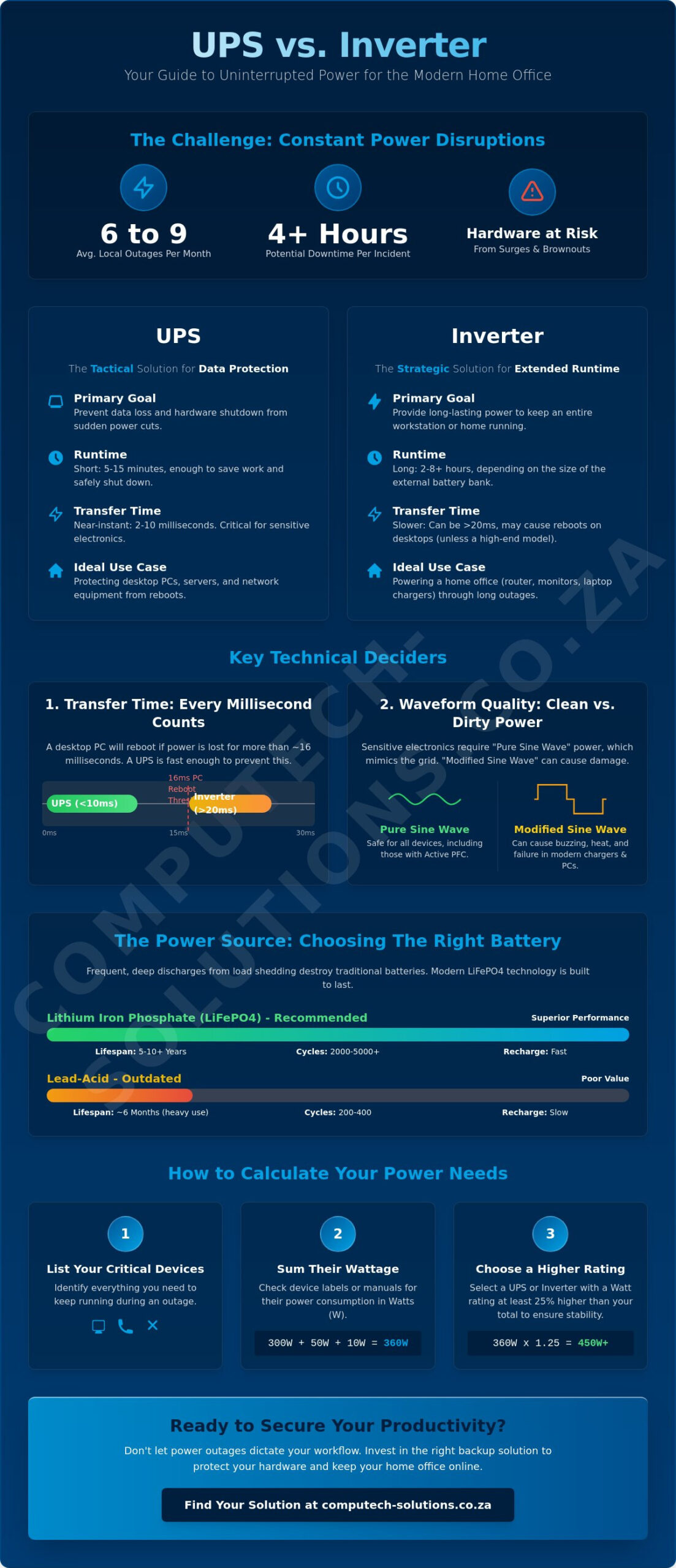
Choosing between a UPS vs inverter for load shedding depends entirely on what you’re trying to save. An Uninterruptible power supply (UPS) is a tactical device built for speed. Its primary job is to provide near-instantaneous power the moment the grid fails, typically within 2 to 10 milliseconds. This speed is vital for desktop computers and servers that would otherwise crash and lose unsaved data. Determining the right UPS vs inverter for load shedding setup requires a careful look at your specific hardware needs and how much downtime your workflow can tolerate.
In contrast, an inverter is a strategic bridge designed for duration. It converts DC power from external batteries into AC power for your appliances. While a standard UPS might only give you 15 minutes to shut down safely, a properly sized inverter system can power your home office for several hours. During high-stage outages, where localized faults or load shedding can last four hours or more, an inverter keeps your router and laptop chargers running so your productivity doesn’t stall. The distinction is simple: use a UPS to protect your data and an inverter to maintain your lifestyle.
The Core Differences in Functionality
The most significant technical difference is the transfer time. Desktop PCs have power supplies that can only sustain a “power-off” state for about 16 milliseconds. If your backup takes longer to kick in, your computer reboots. Most UPS systems beat this threshold easily. Inverters often have a slightly slower switch-over, which might cause a flicker or a reboot unless they are high-end hybrid models. Battery configuration also separates the two. A UPS usually contains small, internal batteries that are difficult to expand. Inverters use large, external battery banks, making them more scalable if your power needs grow.
Why Load Shedding Changes the Rules
South Africans faced an average of 6 to 9 grid outages per month in 2025, and this frequency continues to challenge hardware resilience in 2026. This constant cycling is brutal on batteries. Standard lead-acid units often fail after six months of heavy use because they aren’t designed for deep discharges. Modern Lithium Iron Phosphate (LiFePO4) batteries are now the preferred standard because they handle thousands of cycles and recharge much faster. The “recharge window” is also critical. During Stage 4 or frequent local faults, you might only have a few hours between outages. An inverter with a high-amperage charger can replenish your reserves more efficiently than a small UPS. Both systems act as a vital buffer against voltage spikes that occur when the grid returns, protecting your desktop computers and laptops from terminal damage.
Technical Deciders: Transfer Time and Waveform Quality
Selecting between a UPS vs inverter for load shedding requires more than just checking the battery size. The most critical technical factor for your home office is the transfer time. Most modern desktop computers use power supplies with a “hold-up time” of approximately 16 milliseconds. If your backup system takes longer than this to switch from grid power to battery, your PC will reboot, leading to potential data loss or hardware strain. A high-quality UPS typically switches in under 10 milliseconds, ensuring your hardware never notices the interruption.
The quality of the electricity produced, known as the waveform, is the second major decider. Pure Sine Wave systems replicate the smooth, oscillating curve of Eskom’s grid power. In contrast, Modified Sine Wave systems produce a blocky, “stepped” wave that is easier to manufacture but harder on your electronics. While simple items like a basic lamp won’t care about the difference, sensitive equipment like medical devices or high-fidelity audio systems can suffer from electrical noise and interference when running on a modified wave.
The ‘Clean Power’ Debate
Modern laptop chargers and high-end workstation power supplies are increasingly sophisticated. Many use Active Power Factor Correction (PFC) to improve efficiency. These components often struggle with Modified Sine Wave inverters, which can cause the charger to run significantly hotter than usual. Over time, this heat degrades internal capacitors and can lead to premature failure. If you hear a buzzing sound from your laptop brick or see “ghosting” on your monitor during an outage, your backup system isn’t providing the clean power your hardware requires. Always check your device’s technical manual for Active PFC requirements before choosing your backup unit.
Switch-over Speed: Why Your PC Might Still Turn Off
Not all UPS systems are built the same. An “offline” or standby UPS waits for the power to fail before it reacts, which creates that tiny switch-over delay. For most users, this is sufficient. However, if you’re in an area with frequent voltage fluctuations, an “online” or double-conversion UPS is superior. It constantly converts power from AC to DC and back to AC, meaning there’s zero transfer time because the load is always running off the inverter. Standard inverters often have a 20ms delay, which is why your lights might stay on while your router resets. If you’re using a large inverter for the whole house, you might still need a small, dedicated UPS for your most sensitive desktop equipment to bridge that millisecond gap.
Comparing Runtime and Battery Maintenance Requirements
Runtime is the most visible difference when evaluating a UPS vs inverter for load shedding. A standard UPS usually provides between 15 and 30 minutes of power. This limited window is strictly tactical; it gives you enough time to save your work and shut down your desktop computer safely to prevent file corruption. Inverters are designed for the long haul. Depending on the size of your battery bank, an inverter can keep your home office running for 2 to 8 hours. This allows you to work through an entire Stage 4 or Stage 6 slot without interruption, provided you manage your load correctly.
Understanding Depth of Discharge (DoD) is essential for protecting your investment. DoD refers to how much of the battery’s capacity you use before recharging. For example, if you use 50% of a battery’s energy, the DoD is 50%. Lead-acid and gel batteries should ideally never exceed a 50% DoD. If you consistently drain them to zero, the chemical plates inside degrade rapidly, and the unit will lose its ability to hold a charge. Lithium batteries are far more resilient, often allowing for an 80% to 100% DoD without significant degradation, making them the superior choice for frequent grid instability.
Lead-Acid vs. Lithium: The Real Cost of Ownership
While lead-acid batteries have a lower initial purchase price, they’re often more expensive over time. A lead-acid battery might last for 300 to 500 cycles. During Stage 6 load shedding, where the power might go off three times a day, you could exhaust that lifespan in less than six months. Lithium Iron Phosphate (LiFePO4) batteries can handle 2,000 to 6,000 cycles. They’re also much lighter and safer for indoor use since they don’t emit corrosive gases during charging. For high-demand home offices, the long-term stability of lithium far outweighs the upfront savings of older technology.
Maximising Your Battery Life
Heat is the primary enemy of all battery types. In South African summers, ensure your backup system is placed in a well-ventilated area away from direct sunlight. Dust can also clog the cooling fans of your inverter or UPS, leading to internal overheating. We recommend a monthly check to clear any obstructions from the vents. To further extend the life of your backup, manage your power consumption manually. Set up load shedding alerts on your phone and turn off non-essential devices like secondary monitors or printers when the grid goes down. If your external backup does reach its limit, having a healthy internal battery in your laptop is your final line of defense. If your current portable power is fading, consider upgrading to high-quality HP replacement laptop batteries or similar OEM-spec components to maintain your mobility during extended outages.
Step-by-Step: Calculating Your Power Requirements
Avoid the common mistake of guessing your power needs. When comparing a UPS vs inverter for load shedding, the most critical step is an accurate load audit. Start by listing every device you need to stay online. A typical home office includes a router, a laptop, one or two monitors, and perhaps a desk lamp. Check the power brick or the back panel of each device to find its wattage rating. If the label only lists Volts (V) and Amps (A), multiply them to get the Watts (W). For example, a 19V laptop charger at 4.74A draws approximately 90W.
Once you have your total wattage, add a 20% safety buffer. This overhead accounts for the “inrush current” or surge that occurs when electronic devices first power up. If your total is 200W, your backup system should handle at least 240W. However, manufacturers usually rate their equipment in VA (Volt-Amperes) rather than Watts. To find the correct size, divide your buffered wattage by a power factor of 0.7. In this scenario, 240W divided by 0.7 requires a system rated for at least 343VA. If your current workstation is inefficient, upgrading to modern desktop computers or energy-efficient laptops can significantly lower the VA rating you need to stay powered.
Common Home Office Load Examples
- The Basic Router Setup: A standard fiber ONT and Wi-Fi router typically draw 15W to 30W. A small 600VA UPS or a dedicated DC micro-UPS is usually sufficient for this.
- The Work-from-Home Setup: A laptop and two 24-inch monitors generally pull between 120W and 180W. You’ll need a minimum of 1000VA to 1200VA to bridge the switch-over gap safely.
- The Gaming or Creator Setup: High-performance machines with dedicated GPUs can pull 400W to 600W under load. These require robust 2000VA+ systems or high-capacity pure sine wave inverters.
Planning for the Future
Buy for your next upgrade, not just your current hardware. If you plan to add a second monitor or a more powerful desktop later this year, ensure your backup system has the capacity to grow. Inverters offer better modularity in this regard; many allow you to add more batteries to the bank to increase runtime as your needs evolve. Don’t forget the “hidden” draws either. Phone chargers, external speakers, and standby lights on your peripherals can add another 10W to 20W to your daily consumption. Monitoring these small details ensures your UPS vs inverter for load shedding investment provides reliable service for years to come.
Building a Total Backup Strategy for Your Hardware
Relying solely on an external power source is a common oversight in home office planning. While your choice between a UPS vs inverter for load shedding addresses immediate grid failure, your internal hardware health remains the final line of defense. For laptop users, a functioning internal battery acts as a secondary buffer. If your external backup reaches its depth-of-discharge limit or suffers a technical fault, a healthy internal battery ensures you don’t lose progress on critical tasks. Without this redundancy, even the most sophisticated backup system leaves your work vulnerable to a single point of failure.
A truly resilient strategy combines external runtime with internal hardware reliability. This means ensuring your desktop computers are protected by the near-instantaneous switch-over of a UPS, while your mobile devices have the battery capacity to survive beyond the inverter’s limits. Managing your hardware health is just as important as managing your load shedding schedule.
The Role of High-Quality Replacement Parts
Maintaining your hardware with high-quality components is essential for system longevity. A degraded battery doesn’t just hold less charge; it can also swell or cause internal heat buildup, which is exacerbated when charging from a backup power source. Using specific Lenovo replacement laptop batteries or Dell-compatible units ensures that your device’s power management system communicates correctly with your charger. This synergy is crucial when running on the slightly different electrical profiles provided by some inverters. We also recommend verifying that your laptop chargers are in peak condition, as frayed cables or failing bricks can cause arcing that bypasses your system’s surge protection.
Conclusion: Making the Final Choice
Your final decision on a UPS vs inverter for load shedding depends on your primary device and runtime needs. For desktop-heavy environments where data integrity is the priority, a UPS is non-negotiable to bridge the millisecond gap during a power drop. For the mobile professional using laptops and requiring extended Wi-Fi uptime, a high-capacity pure sine wave inverter offers the best return on investment. The most stable South African home offices often use a hybrid approach: a large inverter for the router and lights, supported by healthy internal batteries in every laptop.
Before the next outage hits, run through this final resilience checklist:
- Install high-quality surge strips on all sensitive electronics.
- Replace internal laptop batteries that show less than 80% health.
- Ensure all laptop chargers match the original manufacturer wattage.
- Verify your backup system’s cooling fans are free of dust and obstructions.
Shop our range of laptop batteries and power solutions to stay connected and ensure your hardware is ready for any grid disruption.
Future-Proof Your Power Strategy
Deciding on a UPS vs inverter for load shedding represents a significant step toward operational stability. You now understand that a UPS secures your immediate data, while an inverter provides the runtime necessary to outlast extended local outages. Successful power management requires more than just a large battery; it demands hardware that can withstand frequent grid cycling and voltage fluctuations. High-quality components are the foundation of this resilience.
Our team provides expert technical support tailored specifically for South African power conditions. We specialize in high-quality replacement batteries and chargers to ensure your devices remain efficient and protected. With national delivery across all provinces, we make it simple to maintain your hardware standards regardless of your location. Don’t let power instability dictate your productivity or risk your expensive equipment.
Secure your setup with reliable laptop batteries and power hardware at Computech-Solutions. Take control of your home office environment today and work with the confidence that your systems are fully protected.
Frequently Asked Questions
Can I run my fridge on a standard computer UPS?
No, you cannot run a fridge on a standard computer UPS. Fridges require a high inrush current to start their compressors, which typically exceeds the wattage capacity of consumer-grade UPS units. Attempting this will likely trigger an overload protection fault or cause permanent damage to the internal circuitry of the UPS.
How long will a 1000VA UPS last during load shedding?
A 1000VA UPS typically provides between 15 and 30 minutes of runtime for a standard desktop computer and monitor. If you only use it to power a small fiber ONT and a router, you might extend this to 90 minutes. It’s designed for safe shutdowns rather than sustaining productivity through a full four-hour outage.
Is it better to leave my UPS plugged in all the time?
Yes, it’s best to leave your UPS plugged in and switched on at the wall. The device manages its own battery health through an internal charging circuit that prevents overcharging while keeping the cells topped up. Frequent unplugging can lead to self-discharge and may leave you without power when a localized grid failure occurs.
Why does my inverter beep when the power goes off?
Your inverter beeps to provide an audible notification that it has switched from grid power to battery mode. This alert ensures you’re aware that you’re now consuming limited battery reserves. If the beeping is rapid or continuous, it usually signals a low-battery warning or that the connected load is exceeding the inverter’s capacity.
Can I use a car battery with my home inverter?
No, using a car battery with a home inverter is not recommended for backup purposes. Car batteries are designed for short, high-current bursts to start engines and don’t handle deep discharges well. Using one for sustained power will lead to rapid chemical degradation, often resulting in battery failure within a few weeks of regular use.
What is the difference between a Pure Sine Wave and a Modified Sine Wave?
Pure Sine Wave power replicates the smooth, oscillating curve of the national grid and is safe for all sensitive electronics. Modified Sine Wave power uses a blocky, stepped waveform that is cheaper to produce but can cause overheating in laptop chargers. Deciding on a UPS vs inverter for load shedding often depends on whether your hardware requires this cleaner signal to operate efficiently.
How many years does a lithium inverter battery last?
A high-quality Lithium Iron Phosphate (LiFePO4) battery typically lasts between 5 and 10 years. These units are rated for 2,000 to 6,000 cycles, which is vastly superior to the 300 cycles provided by older lead-acid technology. Even with frequent localized outages, lithium remains a reliable long-term investment for home offices.
Will a UPS protect my computer from lightning strikes?
A UPS provides protection against standard grid surges and voltage spikes, but it won’t stop a direct lightning strike. The massive voltage from lightning can jump across internal gaps in the equipment to reach your desktop computer. For maximum safety during summer storms, it’s still best to unplug sensitive hardware from the wall entirely.
