
Imagine you’re five minutes into a high-stakes Teams meeting when the power cuts, but your internet doesn’t even flicker. While national load shedding has been suspended for over a year, localized load reduction continues to disrupt workdays across South Africa in 2026. Finding the best backup power for WiFi router during load shedding is no longer just about buying the biggest battery. It’s about matching the specific voltage requirements of your fibre box and router to ensure seamless transitions during peak-hour outages.
We understand the frustration of seeing confusing voltage labels or having a budget battery fail after just three months of consistent use. This guide clarifies the technical requirements surrounding DC Mini UPS systems and the latest LiFePO4 battery technology. You’ll learn how to select a setup that powers both your ONT and router for up to seven hours, keeping your professional reputation intact. We’ll examine capacity options ranging from 8,000mAh to 20,000mAh so you can maintain a stable connection through every scheduled power disruption.
Key Takeaways
- Understand why a DC Mini UPS is the most efficient choice, offering up to 30% longer run-times than traditional AC units by eliminating unnecessary power conversions.
- Learn how to identify the correct voltage and amperage for your specific hardware to avoid damaging your router or fibre ONT.
- Discover the best backup power for WiFi router during load shedding by calculating exact run-times for Stage 6 intervals using milliamp-hours (mAh) and Watt-hours (Wh).
- Master the Stage 6 survival strategy to ensure your battery has sufficient time to recharge between frequent power cuts.
- Find out why prioritizing technical support and high-quality cell replacement is essential for maintaining long-term connectivity stability.
Understanding Your Options for WiFi Router Backup Power
Fibre internet infrastructure in South Africa is remarkably resilient. Even when the lights go out, the light pulses in your fibre optic cable usually keep moving because the provider’s exchange has its own industrial-scale backup. The “Connectivity Gap” occurs at your front door. If your Optical Network Terminal (ONT) and WiFi router don’t have power, your high-speed connection is useless. Solving this requires the best backup power for WiFi router during load shedding, which typically means choosing between dedicated DC units and traditional battery backups.
While many users initially reach for a standard Uninterruptible Power Supply (UPS) designed for desktop computers, these are often inefficient for networking gear. A standard AC UPS converts battery power from DC to AC, only for your router’s power brick to convert it back to DC again. This double conversion wastes energy as heat, significantly shortening your runtime. DIY hacks involving power banks and step-up cables often fail because they can’t provide the stable amperage required during high-traffic periods, leading to intermittent signal drops or hardware damage.
The Role of the DC Mini UPS
A DC Mini UPS is engineered specifically for the 9V or 12V requirements of networking hardware. By bypassing the inefficient DC-to-AC conversion process, these units deliver power directly to your devices. This streamlined path can extend your internet uptime by 30% compared to a bulky AC unit. Crucially, these devices offer “Zero Transfer Time.” This means your router never detects a power loss, preventing the dreaded three-minute reboot cycle that happens with slower backup systems. Their compact footprint allows them to sit discreetly inside small DB boards or narrow shelving units.
Portable Power Stations vs. Dedicated UPS
Portable power stations have become popular for running laptops and lamps, but they aren’t always the best backup power for WiFi router during load shedding due to their “always-on” requirements. Power stations often require manual intervention to charge or turn on, whereas a dedicated Mini UPS stays plugged in permanently. It manages its own health, charging when the grid is active and discharging instantly when it fails. Dedicated UPS units are also silent. Unlike power stations or large AC UPS units that use loud cooling fans, a Mini UPS operates silently in your home office. This makes them a more professional, set-and-forget solution for maintaining operational efficiency during localized load reduction.
DC Mini UPS vs. Traditional AC UPS: Which Wins for WiFi?
Many South Africans assume a heavy black box with a lead-acid battery is the default solution for power outages. It isn’t. A traditional AC UPS is designed for high-draw devices like desktop computers. When you use it for a 12W router, it’s like using a freight truck to deliver a single letter. You waste massive amounts of energy through heat and “self-consumption.” For a targeted application, the best backup power for WiFi router during load shedding is almost always a dedicated DC unit.
Heat generation is a silent killer of electronics during South African summers. AC UPS units generate significant heat during the DC-to-AC conversion process. In a 30-degree Gauteng afternoon, this heat can degrade the internal battery and the router’s sensitive circuitry. DC Mini UPS units stay cool because they deliver power directly without conversion. This lack of heat makes them a more stable partner for your home office hardware. They also solve the “phantom load” problem found in large home inverters. While a large inverter might consume 50W just to stay turned on, a mini UPS uses negligible power to maintain your connection.
Efficiency and Run-Time Comparison
A 1000VA AC UPS sounds powerful, but its efficiency is remarkably low when powering small loads. A 15000mAh DC UPS often outlasts it because it avoids the 30% energy loss typical of double-conversion systems. Energy density refers to the amount of energy stored in a given system or region of space per unit volume. By choosing an ENERGY STAR certified UPS or a high-efficiency DC equivalent, you ensure your 4-hour Stage 6 slot doesn’t end with a dead battery at the 3-hour mark. This efficiency is what allows a device the size of a paperback book to outperform a heavy lead-acid unit.
Maintenance and Replacement Costs
Lead-acid batteries in traditional UPS units typically last 12 to 18 months under the stress of Stage 6. In contrast, Lithium Iron Phosphate (LiFePO4) cells found in modern DC units can handle thousands of cycles. This makes the Total Cost of Ownership (TCO) much lower over a two-year period. If your current setup is struggling, you might consider upgrading to more reliable power solutions from specialists who understand these technical nuances. Lithium is also easier to recycle and has a lower environmental impact, making it the responsible choice for long-term best backup power for WiFi router during load shedding. Choosing modular units also allows for easier cell replacement down the line without replacing the entire housing.
Matching Voltage and Amperage: The Technical Checklist
Selecting the best backup power for WiFi router during load shedding requires more than just looking at battery capacity. The technical mismatch between a UPS and your networking hardware is the leading cause of equipment failure and unstable connections. To avoid frying your sensitive electronics, you must start by inspecting the power adapters currently plugged into your wall. Look specifically for the “Output” line on the label. This will typically list a voltage, such as 12V or 9V, followed by an amperage rating, like 1.0A, 1.5A, or 2.0A.
Voltage is non-negotiable. If your router requires 9V and you plug it into a 12V port, you risk permanent hardware damage. Conversely, providing 9V to a 12V device will result in a router that won’t boot or drops the signal under load. Amperage is slightly more flexible; your UPS must provide at least the amount of Amps your router demands. If your router pulls 2.0A, a 1.0A UPS port will overheat and fail. Using a UPS with a higher amperage rating than your device, such as a 3.0A port for a 1.5A router, is perfectly safe because the device only “pulls” the current it needs.
The ONT (Optical Network Terminal) Factor
A common mistake is powering the router while forgetting the fibre box, or ONT. Whether your infrastructure is provided by Vuma, Openserve, or Frogfoot, that small box where the fibre enters your home requires its own power source. If the ONT goes dark, your router has no signal to broadcast. This is the “Double-Hurdle” of South African connectivity. While some users attempt to use Y-splitter cables to power both devices from a single port, this often leads to voltage drops. A superior solution is a dual-output UPS that provides dedicated, regulated power to both the ONT and the router simultaneously.
Power over Ethernet (POE) and 24V Requirements
Standard home routers usually run on 12V, but specialized equipment often demands more. If you use outdoor antennas for fixed LTE or high-power range extenders, you might encounter 24V Power over Ethernet (POE) requirements. Identifying these high-voltage needs is essential when searching for the best backup power for WiFi router during load shedding. Standard 12V mini UPS units won’t keep this equipment operational. You’ll need a “Universal” mini UPS that features selectable voltage toggles. These units allow you to switch specific ports to 15V or 24V, ensuring your entire network architecture remains stable regardless of how complex your hardware setup becomes.
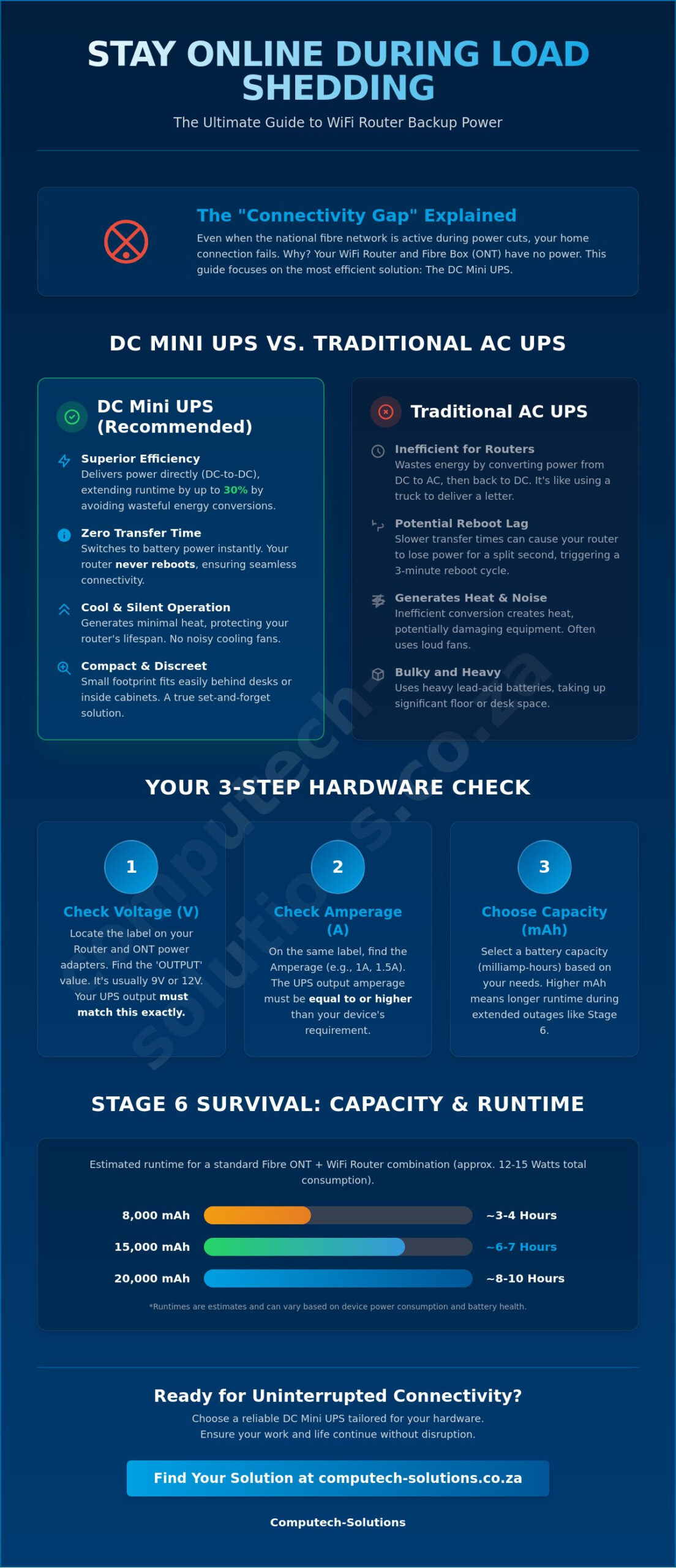
Calculating Run-Time for Extended Load Shedding Stages
Understanding capacity is the final step in securing the best backup power for WiFi router during load shedding. While matching voltage ensures your equipment stays safe, capacity determines how long you stay online. During Stage 6 load shedding or localized load reduction, power cuts often last four hours or occur multiple times a day. If your setup isn’t calculated correctly, your connection will drop long before the grid returns. Most mini UPS devices are rated in milliamp-hours (mAh), but the actual performance depends on the combined wattage of your router and fibre ONT.
Battery chemistry plays a decisive role in 2026. Traditional lithium-ion cells are common, but Lithium Iron Phosphate (LiFePO4) has become the gold standard for South African conditions. LiFePO4 batteries handle the high-frequency cycling of Stage 6 much better, offering up to 2,000 charge cycles compared to the 300 to 500 cycles of standard lithium cells. They also remain stable in higher temperatures. Heat is a significant factor in battery drain; a UPS tucked into a poorly ventilated cupboard will lose its charge faster than one kept in a cool, open space. Ensuring proper airflow can add valuable minutes to your backup duration.
The Math of mAh vs. Wh
To estimate your run-time, you first need to know the total power draw of your hardware. A typical router and ONT combination consumes between 15W and 25W. To convert mAh to Watt-hours for 3.7V cells, multiply the mAh by 3.7 and divide by 1,000. For example, a 15,000mAh unit provides approximately 55.5Wh. If your equipment draws 15W, you can expect nearly 3.7 hours of uptime. However, “Rated Capacity” is rarely the same as “Usable Capacity.” Most high-quality systems stop discharging at 10% to 20% to protect the battery cells, so you should always over-spec your purchase by at least 20% to ensure you cover a full 4-hour slot.
Survival During High-Frequency Outages
Stage 6 creates a recharge crisis. If you have a 4-hour power cut followed by only two hours of grid activity, a standard UPS might not reach 100% charge before the next slot begins. This leads to deep discharge, which can permanently damage cheaper batteries within weeks. Smart features like low-battery protection and automatic shut-off are essential to prevent this degradation. To find hardware that balances fast recharge times with long-term durability, you can explore the specialized power solutions available at Computech-Solutions. Prioritizing units with high-speed charging ensures you’re ready for the best backup power for WiFi router during load shedding even when the intervals between outages are short.
Choosing Reliable Power Solutions from Computech-Solutions
Securing the best backup power for WiFi router during load shedding is a strategic decision that impacts your daily productivity. While many retailers offer generic battery backups, the value of a specialized partner lies in technical authority and after-sales reliability. Choosing a solution based solely on the lowest price often leads to premature battery failure or, worse, damaged networking hardware due to poor voltage regulation. We prioritize high-quality replacement cells and power units that are engineered to withstand the rigorous cycling of Stage 6 schedules and localized load reduction.
Our commitment to stability means we don’t just provide a product; we offer a comprehensive service model. This includes ensuring that the internal components of our power solutions meet international safety standards. Whether you’re managing a single home office or a distributed team, having a reliable source for power hardware is essential. We provide nationwide delivery across South Africa, ensuring that professional-grade backup solutions are accessible regardless of your location. This logistical efficiency allows you to maintain operational continuity without the stress of technical disruptions.
Expert Support for Complex Networking Setups
Technical hurdles like connector size mismatches or incorrect voltage toggles can stall your setup process. Our team offers direct assistance with voltage matching and connector compatibility to ensure your ONT and router integrate perfectly with your new UPS. Our deep specialized knowledge, evidenced by our extensive range of Acer replacement laptop batteries and other high-performance power components, allows us to troubleshoot even the most complex configurations. We back our products with a warranty and after-sales service that reflects our confidence in the hardware we supply.
The Complete Load Shedding Strategy
A truly resilient home office strategy involves more than just keeping the WiFi on. It requires a holistic view of your power needs, from your fibre box to your primary workstation. By combining dedicated mini UPS units with high-quality laptop chargers and replacement batteries, you create an ecosystem that remains functional through extended outages. This all-encompassing approach ensures that when the grid fails, your transition to backup power is instantaneous and invisible. Don’t let power instability dictate your professional output. View our full range of power backup solutions to find the best backup power for WiFi router during load shedding and secure your digital workspace against future disruptions.
Secure Your Digital Uptime in 2026
Maintaining a stable connection through localized load reduction or national outages is a matter of technical precision. By prioritizing DC-to-DC efficiency and matching the specific voltage requirements of your hardware, you eliminate the risk of hardware damage and signal drops. Selecting the best backup power for WiFi router during load shedding means investing in LiFePO4 battery technology that survives the frequent cycling of Stage 6. These targeted solutions provide the reliability needed for uninterrupted video calls and critical professional deadlines.
At Computech-Solutions, we are specialists in high-quality battery technology. Our Pretoria-based team provides expert technical support to ensure your home office remains operational regardless of the grid’s status. With nationwide South African delivery, professional-grade power solutions are always within reach. We understand the unique challenges of the local energy landscape and provide the hardware to overcome them with ease.
Browse Reliable Backup Power for Your Home Office and take control of your connectivity today. You don’t have to let power disruptions dictate your professional output.
Frequently Asked Questions
Can I leave my mini UPS plugged into the wall permanently?
Yes, you can leave your mini UPS plugged in permanently. These units are designed with intelligent charging circuits that maintain battery health while the grid is active. They automatically switch to battery power the instant a cut occurs, ensuring your connection remains stable without any manual intervention. This constant connection also protects your sensitive networking hardware from the electrical surges that often occur when the grid is restored after a period of load reduction.
Will a mini UPS work with both my Vumatel/Openserve box and my WiFi router?
A mini UPS will work with both your ONT and router if it features dual output ports or includes a specific Y-splitter cable. Both the fibre box (Vumatel, Openserve, or Frogfoot) and the router require power to maintain an active internet signal. This is often cited as a key feature when looking for the best backup power for WiFi router during load shedding, as it bridges the “connectivity gap” that occurs when only one device remains powered.
What is the difference between a 12V and a 9V router, and can one UPS do both?
The difference lies in the electrical pressure the hardware requires to operate safely without overheating or failing. While some routers use 9V and others use 12V, many modern mini UPS units feature selectable voltage toggles or multiple output ports. This allows you to power a 9V ONT and a 12V router from the same device simultaneously. Always verify the labels on your original power bricks before connecting your equipment to avoid causing permanent damage to the circuitry.
How long does a typical router backup battery last before it needs replacing?
Life expectancy depends heavily on the battery chemistry and the frequency of power cuts in your specific area. Standard lithium-ion units typically last between 18 and 24 months under the stress of daily load reduction. LiFePO4 models are significantly more durable, often providing reliable service for over five years due to their superior cycle life. Choosing a high-quality replacement battery from a specialist ensures your backup system remains effective through thousands of intensive charge cycles.
Can I use a standard power bank to power my router during load shedding?
Standard mobile phone power banks are generally unsuitable because they output 5V via USB. Most routers require a much higher 9V or 12V output to function correctly. While step-up adapter cables exist, they often fail to provide the stable amperage needed for high-speed fibre connections. This mismatch leads to frequent reboots or dropped signals, especially during high-traffic periods when your router’s internal components are working at their peak capacity.
Why does my router take so long to restart after power comes back if I don’t have a UPS?
Without a UPS, your hardware must undergo a full cold boot sequence every time power returns. The ONT has to re-synchronize with the provider’s exchange, and the router must then negotiate a new IP address and authenticate your credentials. This process can take three to five minutes of unnecessary downtime. A dedicated UPS eliminates this entirely by providing an instantaneous transition that keeps the hardware powered and synchronized throughout the entire outage period.
How do I know if my router uses POE (Power over Ethernet)?
You can identify POE requirements by checking the “Input” section on your router’s label or looking for a port specifically marked “POE” or “WAN/POE.” This is common for outdoor fixed-LTE antennas or high-end wireless access points. These devices typically require higher voltages, such as 24V or 48V. Standard 12V UPS units cannot provide this power, so you’ll need a specialized universal mini UPS that features selectable voltage ports to handle these specific requirements.
Is it safe to use a third-party backup on my ISP-provided router?
It’s perfectly safe to use a third-party backup solution with your ISP-provided hardware. As long as you match the voltage and ensure the amperage meets the device’s peak draw, there’s no risk of damage. This setup is the best backup power for WiFi router during load shedding as it protects the ISP’s equipment from the harmful power surges that occur when the grid restarts. Most providers actually encourage using a UPS to reduce hardware failures.
