
Your expensive IT equipment remains at risk even though national load shedding has been suspended for over 400 consecutive days as of July 2026. While the national grid shows stability with an Energy Availability Factor of 64.29%, localized load reduction continues to disrupt productivity in high-density areas like Johannesburg. Understanding the load shedding impact on electronics is no longer just about surviving high stages of outages. It’s about protecting your hardware from the silent wear of voltage spikes and frequent power cycles that happen without warning during peak demand periods.
You’ve likely felt the frustration of a laptop that won’t hold a charge or the stress of a sudden shutdown during a critical business task. It’s common to feel confused by the difference between surge protection and backup power, which often leads to avoidable hardware replacement costs. This 2026 protection guide promises to show you how to extend the lifespan of your devices and accurately identify when a battery needs replacement versus when a charger is faulty. We’ll preview the SANS-compliant tools you need to build a resilient setup that stays operational despite ongoing municipal infrastructure challenges.
Key Takeaways
- Understand why inrush current during power restoration is a primary cause of hardware failure and how to block these dangerous voltage spikes.
- Identify the specific load shedding impact on electronics like laptop batteries, which typically only survive 300 to 500 charge cycles before needing replacement.
- Recognize the early warning signs of peripheral damage, including backlight bleed in LCD panels and the failure of AC adapters acting as sacrificial components.
- Learn how to implement a tiered protection hierarchy using SANS-compliant surge protectors and uninterruptible power supplies to safeguard your desktop and network gear.
- Discover how professional replacement batteries and chargers can restore your device’s original performance and extend the life of your current hardware.
The Science of the Surge: How Power Restoration Damages Hardware
When the lights flicker back on after a scheduled outage, your devices face their most dangerous moment. This return of energy triggers “inrush current,” a massive surge that peaks because the grid is re-energised across entire neighborhoods simultaneously. A voltage spike is a transient magnitude of electrical potential that exceeds the design limits of household circuitry. These events represent a significant portion of the load shedding impact on electronics, as they hit sensitive internal components before your home’s distribution board can react.
It’s vital to distinguish between a standard surge and a high-voltage spike. While a surge is a sustained increase in voltage lasting several seconds, a spike is a microsecond event that can reach thousands of volts. Your computer’s Power Supply Unit (PSU) and its internal capacitors are the most vulnerable parts. Capacitors are designed to smooth out power, but a spike can cause them to fail instantly, leading to a dead motherboard or a “fried” laptop power brick. Unlike a slow wear-and-tear process, this damage is often immediate and irreversible.
The Danger of “Dirty Power” and Frequency Fluctuations
The first five minutes after power restoration are often characterized by “dirty power.” This refers to electricity that doesn’t maintain a steady 50Hz frequency. When the frequency fluctuates, the timing of digital circuits in your desktop computers or server equipment can drift, leading to data corruption or hardware crashes. Professional backup systems often include a “Grid-Tie” delay, which keeps the load on the battery for a few minutes until the utility power stabilizes. To understand the broader context of these outages, it helps to review What is load shedding? and why it creates these technical instabilities.
Surge Protection vs. Voltage Regulation
A standard surge strip is often a partial solution that fails during Stage 6 load shedding. These strips are sacrificial; once they take a hit, they no longer provide protection. For desktop computers, Automatic Voltage Regulation (AVR) is more effective because it corrects “brownouts” or undervoltage, which can be just as damaging as surges. Low voltage forces components to draw more current, causing them to overheat. You can proactively mitigate the load shedding impact on electronics by following these steps:
- Unplug all sensitive devices 10 minutes before your scheduled restoration time.
- Wait at least five minutes after the power returns before plugging equipment back in.
- Use high-quality laptop chargers that feature built-in thermal protection.
- Prioritize AVR-enabled backup systems for equipment that lacks an internal battery.
By understanding that the threat isn’t just the absence of power, but the quality of its return, you can better safeguard your IT investments. Addressing both high-voltage spikes and the strain of undervoltage ensures your hardware survives the daily cycling of the South African grid.
The Silent Battery Killer: Cycle Exhaustion and Deep Discharge
While power surges cause immediate failure, the most pervasive load shedding impact on electronics is the rapid exhaustion of Lithium-ion batteries. Every laptop battery has a finite lifespan measured in charge cycles, typically ranging from 300 to 500. A single cycle occurs when you use 100% of the battery’s capacity. Under normal conditions, a professional might complete one cycle per day. However, during Stage 4 or Stage 6 outages, users often cycle their hardware three or more times daily. This effectively compresses three years of wear into a single calendar year.
Deep discharge is the second half of this silent assault. When a battery drops below 10%, it triggers a process called chemical plating. This creates internal resistance that permanently reduces the amount of energy the battery can hold. If you notice your laptop percentage dropping from 40% to 10% in minutes, or if the underside of your device feels unusually hot, the chemical integrity of the cells has already been compromised. In extreme cases, this degradation leads to battery swelling; this can warp the chassis and damage internal trackpads or motherboards.
Managing Heat During Rapid Charging
Heat is the primary enemy of battery chemistry. When power returns and your charger begins fast-charging a depleted battery, it generates significant thermal stress. This is particularly dangerous during South African summers when ambient temperatures already challenge cooling systems. To preserve health, consider using software tools to set a charge threshold. Limiting your maximum charge to 80% can significantly reduce the rate of chemical exhaustion and extend the functional life of your hardware during ongoing energy instability.
When to Replace Your Laptop Battery
You can verify the status of your hardware by running a battery health report. On Windows 11, use the command “powercfg /batteryreport” in the terminal. macOS users can find similar data under System Settings. If your “Full Charge Capacity” is significantly lower than the “Design Capacity,” it’s time to consider a professional solution. Replacing a failing component is a strategic way to maintain tech resilience without the expense of a new machine. You can find high-quality Acer, Dell, and HP replacement batteries that restore your laptop’s original runtime and eliminate the safety risks associated with swollen cells.
Peripheral Casualties: LCD Panels and Power Adapters
While most users focus on motherboard failure, the load shedding impact on electronics often manifests first in peripheral components. LCD panels are particularly sensitive to the voltage fluctuations that characterize localized load reduction events. When power levels dip or spike, the LED drivers responsible for the display’s backlight undergo significant electrical stress. This often results in visible flickering or “backlight bleed,” where light escapes around the edges of the screen due to damaged internal masking or overstressed circuitry. Over time, these fluctuations can permanently degrade the liquid crystals, leading to distorted colors or dead pixels.
Your laptop charger, or AC adapter, serves a critical role beyond simply providing power. The AC adapter acts as a sacrificial buffer, often failing internally to prevent a surge from reaching the laptop’s DC-in circuit. High-quality adapters are designed with complex filtration stages to catch these spikes. However, generic or non-regulated chargers often lack these safeguards. When a low-quality adapter is hit by a surge, it can leak “AC ripple” into the motherboard. This is essentially unfiltered alternating current that can bypass the laptop’s internal voltage regulators and cause catastrophic damage to the CPU or RAM.
Signs of a Failing Laptop Screen
Identifying display damage early can save you from total hardware failure. If you notice horizontal lines or “ghosting” effects after a power restoration event, your hardware has likely taken a hit. It’s important to distinguish these from software driver issues; if the lines appear during the initial boot-up screen before the operating system loads, the damage is physical. Replacing an LCD panel is a highly cost-effective alternative to replacing the entire unit, especially for professional-grade laptops that otherwise remain functional. Modern Laptop LCD Replacement Panels can restore your workstation to its original clarity without the expense of a new machine.
The Importance of High-Quality Replacement Chargers
Using a “universal” charger is a significant risk for modern systems. Brands like Dell and Lenovo use proprietary voltage-sensing pins that communicate with the adapter to ensure the correct power delivery. If a replacement adapter doesn’t match the exact Amperage and Voltage requirements, it can cause the battery to overheat or the processor to throttle its speed. When selecting a replacement, prioritize adapters that offer verified thermal protection and low ripple voltage. Ensuring your charger is a regulated, high-quality component is the most effective way to maintain a reliable “first line of defense” against the unpredictable South African grid.
The Protection Hierarchy: From Surge Plugs to Solar
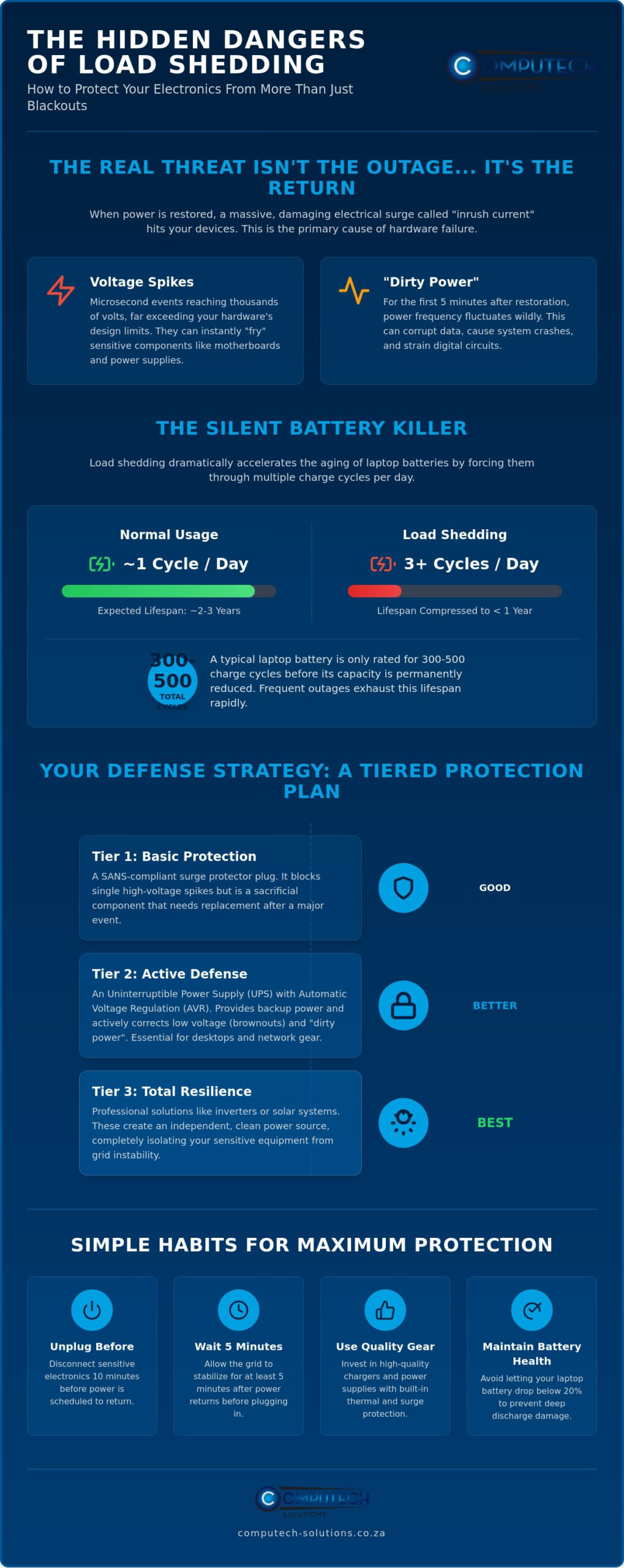
Building a defense against the load shedding impact on electronics requires a structured, tiered approach. You can’t rely on a single device to solve every power issue. A professional protection hierarchy starts at Level 1 with high-quality surge protectors that comply with SANS 61643-11 and include insurance warranties. Level 2 involves Uninterruptible Power Supplies (UPS) to protect desktop computers and routers from immediate hard-shutdowns. Moving up, Level 3 uses Portable Power Stations for mobile laptop setups, while Level 4 features integrated inverter and battery systems for seamless transitions. The final tier, Level 5, incorporates Solar PV for total grid independence. Each level adds a layer of resilience against both localized load reduction and national grid instability.
UPS vs. Inverter: Which Do You Need?
Many users buy a small UPS expecting it to power their office through a two-hour outage. It won’t. A standard line-interactive UPS is designed for a “safe shutdown” window of 5 to 10 minutes. This gives you enough time to save your work on desktop computers and power down safely. If you need to work through the outage, you need an inverter system. Be careful with the wave type; modified sine wave inverters are cheaper but can cause buzzing or internal damage to sensitive power supplies in high-end desktops or Apple MacBooks. Always choose Pure Sine Wave inverters to ensure clean, stable power that mimics the utility grid.
Calculating Your Power Needs
To find the right system, calculate your total Watt-hours (Wh). Multiply the power consumption of your devices in Watts by the number of hours you need them to run. For example, a laptop (60W) and a 27-inch monitor (30W) total 90W. To run this setup for a two-hour outage, you need at least 180Wh of usable capacity. A 1kVA inverter system typically handles this with ease, but remember that lead-acid batteries shouldn’t be discharged below 50% to maintain their lifespan. Professional commissioning ensures your inverter settings match your battery chemistry for maximum system longevity. If your current hardware has already suffered from poor power quality, you can restore your productivity with our range of Desktop Computers and Laptops designed for modern professional demands.
Maintaining Tech Resilience with Computech-Solutions
Computech-Solutions understands that operational stability is the foundation of business growth. As detailed in previous sections, the long-term load shedding impact on electronics goes beyond simple outages; it’s a constant battle against component degradation. We position ourselves as your reliable partner, providing the specialized hardware required to bridge the energy gap. By focusing on high-quality replacement components and robust computing hardware, we help you maintain productivity even when the local grid fails or localized load reduction occurs.
Our approach is grounded in the belief that your current IT investment should last. When frequency fluctuations or deep discharge cycles compromise your equipment, a total system replacement isn’t always necessary. We provide expert technical support to ensure you find the exact battery or charger match for your specific model, whether you’re using a legacy machine or a modern workstation. With nationwide delivery across South Africa, our solutions are accessible to decision-makers in every province, ensuring your team stays online regardless of your specific geographic location.
Our Range of Replacement Batteries and Chargers
We maintain an extensive inventory of Acer, Apple, ASUS, Dell, HP, and Lenovo replacement batteries to address the cycle exhaustion caused by frequent power shifts. Each component is selected to meet rigorous standards, ensuring it can handle the thermal stress of rapid charging cycles. Our laptop chargers are specifically tested for South African electrical conditions to act as the effective sacrificial buffer your device needs. Choosing a proactive replacement before a total hardware failure occurs is a strategic decision that prevents unexpected downtime. We also stock replacement batteries for Samsung, Sony, and Toshiba systems to ensure no part of your fleet is left vulnerable to aging power cells.
Transitioning to Solar and Backup Power
For organizations seeking total grid independence, we offer comprehensive solar power solutions and backup systems. These setups move you beyond temporary fixes to a state of permanent energy resilience. Professional installation and commissioning are central to our service model; this ensures your system longevity and protects your sensitive electronics from the nuances of inverter wave patterns. By integrating these systems, you create a definitive, total solution that safeguards your professional environment against any future energy crisis. Every replacement part, from Laptop LCD Replacement Panels to high-capacity batteries, is part of a broader strategy to mitigate the load shedding impact on electronics and secure your operational future.
Secure Your Digital Infrastructure for the Long Term
Protecting your professional hardware requires more than just reacting to power cuts. You now understand how inrush current damages sensitive capacitors and how frequent cycling shortens the lifespan of your laptop batteries. By implementing a tiered protection strategy, you can effectively mitigate the load shedding impact on electronics and avoid the high costs of premature hardware replacement.
Computech-Solutions provides the stability your business needs. We’re specialists in Acer, Dell, and HP replacement parts, offering expert technical support to ensure your equipment remains operational. Whether you need a sacrificial AC adapter or a high-capacity replacement battery, our nationwide delivery ensures you get the parts you need quickly. We’re also a trusted provider of solar and backup power solutions for those ready for total energy independence.
Browse our range of high-quality replacement batteries and chargers at Computech-Solutions to restore your tech resilience today. You don’t have to face grid instability alone; with the right components, your hardware can thrive in any environment.
Frequently Asked Questions
Can load shedding damage my laptop if it is turned off?
Yes, load shedding can damage your laptop even when it is turned off if the device remains connected to a wall socket. The voltage spike occurs at the moment of power restoration and travels through the power cable. This surge can bypass the AC adapter and strike the motherboard’s charging circuit, leading to a hardware failure that prevents the laptop from turning on again.
Is it better to leave my laptop plugged in or on battery during load shedding?
It is always better to run your laptop on battery power during an outage and keep it unplugged from the wall. This is the most effective way to eliminate the load shedding impact on electronics. By disconnecting the charger, you ensure that the massive inrush current during power restoration cannot reach your sensitive internal components or cause thermal stress to the battery.
What is the difference between a surge protector and a UPS?
A surge protector is designed to block or divert excess voltage spikes, while a UPS provides temporary battery power to keep devices running. While many UPS units include basic surge protection, their primary function is to prevent sudden shutdowns. For high-end desktop computers, a UPS is essential to allow for a safe, controlled power-down sequence that protects your data and operating system.
Why does my laptop battery get hot when the power comes back on?
Your battery gets hot because the charging circuit draws maximum current to replenish the cells as quickly as possible once power returns. This rapid charging generates significant thermal energy, especially if the battery is already degraded from frequent cycling. High internal resistance in an older battery makes this heat more intense, which can eventually lead to cell swelling or chassis damage.
Do I need a Pure Sine Wave inverter for my desktop computer?
Yes, you should use a Pure Sine Wave inverter for any high-end desktop computer or professional workstation. Sensitive power supply units (PSUs) require the smooth, clean electrical signal that a Pure Sine Wave provides. Using a cheaper modified sine wave inverter can cause your PSU to hum, run hot, or fail prematurely due to the inconsistent nature of the electrical signal.
How can I tell if my laptop charger has been damaged by a power surge?
You can identify a damaged laptop charger by checking for physical signs like a burnt plastic smell or a discolored casing. If the indicator LED no longer lights up or if the laptop alternates between “charging” and “on battery” while plugged in, the internal filtration has likely failed. A sacrificial failure in the charger often saves the laptop motherboard from a fatal spike.
Will load shedding affect my SSD or hard drive data?
Sudden power loss can definitely affect your data, particularly on mechanical hard drives where the read/write head might not park safely. While SSDs don’t have moving parts, a hard shutdown during a write operation can corrupt the file system or damage the drive’s controller. This is why a UPS is a critical part of a professional hardware protection strategy for any desktop system.
How long does a typical laptop battery last under Stage 6 load shedding?
Under Stage 6 load shedding, a typical laptop battery may only provide reliable service for six to nine months. Because Stage 6 requires multiple discharge cycles per day, you reach the 300 to 500 cycle limit of a Lithium-ion battery much faster than usual. This constant stress accelerates chemical exhaustion, making the load shedding impact on electronics highly visible through rapidly declining runtimes and capacity loss.
