
Did you know that as of May 11, 2026, South Africa has officially recorded 360 consecutive days without national load shedding? While this grid stability is a significant milestone, finding the best budget desktop computers South Africa 2026 still requires a strategic approach to navigate fluctuating exchange rates and the rising costs of DDR5 memory. You want a system that delivers reliable performance without the stress of technical disruptions or overspending on outdated hardware.
We understand that balancing component requirements with a fixed budget is challenging, especially when localized load reduction still threatens hardware longevity in provinces like Gauteng. This guide provides a comprehensive breakdown of current market pricing, from entry-level CPUs starting at R3,399 to the essential costs of power protection. You’ll learn how to allocate your Rands effectively across different performance tiers to ensure your new desktop remains a stable, long-term asset for your operational needs. We’ll explore specific price brackets and identify the exact hardware configurations that offer the best value in the current South African market.
Key Takeaways
- Understand how the Rand’s performance against the Dollar directly shapes local component availability and helps you time your purchase for maximum value.
- Discover how to select the best budget desktop computers South Africa 2026 by prioritizing the “Core Four” components to balance immediate performance with future socket longevity.
- Master the 40-50% budget allocation rule for GPUs to ensure your creative or gaming builds handle modern software without overspending on secondary parts.
- Evaluate the practical costs of UPS and inverter systems to protect your hardware investment from localized load reduction and infrastructure strain.
- Compare the total cost of ownership between custom builds from national retailers and pre-built systems that offer professional cable management and simplified warranty support.
The Landscape of Desktop Computer Costs in South Africa (2026)
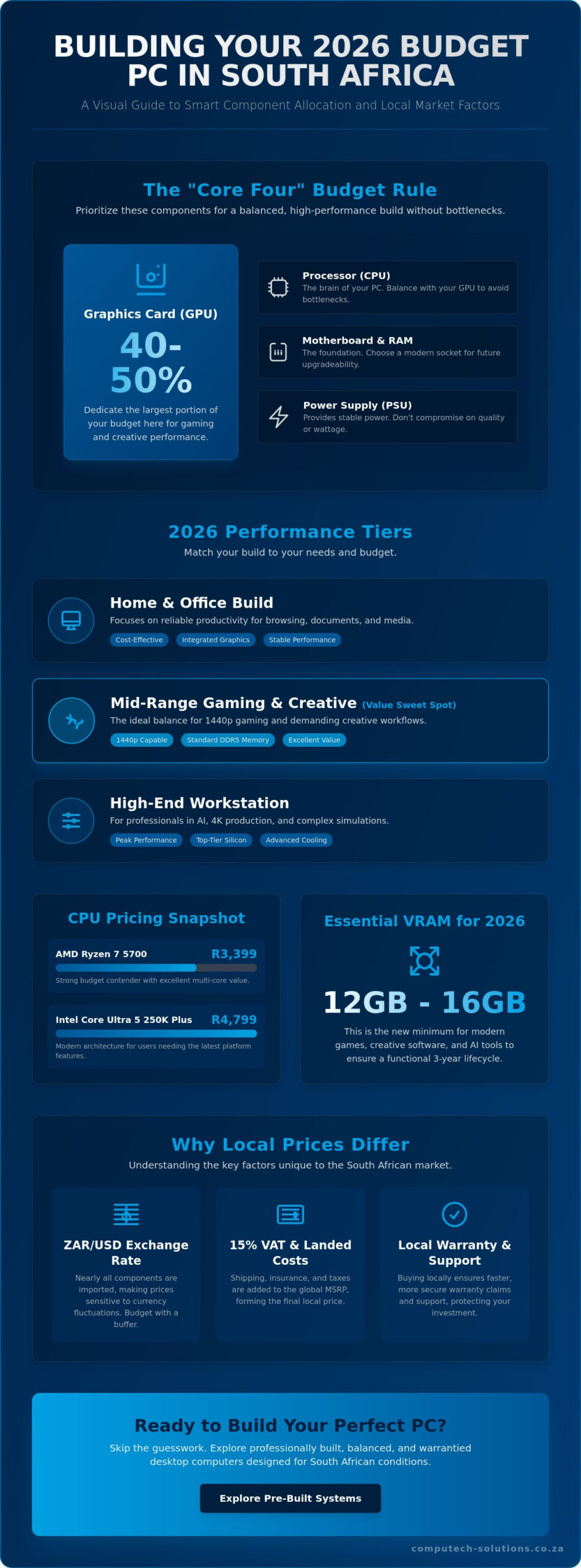
The South African hardware market in 2026 is defined by a delicate balance between global innovation and local economic factors. While the national power grid has remained stable for nearly a year, the cost of the best budget desktop computers South Africa 2026 is heavily influenced by the ZAR/USD exchange rate. Because almost all core components are manufactured abroad, any fluctuation in the Rand’s value immediately shifts the price of CPUs and GPUs at local retailers. This volatility makes it essential to budget with a buffer for currency shifts that occur between the planning and purchasing phases of your build.
Finding the right balance requires understanding computer hardware and how it’s priced within our borders. Beyond the base component cost, you must account for a 15% VAT rate and logistics fees. While core parts like CPUs and RAM often carry a 0% customs duty, shipping and insurance for nationwide delivery add a layer of expense that global MSRPs don’t reflect. These hidden costs ensure your components arrive safely and are covered by local consumer protections, providing a level of security that international imports lack.
Defining the 2026 Performance Tiers
Identifying the right tier is the first step in securing the best budget desktop computers South Africa 2026 for your specific needs. The Home and Office tier focuses on reliable productivity for basic tasks, typically utilizing integrated graphics to keep costs manageable. Mid-range builds represent the “sweet spot” for most users; they offer enough power for 1440p gaming and creative workflows using the now-standard DDR5 memory. High-end workstations target professionals in AI and 4K production. These systems require substantial investment in top-tier silicon and advanced cooling solutions to maintain peak operational efficiency.
Why South African Prices Differ from Global MSRP
Local prices often seem higher than those in the US or Europe due to the 15% VAT and the “landed cost” of goods. Retailers must factor in air or sea freight, which remains a significant expense for a country located far from major manufacturing hubs. However, buying from a local partner provides a significant benefit: walk-in warranties. If a component fails, returning it to a South African supplier is faster and more secure than shipping it overseas. This local support alleviates the stress of technical disruptions and ensures your investment is protected by a reliable, accessible partner.
Core Component Breakdown: Where Your Money Goes
Allocating your funds correctly is the difference between a high-performing rig and a system that bottlenecks under pressure. For those building the best budget desktop computers South Africa 2026, the primary rule is to dedicate 40% to 50% of your total spend to the Graphics Processing Unit (GPU). This component dictates your frame rates and rendering speeds more than any other. While global markets focus on MSRP, local buyers must analyze South African PC market trends to understand how supply chain logistics impact the final shelf price of these cards.
A balanced build ensures that no single part limits the performance of another. While it’s tempting to overspend on a flagship processor, a budget-conscious strategy prioritizes the “Core Four”: the GPU, CPU, PSU, and Motherboard. This approach provides a stable foundation that handles current software requirements while leaving room for future upgrades. If you’re looking for a pre-configured solution that balances these parts perfectly, you can browse a range of desktop computers designed for local performance needs.
Graphics Cards and Processors: The Heart of the Build
In 2026, the battle between NVIDIA’s RTX 50-series and AMD’s RX 9000-series has matured. For a budget-conscious build, the AMD Ryzen 7 5700 remains a strong contender at approximately R3,399, while the Intel Core Ultra 5 250K Plus sits around R4,799 for those needing more modern architecture. VRAM is no longer a luxury. Modern software and AI tools now require a minimum of 12GB to 16GB of VRAM to remain functional over a three-year lifecycle. When selecting the best budget desktop computers South Africa 2026, ensure the CPU and GPU pairing doesn’t lead to wasted potential.
The Platform: Motherboard, RAM, and Cooling
The motherboard provides the foundation for your system’s longevity. Budget-friendly AM5 or LGA-1851 boards currently range from R1,800 to R3,500. Prioritizing PCIe 5.0 support is a smart move for 2026, as it ensures your system can handle the blistering speeds of NVMe Gen5 storage. RAM prices are currently a pressure point due to massive demand from the AI industry. DDR5 is the baseline standard, and 32GB has effectively replaced 16GB as the recommendation for multitasking and gaming.
Cooling is often overlooked but remains critical in the South African climate. High ambient temperatures in summer can cause thermal throttling, which reduces your expensive components’ performance. Investing in a reliable air cooler or a basic liquid loop ensures your hardware maintains its operational efficiency. For storage, a 500GB NVMe SSD starts between R700 and R900, but a 1TB drive is the practical minimum for modern software libraries. By selecting these parts with a focus on stability, you ensure your investment delivers a definitive, total solution.
Custom Build vs. Pre-Built: The South African Value Proposition
Deciding between a custom build and a pre-assembled system is a pivotal moment when searching for the best budget desktop computers South Africa 2026. Sourcing individual components from various national retailers allows you to capitalize on specific sales, potentially saving hundreds of Rands on a motherboard or chassis. However, this path introduces the “DIY Tax.” You’ll need to invest in quality thermal paste, precision tools, and anti-static equipment. Most importantly, you assume the risk of component damage during assembly. A single bent CPU pin or an electrostatic discharge can lead to costly technical disruptions and complicated warranty claims across multiple suppliers.
Pre-built systems offer a streamlined solution for those who value operational efficiency and stability. These machines arrive with professional cable management and a single-point warranty, meaning one phone call resolves any hardware failure. While the initial price might seem slightly higher, the lack of assembly stress and the assurance of a tested system often outweigh the marginal savings of a custom build. For many South African professionals, the certainty of a machine that works out of the box is a definitive, total solution for their business needs.
The Case for Building Your Own
Building your own rig provides total control over every brand and aesthetic choice. You aren’t limited by a retailer’s specific pre-built configurations, which is helpful when certain high-end parts are harder to find locally due to global shipping delays. This process allows you to hunt for deals on high-speed NVMe drives or specific cooling solutions that fit our local climate. This process also builds valuable technical skills. Understanding how your system is put together makes future troubleshooting far easier, reducing your long-term reliance on external support for simple maintenance tasks.
Upgrading vs. Buying New
Before committing to a completely new system, evaluate if your current hardware can be revitalized to meet 2026 requirements. Extending the life of your existing tech is a highly cost-effective strategy that alleviates the financial pressure of a full upgrade. For example, replacing aging laptop batteries or installing new laptop LCD replacement panels can make a mobile workstation feel new again. In a desktop environment, swapping an aging GPU for a modern mid-range card or upgrading to a 1TB NVMe SSD often provides the performance boost you need. If you’re unsure about the compatibility of new parts, you can explore desktop computers and support services that help you decide when to repair and when to replace. This targeted approach ensures you only spend where it directly impacts your productivity and growth.
The Power Stability Factor: Load Shedding & Your Build Budget
While South Africa has celebrated 360 consecutive days without national load shedding as of May 11, 2026, the grid remains a complex variable for PC owners. Localized load reduction in provinces like Gauteng continues to disrupt power in 4-5 hour blocks due to infrastructure strain and illegal connections. These sudden outages and subsequent power surges are the primary causes of premature hardware failure. When budgeting for the best budget desktop computers South Africa 2026, you must view power protection as a core defensive component rather than an optional extra. Fluctuating voltage levels can degrade sensitive capacitors in your motherboard and GPU over time, leading to technical disruptions that far exceed the cost of protection.
A high-quality Power Supply Unit (PSU) serves as your first line of defense. Cheap, unrated units often lack the robust voltage regulation needed to handle the South African grid’s inconsistencies. Investing in a PSU with an 80 Plus Gold efficiency rating ensures that your system converts wall power effectively while generating less heat. This choice directly impacts your build’s stability and longevity, providing a reassuring foundation for your hardware investment. To ensure your rig includes a reliable power foundation, you can buy desktop computers that feature high-efficiency power components from our curated range.
Choosing the Right PSU and UPS
Selecting the correct protection for the best budget desktop computers South Africa 2026 involves calculating your specific power draw. For a mid-range system, a 1.5kVA or 2kVA UPS is usually sufficient to allow for a safe shutdown during a localized outage. There’s a significant difference between basic surge protectors and true double-conversion UPS systems. While a surge protector might stop a massive spike, a double-conversion UPS constantly cleans the incoming current, ensuring your desktop receives a steady, pure sine wave. This level of protection is essential for professionals whose growth depends on uninterrupted uptime.
Solar Power for Modern Computing
Integrating your desktop with a home solar solution has become a viable strategy for heavy users in 2026. High-wattage workstations used for AI or 4K rendering consume significant electricity, and solar helps offset these operational costs during daylight hours. With Eskom’s winter 2026 outlook still carrying a high-risk scenario for Stage 2 to Stage 6 cuts if breakdowns exceed 16,000MW, solar offers a definitive, total solution for energy independence. The long-term ROI is particularly strong for remote workers who require consistent power to maintain their business outcomes without the stress of grid instability.
Step-by-Step Budgeting for Your 2026 Desktop Purchase
Building a reliable system starts with a clear financial roadmap. When you’re searching for the best budget desktop computers South Africa 2026, your total budget must account for more than just the tower. You need to include the monitor, peripherals, and the power protection solutions discussed previously. A realistic starting point for a capable 2026 system is approximately R12,000 to R15,000. This range allows you to secure modern components that won’t become obsolete within twelve months. Attempting to build a new system for under R5,000 is no longer feasible, as the combined cost of a modern CPU and motherboard already exceeds this threshold.
The “Core Four” strategy is the most efficient way to allocate your Rands. You prioritize the GPU, CPU, PSU, and Motherboard. These parts define your system’s performance and stability. Secondary components like the chassis or additional storage can be added or upgraded later as your financial situation allows. This methodical approach ensures that you don’t compromise on the parts that are difficult or expensive to replace. By focusing on these essentials first, you create a definitive, total solution that supports your operational goals from day one.
Where to Save and Where to Splurge
You should never sacrifice quality on the PSU or Motherboard. A high-quality motherboard ensures your components communicate without errors, while a robust PSU protects your investment from the “dirty power” common in localized load reduction areas. You can save money by choosing a functional case without expensive RGB lighting or glass panels. Additionally, you don’t need the fastest NVMe drive for a budget build; a standard Gen4 or Gen5 entry-level drive provides excellent speeds for a lower price. If your budget is extremely tight, consider using an AMD APU like the Ryzen 7 5700. This allows you to build a functional system now and add a dedicated graphics card when prices stabilize.
Completing Your Setup with Computech-Solutions
Securing your hardware from a reliable partner is the final step in your budgeting journey. We provide nationwide delivery across South Africa, ensuring your components arrive safely regardless of your province. Our expert technical support is available to assist first-time builders and professionals in selecting the right parts for their specific use cases. Beyond full systems, we offer high-quality replacement parts to maintain your long-term investment. Whether you need desktop computers, laptops, or essential laptop chargers and replacement batteries, we ensure your technology remains a stable asset for your growth. This comprehensive service model alleviates the stress of sourcing parts and provides the confidence you need to operate at peak efficiency.
Securing Your Technical Future in South Africa
Building a desktop in 2026 requires more than just picking parts. It’s about engineering a stable environment for your digital growth. You’ve learned that prioritizing the “Core Four” components and integrating robust power protection are the most effective ways to safeguard your investment against local infrastructure challenges. By balancing component performance with specialized power and solar solutions, you ensure your system remains operational regardless of grid status.
The search for the best budget desktop computers South Africa 2026 ends with a strategy that values reliability as much as raw speed. Whether you choose a custom build or a pre-assembled workstation, your focus should remain on long-term operational efficiency. We provide the expertise and hardware needed to turn these budgeting insights into a high-performing reality.
Browse our range of high-performance desktops and components at Computech-Solutions to find a definitive, total solution for your needs. Our team offers expert technical support for all builds and reliable nationwide delivery across South Africa. Take the next step with confidence, knowing your new desktop is backed by professionals who understand our local market.
Frequently Asked Questions
How much does a decent desktop PC cost in South Africa in 2026?
A reliable desktop system starts at approximately R12,000 to R15,000 for a complete tower build. This budget allows for modern architecture like the AMD Ryzen 7 5700 or Intel Core Ultra 5 platforms. While ultra-budget configurations using integrated graphics exist for less, this price range ensures your system handles 2026 software requirements without immediate bottlenecks or technical disruptions.
Is it cheaper to build or buy a pre-built desktop in SA?
Building your own system can save you between 5% and 10% on component costs if you source individual deals across national retailers. However, pre-built systems often provide better long-term value through single-point warranties and professional assembly. For many users, the convenience of a tested machine outweighs the marginal savings of a DIY project, especially when considering the risk of damaging sensitive parts.
What is the minimum GPU I need for 1440p gaming in 2026?
You need a graphics card with at least 12GB of VRAM, such as an NVIDIA RTX 5060 or an equivalent AMD RX 9000-series card. These components are essential for maintaining stable frame rates at higher resolutions. When selecting the best budget desktop computers South Africa 2026, ensuring your GPU meets these memory requirements is critical for playing modern AAA titles without stuttering.
Will load shedding damage my desktop if I don’t have a UPS?
Yes, sudden power cuts and voltage spikes can cause physical damage to your motherboard, PSU, and storage drives. Even though national load shedding is currently suspended, localized load reduction and grid instability remain significant risks. A UPS acts as a buffer, cleaning the power and providing enough time to shut down your system safely, protecting your hardware from permanent operational failure.
Can I use a laptop charger to power desktop components?
No, laptop chargers are designed for specific voltage and current requirements that are incompatible with desktop internal components. Desktop hardware requires a dedicated internal Power Supply Unit (PSU) to distribute power to the motherboard and GPU. We specialize in providing the correct laptop chargers for mobile devices, but desktop systems must always use a high-efficiency 80 Plus rated PSU to ensure stability.
Is 16GB of RAM still enough for desktop use in 2026?
16GB is the absolute minimum for basic productivity, but 32GB is now the recommended standard for most users. Modern operating systems and AI-integrated software consume more memory than previous generations. Upgrading to 32GB of DDR5 RAM prevents system slowdowns during heavy multitasking and ensures your desktop remains a reliable partner for your professional growth over the next several years.
How do I know if a component is compatible with my motherboard?
You must verify the CPU socket type, RAM generation, and PCIe version in the motherboard’s technical specifications. For example, an AM5 motherboard requires an AM5-compatible processor and DDR5 memory. Checking these details before purchase prevents technical disruptions. Our expert support team can assist you in verifying compatibility to ensure your build functions as a definitive, total solution from the start.
Does building a PC myself void any warranties in South Africa?
No, individual components carry their own manufacturer warranties when purchased from reputable South African retailers. However, these warranties only cover factory defects and not damage caused by incorrect assembly or power surges. If you build the best budget desktop computers South Africa 2026 yourself, you are responsible for troubleshooting each part. Buying a pre-built system simplifies this by providing a comprehensive warranty for the entire unit.
