
Why does your high-performance workstation sound like a jet engine during every critical client call? You have likely accepted the idea that high-end processing requires loud, aggressive fans, especially when the South African summer pushes ambient temperatures to their limits. Constant fan whirring and dust buildup are not just distractions; they are operational risks that signal thermal stress on your hardware. Building a silent home office PC in 2026 is no longer a compromise between power and peace. It is a strategic requirement for maintaining a focused and professional work environment.
You can engineer a whisper-quiet workstation that maintains peak efficiency even in the heat. This guide provides a definitive roadmap for selecting components with optimal thermal profiles, such as the Intel Core Ultra 9 285K or the AMD Ryzen 9 9950X. We will examine how to manage the 575W TDP of flagship components like the RTX 5090 using semi-passive cooling and 140mm fan configurations. You will learn to eliminate acoustic disruptions through undervolting and smart airflow management, ensuring your hardware remains a reliable, silent partner in your business growth.
Key Takeaways
- Achieve sub-20 decibel operation to eliminate acoustic distractions and maintain the high level of cognitive focus required for professional productivity.
- Identify high-efficiency CPUs and evaluate when integrated graphics provide a superior acoustic advantage over dedicated GPUs for office-centric workflows.
- Select the ideal chassis configuration by balancing airflow mesh with solid, sound-dampened panels to neutralize internal component vibrations.
- Implement specialized cooling and filtration strategies designed to maintain system silence even during the high-temperature peaks of the South African summer.
- Follow a professional assembly and software optimization checklist for building a silent home office PC that ensures long-term thermal and acoustic stability.
The Fundamentals of Silent Computing for Professional Productivity
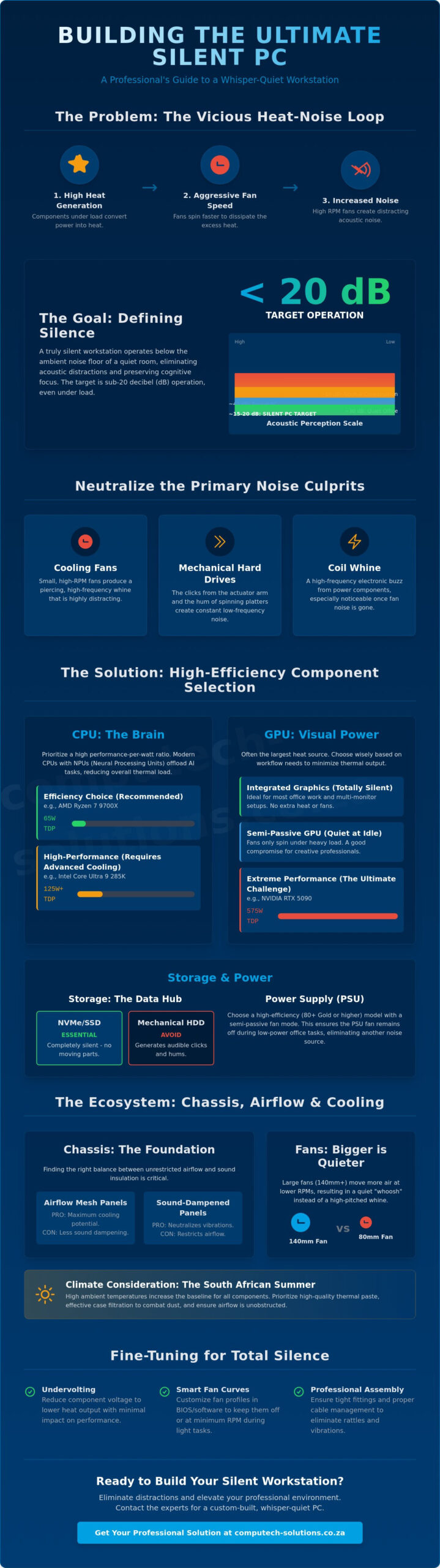
Building a silent home office PC in 2026 requires moving beyond the quiet builds of the past. A truly silent workstation is defined by its ability to maintain sub-20 decibel (dB) operation even under heavy computational loads. At this level, the machine remains indistinguishable from the background noise floor of a typical residential office. Achieving this goal involves addressing the “Heat-Noise Loop,” where inefficient thermal management forces fans to spin faster, generating more noise and drawing more power. This creates a cycle of technical disruptions that can derail your focus and impact professional output.
Acoustic comfort directly correlates to cognitive focus. Constant, high-pitched fan noise acts as a persistent stressor that increases mental fatigue during long work sessions. By eliminating these auditory distractions, you create a stable environment conducive to deep work and clear communication during virtual meetings. Understanding the Fundamentals of computer cooling is the first step toward breaking the noise cycle and ensuring your hardware remains a reliable partner in your business operations.
To achieve total silence, you must identify and neutralize the primary noise culprits within the chassis:
- Mechanical Hard Drives (HDDs): The rhythmic clicking and low-frequency hum of spinning platters are often the loudest components in a legacy system.
- Cooling Fans: Small, high-RPM fans produce a piercing whine that is particularly distracting compared to larger, slower-moving fans.
- Coil Whine: This high-frequency electronic buzz from power delivery components becomes highly noticeable once mechanical fan noise is reduced.
Decibels and Human Perception in the Home Office
Sound is logarithmic, meaning a 10 dB increase represents a tenfold increase in sound intensity. In a South African home office, the ambient noise floor typically sits around 30 dB. When building a silent home office PC, targeting a 15-20 dB range ensures the machine’s output is effectively masked by the environment. High-frequency noises are psychologically more taxing than low-frequency hums. It’s vital to prioritize components that avoid the “drone” effect which can interrupt complex problem-solving tasks.
Thermodynamics 101: Reducing Noise at the Source
Silence begins with strategic component selection. Choosing hardware with a low Thermal Design Power (TDP) reduces the total energy converted into heat. When less heat is generated, fans can operate at lower RPMs or remain entirely passive during standard office tasks. High efficiency ratings in hardware components reduce acoustic output by minimizing energy waste that would otherwise manifest as heat. Partnering with a specialized electronics distributor like 2B Trading can help you source the latest high-efficiency components required for such builds. This direct link between power stability and acoustic performance ensures a streamlined, professional solution for your workspace.
Selecting High-Efficiency Components for a 2026 Silent Build
Selecting the right hardware is the most critical phase of building a silent home office PC. In 2026, the market has shifted toward processors with dedicated AI cores. These Neural Processing Units (NPUs) offload intensive background tasks like real-time noise cancellation or video background blurring from the primary CPU cores. This specialized processing reduces the overall thermal load, allowing your cooling system to remain at its lowest acoustic state. By choosing components that prioritize efficiency over raw, unmanaged power, you eliminate the technical disruptions caused by aggressive fan curves.
For many professional workflows, integrated graphics have matured enough to handle complex multi-monitor setups without the heat signature of a dedicated card. Eliminating a discrete GPU removes the largest heat generator in a system, often allowing for a completely fanless build. If your work requires a discrete GPU, look for semi-passive models that keep fans completely stationary during standard office tasks. This expert guide to quiet PC construction highlights that reducing heat at the source is always more effective than trying to muffle it later.
CPUs and GPUs: Balancing Power and Thermal Output
Modern office multitasking requires a high performance-per-watt ratio. Processors like the AMD Ryzen 7 9700X, with its efficient 65W TDP, offer a significant advantage for silent builds compared to the 125W TDP of flagship models like the Intel Core Ultra 9 285K. Professional users often find that undervolting these components provides a stable way to lower temperatures without sacrificing the speed needed for business operations. If you are looking for a reliable foundation for your workspace, exploring modern desktop computers designed for efficiency can save you hours of complex troubleshooting.
Power Supplies and Storage: The Silent Backbone
The power supply unit (PSU) is a primary source of waste heat if not specified correctly. An 80 Plus Titanium rated PSU ensures that over 94% of the energy drawn from the wall actually powers your system. This extreme efficiency means the unit generates very little heat, allowing for fanless operation in many high-end models. Oversizing your PSU is a common professional strategy; a 750W unit running a 300W load often stays in passive mode indefinitely because it never reaches the thermal threshold required to trigger its fan.
Storage must be entirely solid-state to achieve true silence. Mechanical hard drives create vibration and a persistent low-frequency hum that no amount of insulation can fully mask. High-capacity NVMe SSDs have become the standard for silent professional systems, offering lightning-fast access without any moving parts. Eliminating the mechanical platter is a non-negotiable step in ensuring your workstation remains a silent, reliable partner in your daily productivity.
Optimizing Airflow and Acoustic Insulation within the Chassis
The chassis serves as the final barrier between internal component noise and your professional workspace. When building a silent home office PC, you must choose between solid-paneled cases and high-airflow mesh designs. Solid panels lined with mass-loaded vinyl excel at trapping high-frequency sounds like coil whine, though they require more precise internal management to prevent heat buildup. High-airflow mesh cases allow components to run cooler, which frequently keeps fan speeds lower, but they offer less physical sound insulation. Achieving a sub-20 decibel target requires a chassis that balances these two extremes without compromising thermal stability.
Professional silent builds utilize specialized materials to neutralize acoustic energy. Mass-loaded vinyl adds density to the case panels, preventing them from vibrating in sympathy with internal components. Open-cell foam is used to absorb air-borne noise before it can exit the chassis. Decoupling fans and cooling pumps from the frame using silicone mounts or rubber grommets is a non-negotiable step. This prevents mechanical vibrations from transferring to the case structure, which would otherwise turn the entire unit into a sounding board for technical disruptions.
Case Selection: Airflow vs. Sound Dampening
Indirect air intakes are a hallmark of sophisticated silent case geometry. These designs force sound waves to bounce off dampening materials before exiting the chassis, significantly reducing the perceived noise level. Within the case, rubber-padded drive bays and tool-less mounts neutralize micro-vibrations. Proper cable management is a vital thermal strategy. By clearing the path for effortless airflow, you ensure that heat moves out of the system with minimal resistance, allowing fans to remain at their lowest possible RPM.
Advanced Fan Control and Pressure Optimization
Modern Pulse Width Modulation (PWM) fan curves allow you to eliminate the distracting surging sound that occurs when fans spin up rapidly during brief background tasks. By setting a flat curve for lower temperatures, you maintain a consistent acoustic profile that is easier for the brain to tune out. In South African homes, maintaining positive air pressure is a critical strategy to minimize dust ingress through unfiltered gaps. Fluid dynamic bearing (FDB) fans offer a superior lifespan and lower mechanical friction compared to standard sleeve or ball-bearing alternatives. Using larger 140mm fans instead of 120mm models allows you to move the same volume of air at significantly lower speeds, further reducing the acoustic footprint of your workstation.
Managing Heat and Power Stability in the South African Climate
The South African climate demands a specialized approach to thermal management. High ambient temperatures and pervasive dust are the primary enemies of a silent workstation. When you are building a silent home office PC, you must account for summer peaks that can reach 35°C or higher. Standard cooling configurations often fail in these conditions, leading to aggressive fan behavior and thermal throttling that disrupts your professional workflow. Engineering for local resilience ensures that your hardware remains a stable, silent partner regardless of external conditions.
Thermal Resilience in High-Ambient Environments
Over-specifying your cooling hardware is the most effective way to combat local heat. Heatsinks with massive surface areas allow for greater heat dissipation at lower fan speeds. Using high-thermal-conductivity paste ensures that heat moves away from your processor as efficiently as possible. Maintenance is equally critical. Fine dust common across the country can accumulate in cooling fins, acting as an insulator that traps heat. Establishing a regular cleaning schedule prevents this buildup and maintains the acoustic integrity of your build. High-quality, fine-mesh filters are essential for keeping internal components clean without significantly restricting airflow. If you require a system that is already engineered for these environmental challenges, consider investing in high-performance desktop computers designed for professional reliability.
Silent Power: Backup Systems and Inverters
Load shedding adds another layer of complexity to silent computing. Many backup power solutions, such as entry-level UPS units or modified sine wave inverters, produce “dirty power.” This electrical noise often manifests as audible coil whine or buzzing from your PC’s power supply. Pure sine wave inverters are necessary to provide the clean, stable energy your components require to operate silently. This stability prevents the micro-vibrations in power delivery circuits that can lead to distracting high-frequency sounds during quiet work hours.
Selecting a silent backup solution is vital for maintaining a focused work environment. Entry-level UPS units often feature small, noisy fans that trigger during power transitions. Professional-grade backup systems or solar-integrated inverters offer silent operation and protect your hardware from the thermal stress caused by power surges. By ensuring your workstation receives stable power, you reduce component vibration and heat generation. This allows your cooling system to remain in its lowest acoustic state even when the grid is down, ensuring 24/7 productivity without technical disruptions.
Implementation: Final Assembly and Professional Solutions
The final phase of building a silent home office PC involves precise physical assembly and software calibration to ensure the hardware lives up to its acoustic potential. Even the highest-quality components can produce unwanted noise if the assembly is rushed or poorly managed. Precision during this stage prevents the small technical disruptions that accumulate into a noisy workstation. Strategic implementation ensures that your investment in premium cooling and efficient processors results in a truly silent professional environment.
Software optimization is just as important as the hardware itself. Background processes and unnecessary startup programs cause CPU usage spikes, which in turn trigger the fan controller to increase RPMs. By streamlining your operating system and disabling non-essential services, you keep the thermal output low during standard business operations. Verifying the success of your build is simple; use a smartphone-based decibel meter app to benchmark your room’s noise floor against the PC at full load. If the reading stays within 3 to 5 decibels of the ambient noise, you’ve successfully neutralized the acoustic footprint of your workstation.
The Silent PC Assembly Checklist
- Cable Management: Verify that no loose cables are near fan blades. Even a slight touch creates a persistent clicking sound that is difficult to diagnose once the side panel is closed.
- Gap Sealing: Apply acoustic dampening tape to potential gaps in the chassis where sound might leak. This is especially effective around rear I/O panels and expansion slots where noise often escapes.
- The Burn-in Test: Run a stress test for at least two hours while monitoring thermal sensors. This ensures your fan curves are stable and the system can handle the South African summer heat without acoustic surging.
Professional Hardware Support in South Africa
Achieving total silence in a professional environment requires more than just a parts list; it requires a reliable partner. Computech-Solutions provides the high-performance hardware and technical expertise needed to secure your home office productivity. Whether you’re sourcing specialized components for a custom build or looking for pre-configured desktop computers and professional laptops, our inventory is tailored for the South African market. We ensure your new silent rig integrates seamlessly with professional solar and power solutions to maintain uptime during load shedding.
Our comprehensive service model includes nationwide delivery and expert technical support for all home office upgrades. We prioritize operational efficiency, helping you transition from a noisy, distracting environment to a streamlined, silent workspace. If you’re ready to eliminate acoustic stress and focus on growth, browse our range of high-performance desktop hardware to find the ideal solution for your specialized needs.
Secure Your Professional Focus with Silent Hardware
Achieving a sub-20 decibel workstation is a strategic investment in your daily productivity. By prioritizing thermal efficiency and managing the specific environmental challenges of the South African climate, you eliminate the technical disruptions that hinder deep work. Successfully building a silent home office PC ensures your workspace remains a stable environment where performance won’t come at the cost of acoustic comfort. You now have the roadmap to select high-efficiency components and optimize your airflow for long-term reliability.
Computech-Solutions is ready to support your transition to a quieter, more efficient office. We offer expert technical support for South African power conditions and specialized solar and backup power integration services to keep your system silent during load shedding. Our team ensures a streamlined experience with nationwide delivery on all computer components. Build your perfect silent workspace with Computech-Solutions hardware today and experience the difference that professional-grade silence makes to your business growth.
Frequently Asked Questions
Is liquid cooling quieter than air cooling for a home office PC?
High-end air cooling is generally quieter than liquid cooling for professional office environments because it eliminates pump noise. While liquid systems are efficient for extreme gaming loads, the mechanical hum of a pump is often audible during quiet work sessions. For those building a silent home office PC, a large-diameter air cooler with premium bearings provides a more consistent, sub-20 decibel acoustic profile.
Can I make my existing office computer silent without buying a new one?
You can significantly reduce noise in an existing system by replacing mechanical hard drives with silent SSDs and swapping stock fans for high-quality, low-RPM alternatives. Applying a custom fan curve in your BIOS and undervolting your CPU can also lower temperatures enough to keep fans at their lowest speeds. These targeted hardware replacements provide a streamlined way to eliminate the technical disruptions caused by aging, noisy components.
What is ‘coil whine’ and how can I prevent it in my build?
Coil whine is a high-frequency electronic buzz caused by vibrations in power delivery components like inductors and capacitors. You can prevent this by selecting high-quality, 80 Plus Titanium rated power supplies that use premium internal damping. Reducing the power limit of your GPU through software also lowers the electrical stress that typically triggers these distracting high-pitched frequencies.
Do silent PC cases cause components to overheat in hot South African summers?
Silent cases do not cause overheating if you prioritize thermal efficiency and use high-surface-area heatsinks. In the South African climate, selecting a chassis with indirect air intakes allows for effective cooling while trapping internal noise. Maintaining a positive air pressure configuration ensures that heat is exhausted efficiently even when ambient temperatures reach 35°C or higher.
Are fanless (passive) power supplies safe for long-term professional use?
High-efficiency passive power supplies are completely safe for professional use when installed in a case with adequate natural convection. Because these units generate very little waste heat, they remain stable and reliable during extended workdays. They are a definitive, total solution for users who want to eliminate the mechanical noise of a PSU fan without risking operational stability.
How often should I clean a silent PC to maintain its acoustic performance?
You should perform a deep internal clean every three to six months to account for South African dust conditions. Dust acts as an insulator on heatsinks, forcing fans to spin faster and louder to maintain safe operating temperatures. Cleaning your external dust filters once a month is a simple maintenance task that preserves the acoustic integrity of your silent workstation.
Does a silent PC use more electricity than a standard desktop?
A silent PC typically uses less electricity than a standard desktop because it utilizes high-efficiency, low-TDP components. Building a silent home office PC focuses on maximizing performance-per-watt, which naturally lowers your total energy consumption. This focus on efficiency reduces both your monthly utility costs and the waste heat that would otherwise require noisy cooling fans.
Will my silent PC work with a standard home solar inverter during load shedding?
Your silent PC will work perfectly with solar power as long as you use a pure sine wave inverter. Modified sine wave inverters produce electrical noise that often manifests as audible buzzing or coil whine in your PC’s power supply. Pure sine wave systems provide the clean, stable energy required for silent operation and long-term component health during load shedding transitions.
