
Imagine you are finishing a critical business proposal during a scheduled 17:00 load reduction window in Gauteng, only for your Asus ZenBook 13 to shut down unexpectedly despite showing a partial charge. This sudden loss of power often stems from a degraded c31n1815 battery, a component that serves as the lifeline for your mobile workstation. We understand that finding a reliable replacement in South Africa feels daunting, especially when you’re faced with conflicting capacity ratings like 39Wh versus 50Wh and the fear of installing a sub-par generic part that could compromise your hardware.
You deserve a solution that restores your laptop’s portability without the technical guesswork. This expert guide provides the clarity you need to verify compatibility for the 11.55V 3400mAh/39Wh specification. We’ll walk you through the essential steps to secure a high-quality replacement, compare local delivery costs, and explain how professional installation provides the peace of mind of a local warranty. You’ll learn exactly how to keep your ZenBook powered through every peak-hour power cut with total confidence.
Key Takeaways
- Confirm compatibility for your UX333 series by identifying the specific 3-cell Lithium-Polymer design of the c31n1815 battery.
- Understand the critical importance of matching the 11.55V standard exactly to maintain system stability and avoid internal hardware damage.
- Identify early warning signs of battery failure, such as “Plugged in, not charging” messages, to prevent data loss during power fluctuations.
- Prepare for a successful DIY replacement by learning which specific tools, like the Torx T5 screwdriver, are required to safely open your device.
- Secure a reliable replacement with nationwide delivery and the peace of mind that comes from partnering with a trusted South African IT specialist.
Understanding the C31N1815 Battery for Asus ZenBook 13
The c31n1815 serves as the primary internal power source for the Asus ZenBook 13 UX333 series. This 3-cell Lithium-Polymer battery is engineered to fit the exact physical constraints of a chassis designed for maximum mobility. When you see the “C” prefix in an Asus part number, it identifies the component as an internal unit. Unlike older external batteries that clipped onto the back of a machine, this model is secured within the laptop’s frame using internal mounting brackets. This design choice is what allows the ZenBook 13 to maintain its signature ultra-slim profile.
Selecting the exact part number is critical for high-precision devices. Even a 2mm difference in thickness or a slight shift in the screw hole alignment can prevent the bottom cover from closing correctly or put dangerous pressure on the LCD ribbon cables. For ZenBook users in South Africa, verifying the c31n1815 designation ensures that the battery connector aligns perfectly with the motherboard pins. This precision prevents electrical shorts that could otherwise lead to a total logic board failure.
Compatible Asus Laptop Models
The c31n1815 is specifically built for the 13-inch UX333 generation released around 2018 and 2019. While many Asus batteries share similar voltage ratings, this unit is only compatible with specific variants:
- ZenBook 13 UX333FA: The standard productivity model with integrated graphics.
- ZenBook 13 UX333FN: The performance variant featuring dedicated NVIDIA graphics.
- ZenBook 13 UX333F: The general series designation found on many local retail stickers.
- Regional variants: This includes the RX333 and BX333 series often sold in specific corporate or international markets.
It’s vital to note that this battery will not fit the ZenBook 14 (UX433) or ZenBook 15 (UX533) models. Those larger laptops utilize different internal layouts and higher capacity cells that require significantly more physical space than the UX333 chassis provides.
The Role of Li-Polymer Technology in Slim Devices
Lithium-Polymer (Li-Poly) technology is the standard for the ZenBook series because it allows for high energy density in a flat, moldable form factor. Standard Lithium-Ion batteries often use cylindrical cells that are far too bulky for modern 13-inch laptops. Li-Poly cells provide superior heat dissipation properties. This is essential in a compact device where internal airflow is limited by the thin frame. Modern replacement units also include integrated safety microchips. These components monitor voltage levels in real-time to prevent overcharging and thermal runaway, ensuring your laptop remains stable even during long working sessions or while charging during power fluctuations.
Technical Specifications: Capacity, Voltage, and Performance
The c31n1815 battery operates at a standard 11.55V. This voltage is a non-negotiable specification for your ZenBook 13. While some laptop components offer a bit of flexibility, power delivery doesn’t. Using a battery with the wrong voltage can cause the motherboard’s power management chips to overheat or fail entirely. Precision matters. Every reliable replacement must adhere to this 11.55V threshold to ensure the safety of your internal hardware. It’s the foundation of a stable system.
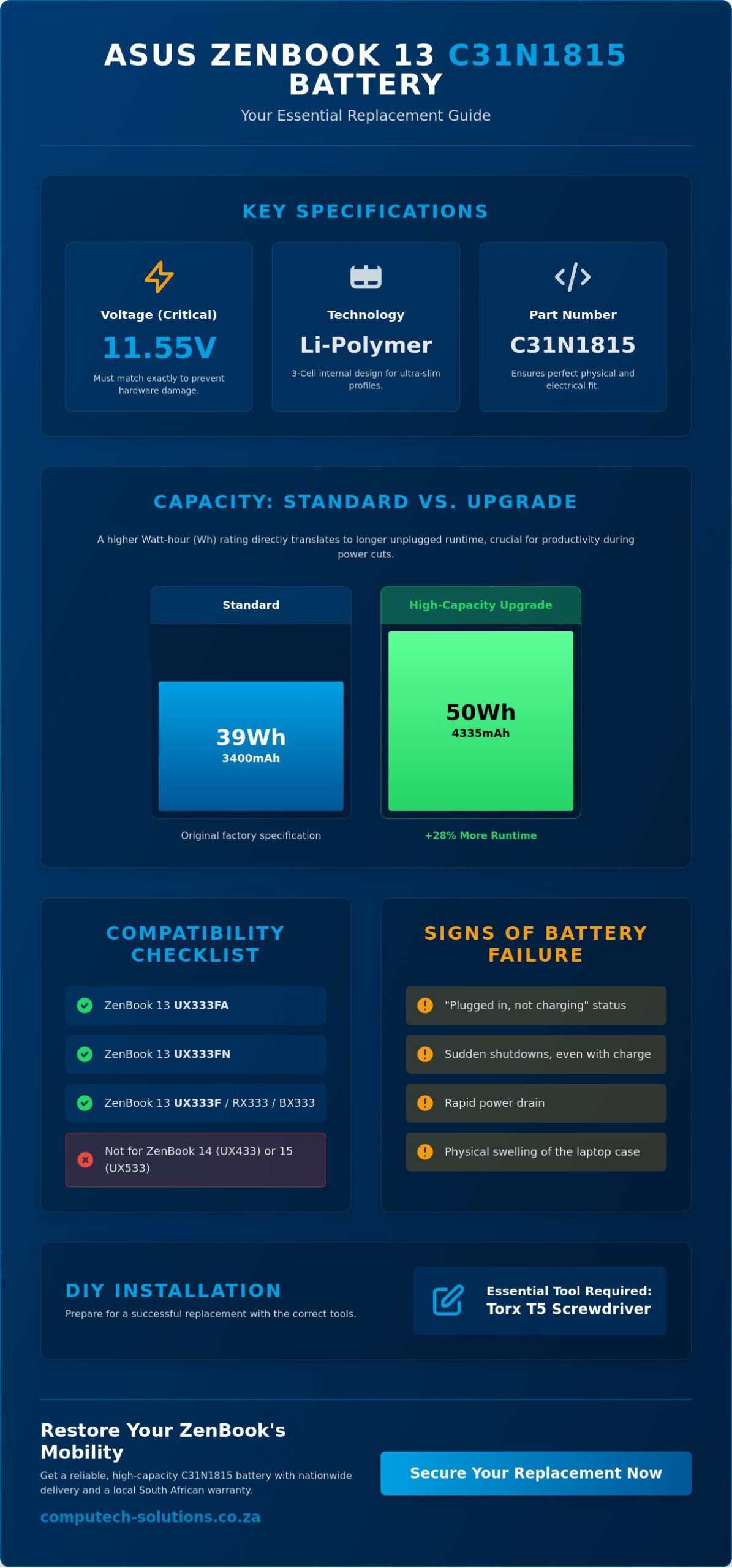
One of the most confusing aspects for South African buyers is the variance in capacity ratings found online. You’ll likely see options for 3400mAh (39Wh) and 4335mAh (50Wh). Watt-hours (Wh) measure the total energy storage available to your laptop. A higher Wh rating directly translates to longer unplugged usage time. While the 39Wh version was the standard factory specification for many UX333 units, the 50Wh version acts as a high-capacity upgrade. This higher capacity is achieved through increased cell density. It fits into the same physical space without requiring a thicker chassis or causing the bottom panel to bulge.
Voltage and Watt-Hour Breakdown
The 11.55V rating is the critical safety threshold for the ZenBook series. If you install a battery with a significantly different voltage, the system might refuse to boot or damage the charging circuit. The difference between 39Wh and 50Wh is purely about runtime. A 50Wh battery provides approximately 28% more energy than the 39Wh model. This extra headroom is invaluable during the two-hour load reduction windows common in high-density areas. Choosing the higher capacity 50Wh unit is a safe and effective way to extend your productivity. If you’re ready to restore your laptop’s mobility, you can find a compatible Asus replacement battery that meets these exact standards.
Cell Quality and Longevity
Technical specs only tell half the story. The quality of the cells inside the c31n1815 casing determines how long the battery will last over months of use. Grade A cells are essential for maintaining capacity over hundreds of charge cycles. A high-quality replacement should sustain 300 to 500 full charge-discharge cycles before showing significant degradation. Cheaper alternatives often skip the Protection Circuit Module (PCM). This internal board is vital. It prevents overcharging, over-discharging, and short circuits. Without a robust PCM, a battery can swell and damage your laptop’s trackpad or keyboard from the inside.
When to Replace Your Battery: Performance and Load Shedding
Your ZenBook 13 is designed for peak mobility, but even the highest quality c31n1815 units have a finite lifespan. In South Africa, the health of your battery is often tied to the stability of the power grid. While national load shedding has been suspended for over 300 consecutive days as of May 2026, many users in high-density areas like Gauteng still face daily “load reduction” schedules. These localized power cuts, occurring between 05:00-09:00 and 17:00-22:00, force your laptop to rely on battery power during your most productive hours. Identifying failure signs early prevents the stress of a sudden shutdown during a critical meeting.
Common indicators of a failing battery include the “Plugged in, not charging” status message or a laptop that dies immediately once the charger is removed. You can verify your battery’s health using the built-in Windows Battery Report. Simply open the Command Prompt and type powercfg /batteryreport. This tool provides a detailed comparison between the original design capacity and the current full charge capacity. If your c31n1815 shows a capacity drop of more than 40%, it’s time to consider a replacement to maintain your professional workflow.
Impact of Frequent Power Outages
Frequent deep discharge cycles are the primary enemy of Lithium-Polymer cells. When localized load reduction hits, your battery often drains to near zero. Repeatedly hitting these low percentages accelerates chemical degradation. Even though Eskom does not anticipate national load shedding for the winter of 2026, the cumulative damage from previous years or current localized outages can cause the cells to become unstable. Proactive replacement is a strategic business decision. It ensures your hardware remains reliable and prevents the motherboard from suffering from the irregular voltage spikes that often accompany a dying battery.
Physical Warning Signs to Watch For
Physical degradation often manifests in ways that can permanently damage your ZenBook 13 chassis. You should be vigilant for these specific signs:
- Trackpad or Keyboard Lifting: This is a critical warning sign of battery swelling. As the gas builds up inside the cells, the battery expands and pushes against the internal components.
- Excessive Heat: If the bottom of your laptop feels unusually hot during simple tasks like web browsing, the battery is likely struggling to manage its internal resistance.
- Chassis Bulging: If your laptop no longer sits flat on a desk, the battery has likely warped the bottom panel.
Ignoring a swollen battery is a safety risk. The pressure can crack the glass trackpad or damage the delicate LCD ribbon cables mentioned earlier. If you notice any warping, disconnect the power immediately and seek a replacement unit.
How to Verify and Install Your New Asus Battery Safely
Before you finalize your purchase, we recommend a physical verification of your current hardware. While the c31n1815 is the standard for the UX333 series, Asus occasionally makes mid-cycle production changes. Opening your laptop to confirm the part number printed on the original battery is the only way to be 100% certain of compatibility. This proactive step prevents the frustration of receiving a component that doesn’t align with your internal mounting brackets. You’ll need a specific set of tools for this task, primarily a Torx T5 screwdriver and a plastic prying tool to avoid scratching the aluminum chassis.
Safety is the absolute priority during any internal hardware procedure. Always disconnect your power adapter and shut down the laptop completely before you begin. Static electricity can destroy a motherboard in seconds. Ground yourself by touching a metal object or using an anti-static wrist strap. Once you’re ready, place your ZenBook on a soft surface to prevent scuffs on the lid. If you don’t feel comfortable performing these steps yourself, you can always browse our range of Asus replacement batteries and consult with a professional technician for the installation.
Step-by-Step Installation Guide
The ZenBook 13 UX333 typically uses 10 Torx T5 screws to secure the bottom panel. Keep these organized; they’re often different lengths. After removing the screws, use your plastic tool to gently pop the clips around the edges. Once the panel is off, the c31n1815 will be clearly visible. You must handle the battery connector with extreme care. It’s a delicate ribbon cable that slides into a friction-fit socket. Don’t pull on the wires themselves. Use your prying tool to gently nudge the connector out of its housing. Lift the old battery out, align the new unit with the screw mounts, and firmly press the connector back into place until it clicks or seats fully.
Calibrating Your New Replacement
Once the new battery is installed and the chassis is closed, you must calibrate the power management system. Calibration involves a full charge and discharge cycle to sync the battery’s internal management chip with your laptop’s operating system. Charge the laptop to 100% and leave it on the charger for an extra hour. Then, unplug it and use it until it reaches about 5% or shuts down. This process ensures your Windows battery percentage indicator remains accurate. If the laptop doesn’t recognize the new unit immediately, you might need to enter the BIOS and reset the power defaults to refresh the hardware handshake.
Secure Your C31N1815 Battery from Computech-Solutions
Choosing the right replacement component is a strategic decision to protect your hardware investment. At Computech Solutions, we position ourselves as your reliable partner in maintaining operational efficiency. We understand that technical downtime translates to lost revenue. That’s why we stock high-quality c31n1815 units specifically for the ZenBook 13 series. Our role as a Trusted Advisor means we don’t just sell parts; we provide the end-to-end support necessary to keep your business mobile and secure.
Our comprehensive inventory includes everything from replacement batteries and chargers to laptop LCD panels. This one-stop-shop approach ensures you have a single, authoritative point of contact for all your IT hardware requirements. We back our products with a robust warranty and a transparent return policy, alleviating the stress of buying technical components online. If you have questions about the installation steps we’ve detailed, our expert technical support team is available to provide the professional clarity you need to complete the process safely.
The Computech-Solutions Advantage
We focus on business growth by ensuring your tools never fail you. Our c31n1815 replacement batteries undergo rigorous quality checks to meet the exact 11.55V and capacity standards your ZenBook requires. When you buy from us, you’re securing a part that matches the precision of your original Asus hardware. Our secure online checkout process is streamlined for efficiency, and we offer a 3% discount for cash or direct EFT payments. This incentive allows businesses to optimize their procurement costs while securing premium hardware from a local South African hub.
Ordering and Delivery Information
We manage a centralized distribution hub that facilitates nationwide delivery across all nine South African provinces. For a standard delivery fee of R115.00, your order is dispatched using reliable couriers with full tracking capabilities. The battery is available for R620.00, which includes VAT. We use specialized packaging standards designed for delicate Lithium-Polymer cells to ensure they arrive in perfect condition, ready for immediate installation. This prevents the risks associated with low-quality generic parts that often lack proper transit protection.
Whether you’re located in a major hub like Johannesburg or a more remote area, our rhythmic efficiency ensures your part arrives promptly. Don’t let a degraded battery compromise your productivity during the next localized power cut. Order your C31N1815 battery today and restore your laptop’s mobility with a partner you can trust.
Restore Your ZenBook’s Professional Mobility
Maintaining the portability of your Asus ZenBook 13 is essential for staying productive during Gauteng’s localized power cuts or busy travel schedules. You now have the technical knowledge to verify the 11.55V standard and distinguish between the 39Wh and 50Wh capacity options. Choosing a high-quality c31n1815 replacement is about more than just power; it’s about protecting your laptop from the physical risks of battery swelling and internal heat damage. Proper verification and a methodical installation process ensure your hardware remains a reliable business tool.
Computech Solutions provides the end-to-end support needed to secure your hardware. We offer nationwide South African delivery and expert technical support to assist with your installation questions. Every replacement part comes with a 1-year warranty to give you total confidence in your purchase. Our streamlined ordering process ensures you receive a high-precision component that meets strict safety requirements. Don’t let a failing battery dictate your workday or compromise your mobile workstation’s lifespan. Buy the C31N1815 Battery for Asus ZenBook 13 Now and get back to peak performance. Your laptop’s reliability is our priority.
Frequently Asked Questions
Is it safe to replace the Asus ZenBook 13 battery myself?
Yes, replacing the battery is a safe procedure if you follow standard electrostatic discharge (ESD) safety protocols. You only need a Torx T5 screwdriver and a plastic prying tool to access the internal compartment. It’s vital to disconnect the power adapter before opening the chassis to prevent short-circuiting the motherboard. If you aren’t comfortable handling small ribbon cables, a professional technician can complete the installation in approximately 30 minutes.
Will a 50Wh C31N1815 battery work if my original was 39Wh?
Yes, the 50Wh version of the c31n1815 is a compatible high-capacity upgrade for the ZenBook 13 UX333 series. It shares the exact physical dimensions and 11.55V rating as the 39Wh model but utilizes higher-density cells. Installing the 50Wh unit provides approximately 28% more runtime without requiring any modifications to your laptop’s internal frame or mounting brackets.
How long does a replacement C31N1815 battery typically last?
A high-quality replacement battery using Grade A cells typically maintains its peak performance for 300 to 500 full charge-discharge cycles. For most business users, this translates to roughly 2 to 3 years of daily use before you notice a significant drop in capacity. Maintaining your charge level between 20% and 80% can further extend the chemical lifespan of the Lithium-Polymer cells.
Does Computech-Solutions offer nationwide delivery in South Africa?
Yes, we provide reliable courier delivery to all nine provinces across South Africa from our central distribution hub. Every order includes a tracking number so you can monitor your package’s progress in real-time. We utilize specialized protective packaging to ensure that delicate internal batteries arrive in perfect condition, regardless of whether you’re in a major city or a regional area.
Why is my Asus laptop saying “Battery Not Detected” after replacement?
This error usually indicates that the delicate ribbon connector isn’t fully seated in its socket on the motherboard. Because the ZenBook 13 uses a friction-fit connector, even a 1mm misalignment can prevent a successful hardware handshake. We recommend re-opening the bottom panel to verify that the connector is pushed in completely and that the locking clip, if present, is secured.
How can I prevent my new battery from swelling during load shedding?
Heat and deep discharges are the primary causes of battery swelling. To protect your new cells, avoid letting the battery drop below 10% during localized power cuts or load reduction windows. Always use your laptop on a hard, flat surface to ensure the internal cooling fans can dissipate heat effectively. Excessive heat buildup during charging is a major contributor to cell oxidation and gas expansion.
What is the warranty period for replacement Asus batteries?
Computech Solutions provides a 1-year warranty on our replacement laptop batteries. This coverage protects you against manufacturing defects, premature capacity loss, and installation-related performance issues. We maintain a professional and reassuring return policy to ensure that your business operations face minimal disruption if a technical fault occurs within the warranty period.
Can I use a universal charger with my new C31N1815 battery?
No, we strongly advise against using universal chargers with the ZenBook 13 series. Universal adapters often lack the precise voltage regulation and surge protection found in dedicated Asus chargers. Fluctuations in power delivery can stress the internal Protection Circuit Module of the c31n1815, potentially leading to reduced lifespan or permanent damage to the laptop’s charging circuit.
