
Why pay a technician for a two-week wait and a heavy bill when the solution might be sitting in your own hands? It’s incredibly frustrating when a single crack or a flickering display brings your productivity to a halt. You’re likely staring at a professional repair quote that feels more like a down payment on a new machine, wondering, “can I replace my laptop screen myself?” without turning the device into a paperweight. It’s a common fear, especially with the rising cost of components in 2026 and the technical complexity of modern hardware.
We’ll help you determine if your specific model is DIY-friendly and provide the technical clarity needed to perform a safe, successful swap. You don’t need an engineering degree to fix your hardware, but you do need a precise approach to avoid risks like motherboard short-circuits. This guide breaks down the feasibility of home repair, lists the essential tools you’ll need, and shows you exactly how to identify the correct replacement panel for a perfect fit. By the end of this article, you’ll have the confidence to decide whether to grab a screwdriver or call in the pros.
Key Takeaways
- Determine if you can replace your laptop screen yourself by understanding standardized eDP connector types and modern panel housing.
- Learn why a laptop’s model name isn’t enough for part matching and how to locate the specific Manufacturer Part Number on the LCD panel.
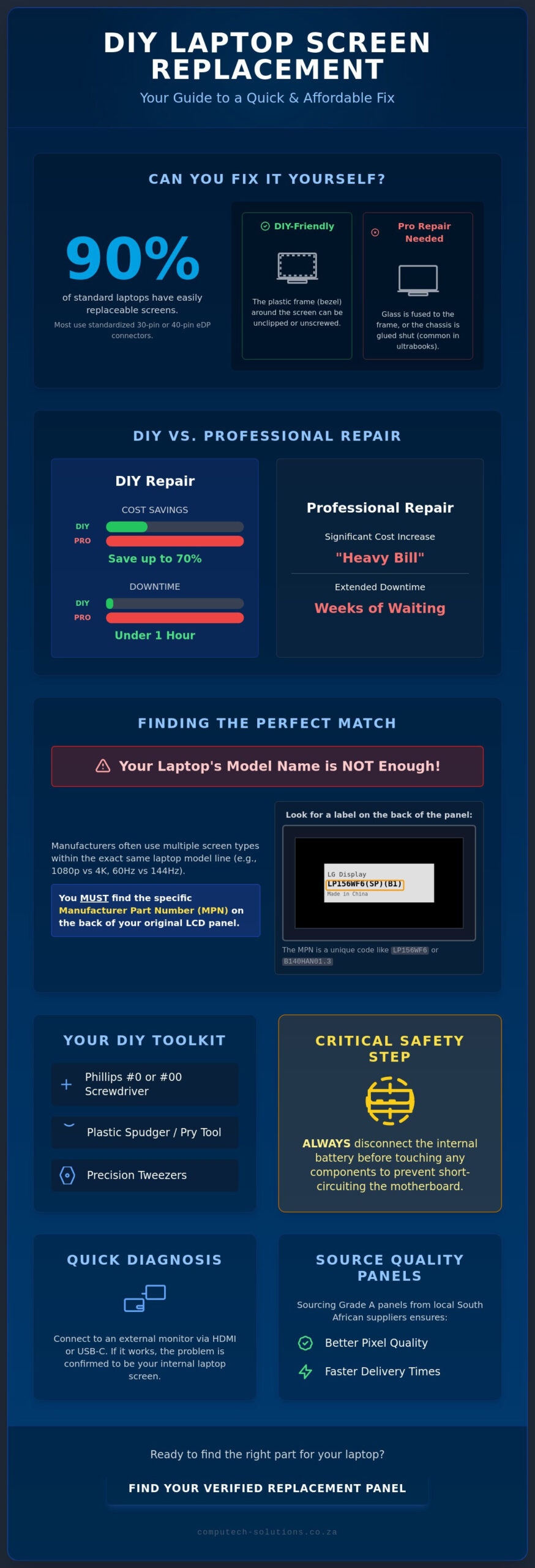
- Understand how DIY repairs can reduce your costs by up to 70% while cutting down downtime from several weeks to less than an hour.
- Master essential safety protocols, including internal battery disconnection, to prevent short-circuiting your motherboard during the installation.
- Discover the advantages of sourcing Grade A replacement panels from local South African suppliers to ensure better pixel quality and faster delivery.
Assessing the Damage: Can You Replace Your Laptop Screen Yourself?
Laptop screen replacement is often misunderstood as a complete overhaul of the device’s upper assembly. In reality, the process involves swapping the internal LCD or LED panel while keeping the original plastic or metal housing intact. Most modern devices produced through 2026 utilize a standardized video connector, typically a 30-pin or 40-pin eDP (Embedded DisplayPort) interface. This standardization is a primary reason why the answer to “can I replace my laptop screen myself” is a resounding yes for approximately 90% of standard models. Understanding how these laptop components interact is the first step toward a successful repair.
To determine if your device is a candidate for a home fix, perform a simple “bezel test.” If your screen is surrounded by a plastic frame that can be unscrewed or unclipped, the panel is likely accessible for a straightforward swap. However, if you own a high-end ultrabook where the glass is fused to the frame or the chassis is glued shut, professional intervention is usually safer. Devices with integrated touch layers or OLED displays often require specialized heat tools that increase the risk of accidental damage during a DIY attempt. If your laptop falls into the standard category, you can proceed with confidence.
Signs Your Screen Needs Replacement vs. Software Fixes
Physical trauma is easy to spot. Impact points often result in “ink bleeds” or spider-web cracks that indicate permanent hardware failure. These issues cannot be resolved with software updates. If your display is simply dark, you might be facing a failed backlight or a loose cable rather than a completely dead panel. Always connect your device to an external monitor via HDMI or USB-C first. If the external display works perfectly, your motherboard and graphics chip are healthy, confirming that the internal screen is the specific culprit. This diagnostic step prevents you from purchasing parts you don’t actually need.
The Tools You Actually Need
Successful hardware repair depends on having the right precision instruments. You don’t need a full workshop, but a few specific items are non-negotiable to ensure you don’t damage the casing or delicate electronics:
- Phillips #0 or #00 Screwdriver: Most internal laptop screws are tiny and easily stripped by standard household tools.
- Plastic Spudgers: These pry tools allow you to pop the bezel clips without scarring the finish of your casing.
- Precision Tweezers: Essential for handling delicate ribbon cable latches that are too small for human fingers.
Having these tools ready ensures the process remains streamlined and professional. It protects both the new panel and your laptop’s aesthetic integrity while you work.
The Critical First Step: Identifying Your Exact Laptop LCD Panel
Identifying the correct component is the most technical hurdle you’ll face. Many users assume that knowing their laptop’s model name, such as a Dell Latitude or HP Pavilion, is sufficient for ordering a part. It isn’t. Manufacturers often use three or four different screen types within the exact same model line depending on the original retail price point. You might have a 1080p matte display while another version of the same laptop uses a 4K glossy panel. If you’re asking “can I replace my laptop screen myself,” the success of your project depends entirely on matching the Manufacturer Part Number (MPN) found on the back of the original LCD.
Ordering a “compatible” screen based solely on size is a significant risk. These panels might have the right dimensions but feature different mounting bracket locations or refresh rates. In 2026, many mid-range laptops have shifted to 120Hz or 144Hz refresh rates. Installing a 60Hz panel in a system designed for higher speeds can cause flickering or a total failure to boot. To ensure a seamless installation, you should browse verified Laptop LCD Replacement Panels that match your specific hardware requirements.
Finding the LCD Model Number Without Opening the Case
Software tools provide a non-invasive way to start your search. Applications like HWiNFO can pull the “Monitor ID” string directly from your system’s firmware. This string often corresponds to the manufacturer’s internal code. You can also check your original purchase invoice or the detailed specification sheet provided by the manufacturer. While these digital methods are helpful, physical verification remains the only 100% accurate way to confirm what’s inside your chassis before spending money on parts.
Understanding Connector Pins and Positions
The video connector is the literal lifeline of your display. Most modern laptops use either a 30-pin or 40-pin eDP connector. These are not interchangeable; the 40-pin version typically supports higher resolutions or touch functionality. You must also verify the physical location of the connector. A panel with a bottom-left port won’t work if your internal ribbon cable is designed for a bottom-right connection. Finally, check the mounting ears. Some screens are held by brackets on the sides, while others use top and bottom ears. Matching these physical traits ensures you can safely replace your laptop screen yourself without having to modify the internal housing.
DIY vs. Professional Repair: Is the Risk Worth the Reward?
Deciding between a home repair and a professional service center requires a balanced view of your technical comfort and the age of your hardware. The financial savings are usually the primary driver; a DIY approach typically costs 50-70% less than manufacturer-authorized service centers. These centers often apply significant markups on components and include high labor fees. Beyond the cost, the speed of recovery is a critical factor. In 2026, professional turnaround times at official repair hubs can stretch into weeks due to service backlogs. If you have the part in hand, you can finish the job in roughly an hour.
Determining if you can replace your laptop screen yourself involves assessing your tolerance for technical risk. The primary hazard isn’t the screen itself but the motherboard. If the internal battery remains connected during the swap, a single spark can cause a catastrophic short circuit. Static discharge (ESD) is another factor that requires careful management. You must also consider your warranty. In South Africa, opening your laptop’s chassis often voids the manufacturer’s warranty. However, if your machine is over a year old, that warranty has likely expired, making the DIY route far more attractive for extending the device’s lifecycle.
When DIY is the Smartest Choice
Home repair is the most logical path for out-of-warranty machines where a professional quote exceeds 50% of the laptop’s current market value. Standard business models, such as the Dell Latitude, HP ProBook, or Lenovo ThinkPad, are designed with modularity in mind. These devices often feature accessible bezels and standardized connectors that simplify the process. If you possess basic mechanical aptitude and a steady hand, these machines are perfect candidates for a self-performed upgrade. It’s a practical way to maintain operational efficiency without the corporate price tag.
When to Seek Professional Help
Some hardware designs are intentionally restrictive. MacBooks with Retina displays are a prime example; the screen is often fused to the top assembly, requiring a much more complex replacement of the entire upper half of the laptop. Similarly, ultra-thin laptops with “infinity edge” displays use industrial adhesives instead of screws to hold the bezel in place. Removing these without specialized heat tools often results in a cracked frame. Finally, if your screen damage was caused by a liquid spill, professional diagnostics are essential. Liquid can corrode internal traces that a simple screen swap won’t fix, potentially leading to total system failure later.
Step-by-Step: How to Replace Your Laptop Screen Safely
Isolation of power is the most critical safety protocol before you begin any hardware manipulation. You must disconnect the AC adapter and, crucially, the internal battery. If your laptop has an integrated battery, you’ll need to remove the bottom cover first to pull the battery connector from the motherboard. In South Africa, you should also plan your repair around the load shedding schedule. Don’t attempt this process in poor lighting or during the final minutes of a power cycle; you need consistent, bright light and enough time to test the display before the power goes out. If you’re wondering “can I replace my laptop screen myself,” the answer depends on your ability to follow these safety steps without shortcuts.
Once the power is isolated, you can begin removing the bezel. Use a plastic spudger to gently pop the clips around the edge of the frame. Metal tools will scar the plastic and should be avoided. As the clips release, work your way around the perimeter until the bezel is free. You’ll then encounter the tiny screws holding the LCD panel to the lid or mounting brackets. These screws are exceptionally small and easily lost; place them in a magnetic tray or a labeled container to ensure they don’t fall into the laptop chassis where they could cause a short circuit later.
The ribbon cable is the final link. Most modern screens use a thin, wide cable secured by a tiny metal latch. You must flip this latch up with your tweezers or a fingernail before gently pulling the connector out. Never pull the cable itself, as the internal wires are fragile. Once the old panel is removed, you can browse our range of Laptop LCD Replacement Panels to find the exact match for your device. Before you snap the bezel back into place, perform a “dry boot” by reconnecting the battery and AC adapter to ensure the screen lights up and displays a clear image. This prevents the frustration of having to reopen the casing if the cable isn’t seated perfectly.
Dealing with Glued Bezels and Adhesive Strips
Many 2026 laptop models have moved away from screws in favor of industrial adhesives. If your bezel doesn’t pop off easily, it may be glued. Use a hairdryer on a low, warm setting to soften the glue before prying. Some internal panels are held by “stretch-release” tabs. You must pull these tabs horizontally and slowly, similar to how you would remove a Command strip from a wall. If you snap these tabs, you’ll have a much harder time removing the panel without bending the lid. Always replace the adhesive tape during assembly to prevent the new screen from rattling or shifting.
Final Assembly and Pixel Check
Alignment is vital during the final assembly. Ensure the ribbon cable is seated perfectly straight; a crooked connection often results in “no-backlight” issues or vertical lines on the display. Clean the new panel with a microfibre cloth to remove any fingerprints before you snap the bezel back on. Immediately after the first successful boot, run a dead-pixel test by displaying solid red, green, blue, and white backgrounds. This allows you to verify that your new hardware meets “Grade A” standards before you resume your normal workflow.
Sourcing Quality Replacement Panels in South Africa
Sourcing the hardware is the final piece of the puzzle. While international marketplaces might offer lower sticker prices, they often lead to logistical nightmares for South African buyers. Fragile LCD panels are highly susceptible to damage during long-haul transit and multiple customs handovers. If the part arrives cracked, the cost of international return shipping often exceeds the value of the screen itself. By choosing a local supplier, you ensure the panel is shipped in protective, screen-specific packaging designed for domestic couriers. This local proximity also provides a vital safety net: a functional return policy if the component is incompatible or damaged upon arrival.
If you’re still asking “can I replace my laptop screen myself,” the quality of the part you buy will dictate the final result. Professional suppliers categorize panels as “Grade A” or “Grade B.” Grade A panels meet the highest industry standards with zero dead pixels, ensuring your display looks exactly like the day you bought the laptop. Grade B panels are cheaper but may have noticeable dead pixels or minor surface scuffs. For a primary workstation, investing in Grade A hardware is the only way to maintain operational efficiency and visual clarity. Using a local partner like Computech-Solutions simplifies this search, providing a reliable source for high-quality hardware within the South African market.
What to Look for in a South African Supplier
A reliable partner should offer more than just a product. Look for suppliers that provide technical support to verify compatibility based on the Manufacturer Part Number you identified in earlier steps. National delivery options should be streamlined, moving quickly from the warehouse to your door to minimize downtime. Additionally, verify that the replacement part carries its own warranty. This protects your investment against premature failure, giving you the same stability you’d expect from a professional service center.
The Advantage of Generic vs. Branded Replacements
One of the biggest misconceptions in hardware repair is that you must buy a “Dell” or “HP” branded screen. In reality, these laptop manufacturers don’t produce their own displays. They source panels from specialized manufacturers like LG, Samsung, or AUO. When you purchase a replacement panel, you’re often getting the exact same hardware found in the original machine, just without the manufacturer’s logo on the box. This allows you to secure original quality without paying a premium for a brand name. If you’re ready to proceed, you can browse our full range of Laptop LCD Replacement Panels with nationwide delivery to find the definitive solution for your device.
Restore Your Display with Confidence
Mastering your own hardware repair is a practical way to bypass long service queues and excessive labor fees. By identifying your exact Manufacturer Part Number and following strict safety protocols, you can successfully revive your device in under an hour. When you ask, “can I replace my laptop screen myself”, the answer is a definitive yes for most users who prioritize precision and follow a structured approach. You’ve learned how to identify the correct panel, navigate the risks of modern adhesives, and why local sourcing provides the best protection for your investment.
As a specialist in Laptop LCD Replacement Panels, we provide the technical clarity you need for a seamless installation. We offer nationwide delivery across South Africa and provide expert technical support to ensure you select the correct hardware the first time. Don’t let a broken display disrupt your operational efficiency any longer. We’re here to ensure your DIY project is a success from start to finish.
Find the Exact Replacement Screen for Your Laptop Model Here
With the right tools and a steady hand, your laptop will be back to original quality before you know it.
Frequently Asked Questions
How much does it cost to replace a laptop screen in South Africa?
The total investment for a replacement depends on the panel’s resolution, display technology, and whether it features touch functionality. High-resolution OLED or 4K panels represent a higher investment compared to standard 1080p LED displays. While sourcing parts for a DIY repair is generally more cost-effective than professional service packages, you should verify your specific hardware requirements to determine the exact component costs involved for your model.
Will I lose my data if I replace my laptop screen myself?
Data loss is extremely unlikely during this repair because your files are stored on the internal SSD or hard drive. Replacing a screen only involves the display hardware and doesn’t interact with your storage system. As long as you follow standard safety protocols and prevent electrical shorts, your operating system and personal data will remain exactly as they were before the repair began.
Can I upgrade my screen resolution (e.g., from HD to Full HD) during replacement?
Upgrading resolution is technically possible but often requires a different video cable to handle the increased bandwidth. If your current screen is HD and uses a single-lane eDP cable, it won’t support a Full HD panel without a physical cable swap. Your motherboard must also be capable of driving the higher pixel density. It’s usually safer to stick with the original specifications to ensure total compatibility.
Why is my new laptop screen black after I installed it?
A black display after installation typically indicates an unseated video cable or a hardware failure caused by residual power. If you didn’t disconnect the battery, you might’ve blown the backlight fuse on the motherboard. When asking “can I replace my laptop screen myself”, remember that the ribbon cable must be perfectly level and locked into the connector to function. Re-check the connection before assuming the new panel is defective.
Do I need to disconnect the battery if the laptop is turned off?
Yes, you must disconnect the battery even if the device is powered down. Modern laptops maintain a small electrical current to the motherboard for features like quick-start and internal clocks. Touching the video connector while this current is present can permanently damage the backlight circuit or blow a fuse. Always pull the battery connector or remove the external battery pack before you touch any internal display cables.
What is the difference between an LCD and an LED laptop screen?
In the context of modern laptops, LED screens are actually a type of LCD. The term LED refers to the Light Emitting Diodes used for backlighting, whereas older screens used CCFL lamps. Almost every replacement panel produced in 2026 uses LED backlighting because it’s more energy-efficient and allows for thinner lid designs. When sourcing parts, you’ll find most listings use these terms interchangeably for current hardware.
Can I fix a cracked laptop screen with tape or glue?
No, tape or glue cannot repair the internal damage caused by a cracked display. A crack ruptures the liquid crystal cells and the glass substrate, leading to permanent ink bleeds or dead zones on the image. Adhesive fixes are only suitable for external cosmetic damage to the plastic bezel. Once the internal panel is compromised, the only definitive solution is a total replacement of the LCD hardware.
How long does it take to DIY replace a screen?
Most standard screen replacements take between 30 and 60 minutes for a first-time installer. If your laptop uses screws to secure the bezel and panel, the process is very fast. When considering can I replace my laptop screen myself, remember that models with industrial adhesives might require more time to remove safely. Once you have the correct tools and a clear workspace, the actual hardware swap is a streamlined task.
