
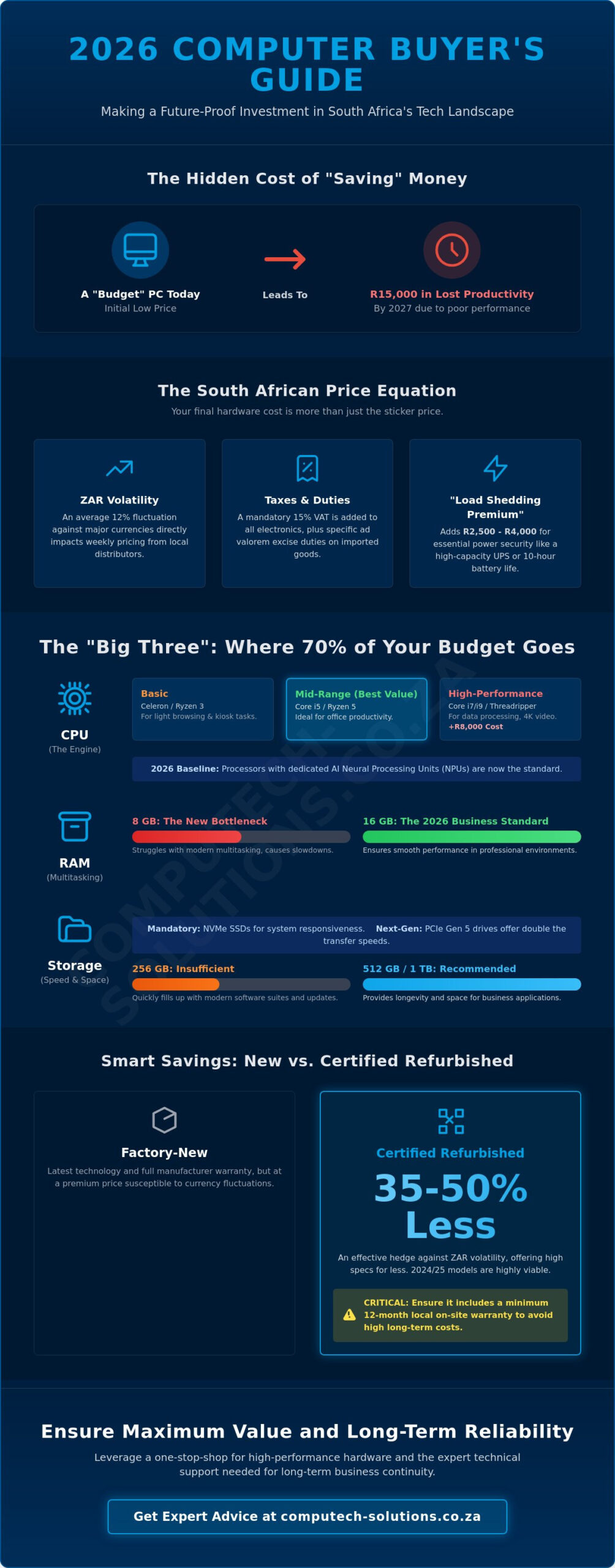
A budget-focused computer purchase today can cost your business R15,000 in lost productivity by 2027 if it lacks the specific resilience needed for South Africa’s unique power environment. You likely feel the pressure of watching the ZAR exchange rate fluctuate while trying to find a competitive computer price that doesn’t compromise on quality. It’s a common stress for decision-makers who need to secure high-performing tools without overextending their capital or risking hardware failure during unexpected outages.
This guide ensures you master the specific factors influencing hardware costs in the current market, allowing you to get the best possible performance for your specific budget. We’ll provide the clarity you need to distinguish between unnecessary features and the critical components that prevent technical downtime and premature obsolescence. You’ll gain a clear understanding of 2026 price tiers and the knowledge required to source reliable hardware and replacement parts that withstand local infrastructure challenges.
Key Takeaways
- Understand how the South African Rand exchange rate and local market trends dictate hardware procurement costs to time your investment effectively.
- Identify the critical technical specifications that drive performance to ensure your budget is allocated toward future-proof components like the processor.
- Navigate every computer price bracket in the local market, including how to find reliable student and office solutions for under R10,000.
- Protect your investment by accounting for the total cost of ownership, including essential maintenance and battery replacement cycles.
- Leverage a one-stop-shop philosophy to secure both high-performance hardware and the expert technical support needed for long-term business continuity.
Understanding Computer Price Trends in South Africa for 2026
South African businesses face unique challenges when budgeting for hardware due to a combination of global tech cycles and local economic pressures. The computer price landscape in 2026 is defined by the integration of AI-capable silicon as a baseline standard rather than a premium feature. By January 2026, processors featuring dedicated Neural Processing Units (NPUs) have become the minimum requirement for enterprise software, shifting the baseline cost for entry-level workstations higher than in previous years.
The South African Rand remains the most significant variable in hardware procurement. Local distributors often adjust pricing weekly to account for ZAR volatility, which saw an average fluctuation of 12% against major currencies in the preceding fiscal year. While Moore’s Law historically suggested that performance would increase as costs decreased, the complexity of 3nm and 2nm manufacturing processes has stabilized prices at a higher floor. Global silicon supply chains have recovered from the disruptions of the early 2020s, yet South Africa’s geographic position adds a logistical premium to every unit landed on retail shelves.
Economic Factors Affecting Your Budget
Your final computer price includes a 15% Value Added Tax (VAT) and specific ad valorem excise duties that apply to imported electronics. In 2026, the “Load Shedding Premium” is a critical budget line item. Businesses now prioritize laptops with 10-hour verified battery lives or desktops bundled with high-capacity Pure Sine Wave UPS systems. This power-security requirement adds approximately R2,500 to R4,000 to the cost of a standard office setup. For the best value, procurement should be targeted during the “Back to Business” window in late January or the Black Friday period, where retail margins are often slashed by 15% to 20%.
New vs Refurbished: The Price Gap
Choosing between factory-new and certified refurbished hardware is a strategic decision for cost management. A certified refurbished Tier-1 workstation typically costs 35% to 50% less than its current-generation equivalent. This serves as an effective hedge against currency-driven price hikes, allowing departments to maintain high specifications despite a weaker Rand. We advise clients to verify that refurbished units include a minimum 12-month local on-site warranty. Without local support, a lower initial purchase price often leads to higher long-term operational costs when technical failures occur. Refurbished hardware from 2024 and 2025 remains highly viable for standard administrative tasks, provided the components support the latest security protocols required by South African data privacy regulations.
Key Technical Specifications That Drive Computer Costs
Understanding what influences a computer price in the South African market requires looking at the “Big Three” components: the central processing unit (CPU), memory (RAM), and storage (SSD). These three elements typically account for 70% of the total hardware cost. When businesses evaluate these specs, they must consider the Total Cost of Ownership (TCO) rather than just the initial sticker price. A cheaper machine often costs more over a three-year lifecycle due to performance degradation and increased maintenance requirements.
The Processor Power Scale
The CPU serves as the engine of your workstation. By January 2026, entry-level chips like Intel Celeron or Ryzen 3 are strictly for basic kiosk tasks or light browsing. Mid-range chips such as the Intel Core i5 or Ryzen 5 provide the best balance for office productivity, offering enough overhead to handle the latest operating systems. High-performance i7, i9, or Threadripper systems are essential for heavy data processing and 4K video editing, though they can increase the base computer price by R8,000 or more. In 2026, the performance-per-Rand metric for processors is defined by the chip’s ability to handle concurrent AI background tasks without throttling primary application speed.
Memory and storage requirements have shifted significantly. 8GB of RAM is no longer the standard for business efficiency; it’s a bottleneck. By 2026, 16GB is the baseline for smooth multitasking in professional environments. For storage, NVMe SSDs are mandatory for speed. While a 256GB drive might seem cost-effective, it’s often insufficient for modern software suites. Upgrading to a 512GB or 1TB drive ensures longevity. New PCIe Gen 5 drives offer double the transfer speeds of previous generations, though they currently carry a 25% price premium over Gen 4 models.
Graphics and Specialised Hardware
Integrated graphics suit standard administrative work and help keep costs down. However, dedicated GPUs from NVIDIA or AMD add between R4,000 and R15,000 to the total cost depending on the VRAM capacity. A new factor in the 2026 market is the Neural Processing Unit (NPU). These AI-accelerators are now standard in “AI PCs,” helping reduce CPU load by up to 30% during video calls and real-time data encryption. Specialized crypto-mining or rendering hardware uses high-wattage power supplies and specialized cooling, which differs significantly from standard office hardware configurations and pricing structures.
If you’re unsure which configuration fits your team’s specific workflow, our experts can help you choose the right hardware to ensure your investment delivers long-term value without unnecessary overspending.
Price Brackets: What Can You Get for Your Budget?
The South African hardware market in 2026 is defined by three distinct price tiers. Understanding these brackets helps you align your investment with your operational requirements. Every computer price is influenced by the performance of key components like the processor and memory density. Choosing the right tier isn’t just about the initial cost; it’s about the total cost of ownership over the next three to five years.
Tier 1: Entry-Level Value
This category focuses on users requiring reliability for basic tasks under R10,000. You’ll typically find machines equipped with Intel Core i3 or AMD Ryzen 3 processors, 8GB of RAM, and 256GB solid-state drives. These units suit home schooling or simple administrative work. A common pitfall in this bracket is purchasing “bargain” laptops with soldered memory. This prevents future upgrades and shortens the device’s lifespan. For the best value, look for units with at least one open SO-DIMM slot for RAM expansion. When components fail outside of warranty, local retailers like Wootware or Evetech offer the most cost-effective replacement parts for these specific entry-level models.
Tier 2: The Professional Sweet Spot
Ranging from R15,000 to R30,000, this bracket provides the best longevity for South African business owners. You aren’t just paying for speed; you’re paying for durability. Machines in this range often feature aluminium chassis instead of plastic. This material choice reduces mechanical failures related to hinge stress by approximately 15% in high-mobility environments. We recommend brands like Dell (Latitude series) or Lenovo (ThinkPad) due to their robust local parts availability and on-site support options in South Africa. It’s a strategic move for companies that need to minimize technical downtime without the extreme cost of workstation-grade gear.
Tier 3: Enterprise and High-End Gaming
For budgets exceeding R35,000, the focus shifts to no-compromise hardware. This tier is essential for 3D rendering, complex data analytics, or competitive gaming. You can expect high-refresh-rate displays and dedicated GPUs with at least 8GB of VRAM. While the initial computer price is higher, these systems offer a 40% longer relevance cycle compared to entry-level units. They support the latest cybersecurity protocols and managed services environments, ensuring your infrastructure remains secure and efficient for years. These machines represent a definitive solution for power users who cannot afford performance bottlenecks.
- Budget (Under R10k): Best for students and basic office admin.
- Mid-Range (R15k – R30k): The standard for professional reliability and build quality.
- High-End (R35k+): Necessary for specialized technical roles and intensive processing.
Managing the Total Cost of Ownership: Batteries, Power, and Longevity
The initial computer price represents only the first stage of a long-term financial commitment. In the South African market, environmental factors and infrastructure instability significantly influence the total cost of ownership (TCO). Business owners often overlook the secondary expenses required to keep hardware operational for its intended four or five-year lifespan. You need to account for protection against power surges, battery degradation, and the eventual need for component refreshes to avoid premature replacement costs.
- Surge Protection: High-quality surge strips are mandatory to protect sensitive silicon from grid spikes.
- UPS Systems: An entry-level 600VA to 1000VA UPS provides the necessary window to shut down equipment safely during sudden outages.
- Solar Compatibility: Selecting energy-efficient components reduces the load on your backup batteries. This allows for longer work sessions during daytime power interruptions.
The Critical Role of Laptop Battery Maintenance
Load shedding cycles accelerate the chemical aging of lithium-ion cells. Most laptop batteries are rated for approximately 300 to 500 full charge cycles before their capacity drops below 80%. In South Africa, where devices frequently switch between AC and DC power several times a day, users often hit this limit within 18 to 24 months. While generic batteries are available at lower price points, they frequently lack the sophisticated power management chips found in brand-name alternatives. A R1,000 battery replacement can save a R15,000 laptop.
LCD Panels and Component Repairs
Hardware failures don’t always signal the end of a device’s utility. Replacing an LCD panel typically costs between R2,500 and R5,000, which is significantly more affordable than purchasing a new mid-range unit. However, the quality of your repair components matters. Sourcing chargers and power adapters from a specialist prevents motherboard damage caused by unstable power delivery. Many businesses now rely on nationwide delivery services to get these critical repair parts to remote branches within 24 to 48 hours. This strategy minimizes downtime and maximizes the return on your initial computer price investment.
Maintain your hardware’s peak performance with professional assistance. Contact Computech Solutions for comprehensive IT support and component sourcing.
Why Sourcing from Computech-Solutions Ensures Maximum Value
Securing a competitive computer price is just the beginning of a successful IT strategy. At Computech Solutions, we operate with a one-stop-shop philosophy that prioritizes long-term operational efficiency over simple transactions. This approach ensures you have immediate access to both primary hardware and the specific replacement parts needed to maintain it. We’ve seen that technical delays often stem from a lack of ready components; we solve this by stocking high-quality batteries and chargers for every major brand in the country.
Our expert technical support team provides solutions that extend well beyond the initial sale. We don’t just ship boxes. We act as a professional partner that understands the South African business climate. Our nationwide delivery network reaches every province, ensuring that a critical hardware failure in a remote area doesn’t result in days of lost productivity. You get reliable access to the tools you need, regardless of your location. We’re committed to keeping your business moving with technical support that focuses on stability and confidence.
Comprehensive Hardware Support
We specialize in Acer, Dell, HP, and Lenovo components to provide deep technical expertise for the most common professional systems in South Africa. Choosing the right specifications the first time is vital for your budget. Our technical expertise ensures you select hardware that justifies the computer price by delivering a lower total cost of ownership over a five-year lifecycle. To counter local energy instability, we provide integrated solar power solutions. These systems are designed to maintain uptime during load-shedding, ensuring your hardware investment isn’t sidelined by grid failures.
- Expert guidance on Acer, Dell, HP, and Lenovo ecosystem compatibility.
- Dedicated inventory of high-capacity batteries and chargers to extend device lifespan.
- Customized solar and backup power configurations for uninterrupted business operations.
Secure and Reliable Online Shopping
Our online platform offers a streamlined checkout process for both individual components and full workstation deployments. We’ve built our reputation as a trusted advisor by providing a secure environment for all IT procurement. This eliminates the risks often associated with sourcing hardware from unverified vendors. You can rely on our stable, authoritative guidance to navigate the complexities of modern infrastructure. We handle the technical logistics so you can focus on your core business growth.
Take the next step in securing your business infrastructure today. View our latest range of desktops and laptops to find the perfect balance of performance and value for your specific needs.
Secure Your Technology Strategy for 2026
Navigating the South African IT market in 2026 requires a sharp focus on both performance and power resilience. Success depends on balancing technical specifications with the total cost of ownership, especially as energy costs and hardware demands shift. By prioritizing energy-efficient components and robust battery backups, you ensure that your initial computer price investment yields a high return over a standard three to five-year hardware lifecycle. Reliable hardware is the foundation of any stable business; making informed choices now prevents costly technical downtime later.
Computech Solutions acts as your trusted partner by offering end-to-end support for all your hardware requirements. We provide nationwide South African delivery and maintain a specialized inventory of replacement batteries for every major brand. Our team delivers expert technical support for both solar installations and IT hardware, bridging the gap between power stability and digital productivity. You don’t have to manage these technical complexities alone when professional guidance is readily available.
Find the best value on computers and parts at Computech-Solutions
Taking control of your IT budget today sets the stage for a more efficient and productive future for your entire organization.
Frequently Asked Questions
What is the average computer price for a reliable office laptop in 2026?
A reliable office laptop in 2026 averages between R14,500 and R21,000 for a machine equipped with a mid-tier processor and 16GB of RAM. This computer price reflects the hardware requirements for modern cloud-based productivity suites and multitasking. We recommend investing in this mid-tier bracket to ensure a three year operational lifespan without significant performance degradation.
Why are computer prices higher in South Africa compared to the US or UK?
South African hardware costs remain higher because of 15% Value Added Tax (VAT) and complex international shipping logistics. The volatile exchange rate between the Rand and the US Dollar creates pricing fluctuations of up to 12% within a single quarter. Local distributors also factor in extended warranty support costs that are unique to our regional market conditions.
Is it better to buy a cheap laptop and upgrade the RAM later?
Buying a cheap laptop to upgrade later is often impossible because 70% of modern entry-level devices use soldered memory that cannot be replaced. You’ll likely void the manufacturer’s warranty by opening the chassis yourself. It’s more cost-effective to purchase a machine with the required 16GB of RAM from the start to maintain your hardware support agreement.
How much does a replacement laptop battery typically cost in South Africa?
A replacement laptop battery in South Africa typically costs between R950 and R2,800 depending on the brand and cell capacity. Genuine OEM batteries sit at the higher end of this scale but offer a 12 month warranty for peace of mind. We suggest replacing batteries when they reach 300 to 500 charge cycles to prevent swelling and potential motherboard damage.
Can load shedding damage my computer, and how do I prevent it?
Sudden power cuts and surges from load shedding can destroy your motherboard and power supply unit instantly. Protect your investment by using an SABS approved Uninterruptible Power Supply (UPS) or a dedicated surge protection plug. These devices provide a 5 millisecond response time to isolate your hardware from high-voltage spikes when the grid returns after a blackout.
Are refurbished computers a safe way to save money on hardware?
Refurbished computers are a safe way to reduce your computer price by 30% to 50% if you purchase from a certified Microsoft Refurbisher. These units undergo a 25 point diagnostic check and include a standard 12 month warranty. This approach allows businesses to acquire enterprise-grade hardware that would otherwise exceed their budget for new equipment purchases.
Does a higher price always mean better performance for my specific needs?
A higher price doesn’t always translate to better performance for specific office tasks like document editing or web browsing. Spending R40,000 on a high-end workstation is unnecessary if your workflow only requires basic cloud connectivity. Match your hardware specifications to your actual software requirements to avoid wasting 40% of your IT budget on unused processing power.
How often should I budget for a new computer in a business environment?
Businesses should budget for a new computer every 3 to 4 years to maintain peak operational efficiency. After 48 months, the risk of hardware failure increases by 25% and software compatibility issues begin to slow down employee output. A structured refresh cycle ensures your security patches remain current and your technical downtime stays below 2% annually.
