
Last Tuesday, a Johannesburg professional discovered that a cheap, unbranded power supply had permanently damaged their R15,000 Latitude workstation during a standard load shedding switchover. It’s a common nightmare. You likely feel the same anxiety when searching for a new dell laptop charger, caught between the fear of buying a counterfeit part and the frustration of mismatched connectors. We agree that your hardware deserves better than a “best guess” solution that might degrade your battery or fry your motherboard.
This guide provides the technical clarity you need to identify the exact wattage, voltage, and pin size, such as the common 4.5mm small barrel, required for your specific model. You’ll learn how to distinguish between legacy pins and modern USB-C standards to ensure a perfect fit every time. We also explain how to choose adapters with built-in surge protection to survive the power fluctuations common in our local grid. By the end of this article, you’ll know exactly how to secure a reliable replacement with fast nationwide delivery to get your business back online.
Key Takeaways
- Learn to identify the correct pin size and connector type to ensure your replacement adapter fits securely and functions correctly.
- Understand the critical relationship between voltage and wattage to select a dell laptop charger that maintains long-term battery health and performance.
- Gain insights into protecting your hardware from the damaging power surges and voltage fluctuations common during South African load shedding.
- Compare the benefits of genuine Dell components against high-quality generic alternatives to balance cost-efficiency with equipment safety.
- Discover how to source reliable, tested power solutions locally to minimize technical downtime and ensure continuous business productivity.
Identifying Your Dell Laptop Charger: Pin Types and Connectors
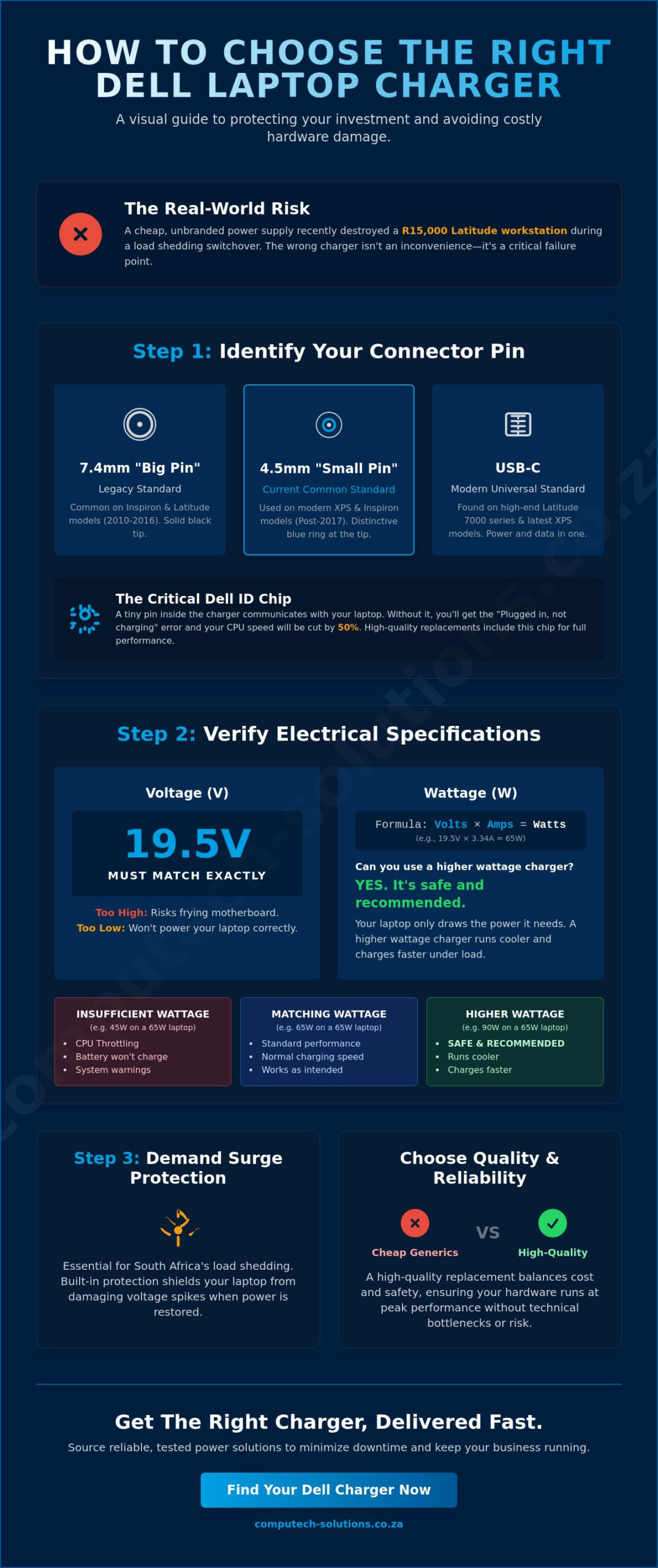
Selecting the correct dell laptop charger isn’t just about finding a plug that fits into the side of your machine. It’s a matter of electrical precision. If the barrel size is off by even half a millimeter, you risk permanent hardware failure. Dell utilizes three primary connector types across their South African product range, each designed for specific power requirements and chassis thicknesses. An AC adapter converts high-voltage wall power into the stable DC voltage your laptop requires, but the physical interface is the first line of defense against electrical issues.
- The 7.4mm “Big Pin”: This was the standard for over a decade. It’s common in Inspiron and Latitude models manufactured between 2010 and 2016. You’ll still find these on many refurbished units sold in Johannesburg and Cape Town retail hubs.
- The 4.5mm “Small Pin”: As laptops became thinner, Dell introduced this smaller connector. It’s the standard for the XPS series and newer Inspiron 3000 or 5000 models released after 2017.
- USB-C Charging: This is the 2024 standard for high-end Latitude 7000 series and the latest XPS 13 Plus. It allows for data transfer and power delivery through a single port.
Measuring Your Connector Pin
You don’t need specialized laboratory equipment to identify your port. Use a standard metric ruler to measure the outer diameter of the barrel. A 7.4mm plug is roughly the width of a standard AA battery’s tip, while the 4.5mm plug is closer to the thickness of a matchstick. Visual cues help too. Most Dell 4.5mm adapters feature a distinctive blue ring at the tip, whereas the 7.4mm versions are typically solid black. Don’t force a connection that feels loose. A poor connection causes electrical arcing, which can fry a R6,000 motherboard in seconds.
The Dell Proprietary ID Chip
Dell laptops are engineered with a security feature that checks for a genuine dell laptop charger. Inside the center of the charging pin sits a tiny wire connected to a proprietary ID chip. This chip tells the BIOS that the power source is safe. If this pin is bent or if you use a low-quality R200 generic adapter, you’ll see the “Plugged in, not charging” error. The laptop might run, but it won’t charge the battery, and it often throttles the CPU speed by 50 percent to protect the system. High-quality replacements from trusted South African suppliers include this chip to ensure your hardware runs at peak performance without technical bottlenecks.
Understanding Wattage and Voltage Requirements
Selecting a dell laptop charger requires technical precision because the wrong electrical specifications can lead to hardware failure or degraded battery health. Most Dell laptops operate on a standard 19.5V (Volts) platform. This voltage must match your original equipment exactly. A higher voltage can fry your motherboard circuits; a lower voltage won’t provide enough pressure to power the internal components. You’ll find these details on the label of your existing power brick or printed in small text on the base of your laptop, usually near the serial number or service tag.
The relationship between Amperage (A) and Wattage (W) is a simple calculation: Volts multiplied by Amps equals Watts. For example, a 19.5V adapter rated at 3.34A provides 65W of power. If you use an adapter with insufficient wattage, your laptop might display a BIOS warning at startup, throttle CPU performance to save energy, or refuse to charge the battery entirely. This under-powering creates a bottleneck that affects productivity. Given the frequent power fluctuations and load shedding schedules in South Africa, ensuring your hardware receives stable power is critical. We recommend Understanding Surge Protectors to safeguard your investment against the high-voltage spikes that often occur when the grid returns after a blackout.
Can You Use a Higher Wattage Charger?
It’s a common misconception that a 90W charger will damage a laptop designed for 65W. In reality, your laptop is the “master” in this relationship. It only draws the specific amount of power it needs from the adapter. Using a higher wattage dell laptop charger is perfectly safe and often beneficial for your hardware’s longevity. It provides more “headroom,” meaning the charger runs cooler because it’s not working at its maximum capacity. This extra capacity also allows for faster charging when you’re using resource-heavy applications like video editing or CAD software. If you’re unsure which capacity fits your specific model, you can consult with our technical team for a compatibility verification.
Wattage Requirements by Dell Series
Power needs vary significantly across the Dell ecosystem based on the internal hardware components. Standard office units like the Dell Inspiron and Vostro series typically require 65W adapters for daily tasks. High-performance workstations like the Dell Precision or Alienware gaming rigs often demand 130W, 180W, or even 240W to maintain peak performance under heavy load. For modern ultra-portables and XPS models, USB-C Power Delivery (USB-C PD) is the new standard. USB-C PD is a communication protocol that allows the charger and laptop to negotiate the exact voltage and wattage required for safe, efficient energy transfer over a universal cable.
Protecting Your Hardware from Load Shedding and Surges
The South African power grid presents a high-risk environment for sensitive electronics. With load shedding reaching record levels in 2023, your dell laptop charger faces constant operational stress. The most dangerous moment isn’t the blackout itself; it’s the restoration of service. When power returns, a massive spike known as inrush current can flood the local circuit. This surge often exceeds the standard 230V capacity of residential wiring, potentially frying the internal capacitors of your power adapter instantly. Without the right protection, these fluctuations lead to hardware degradation or immediate failure.
Surge Protection Features in Quality Adapters
Professional-grade adapters are engineered with sophisticated safety circuitry to mitigate these risks. When you select a replacement dell laptop charger, you must verify it includes built-in over-voltage, over-current, and short-circuit protection. These units utilize Metal Oxide Varistors to divert excess energy away from your laptop’s motherboard. The physical power cable, commonly known as a kettle lead in South Africa, plays a vital role in this ecosystem. A high-quality 3-prong cable ensures proper grounding, which is your first line of defense. Cheap, unbranded alternatives often omit these internal safety components to reduce manufacturing costs, leaving a R20,000 laptop vulnerable to a single voltage fluctuation.
Best Practices for Laptop Longevity
Maintaining your hardware in a volatile power environment requires a proactive strategy. Implementing these small changes can extend the life of your equipment significantly:
- Unplug before the cut: Make it a habit to physically disconnect your charger five minutes before a scheduled load shedding slot. This prevents the initial “kick” from hitting the device when the grid restarts.
- Use dedicated surge plugs: Invest in a high-quality surge protection plug from a reputable local brand. These R200 devices act as a sacrificial barrier, blowing their own internal fuse to save your expensive charger.
- Monitor thermal levels: Check the temperature of the charger brick during use. If it’s too hot to hold comfortably, the internal components are likely struggling with “dirty” power or inconsistent current.
- Avoid daisy-chaining: Don’t plug your laptop into overloaded multi-plugs. Direct wall connections or high-quality power strips are essential for stable energy delivery.
Reliable power management is about more than just convenience; it’s about protecting your digital assets. By choosing certified hardware and following disciplined charging habits, you reduce the risk of catastrophic hardware failure. This approach ensures your business remains operational during even the most severe power cycles. We recommend treating your charger as a critical component of your cybersecurity and disaster recovery plan, rather than just an accessory.
Genuine Dell vs. High-Quality Replacement Chargers
Selecting a dell laptop charger requires a clear understanding of the difference between original equipment and dangerous counterfeits. A genuine Dell adapter is engineered with specific communication chips that “talk” to the laptop motherboard. If this handshake fails, the system often limits battery charging or reduces the processor speed to its lowest state, usually around 800MHz, to prevent power surges. While the upfront cost for an OEM unit typically ranges from R850 to R1,600 depending on the wattage, the protection it offers against R25,000 motherboard repairs justifies the investment.
Distinguishing between a high-quality generic and a counterfeit is essential for hardware safety. Genuine replacements weigh significantly more than fakes because they contain proper heat sinks and EMI shielding. A counterfeit unit often weighs under 200g, while a standard 65W OEM brick weighs approximately 280g. You’ll also notice cable thickness differences; high-quality units use 18AWG copper wiring, whereas cheap fakes use thinner 22AWG strands that can melt under sustained 19.5V loads. Warranty coverage also differs, as genuine parts usually carry a 12-month manufacturer guarantee, while unbranded fakes often offer no recourse after a 7-day return window.
When to Buy Original Dell
Original chargers are mandatory for critical work environments where a single hour of downtime costs thousands in lost productivity. If your device is currently covered by a Dell ProSupport or Basic Warranty, stick with OEM parts. This ensures you don’t void your service contract. High-wattage systems, specifically gaming units like the Alienware series or Precision mobile workstations requiring 180W or 240W, must use original adapters. These high-draw machines are sensitive to voltage fluctuations that generic units can’t always regulate with 100% accuracy.
The Case for Reliable Replacements
For older Dell Latitude or Inspiron models that have reached the end of their official support life, high-quality replacements are a smart financial choice. These units provide a second life to hardware without the high OEM price tag. At Computech Solutions, we vet every replacement component to ensure it meets strict safety benchmarks. We verify that the voltage ripple remains under 100mV, which is the industry standard for stable power delivery. This approach means you get a tested, safe dell laptop charger without the risk of buying an unverified unit from an open marketplace.
Reliable Dell Charger Solutions at Computech-Solutions
Finding a reliable dell laptop charger in South Africa shouldn’t be a gamble. At Computech Solutions, we provide power adapters that have undergone rigorous testing to ensure they meet local voltage requirements and safety standards. Our commitment is to eliminate the risks associated with generic, low-quality chargers that can damage your motherboard or cause electrical fires. We prioritize operational efficiency by stocking components that offer stable power delivery for both home users and corporate environments. Every unit we sell is vetted for durability, ensuring your hardware remains protected against power surges common in the local grid.
Expert Support for Your Purchase
Identifying the correct part is often the biggest hurdle for users. Our technical team is available to assist you through a direct consultation process. Simply provide your Dell Service Tag, a unique seven-character identifier found on the bottom of your laptop. This allows us to verify exact wattage and pin size compatibility before you commit to a purchase. Choosing a local specialist means you get faster response times and localized expertise compared to international marketplaces. We operate with a one-stop-shop philosophy; we handle everything from technical verification to the final delivery of your laptop components. This integrated approach reduces the risk of ordering the wrong part and saves you from unnecessary downtime.
Order Your Replacement Today
We’ve optimized our online store to make finding a dell laptop charger straightforward and fast. Our checkout process is designed for speed, allowing you to secure your hardware in just a few clicks. We support secure payment methods tailored for South African users, including instant EFT and encrypted credit card gateways that protect your financial data. We offer nationwide delivery across all nine provinces, with typical shipping times of 24 to 48 hours for major hubs like Johannesburg, Cape Town, and Durban. If a part doesn’t meet your specific requirements, our return policy ensures a hassle-free resolution. We understand that every hour of downtime impacts your productivity. That’s why we focus on rhythmic efficiency in our logistics to get your hardware back online without delay.
- Verified Compatibility: We match chargers to your specific Dell model or part number.
- Local Expertise: Benefit from support that understands South African power conditions.
- Secure Transactions: Multiple payment layers ensure your data remains private.
- Fast Logistics: Reliable courier partners deliver directly to your door or office.
Find your compatible Dell charger here and restore your laptop’s performance with a trusted power solution.
Secure Your Hardware with the Correct Power Solution
Selecting a dell laptop charger requires absolute precision regarding pin dimensions and wattage output to avoid irreversible motherboard failure. Using an incorrect adapter leads to rapid battery degradation, which is a significant risk during the frequent load shedding cycles managed by Eskom across the national grid. We eliminate this technical uncertainty by providing high-quality replacement components that meet ISO 9001 standards for safety and performance. Our expert technical support team is available to verify your specific model requirements before you finalize your purchase, ensuring 100% compatibility for your device. We provide nationwide delivery across all 9 provinces to keep your business operational without long technical delays. You’ll find that our tested solutions protect your hardware investment against South Africa’s unpredictable power fluctuations. It’s time to restore your productivity with a power solution you can trust. We’re here to ensure your laptop stays charged and your data remains safe.
Browse Our Full Range of Dell Compatible Chargers
Frequently Asked Questions
How do I know which Dell charger I need?
You can identify the correct charger by checking the output specifications on the bottom of your laptop or your existing power brick. Look for the Voltage (V) and Amperage (A) ratings. For instance, if your laptop requires 19.5V and 3.34A, you need a 65W adapter. You must also match the connector pin size to your laptop’s charging port to ensure a secure fit.
Can I use a 90W charger on a 65W Dell laptop?
Yes, it’s perfectly safe to use a 90W charger on a laptop that originally came with a 65W unit. The laptop’s internal power management system only draws the specific wattage it needs to operate and charge the battery. Using a higher wattage adapter can actually reduce heat stress on the charger, though it won’t necessarily charge your battery faster than the system’s maximum intake limit.
Why does my Dell laptop say “AC power adapter type cannot be determined”?
This error message occurs when the laptop’s BIOS doesn’t recognize the identification chip inside the power cable. It’s often caused by a bent center pin in the connector or a failing DC jack on the motherboard. When this happens, the system usually limits performance and stops charging the battery to prevent potential electrical damage. This safeguard ensures that a faulty power source doesn’t compromise your internal hardware.
Are generic Dell chargers safe to use?
Generic chargers often lack the rigorous over-voltage and thermal protection circuits found in original equipment. Industry data suggests that 30% of motherboard power failures are linked to the use of substandard, third-party adapters. Choosing a certified dell laptop charger protects your investment and ensures compliance with South African safety standards. High-quality components prevent the electrical noise that can interfere with touchpad sensitivity and screen clarity.
What is the difference between the 4.5mm and 7.4mm Dell pin?
The difference is the external diameter of the barrel connector that plugs into your machine. The 7.4mm pin is the older, larger standard found on many Latitude and Inspiron models produced before 2015. The 4.5mm pin is the modern “small pin” standard used for slim Ultrabooks and the XPS series. If you have an older 7.4mm charger, you can use a R150 adapter dongle to convert it for use with newer 4.5mm ports.
Can I charge my Dell laptop with a USB-C phone charger?
Most phone chargers only provide 10W to 20W of power, which isn’t enough to charge a laptop that requires at least 45W or 65W. While the USB-C plug fits the port, your Dell will likely display a “Slow Charger” warning or fail to charge entirely. You must use a USB-C Power Delivery (PD) charger that meets the specific wattage requirements listed on your device’s regulatory label for efficient operation.
Does a faulty charger affect my laptop battery life?
A faulty dell laptop charger can significantly shorten your battery’s lifespan by delivering unstable voltage. This electrical “ripple” causes the battery cells to heat up beyond their 35-degree Celsius optimal operating temperature. Consistent exposure to improper current can reduce a battery’s total charge cycles by 40% over a single year. Reliable power delivery is the most important factor in maintaining the long-term health of your lithium-ion cells.
How long does nationwide delivery take for a Dell charger?
Delivery across South Africa typically takes 1 to 3 business days depending on your specific region. Orders bound for major metropolitan hubs like Johannesburg, Pretoria, or Cape Town are often delivered within 24 hours. If you’re located in a more remote or outlying area, the courier process might take up to 72 hours. We provide tracking numbers for every shipment so you can monitor your package’s progress from our warehouse to your door.
