
What if the only barrier to a perfectly functional device is a R1,500 difference in labor costs? It’s frustrating to face a shattered display and realize professional repair quotes often exceed 50% of the laptop’s original value. This DIY laptop screen replacement guide empowers you to take control of your hardware by sourcing high-quality panels and performing the installation with technical precision. While the Right to Repair movement gained significant ground with Washington’s law taking effect on January 1, 2026, the real secret to success isn’t just mechanical skill; it’s the precision of part identification.
We understand the hesitation that comes with opening your device. You don’t want to risk damaging the motherboard or end up with an incompatible panel from an unreliable source. Our guide simplifies the process, showing you how to source high quality replacement LCD panels from trusted South African suppliers like Netlink and Asetos Computers. You’ll learn to identify your specific hardware requirements, handle delicate internal connectors, and complete the installation with the confidence of a seasoned technician. We’ll cover everything from basic LCD swaps to high end OLED configurations so you can restore your laptop’s functionality without the professional price tag.
Key Takeaways
- Evaluate the cost-effectiveness of a repair by comparing the panel price against the 50% value threshold of a new device.
- Organize a professional workspace using precision tools and magnetic trays to prevent component damage or lost hardware.
- Follow our DIY laptop screen replacement guide to master safe bezel removal and secure LCD panel installation for major brands.
- Identify and resolve common post-installation issues like vertical lines by verifying video cable seating and connections.
- Source high-quality replacement panels through local South African suppliers to ensure faster delivery and reliable technical support.
Is DIY Laptop Screen Replacement Right for You?
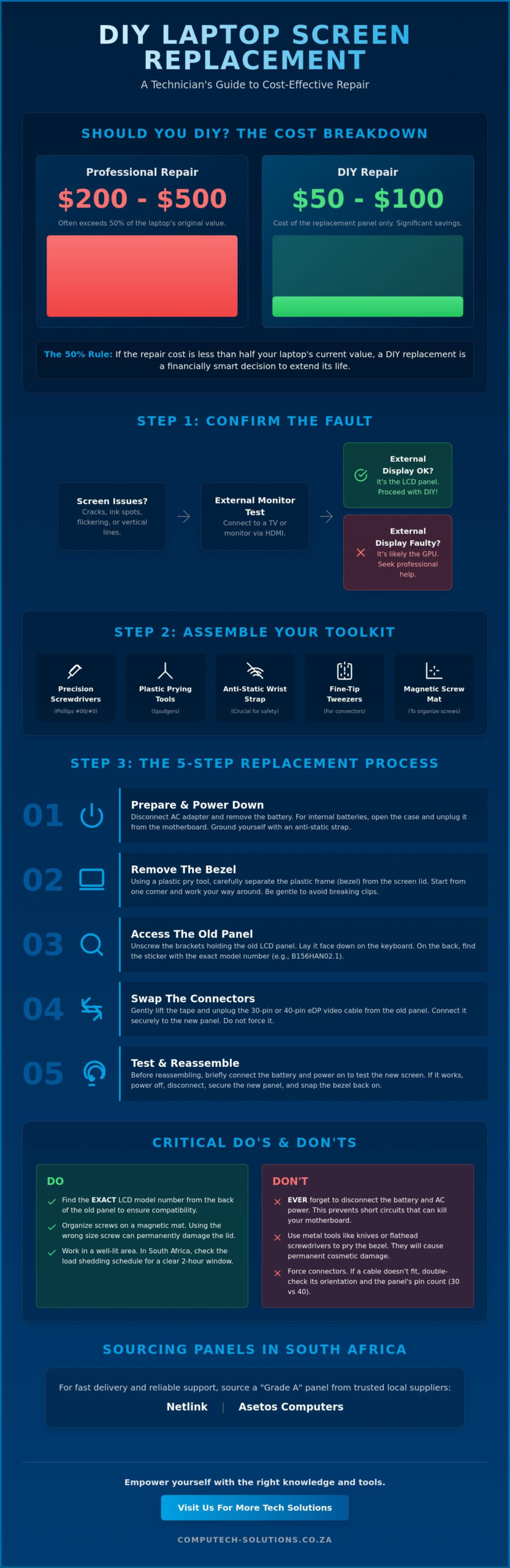
DIY laptop screen replacement is the technical process of swapping a malfunctioning display panel for a new unit without the overhead of a service center. For many South African users, this is a financial necessity rather than just a hobby. As of May 2026, professional repair fees for a standard display typically fall between $200 and $500, while the replacement part alone can be sourced for as little as $50. This DIY laptop screen replacement guide focuses on helping you decide if your device warrants the investment. If your laptop’s current market value is between $600 and $1,200, spending $100 on a new panel is a logical choice to extend its lifecycle by several years.
Warranty status is the primary factor in your decision. If your device is under its original manufacturer coverage, opening the chassis will likely void your protection. However, for out-of-warranty machines, the risks are manageable with the right approach. While a professional computer repair technician offers expertise, the rising cost of labor in 2026 has made self-repair more attractive. You’ll need to handle delicate ribbon cables and plastic clips, but the savings are substantial. For instance, a Dell 15.6-inch FHD non-touch panel retails for approximately $99.99, whereas a professional shop might charge double that amount for the complete service.
Identifying Your Laptop Display Problem
Before ordering parts, you must confirm that the screen is the actual point of failure. Physical cracks or “ink spots” are obvious signs of hardware damage. If you’re experiencing flickering or vertical lines, it could be the screen or a loose video cable. The foolproof method to verify this is the external monitor test. Connect your laptop to a TV or monitor via HDMI. If the external display shows a clean image while the laptop screen remains distorted, the LCD panel is definitely at fault. This DIY laptop screen replacement guide is designed specifically for these hardware-related failures.
Finding Your Specific LCD Model Number
You can’t buy a replacement based solely on your laptop’s model name. Manufacturers often use three or four different screen types for a single model like an HP Pavilion or Lenovo Ideapad. To get the right part, you’ll need the manufacturer’s code located on a sticker on the back of the LCD panel. This code specifies the resolution, such as HD or Full HD, and the connection type. Most modern screens use either a 30-pin or 40-pin eDP connector. Using the wrong pin count will make the panel physically incompatible with your motherboard. Once you have this number, you can source a “Grade A” panel from a reliable South African supplier like Netlink to ensure zero dead pixels.
Essential Tools and Preparation for Screen Repair
Preparation is the foundation of any successful hardware intervention. To follow this DIY laptop screen replacement guide effectively, you’ll need a specialized electronics toolkit. At a minimum, ensure you have Phillips #00 and #0 precision screwdrivers, a set of plastic prying tools or spudgers, and fine-tip tweezers for handling delicate connectors. Avoid using metal knives or flathead screwdrivers to pry the bezel, as these will leave permanent gouges in the plastic casing. A clean, flat workspace is equally vital. Using a magnetic project mat or a simple ice cube tray to organize the tiny screws by their original location prevents the common mistake of using a long screw where a short one is required, which can pierce the laptop lid.
Internal safety protocols protect both you and the device’s sensitive circuitry. Static electricity can destroy a motherboard instantly; use an anti-static wrist strap or frequently touch a grounded metal object to discharge any built-up energy. Before touching any internal components, you must disconnect the AC adapter and remove the battery. For modern ultrabooks with internal batteries, this requires removing the bottom cover and carefully unplugging the battery connector from the motherboard. Failing to discharge the remaining power in the system can result in a short circuit when you disconnect the video cable, potentially blowing the backlight fuse on the logic board.
The South African Repair Environment
Working on electronics in South Africa requires specific logistical planning, particularly regarding load shedding. Before beginning your repair, verify your local schedule to ensure you have at least a two-hour window of guaranteed lighting. Attempting to navigate tiny ribbon cables under poor light increases the risk of pin damage. For brand-specific disassembly instructions, iFixit’s laptop repair guides provide excellent visual aids for entry points. Use your smartphone to take high-resolution photos of the cable routing and screw placements before you remove anything. These photos will be your primary reference during the reassembly phase.
Choosing the Right Replacement Panel
Once you’ve confirmed your part number, you must decide between matte and glossy finishes. Matte screens are the preferred choice for office environments with high overhead lighting because they diffuse reflections. Glossy screens offer more vibrant color reproduction, making them ideal for media consumption or creative work. Always prioritize “Grade A” panels to ensure your replacement is free from dead pixels or backlight bleed. Sourcing your laptop LCD replacement panel from a specialist like Computech-Solutions ensures you receive a component that meets strict quality standards and is compatible with your specific hardware configuration.
Step-by-Step Guide: How to Replace Your Laptop Screen
Once your workspace is organized and the battery is safely disconnected, the physical repair begins. This DIY laptop screen replacement guide focuses on precision over force. Most modern laptops utilize one of two bezel styles: plastic clips or adhesive strips. For clipped bezels, gently insert your plastic spudger into the seam between the bezel and the outer lid. Apply light outward pressure until you hear a snap. If the bezel feels resistant, check for hidden screws behind the rubber pads at the bottom corners. Removing these pads carefully with tweezers ensures they can be reused later. Once the bezel is off, you’ll see the mounting screws securing the LCD to the metal hinges.
Disconnecting the video cable is the most sensitive part of the procedure. The gold-plated 30-pin or 40-pin connector is often secured by a thin metal latch and a layer of clear adhesive tape. Peel the tape back slowly and flip the latch up before sliding the connector out horizontally. Never pull the cable vertically, as this can tear the pins from the panel’s controller board. Once the old panel is free, you should responsibly dispose of e-waste by taking the broken glass to a certified South African recycling center rather than placing it in general refuse.
Removing the Damaged Panel
Position the laptop screen at a 90-degree angle to the keyboard. This provides the most stable access to the side-mount or front-mount screws without putting tension on the hinges. When lifting the panel out, handle it strictly by the metal outer frame. Touching the rear of the LCD can leave oils that interfere with the backlight or damage the fragile internal layers. If your laptop uses “pull-to-release” adhesive strips, pull them slowly and parallel to the screen to avoid snapping the tab. This prevents the need for messy adhesive cleanup on the back cover.
Connecting the New Display
Alignment is the key to a professional finish. Lay the new panel face-down on the keyboard, protected by a soft cloth, to align the video cable. Slide the connector into the port until you feel or hear a distinct click. This “click test” confirms the pins are fully seated. Re-apply the adhesive tape to secure the connection against vibration. Before snapping the bezel back on, perform a temporary boot. Connect the AC adapter and power on the machine. If the logo appears clearly, you’ve succeeded. Shut down, disconnect power, and finalize the assembly by replacing the screws and bezel.
Troubleshooting and Post-Installation Testing
Completing the physical installation is a significant milestone, but the testing phase ensures long-term reliability. If you power on your laptop and see a black screen despite hearing the cooling fans, don’t panic. This usually indicates that the video cable isn’t fully seated in the new panel. A black screen with a faint visible image suggests a backlight failure, often caused by a loose connection at the LED driver pins or a blown fuse on the motherboard if the battery wasn’t disconnected as advised in our DIY laptop screen replacement guide. Vertical lines or flickering artifacts are primary indicators of a data synchronization error, which occurs when the 30-pin or 40-pin connector is slightly tilted in its socket.
Verify the panel’s quality by running a dead pixel test using a dedicated tool like LCDTech. Display solid red, green, blue, black, and white backgrounds to spot any stuck or dead pixels that might have been missed during the manufacturing check. As of May 2026, most standard FHD panels utilize 30-pin eDP connectors, while 4K or touch-enabled models require 40-pin configurations. If you encounter persistent flickering that wasn’t present on your external monitor test, re-examine the video cable for any crimps or tears that might have occurred during the routing process. High-quality panels should show zero artifacts across all color ranges.
Common Pitfalls to Avoid
Over-tightening the mounting screws is a frequent mistake that leads to “pressure marks”—small, bright spots on the LCD visible on white backgrounds. Tighten screws until they’re snug, but stop before you feel significant resistance. Pin damage is another risk; if you’ve bent a pin on the panel’s connector, use your fine-point tweezers to very gently realign it. Finally, when snapping the bezel back into place, apply pressure only to the outer edges. Pressing on the center of the bezel can crack the new glass before you’ve even used it. Many technicians find that a bezel that won’t snap into place is often blocked by a misrouted Wi-Fi antenna cable.
Calibrating Your New Display
Once the hardware is secure, optimize the software side of your display. Use the Windows Color Calibration tool to adjust gamma and color balance, as replacement panels often have slightly different color profiles than the originals. Check your display settings to ensure the refresh rate is set to the panel’s maximum capability, whether that’s 60Hz or 144Hz. Most modern screens don’t require specific driver updates, but updating your integrated graphics drivers ensures the hardware communicates efficiently with the new display. If your screen remains dim, verify that the brightness hotkeys are functional. For those still looking for the right hardware, you can find a high-quality laptop LCD replacement panel to ensure a smooth installation process.
Sourcing Reliable Replacement Panels in South Africa
Finding the correct hardware is the most critical step in any DIY laptop screen replacement guide. While international marketplaces like eBay or Amazon might seem attractive, the logistical reality for South African technicians is often different. Importing a fragile LCD panel involves high shipping costs, unpredictable customs duties, and a 15 to 30-day waiting period. National suppliers eliminate these hurdles by providing local technical support and faster delivery times, often reaching your doorstep in 2 to 5 business days. This local presence is invaluable if you need to verify compatibility or handle a warranty claim without the stress of international shipping logistics.
Unlike brand-specific portals that only stock parts for their own machines, a comprehensive South African supplier offers a one-stop-shop experience. Whether you’re repairing an Acer, Apple, ASUS, Dell, HP, Lenovo, or Samsung device, you can find the exact panel you need in one place. We also stock replacement parts for Sony and Toshiba, ensuring that even older or specialized models remain functional. Shipping safety is our priority; every panel is encased in multi-layer anti-static bubble wrap and reinforced cardboard to survive nationwide transit from Pretoria to the most remote provinces. This professional packaging ensures your high-quality “Grade A” panel arrives without a single scratch or dead pixel.
Why Order from Computech Solutions?
Computech Solutions acts as your trusted advisor in the complex world of hardware procurement. Our expert technical support team understands that matching a laptop model to a specific LCD part number can be confusing. We assist you in identifying whether your device requires a 30-pin or 40-pin connector, preventing the frustration of ordering the wrong part. Our inventory covers everything from standard HD panels to specialized high-resolution displays, ensuring we meet the needs of both casual users and high-end creative professionals. With reliable nationwide delivery, we’ve become the definitive answer for IT requirements across the South African business landscape.
Ordering Your Replacement Today
Starting your repair is simple with our streamlined search tools. You can quickly locate the correct laptop LCD replacement panel or even find compatible Acer, Dell, or Lenovo replacement laptop batteries to refresh your device’s entire power system. Our secure online checkout provides real-time tracking so you can plan your repair around your schedule. Don’t let a cracked screen stall your productivity or force you into an expensive new laptop purchase. Take control of your hardware maintenance by choosing a partner that prioritizes technical precision and client success. Browse our Laptop LCD Replacement Panels today and restore your device to its original professional standards.
Restore Your Device to Professional Standards
Mastering a hardware repair is a practical way to extend the lifecycle of your technology while avoiding the $200 to $500 labor fees often charged by service centers. By following this DIY laptop screen replacement guide, you’ve learned that success depends on more than just mechanical skill; it requires precise part matching and a static-safe workspace. The cost-effectiveness threshold remains at 50% of the laptop’s value, making a screen swap a smart financial decision for most devices manufactured within the last five years. You now have the technical foundation to identify your LCD model, safely handle delicate ribbon cables, and troubleshoot post-installation artifacts like a professional technician.
Computech Solutions is ready to support your repair journey with expert technical assistance and high-quality LCD panels for all major brands. Whether you’re in Pretoria or a remote province, our nationwide delivery ensures your parts arrive safely and on time. Don’t let a damaged display hinder your business operations or personal projects. Order Your Reliable Replacement Laptop Screen Today and experience the confidence that comes with a functional, high-resolution display. You’ve got the knowledge to succeed, and we’ve got the hardware to make it happen.
Frequently Asked Questions
Can I replace my laptop screen myself?
Yes, you can replace your laptop screen yourself by following a detailed DIY laptop screen replacement guide. Most modern laptops use modular components that allow for straightforward hardware swaps. According to 2026 industry trends, the Right to Repair movement has made diagnostic information more accessible, allowing roughly 75% of users with basic technical aptitude to complete this task successfully. It’s a manageable project if you work slowly and document your steps with photos.
How much does it cost to replace a laptop screen in South Africa?
Replacement costs depend heavily on the display technology, with standard 15.6-inch LCD panels priced between $50 and $150. High-end OLED or touch-enabled displays can range from $300 to $750 for the part alone. In the South African market, sourcing parts locally through specialists like Computech Solutions saves you from unpredictable customs duties and international shipping fees. Professional labor typically adds another $100 to $500 to these base part costs.
Will a DIY screen replacement void my laptop warranty?
Most manufacturers consider DIY repairs a violation of their standard one-year limited warranty. If your device is still within its initial coverage period, a self-repair will likely void your protection against other hardware failures. However, for the 60% of users whose laptops are older than two years, the warranty has already expired. In these cases, the significant financial savings of a DIY repair far outweigh the non-existent warranty benefits.
How do I know which replacement screen is compatible with my laptop?
Compatibility is determined by the manufacturer part number found on the sticker at the back of the LCD panel. You can’t rely on the laptop’s model name alone, as brands like Dell or HP often use different screen types in the same series. You must verify the physical dimensions, the mounting bracket locations, and whether the connector is a 30-pin or 40-pin eDP interface to ensure the new panel functions correctly.
Do I need special tools to fix a cracked laptop screen?
You require a specific precision toolkit to avoid damaging the delicate plastic components of your device. This includes Phillips #00 and #0 screwdrivers, plastic spudgers for prying the bezel, and anti-static tweezers for handling ribbon cables. Using standard household tools increases the risk of stripping the tiny 2mm screws or gouging the screen casing. Investing in a dedicated electronics repair kit is essential for achieving a professional finish.
What should I do if my new laptop screen is black after installation?
A black screen usually indicates that the video cable isn’t fully seated or the battery wasn’t disconnected during the swap. Re-open the casing and perform the “click test” by firmly re-inserting the 30-pin or 40-pin connector. If the backlight is on but there’s no image, the data pins are likely misaligned. If the screen is completely dead, check for a blown backlight fuse on the motherboard, which often occurs if the power wasn’t drained.
How long does a DIY screen replacement typically take?
A beginner should expect the process to take between 45 and 90 minutes. This timeframe includes the careful removal of the bezel, unscrewing the panel, and performing a post-installation test before final assembly. Experienced technicians can often complete the task in under 20 minutes. Taking your time is vital; rushing the process is the leading cause of snapped plastic clips or torn video cables during the reassembly phase.
Can I upgrade my screen resolution during replacement?
Upgrading resolution is possible but depends strictly on your motherboard’s video cable bandwidth and pin configuration. If your laptop originally came with an HD screen and a 30-pin cable, it might not support the data rates required for a 4K panel. However, many mid-range laptops use a universal 30-pin eDP connector that supports both HD and Full HD. Consult our DIY laptop screen replacement guide or our technical support team to verify your specific motherboard’s limitations.
