
In 2026, a laptop with only 8GB of RAM is no longer a reliable choice for a four-year degree. You need a machine that won’t lag during a critical research project or shut down the moment your neighborhood enters a scheduled load reduction cycle. Learning how to choose a laptop for university in South Africa requires more than just looking at a price tag. It’s about finding a balance between performance and power resilience. We understand the pressure of making a significant investment when evolving academic software requirements keep moving the goalposts.
This guide provides a clear roadmap to mastering technical specifications so you can buy with confidence. You’ll learn which minimum specs are non-negotiable for your specific field of study and how to identify hardware that survives the rigors of campus life. We will also examine the latest 2026 standards for Windows 11 and macOS to ensure your new device remains a high-performing asset well beyond your graduation date.
Key Takeaways
- Identify the 2026 technical baseline, including why 16GB of RAM and an i5 or Ryzen 5 processor are now essential for a future-proof academic machine.
- Master how to choose a laptop for university in South Africa that balances high performance with the battery resilience needed to navigate localized load reduction.
- Discover degree-specific hardware requirements to ensure your device supports your coursework, whether you need a dedicated numpad for commerce or ultra-portability for humanities.
- Prioritize long-term reliability by selecting brands with strong local support and accessible replacement parts to avoid costly downtime during critical exam seasons.
Navigating the 2026 Academic Tech Landscape in South Africa
In 2026, your laptop isn’t just a peripheral; it’s your entire campus experience. From the lecture halls of the University of the Witwatersrand to online tutorials in a residence in Stellenbosch, the device you choose dictates your academic efficiency. Understanding what to look for in a laptop starts with recognizing that modern degrees require intensive multitasking. You’ll likely have dozens of browser tabs open alongside Microsoft 365 apps and video conferencing software simultaneously. The days of a basic “browsing machine” are over; today’s students are content creators and data analysts who need hardware that keeps pace.
When researching how to choose a laptop for university in South Africa, you must prioritize a four-year lifespan. South African students often face a demanding academic cycle where hardware needs to survive daily commutes, varied environmental conditions, and constant handling. A machine that feels fast today might struggle with 2029 software updates if you don’t select the right baseline specifications now. Investing in a device with a 512GB SSD and at least 16GB of RAM ensures your investment remains a high-performing asset until graduation day.
Portability vs. Durability: The Campus Grind
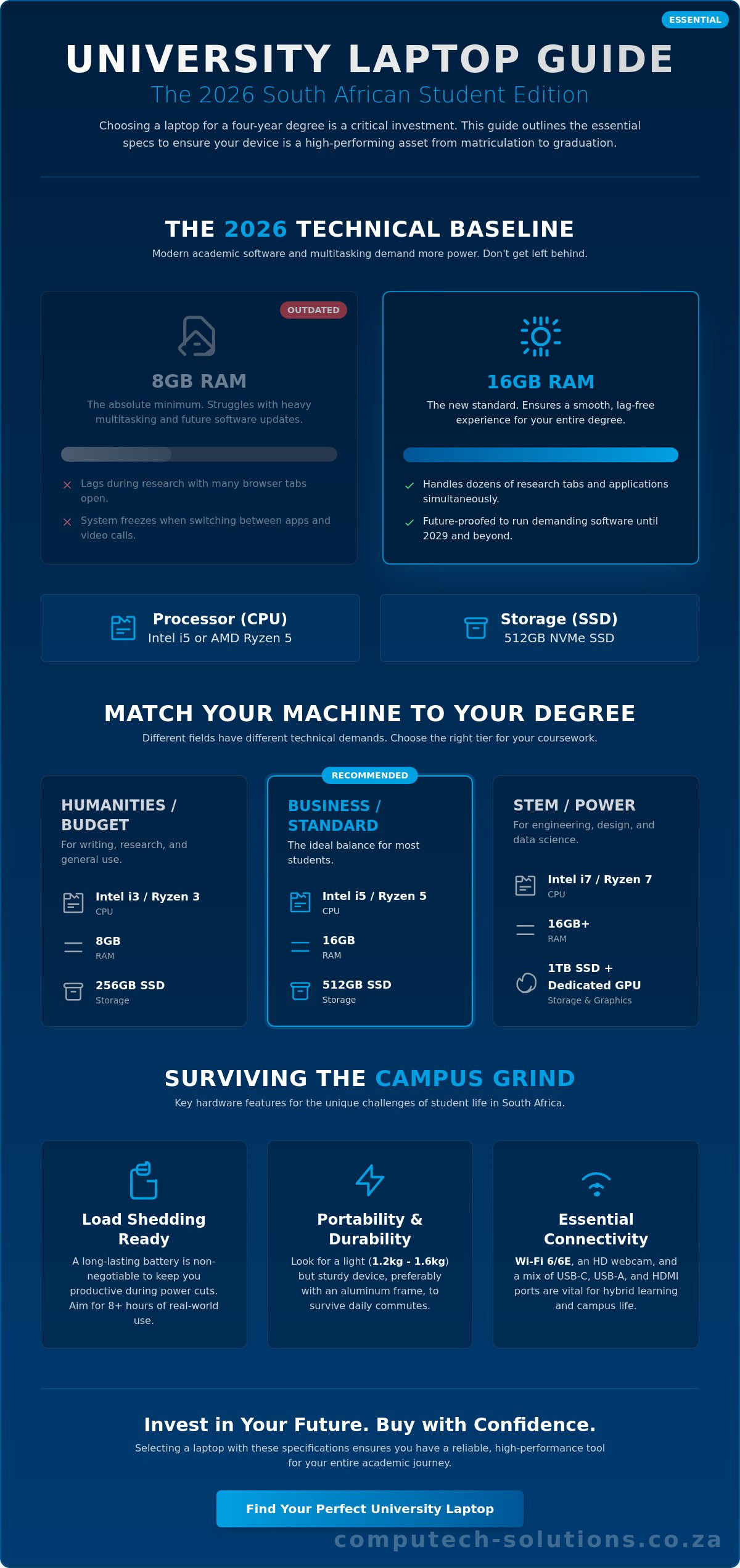
Walking between lecture buildings at large institutions like UP or UCT can be physically taxing if your bag is weighed down by a bulky workstation. Aim for a weight between 1.2kg and 1.6kg to maintain mobility. While a plastic chassis is more affordable, an aluminum frame offers superior protection against the accidental bumps of a crowded commute. Don’t overlook the keyboard; you’ll be typing thousands of words for essays and research papers, so a tactile, durable keyboard with adequate key travel is a non-negotiable requirement for long-term comfort.
Connectivity and Online Learning Requirements
Hybrid learning remains a cornerstone of the South African higher education system. Your laptop must feature a high-definition webcam and a noise-canceling microphone to ensure you’re seen and heard clearly during remote tutorials. With campus Wi-Fi networks often handling thousands of simultaneous connections, having a Wi-Fi 6 or 6E card is vital for maintaining a stable link in high-density zones. Finally, check your port selection. While USB-C is the 2026 standard for charging and data, ensure you have the necessary adapters for older campus projectors or external drives that still use USB-A or HDMI connections.
Defining the Technical Sweet Spot: Specs Every Student Needs
Selecting the right hardware is a balancing act between your budget and your degree’s technical demands. In 2026, the processor serves as the engine of your academic workflow. An Intel Core i5 or AMD Ryzen 5 is now the standard baseline for most students. While an i3 might handle basic word processing, it will likely struggle with the May 2026 Windows 11 update and modern multitasking. Understanding how to choose a laptop for university in South Africa means looking past the lowest price to find a machine that remains functional for several years.
Memory is equally critical for a smooth experience. While 8GB of RAM remains the absolute minimum, 16GB has become the recommended safety zone. Modern browsers and research tools are memory-intensive; 16GB ensures your system doesn’t freeze when switching between a 50-tab research project and a high-definition video call. For storage, traditional Hard Disk Drives (HDDs) are obsolete. A Solid-State Drive (SSD), specifically an NVMe SSD, is non-negotiable for system responsiveness and fast boot times. Most students only require integrated graphics, but if you’re in a STEM or design field, a dedicated GPU becomes necessary for rendering and complex simulations.
The 2026 Spec Comparison Table
This table outlines the performance tiers based on current South African market data and academic requirements.
| Tier | CPU Recommendation | RAM Baseline | Storage Baseline |
|---|---|---|---|
| Budget / Humanities | Intel i3 / Ryzen 3 | 8GB | 256GB SSD |
| Standard / Business | Intel i5 / Ryzen 5 | 16GB | 512GB SSD |
| Power / STEM | Intel i7 / Ryzen 7 | 16GB+ | 1TB SSD + Dedicated GPU |
The SSD is the single most critical component for ensuring daily speed and system reliability across all these tiers.
Operating Systems: Windows vs. macOS vs. Linux
Choosing an operating system often depends on faculty requirements. Windows 11 offers the most flexibility for South African students, especially considering the wide range of hardware available near the R10,499 median price point. macOS remains popular for its build quality and battery efficiency, though it carries a significant price premium. For those seeking technical advice from Stellenbosch University, checking with your specific department is vital before purchase. Computer Science students may find Linux essential for specific development environments, though most modern Windows machines can handle this via virtualization. If your current device is lagging but you aren’t ready for a full replacement, exploring our range of high-performance laptops can provide a reliable path to meeting these 2026 standards.
Course-Specific Requirements: Matching Your Machine to Your Degree
Your faculty requirements are the ultimate filter for your purchase. While we’ve established that 16GB of RAM is the 2026 safety zone, how that memory is used varies wildly between a law student and a future architect. Understanding how to choose a laptop for university in South Africa involves looking beyond the general specs to find features that specifically support your daily coursework. For Humanities and Law students, your laptop is essentially a high-end typewriter and research portal. You should prioritize a comfortable keyboard with deep key travel and a lightweight chassis. Since your days are spent in lecture halls and libraries, battery endurance is more important than raw processing power.
Commerce and Accounting students have a different set of non-negotiables. If you’re spending hours in complex Excel models, a dedicated numeric keypad is a massive productivity booster. This often means looking at 15-inch models rather than the ultra-portable 13-inch variety. Multitasking RAM remains vital here, as you’ll likely have multiple heavy spreadsheets, a browser with 30 tabs, and accounting software running simultaneously. For a broader perspective on current market options, you can consult this guide to buying laptops in South Africa, which categorizes devices by budget and use case.
The ‘Creative’ Degree Checklist
For Graphic Design, Media, or Architecture students, display quality is paramount. You need a screen with high color accuracy, specifically looking for at least 100% sRGB or high DCI-P3 coverage to ensure your prints match your digital work. High-resolution video editing will quickly fill a standard 512GB SSD, so consider the cost of external storage or upgrading to a 1TB internal drive. If your work involves digital illustration, a 2-in-1 laptop with stylus support can replace the need for a separate drawing tablet, streamlining your setup.
STEM and Data Science Needs
Engineering and Computer Science degrees demand the most from hardware. You’ll need a high-performance CPU with multiple threads for compiling code or running local virtual machines. Thermal management is a critical but often overlooked factor. Powerful components generate significant heat; if your laptop has poor cooling, it will “throttle” or slow down during long rendering or simulation sessions. Additionally, ensure your chosen machine supports external monitors. Data science students often find that a single laptop screen isn’t enough for complex data visualizations and coding environments, making a stable HDMI or DisplayPort connection essential for home study.
The Load Shedding Factor: Prioritising Battery Life and Power Resilience
While national load shedding hasn’t occurred for 360 consecutive days as of May 11, 2026, localized load reduction remains a daily reality in high-density areas like Gauteng. Eskom’s winter 2026 outlook also warns that a high-risk scenario could see the return of Stage 2 to Stage 6 outages. This instability is a primary reason why learning how to choose a laptop for university in South Africa requires focusing on power resilience. You cannot rely on manufacturer claims alone; a “12-hour” battery often translates to just 7 or 8 hours of real-world academic use. Aim for a machine that can realistically survive a full day of lectures and a two-hour power cut without needing a wall socket.
When researching how to choose a laptop for university in South Africa, look for models that support 65W or higher USB-C fast charging. This technology is a student’s best friend, allowing you to recover up to 60% of your battery during a short 45-minute gap between classes. If you use an inverter at your residence, be cautious. Modified sine wave inverters are common in budget setups but can cause long-term damage to sensitive laptop power supplies. A pure sine wave inverter or a dedicated DC-to-DC power bank is a much safer investment for protecting your hardware’s longevity.
Survival Tips for Load Shedding on Campus
Proactive power management can extend your working time significantly. Adjust your Windows or macOS settings to trigger “Battery Saver” modes at 50% capacity rather than the default 20%. This gives you a larger buffer if a lecture hall’s power doesn’t return on schedule. Additionally, the frequent power surges that accompany load reduction can degrade your power adapter over time. High-quality replacement chargers serve as a critical safeguard for your device’s internal components. Power Delivery (PD) over USB-C allows for flexible charging from various sources, including compatible power banks and universal adapters.
Solar and Backup Integration
Solar integration is becoming a viable option for students in private digs. Even a small-scale portable solar panel can trickle-charge a laptop during daylight hours, provided the device supports USB-C charging. We recommend a “two-charger” strategy: keep one permanently in your campus bag and another at your primary study desk to avoid being caught without power. Computech Solutions plays a vital role in this ecosystem by providing the necessary hardware to keep student workstations operational. If your current power supply is failing or you need a backup, you can find a high-quality range of laptop chargers to ensure you stay connected through any power cycle.
Long-Term Reliability: Why Your Choice Extends Beyond the Initial Purchase
Choosing a laptop is just the beginning of your academic journey. The total cost of ownership over a three or four-year degree often includes maintenance that many students overlook. When you’re researching how to choose a laptop for university in South Africa, you must consider the availability of local spare parts. Brands like Acer, HP, Dell, and Lenovo have established supply chains in the country. This means if you crack a screen or your battery fails in year three, you won’t be waiting months for an international shipment to arrive while your assignments pile up. Selecting a brand with a strong local presence is a strategic move for long-term stability.
Upgradability is another crucial factor for longevity. Some modern ultra-portables have RAM soldered directly to the motherboard, which prevents you from adding more memory later. If you start a degree with 8GB of RAM, ensure the laptop has an open slot to reach that 16GB safety zone. Similarly, a device with an accessible M.2 slot allows you to swap a 256GB SSD for a 1TB version as your research data grows. This flexibility can save you from having to buy an entirely new machine halfway through your studies. It’s about making a future-proof investment that evolves with your academic needs.
Maintaining Your Investment
Even the most durable hardware requires attention. Lithium-ion batteries naturally degrade over hundreds of charge cycles, especially with the frequent discharging caused by localized load reduction. Look for signs of capacity loss or physical swelling of the trackpad, which often indicates a failing battery. Using high-quality, brand-specific adapters is vital; cheap, generic chargers often lack the voltage regulation needed to protect your motherboard from the power surges common on the South African grid. Accidental damage, such as keyboard spills or screen cracks from a heavy backpack, is often repairable if you’ve chosen a mainstream brand with accessible LCD replacement panels.
The One-Stop Shop Philosophy
Computech Solutions serves as a reliable partner for students across the country. We understand that technical downtime isn’t just an inconvenience; it’s a risk to your academic success. By offering nationwide delivery of critical components, we ensure that you have access to the parts you need without leaving your residence. Whether you require a replacement for a worn-out battery or a secondary charger for your campus bag, our inventory supports the most popular brands in the South African market. Browse our wide range of laptop batteries and chargers to keep your studies on track and ensure your hardware remains a stable tool for your entire university career.
Invest in Your Academic Success
Choosing the right hardware is a strategic decision that impacts your productivity every day on campus. By prioritizing a modern technical baseline like 16GB of RAM and ensuring your device has the power resilience to withstand localized load reduction, you set yourself up for a smoother academic journey. Understanding how to choose a laptop for university in South Africa ensures you don’t just buy a device for today, but for your entire degree. Reliability is about more than just the initial purchase; it’s about knowing you have support when hardware maintenance is required.
Computech Solutions is here to be your long-term partner in maintaining your technology. We are specialists in Acer, Dell, and HP replacement parts, offering nationwide delivery across South Africa and expert technical support for all your hardware queries. Secure your academic future with reliable hardware and accessories from Computech Solutions. You’ve done the research and identified the specs you need. Now, take the final step with confidence and prepare for a successful university career. Your future is bright, and with the right tools, you’re ready to excel.
Frequently Asked Questions
What is the minimum RAM needed for university in 2026?
16GB of RAM is the standard requirement for smooth academic performance in 2026. While 8GB might suffice for entry-level tasks, it often leads to significant system slowdowns when running the latest Windows 11 updates alongside intensive research tools. Choosing 16GB ensures your machine handles heavy multitasking without freezing during a critical deadline. This is a vital part of understanding how to choose a laptop for university in South Africa to avoid early hardware obsolescence.
Is an i3 processor good enough for university students in South Africa?
An i3 processor is generally only suitable for basic word processing and simple web browsing. For most degrees, an Intel Core i5 or AMD Ryzen 5 provides the necessary processing power to remain efficient throughout a full four-year academic cycle. Investing in this higher tier prevents the frustration of a sluggish system as software becomes more demanding. It represents a much more stable choice for students who require a reliable, long-term daily driver.
How long should a university laptop battery last during load shedding?
Your laptop battery should realistically provide 7 to 9 hours of uptime to navigate localized load reduction or potential Stage 6 load shedding scenarios. Manufacturer “all-day” claims often drop significantly under the heavy load of video calls and data-heavy research. Selecting a machine with a high-capacity battery ensures you can continue working through extended power cuts without the stress of searching for a crowded campus charging station during outages.
Should I buy a Windows laptop or a MacBook for my degree?
Your choice should align with your faculty’s specific software requirements and your available budget. Windows laptops offer the most variety and value for money in the South African market, where the median transaction price is R10,499 as of early 2026. MacBooks provide excellent battery efficiency and build quality but carry a significant price premium. Always verify if your specific course uses Windows-only software before you commit to the Apple ecosystem.
Can I upgrade my laptop battery if it starts dying too quickly?
You can certainly replace your laptop battery if the original unit no longer holds a sufficient charge for your needs. Most mainstream brands like Dell, HP, and Lenovo are designed to allow for battery swaps once the lithium-ion cells naturally degrade. This is a cost-effective way to restore your machine’s portability without the expense of buying a new laptop. We provide a wide range of replacement batteries to help students maintain their hardware.
What happens if I break my laptop screen at university?
A broken screen doesn’t mean you need to replace the entire laptop; you can simply install a replacement LCD panel. Accidents happen in crowded lecture halls or during daily commutes, but screen repairs are a standard maintenance task for specialized IT partners. Replacing the panel is significantly cheaper than a full system replacement. It ensures your device remains functional for the remainder of your academic career with minimal technical downtime.
Are gaming laptops good for university students?
Gaming laptops offer incredible processing and graphics power but they often sacrifice portability and battery life. They are excellent for engineering or architecture students who need a dedicated GPU for complex rendering tasks. However, the heavy power bricks and shorter battery runtimes can be a disadvantage during long days on campus or power outages. Consider if the raw performance outweighs the need for a lightweight, long-lasting machine.
Where can I find reliable replacement chargers in South Africa?
Reliable replacement chargers are available through specialized IT providers like Computech Solutions, which offers nationwide delivery for your convenience. It’s essential to use high-quality adapters that match your laptop’s specific voltage and wattage requirements to prevent motherboard damage. Learning how to choose a laptop for university in South Africa includes knowing where to source verified parts when your original equipment fails due to power surges or accidental wear.
