
Plugging the wrong power adapter into your expensive laptop isn’t just a minor mistake; it’s a potential death sentence for your motherboard. Many users feel a surge of anxiety when their original cable fails, fearing that a replacement might fry their internal components. Learning how to choose the right laptop charger is the only way to eliminate this risk and keep your hardware safe. You’re likely staring at a confusing mix of voltage ratings, amperage numbers, and barrel pin sizes, wondering if a slight mismatch will cause a permanent hardware failure.
We understand that technical disruptions are a major hurdle for your productivity. This guide provides a clear, authoritative roadmap to finding a guaranteed compatible match for any major brand, from Dell and HP to Apple and Lenovo. You’ll master the rules of wattage flexibility, understand the impact of the 2026 USB-C Power Delivery standards, and learn why SABS certification is non-negotiable for South African power stability. We’ll move quickly from identifying your specific requirements to ensuring you have a reliable, high-performance solution that keeps your business operational. By the end of this article, you’ll have the confidence to select a replacement that ensures your laptop stays powered and protected.
Key Takeaways
- Match your laptop’s voltage requirements exactly to avoid motherboard damage, though using a charger with a higher amperage rating is perfectly safe.
- Identify your specific power needs and connector dimensions by locating the input ratings typically found on the bottom of your laptop chassis.
- Master the technical checklist for how to choose the right laptop charger to ensure a secure fit and reliable power delivery for any major brand.
- Evaluate the differences between OEM adapters and high-quality certified generics to find a cost-effective solution that doesn’t compromise on safety.
- Ensure your new hardware is protected against localized power surges and grid instability through proper surge protection standards.
Decoding the Specs: Voltage, Amperage, and Wattage Explained
Understanding the technical label on your power brick is the first step in learning how to choose the right laptop charger. It isn’t just a collection of random numbers; it’s a precise set of instructions for your hardware’s survival. Your laptop requires a specific balance of Voltage (V), Amperage (A), and Wattage (W) to operate without risking internal damage. Before diving into specific model numbers, it helps to understand AC adapter basics regarding how power converts from your wall socket to your device. When you match these specs correctly, you ensure your device receives steady, reliable power.
The Golden Rule of Voltage
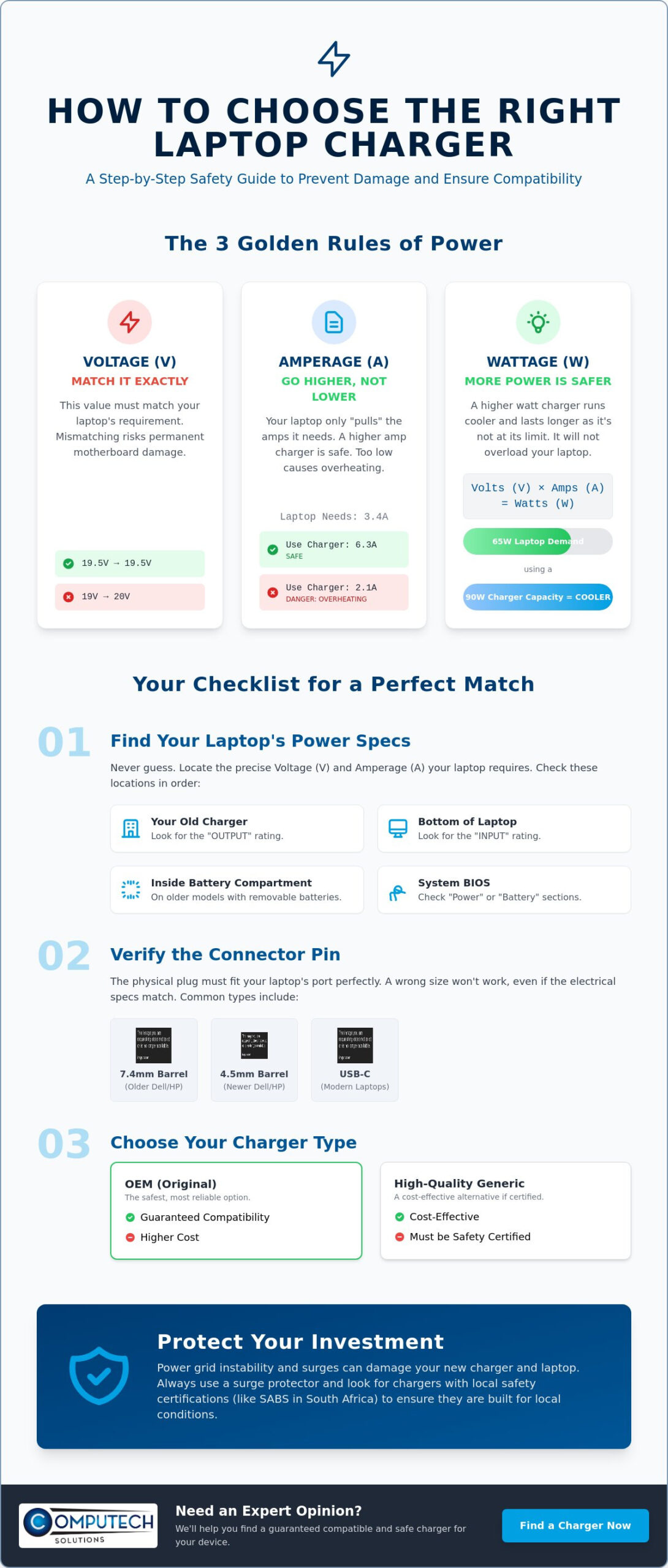
Voltage represents the electrical pressure entering your device. This value must match your laptop’s requirements exactly. While a tiny variance of up to 5% is generally tolerated by most modern circuits, anything beyond that is dangerous. If you use a charger with a higher voltage than specified, you risk permanent motherboard failure as components are overwhelmed by the pressure. Conversely, under-voltage leads to system instability, where the battery fails to charge or the laptop shuts down unexpectedly during high-performance tasks. Always look for the “Output” voltage on your old charger or the “Input” voltage on the bottom of your laptop to be sure.
Understanding Amperage and Current Draw
Think of Amps as a reservoir of current that your laptop draws from as needed. While voltage must match, amperage can be higher than the original spec. A 6.3A charger safely replaces a 3.4A unit if the voltage matches because the laptop only pulls the current it actually requires. Using a charger with too little amperage is where the danger lies. When a charger can’t provide enough current, it works at maximum capacity constantly. This leads to overheating and premature component failure, which is a common cause of “blown” power bricks in demanding environments.
Wattage is the total power output, calculated by multiplying Volts by Amps (V x A = W). A common misconception is that a higher-wattage charger will overload a smaller laptop. This is a myth. Using a 90W charger on a laptop that originally came with a 65W unit is actually a smart move for reliability. Since the 90W charger isn’t being pushed to its thermal limits, it often runs cooler and lasts longer. Mastering these specifications ensures you can find a safe, reliable replacement without the fear of damaging your investment. Learning how to choose the right laptop charger becomes simple once you realize that as long as the voltage is correct, more power capacity is always better than less.
Identifying Your Laptop’s Specific Power Requirements
Locating the exact power needs of your device is the most critical step in learning how to choose the right laptop charger. Most users make the mistake of ordering based on brand alone, but manufacturers often use different connectors and power levels for different models within the same year. To find your specific requirements, turn your laptop over and look for the “Input” rating. This label is usually etched into the plastic or printed on a sticker, showing the required Voltage and Amperage. If the sticker has worn off, you can find the “Output” rating on your original AC adapter, which should match the laptop’s input perfectly.
Where to Find the “Secret” Specs
If your external labels are unreadable, don’t guess. You can often find the power specifications within your system’s BIOS. Restart your computer and tap the F2 or F12 key during startup to enter the settings menu; the “Battery Information” or “Power” section will typically list the detected adapter wattage. For older laptops with removable batteries, the power spec is often hidden inside the battery compartment. Identifying your exact model name, such as a Dell Latitude E7440 or an HP EliteBook 840, is also vital for cross-referencing. A helpful tip from our technicians is to take a clear photo of any remaining labels. If you’re unsure, the experts at computech-solutions.co.za can use that image to verify the exact part you need for your business operations.
The Connector Pin Challenge
The physical plug is where most compatibility errors occur. Even if the electrical specs match, the charger is useless if it doesn’t fit the port. Common barrel sizes include the 7.4mm large pin used by older Dell and HP workstations and the smaller 4.5mm “blue tip” or “black tip” pins found on modern Ultrabooks. You must measure the Outer Diameter (OD) and Inner Diameter (ID) in millimeters to be certain. Some brands use proprietary shapes, like Lenovo’s rectangular “slim tip” which resembles a USB port but is strictly for power.
As of 2026, the industry has shifted significantly toward USB-C Power Delivery (PD). Following the April 2026 regulations for universal charging, most new laptops now use this standard. USB-C is more straightforward because it negotiates power automatically, but you must still ensure the charger’s maximum wattage meets or exceeds your laptop’s requirements. Whether you’re dealing with a legacy barrel connector or a modern USB-C port, verifying the physical fit is just as important as matching the voltage. Taking the time to measure your pin ensures a secure connection that won’t wiggle or overheat during a critical workday.
OEM vs. High-Quality Generic vs. Universal Chargers
Selecting the right hardware is a matter of balancing your budget with the need for operational stability. When you evaluate how to choose the right laptop charger, you’ll generally find three distinct categories: Original Equipment Manufacturer (OEM) units, high-quality certified generics, and universal adapters. Each serves a specific purpose, but the choice often depends on the age of your device and your specific performance requirements. Understanding these distinctions helps you avoid the trap of buying inferior power supplies that could jeopardize your laptop’s internal components.
Original Equipment Manufacturer (OEM) chargers are produced by the same brand that manufactured your laptop. These are the definitive choice for users who want a direct, identical replacement without any technical guesswork. While they offer a high level of confidence, the premium price tag can be a hurdle, particularly for older machines where the cost of the charger represents a significant portion of the device’s total value. For many business professionals, the extra cost is a justified investment in guaranteed compatibility.
You must be vigilant about avoiding unbranded knockoffs found on generic online marketplaces. These cheap imitations often omit critical safety Integrated Circuits (ICs) and use inferior internal shielding to save on manufacturing costs. A poor-quality charger can introduce electrical noise into your system, leading to erratic touchpad behavior or catastrophic motherboard failure. Unlike certified options, these units rarely have the thermal protection needed to handle the heat generated during long work sessions, posing a real risk to your office environment.
When to Choose a Certified Generic
A certified generic is a sophisticated middle ground that meets original safety standards without the brand-name markup. These are the preferred choice for out-of-warranty Acer, ASUS, or Lenovo laptops. High-quality generics include essential over-voltage and short-circuit protection, ensuring that the adapter fails safely during a power spike rather than passing that surge into your laptop. They provide a cost-effective way to maintain productivity without sacrificing the safety of your hardware.
The Pros and Cons of Universal Adapters
Universal chargers offer high versatility through a set of interchangeable tips, making them a streamlined solution for households or offices with multiple laptop brands. They’re excellent for reducing cable clutter, but they require careful verification. You must ensure the adapter’s maximum wattage meets or exceeds the requirements of your most power-hungry device. If you’re using an older universal model with manual voltage switching, you must lock it to the correct setting for your specific laptop to prevent over-voltage damage.
A Step-by-Step Checklist for Selecting Your Replacement
Moving from technical theory to a practical purchase requires a systematic approach. Precision is your best defense against hardware failure, and following a verified process ensures you don’t waste time or money on incompatible parts. When you understand how to choose the right laptop charger, the selection process becomes a series of simple binary checks. Use the following checklist to verify any potential replacement before you finalize your order.
- Step 1: Confirm the Voltage. This value must match your laptop’s input requirements exactly. Check the 19V, 19.5V, or 20V rating on your chassis.
- Step 2: Verify the Amperage. Ensure the new charger’s amperage (A) is equal to or higher than your original unit. Higher amperage is safe; lower is not.
- Step 3: Match the Connector. Measure the physical dimensions of the plug to ensure it fits securely into your charging port.
- Step 4: Check the Wattage. Confirm the total power (W) is sufficient to handle your laptop’s peak performance during heavy workloads.
- Step 5: Review Local Support. Only purchase from vendors providing a local South African warranty and technical verification services.
The Physical Match: The Final Hurdle
Simply looking at a product photo is rarely enough for barrel connectors. A 4.5mm pin and a 5.5mm pin look nearly identical to the naked eye, yet they aren’t interchangeable. Use a standard ruler to measure the outer diameter of your current pin if you’re unsure of the size. A snug fit is vital for operational safety. A loose connection causes “arcing,” where electricity jumps across small gaps. This creates excessive heat that can eventually melt your internal charging port, leading to a much more expensive repair than a simple cable replacement.
Quality Assurance and Warranties
In the South African market, power electronics must meet specific safety standards to handle our unique grid demands. A 6-month or 12-month warranty is a non-negotiable requirement for any reliable adapter. This protection ensures you aren’t left stranded if a component fails prematurely. Always verify SABS (South African Bureau of Standards) compliance to ensure the device has undergone rigorous safety testing. Learning how to choose the right laptop charger means prioritizing these safety markers over the lowest possible price. At computech-solutions.co.za, we provide expert-verified compatibility to ensure your replacement charger meets every technical and safety requirement for your specific model.
Protecting Your Investment: Load Shedding and Surge Safety in SA
South Africa’s electrical landscape presents unique challenges that global guides often ignore. While national load shedding hasn’t occurred for over 398 consecutive days as of June 2026, localized “load reduction” continues to affect specific areas, particularly in Gauteng. These frequent switching events create significant electrical stress for connected devices. Learning how to choose the right laptop charger involves more than just matching technical specs; it requires selecting hardware built to survive these fluctuations. High-quality adapters act as the primary line of defense for your laptop’s delicate internal circuitry.
When power returns after a localized cut, the initial surge can exceed the standard 230V limit significantly. This “inrush current” is the primary killer of cheap, unbranded power bricks. Professional-grade chargers utilize superior capacitors and thermal disconnectors to absorb these spikes. Without these components, a surge can bypass the adapter and fry your motherboard instantly. Investing in a charger with verified surge protection isn’t just an upgrade; it’s an essential insurance policy for your workstation.
Charger Longevity in the Load Shedding Era
Maintaining your hardware’s health requires proactive habits. You should always unplug your charger from the wall socket before scheduled load reduction begins. Only reconnect it once the power has stabilized for at least two or three minutes after restoration. This simple step prevents the most aggressive initial surges from reaching your device. High-quality chargers are designed with robust capacitors that can handle minor voltage ripples, but no charger is invincible against a direct high-voltage spike from a returning grid.
Watch for physical warning signs that your adapter is struggling:
- Audible buzzing or hissing sounds coming from the power brick.
- The casing feels painfully hot to the touch during standard office tasks.
- The laptop toggles between battery and AC power intermittently without being touched.
- Visible bulging or discoloration of the adapter’s plastic housing.
Comprehensive Power Solutions
As more South African businesses transition to solar and inverter systems, charger compatibility remains a vital consideration. Many entry-level inverters produce “modified sine waves” which can cause lower-end chargers to overheat or fail. Selecting a robust, SABS-compliant adapter ensures your hardware remains stable regardless of your power source. For maximum safety, ensure your surge protective devices comply with SANS 61643-11 standards, providing Class III protection for your sensitive office equipment.
Our chargers are specifically sourced to handle these local environmental demands, offering the reliability your operations require. You don’t have to risk your productivity on unverified hardware that isn’t built for local conditions. Browse our wide range of laptop chargers with nationwide delivery to find a solution that’s engineered for the South African grid. Understanding how to choose the right laptop charger is the final step in securing your professional hardware against the unpredictable nature of our national infrastructure.
Secure Your Hardware with a Reliable Power Solution
You now possess the technical expertise to navigate complex electrical specifications without risking your expensive hardware. By matching your voltage requirements exactly and ensuring your connector pin is a perfect fit, you eliminate the threat of motherboard damage and operational downtime. Mastering how to choose the right laptop charger is a vital skill for maintaining your device’s longevity, especially when facing the unique stability challenges of the South African power grid. You can move forward with the confidence that your replacement will provide steady, reliable performance.
We specialize in providing high-quality replacements for Acer, Dell, HP, and Lenovo laptops, ensuring your business stays powered and productive. If you’re still unsure about your specific pin dimensions or wattage needs, our team provides expert technical support for compatibility verification. We offer fast nationwide delivery across South Africa to ensure you receive your hardware without unnecessary delays. Find the perfect replacement charger for your laptop today and enjoy the peace of mind that comes with a professional, verified power solution. Protecting your investment starts with the right adapter, and you’re now ready to make an informed choice.
Frequently Asked Questions
Can I use a charger with a higher wattage than my laptop requires?
Yes, it’s perfectly safe to use a charger with a higher wattage rating than your original unit. Your laptop only draws the specific amount of power it needs to operate and charge the battery. Using a 90W adapter on a 65W laptop often results in the charger running cooler because it isn’t being pushed to its thermal limits. You must still ensure the voltage matches your laptop’s requirements exactly.
Will a different brand charger work if the pin fits my laptop?
A different brand charger might work, but physical fit doesn’t guarantee electrical compatibility. Many manufacturers, such as Dell and HP, use proprietary center pins that communicate with the laptop’s BIOS. Even if the plug fits and the voltage matches, the laptop may refuse to charge the battery if it doesn’t recognize the adapter’s ID chip. Always verify the specific communication protocols for your brand before switching.
How do I know if my laptop charger is broken or if it is the battery?
Test the hardware by removing the battery and plugging the charger directly into the laptop. If the device powers on and runs reliably without the battery, your charger is functioning correctly. If the laptop fails to start or shuts down unexpectedly, the adapter or the internal DC jack is likely the culprit. You should also check for a solid charging light when the cable is plugged in.
Is it safe to use a universal laptop charger for a gaming laptop?
It’s generally unsafe unless the universal adapter is specifically rated for high-performance gaming wattage. Most gaming laptops require between 180W and 330W to handle powerful GPUs, while standard universal chargers often peak at 90W. Using an underpowered adapter will cause it to overheat rapidly and may lead to performance throttling or unexpected system shutdowns during intensive tasks. Always match the peak power demand of your gaming hardware.
What happens if I use a charger with the wrong voltage?
Using a charger with the wrong voltage can cause immediate and permanent damage to your motherboard. Higher voltage acts like excessive pressure that can fry delicate circuits and capacitors instantly. If the voltage is too low, the laptop won’t have enough power to charge the battery or may behave erratically. Learning how to choose the right laptop charger means matching the voltage rating to within a 5% variance of the original spec.
Where can I find the model number of my laptop charger?
The model number is printed on the technical label located on the side or bottom of the power brick. Look for a string of alphanumeric characters next to headers like “Model,” “Part No,” or “P/N.” If the label has faded, you can cross-reference your laptop’s model name, found on the bottom of the chassis, to find the correct replacement adapter in our specialized catalog.
Do you deliver laptop chargers across South Africa?
Yes, we provide efficient nationwide delivery for our entire range of laptop chargers and adapters. We understand that a broken charger stops your business operations, so we prioritize fast shipping to all provinces. Whether you’re in a major metropolitan area or a smaller town, our logistics partners ensure your replacement hardware arrives safely and promptly to minimize your technical disruptions.
Can a faulty charger damage my laptop battery?
A faulty charger can significantly shorten your battery’s lifespan or cause it to fail entirely. If the adapter’s internal regulation components fail, it may deliver “dirty” power with inconsistent voltage spikes. This electrical instability causes the battery to overheat and degrades the chemical cells over time. Using a high-quality, certified replacement ensures your battery receives a steady, clean current that protects its long-term health.
