
Ordering a new display based only on your laptop’s model name is the fastest way to end up with a component that doesn’t fit. While you might assume a 15.6 inch screen is universal, the internal hardware configurations vary significantly between different manufacturers. If you are wondering how to measure laptop screen size for replacement, you must look beyond the external casing. It’s frustrating to wait for a delivery only to realize the connector is on the wrong side or the resolution is incompatible. These errors lead to operational downtime and the added stress of return shipping fees.
We recognize that technical specifications like pin counts and mounting brackets can feel complex when you need a functional device immediately. This guide provides a streamlined solution by walking you through the physical and technical verification process. You’ll learn how to calculate the exact diagonal measurement and locate the manufacturer part number for a guaranteed match. We’ll cover everything from identifying 30-pin versus 40-pin connectors to ensuring your new laptop LCD replacement panel aligns perfectly with your hardware requirements, giving you the confidence to complete your purchase.
Key Takeaways
- Master the industry-standard diagonal measurement technique to define the viewable area of your display panel.
- Learn how to measure laptop screen size for replacement using system information tools to identify technical specifications without opening the chassis.
- Identify critical compatibility factors like video cable pin counts and mounting bracket positions that physical measurements alone won’t reveal.
- Discover the exact internal part number located on the back of your LCD panel to ensure a 100% match for your specific hardware.
- Understand the advantages of sourcing replacement panels through local South African suppliers to secure warranty protections and avoid import delays.
How to Measure Laptop Screen Size: The Diagonal Method
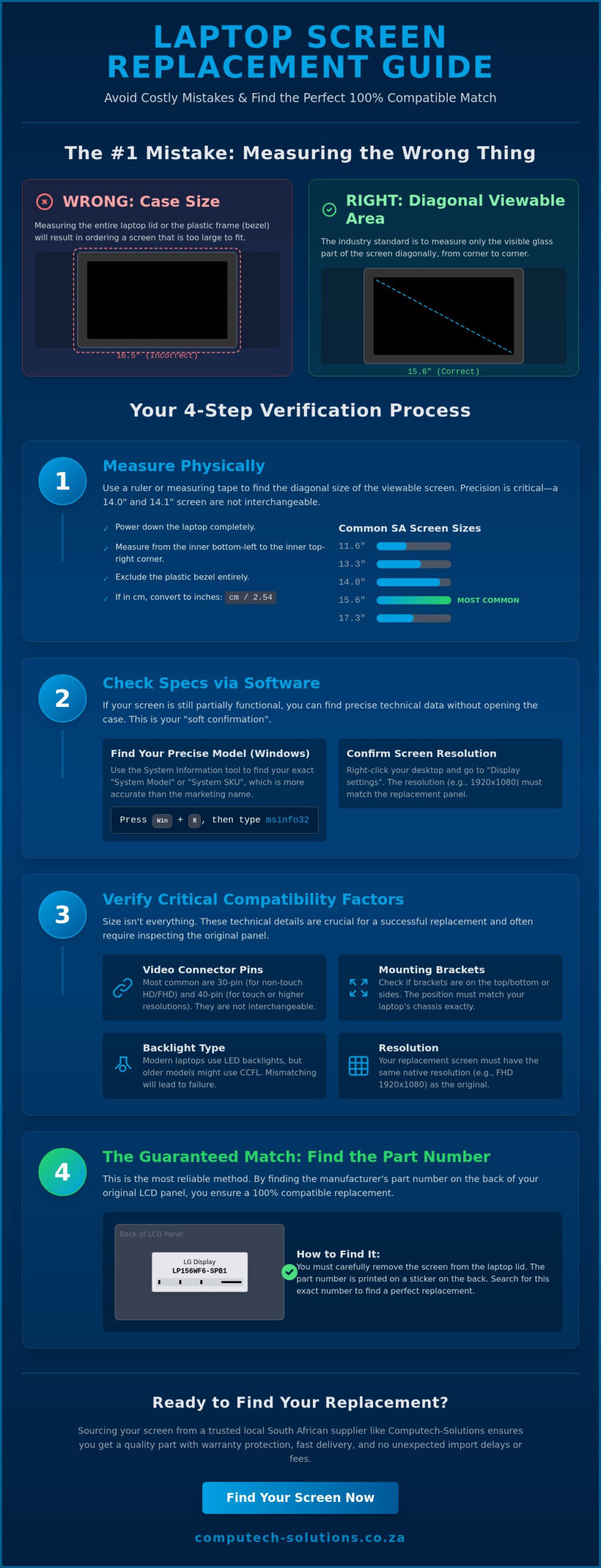
Understanding how to measure laptop screen size for replacement is the first step in restoring your device’s functionality. Laptop screen size refers specifically to the physical measurement of the viewable display area. It doesn’t include the plastic frame, known as the bezel, that surrounds the glass. Manufacturers use the diagonal measurement as the industry standard because it provides a consistent metric regardless of the display aspect ratio, which describes the proportional relationship between width and height. This standardization ensures that a 14 inch panel for a Dell laptop follows the same dimensional logic as a 14 inch panel for an HP or Lenovo model.
Many users mistakenly measure the entire top lid of their laptop. This is known as the case size or footprint, and it’s often significantly larger than the display itself. When you buy a laptop LCD replacement panel, you’re purchasing the internal component. If you rely on the external case dimensions, you’ll almost certainly order a part that’s too large to fit into the internal mounting assembly. Modern laptops with narrow bezels can be especially deceptive. They pack larger screens into smaller frames, making the physical measurement of the glass even more critical. To get started, you only need a standard measuring tape or a long ruler that shows centimeters or inches.
Step-by-Step Physical Measurement
To achieve an accurate reading, follow these specific steps:
- Power down the device to prevent any electrical issues while handling the screen.
- Place the start of your ruler at the very inner corner of the viewable display, typically the bottom-left.
- Extend the ruler diagonally to the opposite top-right corner, ensuring you only measure the glass area.
- Exclude the plastic bezel entirely; including even a few millimeters of the frame will result in an incorrect size.
- Record the measurement. If your ruler only shows centimeters, divide that number by 2.54 to convert it to inches.
Precision is vital here. A 14.0 inch screen and a 14.1 inch screen might look identical to the naked eye, but they aren’t interchangeable in most laptop chassis. Always round your final number to the nearest tenth of an inch to match manufacturer specifications.
Common Laptop Screen Sizes in South Africa
The South African market typically stocks a specific range of display panels. Standard sizes include 11.6, 13.3, 14.0, 15.6, and 17.3 inches. The 15.6 inch model is currently the most common size found in business and student laptops. However, this popularity means it also has the highest variety of internal configurations. Even if two laptops both feature a 15.6 inch display, they might use different pin connectors or mounting brackets. The diagonal rule is the distance between opposite corners of the active display area. While this measurement narrows down your options, you’ll still need to verify technical specs before finalizing your order for a replacement part.
Finding Screen Specifications via Software
Physical measurements tell you the size, but software reveals the internal logic of your device. If your screen still functions despite a crack or dead pixels, you can extract critical data without using a single screwdriver. Understanding how to measure laptop screen size for replacement via software provides a technical baseline that a ruler simply cannot reach. This process acts as a “soft confirmation” of your hardware needs. It’s a vital step before you commit to purchasing a laptop LCD replacement panel from a specialized supplier. Software identification reduces the risk of ordering a part that matches the dimensions but fails to communicate with your motherboard.
The Windows System Info Method
The most reliable built-in tool for Windows users is the System Information utility. To access it, press the Windows Key + R, type “msinfo32”, and press Enter. Once the window opens, look for the “System Model” and “System SKU” entries in the right-hand pane. These alphanumeric strings are far more precise than the generic marketing name printed on your laptop’s chassis. For instance, a Dell Latitude or HP Pavilion might have hundreds of configurations under the same series name. By using the SKU, you can search the manufacturer’s official support site to find the exact factory-installed display specifications, including the backlight type and connector position.
Checking Display Settings for Resolution
Resolution is a primary compatibility factor that dictates whether a screen will function with your existing internal video cable. To find this, right-click on your desktop and select “Display Settings”. Scroll down to “Display Resolution” to see your current pixel count. Most modern laptops in South Africa utilize either HD (1366 x 768) or Full HD (1920 x 1080). It’s a common mistake to assume you can easily upgrade to a higher resolution panel. Higher resolutions often require a different video cable with more data lanes. Matching the original resolution is the most effective way to ensure the replacement works immediately upon installation.
For advanced users who need deeper technical insights, third-party utilities like HWInfo or AIDA64 are invaluable. These programs can identify the specific panel manufacturer, such as LG Philips, Samsung, or BOE, and the internal panel model number. This level of detail is incredibly helpful when you’re following a step-by-step guide to replacing a laptop screen. However, always treat software data as a preliminary step. While learning how to measure laptop screen size for replacement through software saves time, it doesn’t replace the “hard confirmation” of physically checking the part number on the back of the LCD. Software can sometimes report generic driver information or reflect a previous screen swap that wasn’t factory-standard.
Beyond Inches: Understanding Pins, Resolution, and Brackets
Confirming the diagonal dimension is only half the battle. Even if you’ve mastered how to measure your laptop screen diagonally, you’ll find that two 15.6 inch panels can have entirely different internal hardware. Buying a replacement based on size alone often leads to compatibility failures because of the video cable interface. Modern laptops typically use an Embedded DisplayPort (eDP) connection, which has largely replaced the older LVDS standard. If the connector doesn’t match your existing cable, the screen won’t receive power or data, rendering the new part useless. Understanding these technical nuances is what separates a successful repair from a costly mistake.
Physical mounting is another area where identical screen sizes differ. Some panels feature metal side brackets with screw holes for securing the display to the lid. Others use top and bottom brackets, while many “slim” or “ultrabook” designs are bracketless, relying on industrial adhesive strips. When you’re looking at how to measure laptop screen size for replacement, you must also look at the placement of these brackets. If your original screen has side brackets and the replacement has none, you won’t be able to secure it safely within the laptop’s frame.
The 30-Pin vs. 40-Pin Connector Debate
The pin count on the back of the LCD panel is the most critical technical specification to verify. A 30-pin connector is currently the standard for most modern Slim LED and Full HD (1920×1080) screens. In contrast, 40-pin connectors are generally reserved for high-end 4K displays, touch-enabled panels, or older CCFL/LED hybrid models that require more data lanes or power. You must physically count or check the technical datasheet of the connector before purchasing. Using a panel with the wrong pin count can permanently damage the laptop motherboard, leading to a much more expensive repair than a simple screen swap.
Resolution and Refresh Rate Matching
While it’s tempting to upgrade your resolution during a replacement, it isn’t always a plug-and-play process. Moving from a standard HD (1366×768) panel to a Full HD (1920×1080) panel often requires a different video cable with additional data channels. The same logic applies to refresh rates. Standard business laptops use 60Hz panels, while gaming-grade machines might feature 144Hz or 240Hz displays. If your motherboard and video cable aren’t designed to handle the higher bandwidth of a gaming panel, the screen will likely stay black or show distorted images. Stick to the original specifications to ensure a guaranteed fit.
Finish type is one of the few areas where you have flexibility. Matte finishes reduce glare and are ideal for office environments with overhead lighting. Glossy finishes offer more vibrant colors and deeper blacks, which many users prefer for media consumption. As long as the pin count, resolution, and mounting brackets match, you can usually switch between a matte and glossy panel without any technical issues. This choice is purely a matter of personal preference rather than a strict compatibility requirement.
How to Identify Your Exact LCD Part Number
Physical measurements and software diagnostics provide a strong foundation, but the only foolproof way to ensure 100% compatibility is by identifying the Manufacturer Part Number (MPN). This alphanumeric code is the definitive technical “DNA” of your display. It’s printed on a white sticker located on the back of the LCD panel itself. While learning how to measure laptop screen size for replacement helps narrow your search, the MPN accounts for every internal variable, including controller firmware and backlight circuitry. To find this number, you must perform a partial disassembly of the laptop lid.
Safety is the absolute priority before you begin. Always disconnect the power adapter and remove the battery to prevent short-circuiting the motherboard or the delicate video cable. If your laptop has an internal battery, you should ideally disable it in the BIOS or disconnect the internal battery connector once the bottom case is removed. Handling a live display circuit can lead to permanent hardware failure. Once the power is fully drained, you can proceed to access the display panel safely.
Disassembling the Screen Bezel Safely
Most modern laptops utilize a plastic frame, or bezel, held in place by a series of plastic clips and occasionally hidden screws. You’ll need specialized tools like plastic pry tools or a thin guitar pick to avoid marring the finish. Start by inspecting the corners for small rubber bungs. These often hide the screws that secure the bezel to the lid assembly. After removing any screws, gently insert your pry tool into the seam between the bezel and the back cover. Work slowly around the perimeter, listening for the clips to disengage. Once the bezel is removed, you’ll typically find four small screws holding the LCD panel to the hinges. Removing these allows you to tilt the screen forward and reveal the back of the panel.
Reading the LCD Sticker
The back of the panel features several labels, but you’re looking for the one that identifies the manufacturer and the model series. Major brands use specific prefixes that make identification straightforward:
- LP: LG Philips (e.g., LP156WH4)
- B: AU Optronics (e.g., B156XTN)
- LTN: Samsung (e.g., LTN156AT)
- N: Innolux or Chimei (e.g., N156BGE)
The numbers immediately following the prefix usually indicate the screen size. For example, “156” confirms a 15.6 inch panel. Beyond the primary code, pay close attention to version numbers or firmware codes, such as “V.1” or “H/W: 0A”. Manufacturers often update the internal hardware of a panel while keeping the same base part number. Matching these version codes is essential for ensuring that features like brightness control work correctly. Once you’ve documented these details, you can confidently order a laptop LCD replacement panel that matches your original factory specifications exactly.
Identifying the MPN eliminates the guesswork associated with how to measure laptop screen size for replacement. It’s the most reliable method for professional technicians because it guarantees that the connector position and mounting points will align perfectly with your chassis. If the part number on your new screen matches the one you’ve just removed, you can be certain the installation will be successful.
Sourcing Quality Replacement Laptop Screens in South Africa
Sourcing a replacement panel within South Africa offers operational advantages that international platforms cannot match. Importing a fragile component from overseas carries significant risks, including customs delays, high import duties, and a high probability of transit damage. These factors often turn a simple repair into a month-long ordeal. By choosing a local partner, you gain access to domestic consumer protections and significantly faster turnaround times. If you’ve followed our guide on how to measure laptop screen size for replacement, you already have the data needed to secure a part that fits your device perfectly.
Fragile electronics require robust warranty terms and reliable return policies. If a screen arrives with dead pixels or a faulty backlight, an international return is often cost-prohibitive due to shipping fees. Local sourcing ensures that warranty claims are handled within the country, minimizing downtime for your business or personal projects. Technical support is another critical benefit of staying local. Using the data you gathered while learning how to measure laptop screen size for replacement, our team can cross-reference your part numbers against our database to verify compatibility before the item leaves our warehouse.
Why Order from Computech-Solutions?
We maintain a comprehensive inventory of laptop LCD replacement panels for major brands, including Acer, Dell, HP, and Lenovo. Each panel undergoes rigorous quality control testing to ensure zero dead pixels and perfect backlight uniformity. We understand that transit safety is a primary concern for our clients. Every order is shipped nationwide across South Africa using secure, anti-static packaging and reinforced outer layers to prevent pressure damage during courier handling. This professional approach ensures your component arrives in factory-standard condition, ready for immediate installation.
Getting a Technical Compatibility Check
Precision is the foundation of a successful hardware repair. If you’re uncertain about the technical specs you’ve gathered, our specialists are available to perform a final compatibility check. Simply provide the Manufacturer Part Number (MPN) or the system SKU you identified in the previous steps. We also provide specialized support for identifying rare or discontinued screen models that are no longer available through standard retail channels. Contact us today for expert help with your laptop screen replacement to ensure you receive a guaranteed match for your specific hardware configuration.
Our commitment to technical accuracy helps alleviate the stress of ordering specialized components. Whether you’re managing a fleet of corporate laptops or repairing a single personal device, we provide a streamlined solution that prioritizes operational efficiency. By combining your physical measurements with our technical expertise, you can complete your screen replacement with total confidence in the final outcome.
Get Your Laptop Back to Work with a Precise Replacement
Accurate physical measurement is just the beginning of a successful repair. As we’ve detailed, while the diagonal glass dimension is the industry standard, matching technical data like pin counts and mounting styles is what prevents a failed installation. By locating the manufacturer part number on the back of your panel, you eliminate the uncertainty of ordering an incompatible part. Knowing how to measure laptop screen size for replacement ensures you transition from a broken display to a fully functional workstation without unnecessary delays or return shipping costs.
Computech-Solutions provides the technical infrastructure and inventory to support your repair from start to finish. We stock a comprehensive selection of panels for major brands, ensuring your hardware meets original performance standards. Our team offers expert compatibility verification to cross-reference your specific part numbers before shipping. With secure nationwide delivery across South Africa, your sensitive electronics arrive ready for immediate use. Browse our full range of Laptop LCD Replacement Panels today to restore your device with confidence.
Frequently Asked Questions
Can I upgrade my laptop screen to a higher resolution?
Upgrading your resolution is rarely a simple swap. Your laptop’s motherboard and internal video cable are typically designed for a specific data bandwidth. Most standard HD cables don’t have enough data lanes to support a Full HD signal. While you might know how to measure laptop screen size for replacement, you also need to ensure the logic board supports the higher pixel density. It’s best to stick to your original resolution to avoid a black screen or hardware damage.
Is it cheaper to replace a laptop screen or buy a new laptop?
Replacing the display panel is significantly more affordable than purchasing a new laptop. A replacement screen allows you to keep your existing data, software licenses, and hardware configuration intact. For most business and consumer laptops, a new panel costs a fraction of the price of a mid-range replacement device. It’s a sustainable choice that restores your operational efficiency without the capital expense of a new machine.
What is the difference between an LED and an LCD screen?
Modern laptop screens are technically LED-backlit LCDs. The “LCD” refers to the Liquid Crystal Display technology that creates the image, while “LED” refers to the Light Emitting Diodes used for the backlight. Older laptops used CCFL tubes, which were thicker and less energy-efficient. When you search for a replacement today, you’ll almost exclusively find LED-backlit panels as they are the current industry standard for all major manufacturers.
How do I know if I have a 30-pin or 40-pin screen without opening it?
You can identify the pin count by using system diagnostic tools like HWInfo to find the specific panel model number. Once you have the model, you can search technical databases for the pin configuration. However, software occasionally reports generic driver data. The only definitive way to confirm if you need a 30-pin or 40-pin connector is to follow the steps on how to measure laptop screen size for replacement and physically inspect the sticker on the back of the panel.
Does replacing my laptop screen void the warranty?
Replacing the screen typically voids the standard manufacturer warranty. Most brands consider screen replacement a “user-induced” repair unless it’s performed by an authorized service center. If your laptop is still under its initial coverage period, you should check the terms of your service agreement before proceeding. For out-of-warranty devices, a self-replacement or professional third-party repair is the most practical and cost-effective solution to restore functionality.
What should I do if my replacement screen has a different part number but looks the same?
It’s common for a replacement screen to have a different part number than the original. Manufacturers like LG, Samsung, and BOE often produce equivalent panels that are fully compatible with one another. As long as the physical dimensions, resolution, and connector pin count are identical, the panel will function perfectly. We recommend verifying these technical specs with a professional supplier to ensure a guaranteed match before installation.
Can I use a matte screen to replace a glossy one?
You can absolutely switch between matte and glossy finishes. These two types of coatings are technically interchangeable as long as the internal hardware specifications match. Matte screens are excellent for reducing glare in bright offices, while glossy screens often provide better color contrast for media consumption. This choice doesn’t affect compatibility; it’s purely about which viewing experience you prefer for your daily professional or personal tasks.
How much does a replacement laptop screen cost in South Africa?
Costs for replacement panels in South Africa depend on the specific technology and size required. For instance, a standard 15.6 inch screen can range from approximately R678 to over R2,250 depending on the resolution and pin count. 14 inch models are frequently priced between R800 and R1,000. These prices fluctuate based on stock availability and whether the panel is a standard LED or a more advanced IPS or touch-enabled model.
