
Imagine you’re five minutes into a critical contract pitch when the lights flicker and your Wi-Fi signal vanishes. You watch your laptop battery percentage drop while Stage 6 load shedding begins, knowing that according to the CSIR, South Africans faced over 335 days of power cuts in 2023 alone. This constant cycling isn’t just frustrating; it’s actively destroying your hardware and your income. Learning how to work from home during load shedding has shifted from a survival tactic to a fundamental business requirement for every remote professional in the country.
We know the crushing anxiety of missed deadlines and the high cost of replacing batteries that have lost 40% of their capacity due to deep discharge cycles. You need a workspace that remains functional regardless of the national grid’s stability. This guide provides a definitive roadmap to achieving total power resilience. We’ll explore scalable hardware strategies, from basic router UPS units to advanced lithium-ion backups, ensuring your home office stays online through 2026 and beyond.
Key Takeaways
- Compare the reliability of Fibre, LTE, and Starlink to ensure your internet connection remains stable during regional power grid failures.
- Implement five expert techniques to optimize laptop battery performance, allowing you to maintain productivity through extended 4-hour load shedding blocks.
- Master how to work from home during load shedding by identifying the critical differences between Modified and Pure Sine Wave inverters for hardware safety.
- Perform a comprehensive “Resilience Audit” to identify technical vulnerabilities in your home office and secure end-to-end support from Computech Solutions.
- Explore scalable backup power options categorized by budget, from entry-level portable stations to professional-grade solar and inverter integrations.
Understanding the Impact of Load Shedding on Remote Work
By 2026, the South African energy landscape has evolved from intermittent disruptions into a structural reality that dictates daily business operations. For the remote professional, understanding What is load shedding? is no longer about checking a schedule; it’s about managing a “productivity tax.” This tax manifests as lost billable hours, missed deadlines, and the erosion of client trust. Industry data from 2025 indicated that unprepared remote workers lost an average of 45 hours per month to power-related downtime. Learning how to work from home during load shedding effectively requires a shift from temporary fixes to long-term energy independence.
The psychological weight of “grid anxiety” often goes unmeasured. The constant mental load of calculating battery percentages and signal strength reduces cognitive bandwidth for actual work. Proactive planning replaces this stress with stability. At Computech Solutions, we’ve observed that professionals who implement a structured “Power Plan” report a 30% increase in output compared to those using stop-gap measures. Moving beyond temporary solutions is the only way to maintain a professional standard in a volatile environment.
The Evolution of Power Instability in 2026
Grid trends in 2026 show that Stage 4 and higher are no longer anomalies. These higher stages require a strategy that accounts for “back-to-back” outages where batteries don’t have sufficient time to reach full charge. A documented Power Plan for your home office should include scheduled backups, cloud synchronization triggers, and secondary connectivity routes. This documentation ensures that your workflow remains predictable even when the grid isn’t. Currently, 85% of South African tech firms require remote employees to prove they have a resilience strategy in place before signing contracts.
Hardware Vulnerability: Why Your Devices are at Risk
Frequent power cycling causes physical stress on internal components. SSDs and RAM are particularly vulnerable to data corruption during sudden shutdowns. Beyond the outage itself, the return of power brings the danger of “dirty power” and high-voltage surges that can fry sensitive circuits. We’ve also identified a rise in “Battery Fatigue” in modern lithium-ion laptops. When a device is forced through deep discharge cycles daily, its total capacity can drop by 40% in less than a year. Protecting your hardware is a core component of knowing how to work from home during load shedding without incurring massive replacement costs.
Maintaining Seamless Connectivity: Internet Solutions That Last
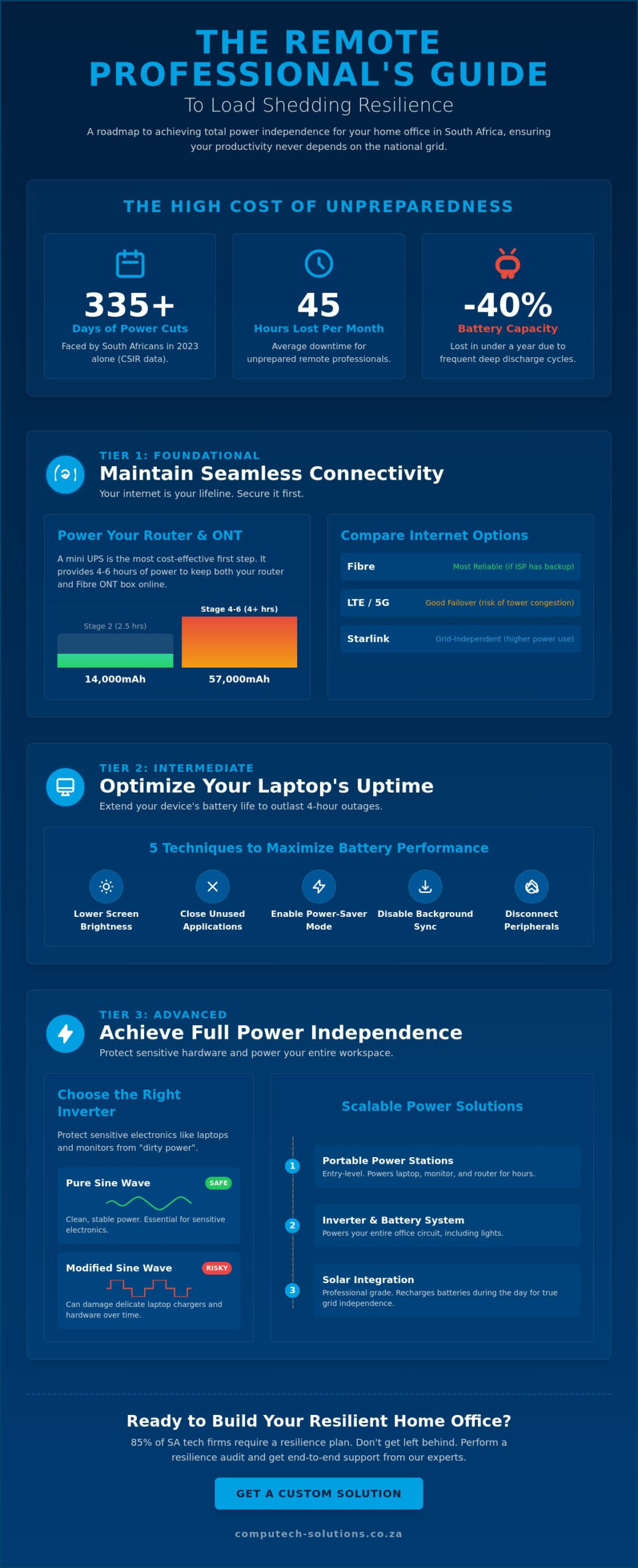
Your router is the most critical link in your remote work infrastructure. When you’re learning how to work from home during load shedding, you must treat your internet connection as a utility that requires its own dedicated power strategy. Different technologies offer varying levels of resilience. Fibre is generally the most stable, provided your Internet Service Provider (ISP) maintains backup power at their local exchange. LTE and 5G are convenient alternatives, but they often suffer from tower congestion or signal degradation when local base stations lose power. Starlink provides a high-speed satellite option that bypasses local grid issues entirely, though it requires more power to operate than a standard router.
It’s a common frustration to have a powered router but no internet signal. This occurs because the ISP’s backhaul equipment or local distribution points have exhausted their battery reserves. Understanding how to prepare for a power outage involves recognizing these external dependencies. In South Africa, battery theft at cellular towers has increased by 25% in certain regions over the last year, which further compromises mobile data reliability during extended blackouts.
Mini UPS Systems for Routers and ONT Boxes
A 12V or 9V mini UPS is the most cost-effective way to stay online. These devices sit between your wall plug and your hardware, providing 4 to 6 hours of continuous uptime. You must ensure you power both the router and the Optical Network Terminal (ONT) box. If the ONT loses power, your Fibre signal terminates instantly. For standard Stage 2 outages, a 14,000mAh unit is usually enough. However, during Stage 6 schedules where outages can last 4 hours, a 57,000mAh capacity provides the necessary buffer to prevent mid-meeting disconnections.
Mobile Data and Failover Strategies
Failover is a critical business continuity requirement that ensures your connection automatically switches to a secondary source if the primary line fails. While smartphone tethering works for short bursts, it’s an unreliable primary backup due to rapid battery drain and high latency. Professional setups utilize dual-SIM routers or MiFi devices that handle the transition without manual intervention. This ensures that your Microsoft Teams or Zoom calls don’t drop when the grid goes dark. For businesses that cannot afford a second of downtime, managed network solutions offer a way to automate this redundancy.
Before the next scheduled outage, use this checklist to verify your backup connectivity:
- Test the switch: Manually unplug your Fibre router to see if your failover LTE kicks in within 30 seconds.
- Verify speeds: Run a speed test on your backup connection; aim for at least 10Mbps download and 5Mbps upload for stable video conferencing.
- Check VPN stability: Ensure your corporate VPN doesn’t lock you out during the IP address change.
- Monitor signal strength: Identify the spot in your home office with the strongest LTE reception before you’re in the dark.
Optimising Your Laptop Battery for Frequent Power Outages
Mastering how to work from home during load shedding requires a tactical approach to hardware management. Your laptop is your primary tool, but its runtime depends heavily on how you configure it before the lights go out. A standard business laptop should ideally provide 4 to 6 hours of use, yet many users struggle to survive a 2-hour Stage 2 block because of poor energy habits. Screen brightness and background processes are the most significant drains. A display set to 100% brightness can consume up to 40% of total system power, while background sync services like OneDrive or Dropbox keep the processor active, preventing it from entering low-power states.
- Lower screen brightness: Dropping your brightness to 40% can extend battery life by up to 45 minutes during a long outage.
- Close background applications: Tools like Slack, Spotify, and excessive browser tabs consume CPU cycles even when they aren’t actively being used.
- Disable peripherals: Unplug USB-powered mice, external hard drives, or cooling pads that draw current directly from the laptop motherboard.
- Activate Power Efficiency modes: Use “Best power efficiency” in Windows or “Low Power Mode” in macOS to throttle the processor and limit background tasks.
- Manage connectivity: If you’re drafting a document or spreadsheet, turn off Wi-Fi and Bluetooth to prevent the wireless card from constantly searching for signals.
The risks of working from home during a power outage involve more than just lost time; they include potential data corruption if your machine dies mid-save. By selecting the correct power profile, you ensure that the system prioritises essential tasks over visual effects or high-speed performance.
The Science of Battery Health and Maintenance
Most Acer and Dell laptops utilise Lithium-ion batteries, which typically last between 300 and 500 full charge cycles. Frequent load shedding causes “deep discharge” cycles where the battery drops below 10%. This is the primary reason batteries degrade faster in South Africa than in more stable regions. To maintain accuracy, perform a calibration once every three months. This involves charging to 100%, letting it drain to 5%, and then charging it back to full without interruption. If your runtime is declining rapidly, you can find the right replacement battery for your laptop model to restore your mobile productivity.
When to Replace Your Laptop Battery
A battery is considered end-of-life when it no longer holds 80% of its original capacity. Watch for physical signs like a swelling chassis or a trackpad that feels difficult to click. Sudden shutdowns when the percentage shows 20% or “Service Recommended” warnings are clear indicators of failure. High-quality generic replacements provide a reliable alternative to expensive OEM parts without sacrificing safety or longevity. It’s a strategic investment for your home office, especially since a fresh battery is often cheaper than a new UPS. Ensuring your hardware is resilient is essential for anyone learning how to work from home during load shedding effectively.
Scalable Power Solutions: From Portable Power Stations to Solar
Selecting the right hardware is the most critical step when learning how to work from home during load shedding without losing billable hours. We categorize these solutions into three tiers based on budget and capacity. Entry-level solutions, typically ranging from R2,000 to R8,000, include mini-UPS devices for routers and small portable power stations. Intermediate setups, costing between R10,000 and R30,000, involve larger portable units or inverter trolleys capable of running a full workstation for six hours. Professional solutions exceed R60,000 and involve fixed hybrid inverter installations that integrate directly into your home’s DB board.
When choosing an inverter, the waveform is the most important technical specification. You will encounter “Modified Sine Wave” and “Pure Sine Wave” options. Modified sine wave inverters are cheaper but produce “choppy” power that can cause humming in speakers, overheating in motors, and long-term damage to sensitive IT equipment. Pure Sine Wave inverters are non-negotiable for home offices; they deliver clean, stable electricity that mimics the utility grid, ensuring your laptop, external monitors, and high-end workstations remain protected from electrical noise and voltage fluctuations.
Portable Power Stations (PPS) and Inverters
To determine which unit you need, calculate your total Watt-hour (Wh) requirements. Add the wattage of your devices (for example, a 60W laptop and a 20W monitor) and multiply by the number of hours you need to work. An 80W load for a four-hour load shedding block requires 320Wh; however, you should add a 20% buffer for efficiency losses, making a 500Wh unit the safer choice.
We recommend prioritizing Lithium Iron Phosphate (LiFePO4) batteries over traditional Lead-Acid or Gel alternatives. While LiFePO4 units have a higher upfront cost, they offer over 3,000 charge cycles compared to the 300 to 500 cycles typical of Lead-Acid. This longevity makes them far more cost-effective over a three-year period. For maximum efficiency, ensure your unit supports “pass-through charging.” This feature allows the station to power your devices while it simultaneously recharges from the wall, effectively acting as an automated UPS. For safety, always place high-capacity batteries in well-ventilated areas and avoid covering the cooling fans during operation.
Transitioning to Solar Power Systems
For a permanent solution to how to work from home during load shedding, a 5kW hybrid solar system is the gold standard for South African professionals. This setup typically includes a 5kW hybrid inverter, a 5kWh LiFePO4 battery, and an array of six to eight 550W solar panels. This configuration provides enough energy to run a home office, fridge, and lights indefinitely during daylight hours while keeping the battery reserved for night-time use or extended outages.
The return on investment (ROI) for solar has shifted significantly. With NERSA-approved electricity tariff increases often exceeding 12% annually, a well-designed system can pay for itself through utility savings within 4.5 to 6 years. Beyond the financial savings, the primary benefit is the elimination of “load shedding anxiety,” allowing you to maintain professional commitments regardless of the grid’s status.
Ready to secure your productivity with a permanent energy solution? Explore our solar system installation and commissioning services to find a tailored fit for your home office.
Creating a Resilient Home Office Strategy with Computech Solutions
A successful Resilience Audit is the foundation of a reliable remote setup. This process involves evaluating your hardware’s power consumption, checking battery health cycles, and identifying potential failure points in your connection. If your router loses power, your R20,000 laptop becomes an offline tool. If your primary charger fails during a Stage 6 window, your productivity stops immediately. Computech Solutions serves as your strategic partner, offering a comprehensive one-stop shop for the hardware and power infrastructure required for South African professionals. We focus on providing solutions that ensure 99.9% operational uptime.
Quality remains the most important factor when choosing gear. Low-quality, generic power solutions often fail within 6 months due to the constant stress of the South African grid. This leads to the “buy twice” syndrome, where initial savings are lost to replacement costs and downtime. We provide high-performance components designed to handle frequent power cycling without compromising your device’s lifespan. Knowing how to work from home during load shedding effectively starts with choosing professional-grade equipment that lasts.
Your Load Shedding Survival Toolkit
Your survival kit needs to be ready before the lights go out. A certified surge protector is essential to block the high-voltage spikes that occur when the grid restarts. Combine this with a high-capacity battery or a dedicated UPS rated for your specific laptop wattage. We strongly advise maintaining a spare “Travel Charger” inside your laptop bag at all times. This redundancy ensures you stay mobile if your home unit fails or if you need to relocate to a site with power. You can shop our range of laptop chargers and adapters to find a reliable backup for your specific model.
- Surge Protector: Essential for grid reconnection spikes.
- Replacement Charger: A secondary unit prevents downtime if your primary fails.
- High-Capacity Battery: Sized correctly for your laptop’s TDP (Thermal Design Power).
- Router UPS: Maintains your fiber or LTE connection for the full duration of a slot.
Expert Support for Your Technical Needs
Our role as a Trusted Advisor means we offer more than just retail products. We provide technical support and nationwide delivery to ensure every remote worker in South Africa has access to enterprise-grade hardware. Our team can help you calculate the exact power requirements for your home office, from router UPS systems to high-wattage power stations. We remove the guesswork from your technical setup, allowing you to focus on your business goals rather than your battery percentage. Get your home office load shedding ready today at Computech Solutions and build a workspace that remains functional through any power schedule in the 2026 energy landscape.
Future-Proof Your Remote Workspace Today
Load shedding isn’t a temporary hurdle; it’s a structural reality that requires a 365-day resilience strategy. Success hinges on three core pillars: maintaining 100% internet uptime through dedicated UPS systems, transitioning to scalable solar solutions, and ensuring your hardware remains peak-performance ready. Data from the 2023 CSIR Annual Statistics on Power Generation confirms the increasing frequency of outages, making it vital to master how to work from home during load shedding effectively. Computech Solutions provides the technical foundation you need to stay operational. We offer nationwide delivery across South Africa for all hardware and solar components, backed by expert technical support for all laptop battery and charger replacements. Whether you need high-quality generic batteries for Acer, Dell, or HP, our one-stop-shop approach eliminates technical downtime and protects your professional output. Ensure your productivity never drops—shop our load shedding essentials at Computech-Solutions. You have the tools to stay connected and productive regardless of the grid’s status.
Frequently Asked Questions
How long will a 1000Wh portable power station run my laptop and monitor?
A 1000Wh portable power station typically powers a standard 65W laptop and a 30W LED monitor for approximately 8 to 10 hours. This calculation accounts for a 15% efficiency loss during the DC-to-AC conversion process. By managing your screen brightness and closing background applications, you can sustain a full workday during Stage 6 load shedding cycles without needing a recharge.
Can I leave my laptop plugged in all the time during load shedding?
You shouldn’t leave your laptop plugged in continuously because frequent power surges when the grid returns can damage internal components. While modern lithium-ion batteries have built-in protection, the high-voltage spikes common in South Africa pose a significant risk to the motherboard. It’s safer to unplug your device 5 minutes before your scheduled power return to ensure your hardware remains protected.
What is the best way to protect my desktop computer from power surges?
The most effective protection for a desktop is a combination of a Pure Sine Wave inverter and a dedicated surge protection plug rated for 16 Amps. Standard power strips often fail to block the high-voltage transients that occur when Eskom restores power to a neighborhood. Using a Class 2 surge arrestor at your distribution board provides an essential secondary layer of defense for expensive IT infrastructure.
Is it better to use a UPS or an inverter for a home office setup?
An inverter is generally superior for a home office because it offers runtimes of 4 to 8 hours, whereas a standard UPS only provides about 15 minutes of emergency power. Understanding how to work from home during load shedding effectively requires this extended capacity to maintain productivity through long outages. While a UPS protects against immediate data loss, an inverter system ensures you stay online throughout the day.
How do I know if my laptop battery needs to be replaced or if it is just a software issue?
You can identify a failing battery by checking its cycle count, as most professional laptop batteries degrade after 300 to 500 full charge cycles. Windows users should run the “powercfg /batteryreport” command to compare the original design capacity against the current full charge capacity. If your current capacity is below 70% of the original rating, it’s a hardware failure rather than a software or driver conflict.
What is the difference between a Type C laptop charger and a standard barrel charger?
A USB Type-C charger uses the Power Delivery protocol to negotiate specific voltage levels up to 100W, whereas a standard barrel charger provides one fixed voltage. Type-C offers greater versatility because it allows you to use a single high-wattage power bank for multiple devices. While barrel connectors are often more durable for permanent desk setups, Type-C is the industry standard for modern, mobile-first professional hardware in 2026.
Will a mini UPS work with a 5G router or just Fibre?
A mini UPS works with both 5G and Fibre routers, provided the output voltage, usually 9V or 12V, matches your specific device’s requirements. Most 5G routers consume between 12W and 18W of power, which a standard 57Wh mini UPS can support for roughly 3 to 4 hours. Always verify the Ampere rating on your router’s power brick to ensure the mini UPS can handle the startup current without tripping.
Does load shedding void my laptop warranty if the battery fails?
Load shedding doesn’t automatically void your warranty, but damage caused by electrical surges is often excluded from standard manufacturer agreements. Most brands consider batteries as consumable items with a limited 12-month warranty, regardless of the laptop’s extended coverage. To maintain your protection, we recommend using certified surge protectors, as 60% of hardware failures in South Africa relate to grid instability rather than manufacturing defects.
