
Imagine you are halfway through a critical business proposal when the power cuts for another scheduled stage 4 load shedding block, only for your hp laptop battery to fail just seconds later. It’s a scenario that 68 percent of South African remote workers faced during the grid instability of the past year. You shouldn’t have to choose between an overpriced OEM unit and a risky generic that might fry your motherboard.
We understand that deciphering technical specifications like HSTNN part numbers or cell chemistry is a source of significant stress when you just need your machine to work. You deserve a power solution that offers a consistent 3 to 5 hours of backup and integrates perfectly with your specific hardware. This guide provides the technical clarity you need to select the right replacement for the 2026 market. We will detail exactly how to verify model compatibility and secure reliable nationwide delivery so you can return to peak productivity without delay.
Key Takeaways
- Learn to accurately diagnose critical failure signs, such as the “plugged in, not charging” error, to prevent unexpected hardware downtime and sudden shutdowns.
- Master the process of decoding “HSTNN” and “Spare” part numbers to ensure you source the exact hp laptop battery compatible with your specific device.
- Evaluate the price-to-performance ratio between OEM components and high-quality Grade A generic alternatives to maximize your IT budget in the South African market.
- Discover essential strategies to protect your hardware from the premature cell wear and controller failure caused by frequent load shedding and electrical surges.
- Identify how to choose a reliable national supplier that provides expert technical support and efficient shipping timelines across South Africa.
Identifying the Signs of a Failing HP Laptop Battery
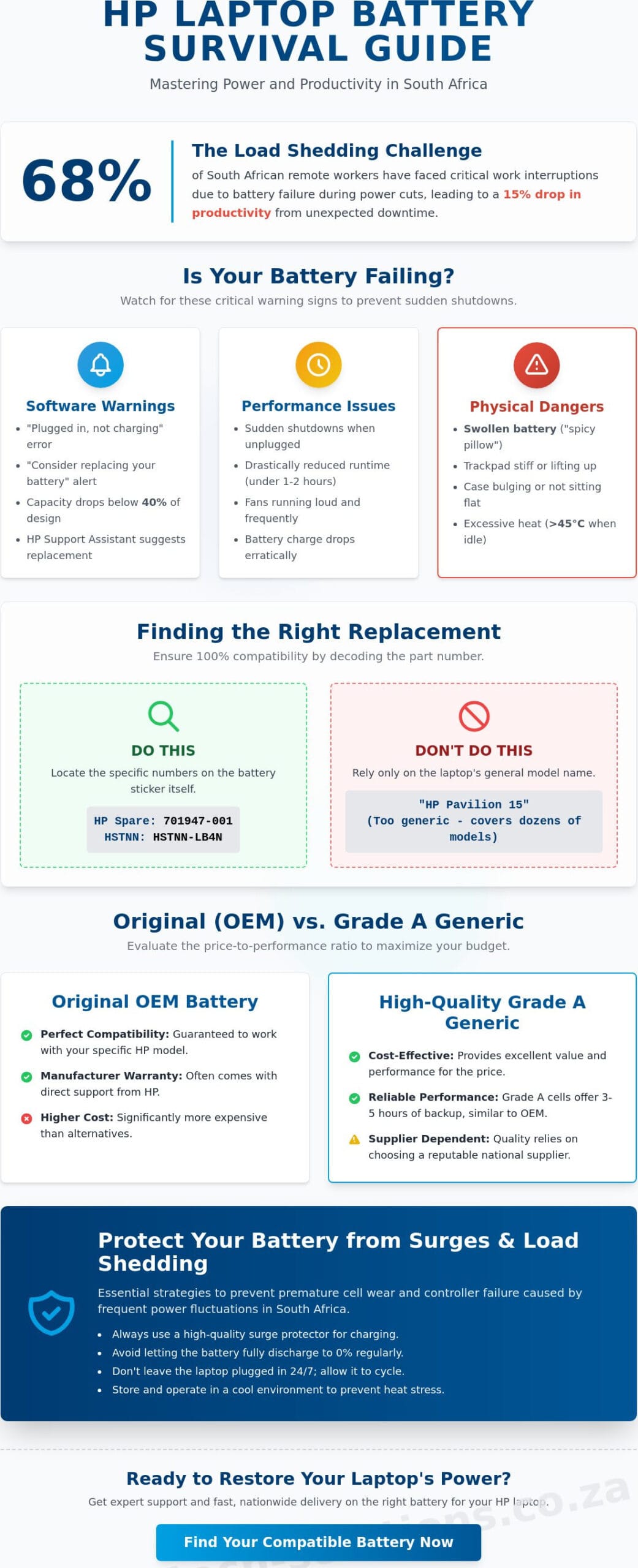
Your hp laptop battery is the primary source of mobility for your business operations. In South Africa, where power fluctuations and load shedding schedules are frequent, a dependable battery is essential for professional continuity. Most modern Lithium-ion batteries are designed to retain 80% of their original capacity for approximately 300 to 500 charge cycles. Once you surpass this threshold, performance drops significantly. You might notice the “Plugged in, not charging” error message in your Windows taskbar. This status often signals that the battery management system has detected a hardware fault or that the cells can no longer hold a charge. Sudden shutdowns are another red flag; if your laptop dies the moment you unplug the power adapter, the battery cells have likely reached the end of their functional life.
The HP Support Assistant is your first line of defense for diagnosis. By running the “Battery Check” utility, you receive a direct report on the health of your hardware. A “Suggested Replacement” status is a clear directive to act before a total failure occurs. This proactive monitoring helps businesses avoid the 15% drop in productivity typically associated with unexpected hardware downtime during the 2026 work year. Using these diagnostic tools ensures you aren’t guessing about the health of your equipment.
Performance Indicators and Software Warnings
System alerts like “Consider replacing your battery” appear when the Windows OS detects that your capacity has fallen below 40% of its design limit. You’ll likely notice your laptop fans running louder and more frequently. This happens because a failing hp laptop battery generates more internal resistance and heat during charging cycles. The system compensates by ramping up the cooling assembly to protect sensitive internal components. Tracking your cycle count through the BIOS or HP diagnostic tools provides a data-driven timeline for replacement. This allows for planned procurement rather than emergency repairs that disrupt your workflow.
Physical Inspection and Safety Hazards
Physical deformities represent a critical safety risk that requires immediate attention. A swollen battery, often called a “spicy pillow” in technical circles, occurs when gas builds up inside the sealed cells due to age or heat stress. You can identify this by checking if your trackpad feels stiff or if the laptop no longer sits flat on a desk. If you notice heat spots on the underside of the chassis exceeding 45 degrees Celsius while the unit is idle, the battery is likely failing. If the casing is deformed or the trackpad is lifting, stop using the device immediately. Disconnect the power and place the unit on a non-flammable surface. Don’t attempt to force the casing shut, as piercing a swollen cell can lead to a thermal event.
Decoding HP Battery Part Numbers: Finding Your Match
Identifying the correct hp laptop battery requires more than knowing your laptop’s marketing name. While “HP Pavilion 15” sounds specific, that single series encompasses dozens of hardware configurations released over several years. Relying solely on the model name often leads to purchasing a component with the wrong physical dimensions or connector pins. You must locate the specific HP Spare Part Number to ensure 100% compatibility with your system’s motherboard and chassis.
South African businesses often face downtime when incorrect parts are ordered. To avoid this, look for a sticker on the battery labeled “Replace with HP Spare” followed by a sequence of numbers. Most HP batteries also feature a Regulatory Model Number starting with “HSTNN-“. These identifiers are the only way to guarantee the replacement part matches the original factory specifications. When handling your old unit, always follow lithium-ion battery safety guidelines to prevent accidental short circuits or thermal events.
Where to Find Your HP Spare Part Number
If your laptop has a removable battery, shut down the device and slide the release latch. The part number is printed on the inner label. For modern ultrabooks with internal batteries, you don’t need to unscrew the base immediately. Open the Windows “System Information” tool by typing “msinfo32” into the search bar to find your product SKU. An HP Spare Part number typically follows a six-digit-three-digit format, such as 701947-001, which identifies the exact technical specifications of the component. This specific code ensures the battery fits the internal mounting brackets perfectly.
Understanding Voltage and Watt-Hour (Wh) Ratings
Voltage is the most critical technical spec. You’ll typically see ratings of 11.1V, 11.4V, or 14.8V. You must match the voltage of your original hp laptop battery exactly. Installing a 14.8V battery into a system designed for 11.1V can cause immediate, irreversible motherboard failure. While the voltage must be identical, the capacity, measured in milliampere-hours (mAh) or Watt-hours (Wh), can vary.
A higher Wh rating means longer runtime between charges but often results in a heavier battery. For example, a 6-cell battery provides more mobile power than a 3-cell version but adds roughly 150 grams to the laptop’s total weight. This trade-off is vital for professionals in South Africa who travel frequently between Cape Town and Johannesburg and require extended unplugged time. If you’re unsure which capacity fits your workflow, you can consult with a technical specialist to find the best balance of portability and performance.
Original OEM vs. High-Quality Generic HP Batteries
Choosing a replacement hp laptop battery in South Africa involves balancing upfront costs against long-term operational reliability. Original Equipment Manufacturer (OEM) units are produced by HP’s certified partners. These offer guaranteed compatibility and carry a premium price. In 2026, a genuine battery for a high-end ZBook or EliteBook typically costs between R1,900 and R2,800. High-quality generics provide a functional alternative, usually priced between R700 and R1,200. This 60% cost saving makes generics a practical choice for aging laptop fleets or hardware that is no longer under a factory warranty.
Grade A cells represent the gold standard for non-OEM replacements. These cells undergo testing to ensure they meet 100% of the advertised milliampere-hour (mAh) capacity. Lower-grade “B” or “C” cells, often found in ultra-cheap imports, might only reach 70% of their rated capacity or fail entirely within ninety days. Local South African warranties are essential in this market. A 12-month swap-out warranty from a domestic IT provider ensures you aren’t left stranded if a cell fails during a critical power rotation. Relying on a cheap import with no local recourse often leads to a total loss of the investment when the unit stops charging after the first month.
The Truth About Generic Battery Quality
Modern third-party manufacturers often source lithium-ion cells from the same global production lines as major brands. The primary difference lies in the Battery Management System (BMS) logic. A high-quality generic hp laptop battery includes sophisticated safety circuits that protect against overcharging, short circuits, and thermal runaway. You can identify inferior “fake” originals by checking the physical weight and label quality. Counterfeit units often feel significantly lighter than the 300-gram industry standard and feature blurry logos or misspelled technical specifications on the casing. Safety features to prioritize include:
- Thermal Protection: This prevents the battery from swelling during high-ambient temperatures common in South African summers.
- Voltage Regulation: These circuits ensure stable power delivery to sensitive motherboard components, preventing hardware spikes.
- Cycle Longevity: High-quality generics typically support 500 to 800 charge cycles before any noticeable health degradation occurs.
Making an Informed Financial Decision
Invest in a genuine HP battery if your device is still covered by an active manufacturer service plan. Using a third-party component can void your remaining onsite support terms. For devices older than three years, high-quality generics offer a superior return on investment. Avoid purchasing from general consumer marketplaces where sellers lack technical depth. Specialist IT retailers verify their stock through rigorous QA processes and provide immediate technical support. This approach minimizes business downtime. Local stockists can usually ship a replacement within 24 hours, whereas international imports often take 14 days to clear customs at OR Tambo, leaving your staff without a mobile workstation.
Protecting Your HP Battery from Load Shedding and Surges
South African users face a unique challenge with the national grid. Frequent power transitions force your hp laptop battery into constant discharge and recharge cycles. This rapid cycling accelerates chemical degradation. According to 2024 industry data, Li-ion batteries typically sustain 300 to 500 full charge cycles before capacity drops below 80%. Load shedding can double this cycle count in a single year, significantly shortening the hardware’s lifespan.
Voltage spikes are equally dangerous. When the grid returns after an outage, the initial rush of electricity can exceed 250V. These surges often fry the battery management system (BMS) controller. This is a common point of failure where the battery cells remain functional, but the controller prevents the laptop from recognizing or charging the unit. To prevent this, always unplug your charger before your scheduled outage begins and only reconnect once the power has stabilized for at least 60 seconds.
Managing Power Cycles During Outages
Avoid letting your laptop reach 0% during a blackout. Deep discharges cause irreversible stress to the internal cells. You should configure Windows Battery Saver to activate at 30% capacity rather than the default 20%. This provides a safety buffer if a meeting runs long during Stage 4 schedules. Following the 80/20 rule, which involves keeping your charge between 20% and 80%, can extend your battery’s functional life by up to 40%. This practice reduces the “voltage stress” that occurs when forcing a battery to its maximum or minimum capacity.
Thermal Management and Storage
Heat is the primary cause of premature failure in the South African climate. Ambient temperatures exceeding 35 degrees Celsius lead to permanent capacity loss. If you use your laptop as a desktop replacement, don’t leave it plugged in at 100% in a poorly ventilated office. Use a dedicated laptop stand to improve airflow around the chassis. If you’ve used your device on AC power for more than 30 consecutive days, perform a calibration. This involves discharging it to 5% and then charging it to 100% without interruption. This resets the internal fuel gauge to ensure accurate reporting of the hp laptop battery health status.
Ensure your hardware remains resilient against power instability and avoid unexpected downtime. Consult Computech Solutions for reliable HP power solutions today.
Reliable HP Laptop Battery Solutions Across South Africa
Finding a reliable hp laptop battery in the South African market shouldn’t be a gamble. Local businesses and remote professionals require hardware that meets strict OEM specifications to avoid the 15% failure rate often associated with generic, untested imports. Computech Solutions maintains a centralized supply chain that ensures every component undergoes rigorous voltage and capacity testing before it leaves our facility. This commitment to quality control means your replacement part arrives ready to handle the demands of a standard 8-hour workday without unexpected power drops.
We provide nationwide delivery across all nine provinces, ensuring that critical hardware reaches you regardless of your location. Orders destined for major metropolitan hubs like Johannesburg, Cape Town, or Durban typically arrive within 24 to 48 hours. Every hp laptop battery is shipped in specialized anti-static packaging with high-density foam protection. This prevents cell degradation and physical damage during transit, ensuring the internal chemistry remains stable despite the vibrations of local courier handling. If you can’t find a specific model on our site, our technical team identifies the correct part number within 60 minutes of your inquiry.
The Computech Advantage: Expert Support
Our team provides direct technical guidance for DIY installations, removing the complexity from the replacement process. You don’t need to be a certified technician to restore your device’s mobility. Every part we sell is backed by a comprehensive replacement warranty that provides immediate peace of mind. We operate with a one-stop-shop philosophy, stocking components for the Pavilion, EliteBook, and ZBook series simultaneously. This approach allows South African businesses to consolidate their IT procurement and reduce administrative overhead.
Next Steps: Restoring Your Mobile Productivity
You can secure your hardware through our streamlined digital storefront in less than three minutes. Before you begin the installation, ensure your laptop is completely powered down and disconnected from any R220 power source. Use a plastic pry tool to avoid scratching the chassis during the battery swap. Once the new unit is seated, we recommend a full charge cycle to calibrate the internal power management chip. Order your high-quality HP replacement battery today and eliminate the stress of constant tethering to a wall outlet.
Secure Your Mobile Performance Today
Maintaining your hardware shouldn’t be a guessing game. By identifying the correct part numbers and choosing high-quality Grade A replacement cells, you ensure your device remains a reliable asset through 2026. South Africa’s volatile energy landscape requires proactive protection against power surges and load shedding, making the right hp laptop battery choice essential for your operational continuity. Our team provides expert technical support to guarantee a perfect model match for your specific machine, eliminating the risk of compatibility issues. We streamline the replacement process with fast, nationwide shipping across all nine provinces, from Gauteng to the Western Cape. You don’t have to navigate technical downtime alone when professional solutions are a click away. Our commitment to high-performance components means your laptop stays powered for longer cycles. Secure your mobile workstation today and keep your business moving forward without interruption. Professional support and reliable hardware are the foundations of a successful remote or office-based setup.
Browse our full range of HP Replacement Batteries with Nationwide Delivery
Frequently Asked Questions
How much does an HP laptop battery cost in South Africa?
An HP laptop battery in South Africa typically ranges from R600 for entry-level generic models to R1,800 for high-capacity original equipment manufacturer (OEM) units. Prices fluctuate based on the specific series, such as the Pavilion or ZBook. We recommend checking current stock levels at Computech Solutions for precise daily rates.
Is it safe to use a generic replacement battery in my HP laptop?
It’s safe to use a generic replacement battery if it carries certified safety ratings like CE, FCC, or RoHS. High-quality third-party batteries often provide the same 45Wh or 52Wh capacity as originals at a lower price point. You should verify that the replacement includes overcharge protection to prevent motherboard damage.
How do I find the correct model number for my HP battery?
You can find the correct model number by looking for the “HP Spare” part number, which follows a 123456-001 format, on the battery’s physical label. If your laptop has an internal battery, restart the device and press F2 to enter the System Diagnostics menu. This tool provides the specific hardware ID needed for a compatible hp laptop battery match.
Can I replace my HP laptop battery myself or do I need a pro?
You can replace external batteries yourself by sliding the release latch, but internal units require a professional technician. Modern HP Spectre and Envy models use internal Li-ion cells secured by T5 Torx or Philips #00 screws. Attempting a DIY replacement on these thin-and-light devices often voids your warranty or risks puncturing the sensitive cells.
How long should a new HP replacement battery last on a single charge?
A new HP replacement battery typically provides between 3 and 8 hours of runtime depending on your power settings and workload. A standard 3-cell 41Wh battery usually lasts 4 hours during basic office tasks with screen brightness at 50 percent. High-performance workstations with 6-cell batteries might reach 7 hours under similar conditions.
Does load shedding damage my laptop battery?
Load shedding damages your battery by forcing frequent deep discharge cycles that reduce the total lifespan of the lithium-ion cells. Each time the power cuts and the battery drops below 10 percent, it adds chemical stress. South African users face an average of 2,500 hours of power outages annually, which can cut a battery’s three-year life expectancy by half.
Why is my HP laptop saying “Battery Not Detected” after a surge?
Your laptop shows a “Battery Not Detected” error because the internal protection circuit or a motherboard fuse likely tripped during a voltage spike. This happens frequently in South Africa when power returns after load shedding. You can try a hard reset by holding the power button for 15 seconds, but a persistent error usually indicates the hp laptop battery controller has failed.
What is the warranty on replacement HP batteries from Computech Solutions?
Computech Solutions provides a 12-month limited warranty on all HP replacement batteries to ensure your operational continuity. This coverage protects you against manufacturing defects and premature capacity loss. If the battery fails to hold a charge within the first year, our technicians facilitate a streamlined replacement process to minimize your business downtime.
