
The traditional logic suggests that building your own rig is always the most cost-effective path, but the financial reality of a prebuilt vs custom PC South Africa has shifted significantly by 2026. You likely feel the pressure of a volatile Rand and the constant threat that load shedding might damage sensitive components before you’ve even finished your first session. It’s a complex environment where technical specifications must be balanced against operational risks and fluctuating import costs.
We understand that choosing a new system is about more than just frame rates; it’s about protecting your capital and ensuring long-term reliability. This article provides a definitive cost comparison tailored for the local market, helping you identify where a custom build saves money and where a pre-built system offers better value through unified warranties. We’ll break down the impact of the 25% import duty on assembled units and the essential expense of power backup solutions like a UPS. You’ll gain the confidence to choose a comprehensive hardware strategy that secures your setup without overextending your budget.
Key Takeaways
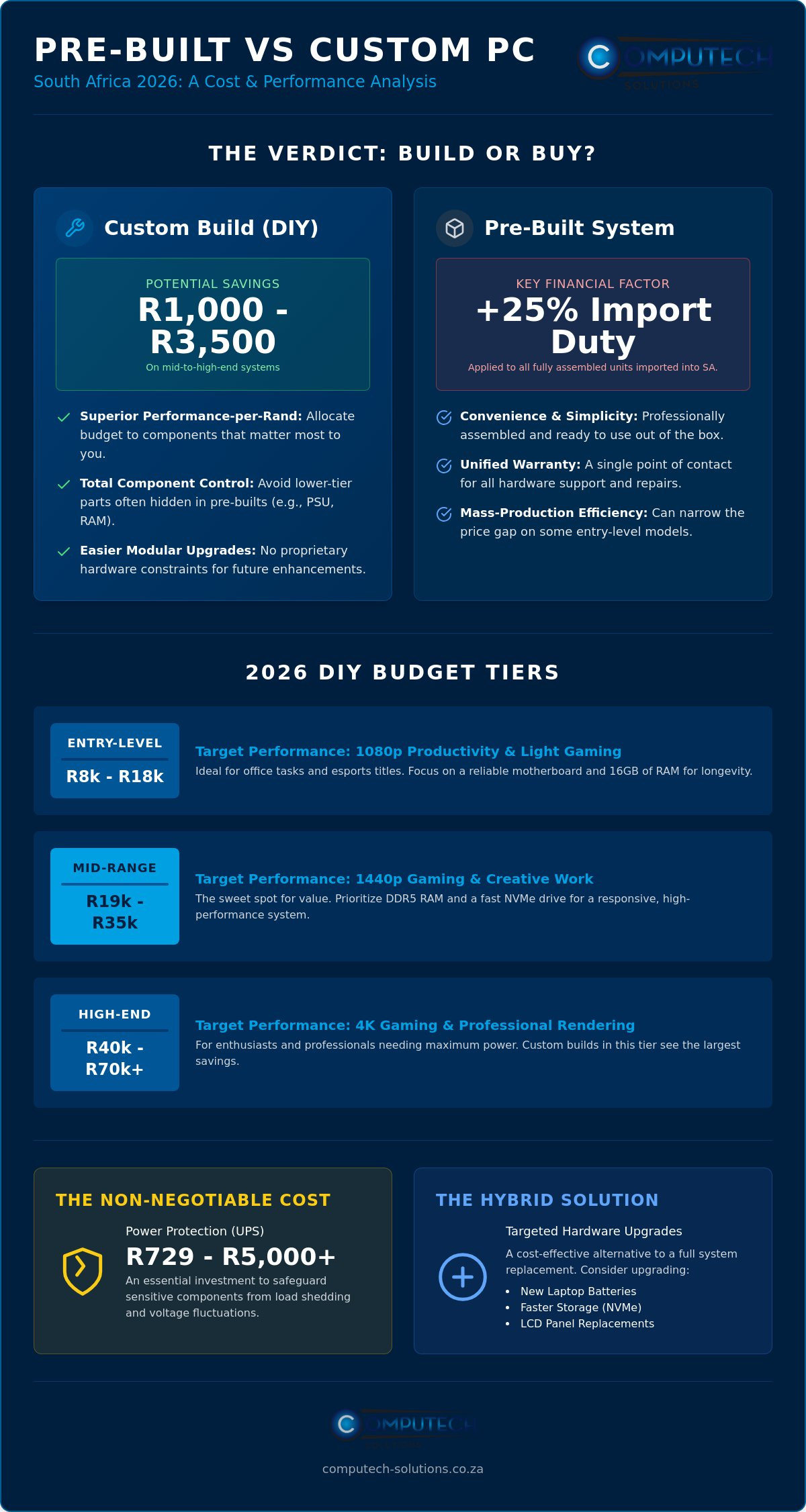
- Compare the potential savings of R1,000 to R3,500 when building yourself against the convenience and unified warranty of a pre-assembled system.
- Analyze how the 25% import duty on fully assembled PCs creates a significant price gap in the prebuilt vs custom PC South Africa debate.
- Factor in the non-negotiable cost of power protection, ranging from R729 to over R5,000, to safeguard your investment against load shedding and voltage fluctuations.
- Discover how targeted hardware upgrades, such as new laptop batteries or LCD panels, can provide a cost-effective alternative to purchasing a completely new system.
- Master the performance-per-Rand ratio for 2026 hardware to ensure your budget aligns with modern gaming and productivity benchmarks.
The 2026 Verdict: Is Building Your Own PC Still Cheaper in South Africa?
The South African hardware market in 2026 is defined by a delicate balance between global supply chains and local economic pressures. When evaluating prebuilt vs custom PC South Africa options, the decision isn’t as simple as it once was. While individual components like CPUs and GPUs remain exempt from import duties, fully assembled machines face a significant 25% import duty plus VAT. This regulatory environment creates a unique price spread that favors the DIY builder, though the margin has narrowed to approximately 5% to 10% in the entry-level segment due to assembly efficiencies in mass-produced units.
For most enthusiasts and professionals, the verdict remains that building your own system offers a superior performance-per-Rand ratio. For a mid-range build costing around R20,000, you’ll typically save between R1,000 and R2,000 by sourcing parts yourself. At the high end of the market, where systems like those featuring an RTX 5080 can reach R69,299, the savings often climb toward R3,500. Beyond the numbers, the emotional value of knowing your machine’s exact internal makeup provides peace of mind that a mass-produced unit cannot match. Customization ensures your hardware meets your specific operational needs without paying for unnecessary extras.
The Performance-to-Price Ratio Explained
Custom builds allow you to allocate funds where they matter most for your specific workflow. Pre-built systems often prioritize visible specifications, such as the GPU model, while using lower-tier power supplies or slower RAM to maintain a specific price point. By opting for custom-built PCs, you ensure every Rand spent contributes to system stability and longevity. The Modular Advantage for South African consumers lies in the ability to replace or upgrade individual components without being forced into a full system replacement by proprietary hardware constraints.
Why Pre-built Prices Fluctuate in the SA Market
Large retailers benefit from bulk shipping, which can occasionally offset the 25% import duty on assembled PCs. However, these retailers must price their stock based on the exchange rate at the time of purchase. If the Rand strengthens after they’ve landed stock, their prices remain high to protect their margins. Conversely, individual component prices react much faster to currency shifts. This volatility means that the cost-effectiveness of a prebuilt vs custom PC South Africa can change within a single week, making timing a critical factor in your purchase strategy.
Comparing the Tiers: Entry-Level, Mid-Range, and High-End Budgets
Selecting the right hardware requires a clear understanding of your performance goals and financial constraints. The local tax on tech products plays a major role in these brackets, particularly the 25% duty on fully assembled units that often pushes pre-built prices higher. Whether you’re weighing a prebuilt vs custom PC South Africa, the value proposition changes as you move up the performance ladder. Below is a breakdown of the standard budget tiers for 2026.
| Tier | Typical DIY Budget | Target Performance (2026) |
|---|---|---|
| Entry-Level | R8,000 – R18,000 | 1080p Productivity / Light Gaming |
| Mid-Range | R19,000 – R35,000 | 1440p Gaming / Creative Work |
| High-End | R40,000 – R70,000+ | 4K Gaming / Professional Rendering |
Entry-Level Rigs (R8,000 – R15,000)
In 2026, entry-level refers to systems capable of smooth 1080p productivity and basic gaming. If your budget is tight, integrated graphics on modern processors have become powerful enough to handle office tasks and light esports titles without a dedicated GPU. You’ll save the most here by choosing a DIY tower over a standard office laptop, as you aren’t paying for the miniaturized components or integrated screen. Focus your spend on a reliable motherboard and 16GB of RAM to ensure the system remains snappy for several years.
The Mid-Range Sweet Spot (R16,000 – R30,000)
This tier represents the best value for South African consumers. A custom 1440p gaming build in this range typically outperforms high-end gaming laptops that cost R10,000 more. To maximize your Rand, prioritize DDR5 RAM and a fast NVMe storage drive. Research indicates that an entry-level gaming prebuilt with an RTX 5060 costs approximately R19,949, while a custom build with the same specs often saves you around R1,500. This saving can be reinvested into a better cooling solution or a higher-quality power supply.
High-Performance Gaming and Workstations (R35,000+)
When you move into professional workstations or 4K gaming, the cost of premium GPUs like the RTX 50-series becomes a major factor. A high-end prebuilt system can reach R69,299, but building it yourself can shave off up to R3,500 in assembly and markup fees. These power-hungry builds require high-wattage, high-efficiency PSUs to handle the 320W+ draw of modern graphics cards. If you’re looking for a powerful machine without the premium price of a brand-new build, consider exploring high-performance desktop computers that offer a more balanced cost-to-power ratio.
Diminishing returns hit hardest after the R50,000 mark. At this level, you’re paying significantly more for marginal performance gains. For most South Africans, the mid-range tier offers the most stability and longevity without the extreme price volatility of flagship components.
The Hidden Costs of Building a PC in South Africa
While the hardware savings in the prebuilt vs custom PC South Africa debate are often clear on paper, the total cost of ownership involves more than just the core components. Many DIY builders overlook the R2,000 to R4,000 typically required for software, logistics, and specialized tools. Sourcing parts from multiple local retailers to find the lowest price for each item can quickly erode your savings through accumulated courier fees. You must also account for the time cost. Assembling, cable managing, and troubleshooting a new system often takes a full day for a novice, which is a hidden expense that pre-built systems eliminate through professional assembly.
The financial risk of hardware failure is another critical factor. If a component is Dead on Arrival (DOA), you’re responsible for the logistics and costs of returning that specific part to the retailer. In a pre-assembled system, the integrator handles all stress testing and component verification before the unit reaches your door. This stability provides a significant safety net for professionals who cannot afford downtime due to a faulty motherboard or a mismatched RAM kit. Managing separate warranties for seven or eight different parts is a logistical challenge that many users find stressful compared to a single point of contact for the entire machine.
Software Licensing and Windows Costs
Operating system costs are a major variable in your final budget. Most pre-built machines include a Windows license, but custom builders must purchase this separately. An OEM license is generally more affordable but remains tied to your motherboard forever. Retail licenses cost more but allow you to transfer the software to a new build in the future. While Linux offers a free alternative, it requires technical expertise that may not suit the average user. We strongly advise business users to avoid “grey market” keys found online. These keys often fail validation during updates and can expose your company to security risks or legal non-compliance.
Shipping, Customs, and Import Volatility
Logistics can add R500 or more to a build if you’re ordering from multiple vendors across the country. We recommend consolidating your orders to one or two major hubs to minimize these delivery fees. If you’re considering importing specialized parts directly from overseas, remember that South Africa applies a 15% VAT on the item’s value plus a 10% markup. This calculation, combined with international shipping rates, often makes local sourcing more predictable and cost-effective. Sticking to local distribution ensures you have access to local warranty support, which is invaluable when dealing with high-value hardware in an unpredictable economic climate.
The Load Shedding Factor: Protecting Your Investment
In the South African hardware market, the most critical hidden cost isn’t a software license or a shipping fee; it’s the infrastructure required to keep your machine alive. Grid instability and frequent load shedding cycles introduce “dirty power” and high-voltage surges that can instantly destroy sensitive silicon. When weighing a prebuilt vs custom PC South Africa, you must budget for power protection as a non-negotiable component of the build. A high-end system is a significant capital investment, and failing to shield it from the national grid’s unpredictability is a risk that few professionals can afford.
The choice between an Uninterruptible Power Supply (UPS) and a portable power station depends on your operational needs. A basic UPS, typically ranging from R729 to R1,278 for 850VA to 1000VA models, provides enough runtime to save your work and shut down safely. For high-performance rigs with power-hungry components like the RTX 5080, which draws up to 320W, a more robust UPS (1600VA to 3000VA) costing between R2,864 and R5,768 is necessary. If you need to work through outages, portable power stations offer a longer runtime but require a larger initial outlay, starting from R4,899 for entry-level 512Wh units.
Why Surge Protection is Non-Negotiable
Standard power strips often provide a false sense of security. A dedicated surge protector is designed to divert excess voltage away from your hardware, whereas a cheap strip may simply melt or pass the surge through to your motherboard. Modern power supplies with “Active PFC” (Power Factor Correction) are better at handling minor fluctuations, but they aren’t a substitute for external protection. To ensure your system remains stable, follow this power-proofing checklist:
- Select a high-quality PSU with at least an 80+ Gold efficiency rating.
- Install a dedicated surge protection plug at the primary wall outlet.
- Use a UPS with a VA rating at least 20% higher than your PC’s peak power draw.
- Ensure your chassis has adequate grounding to prevent static buildup during dry winter months.
Integrating Solar and Battery Backups
As energy costs rise, positioning your hardware for solar integration is a smart long-term strategy. Solar-compatible inverters allow you to run your desktop directly from battery banks charged by the sun, completely decoupling your productivity from the local grid. This setup doesn’t just prevent damage; it ensures zero downtime during business hours. If you’re looking to secure your mobile or desktop setup against these disruptions, explore our range of laptop chargers and power solutions designed for the South African climate. Spending R3,000 to protect a R20,000 PC ensures your primary asset doesn’t become a total loss during a single grid fluctuation.
The Hybrid Solution: Upgrading with Computech-Solutions
The choice between a prebuilt vs custom PC South Africa often feels like a decision between two expensive extremes. Many users believe they must either commit to a brand-new assembly or settle for a compromised retail unit. There is, however, a third path that offers superior financial efficiency: the targeted upgrade. By identifying specific bottlenecks in your existing hardware, you can achieve modern performance levels without the R20,000 price tag associated with 2026’s mid-range systems. This hybrid solution focuses on replacing critical wear-and-tear components to restore a machine’s original utility.
This approach is not only financially responsible but also promotes a sustainable tech ecosystem. In a market where component prices fluctuate rapidly due to the Rand’s volatility, maintaining your current assets is a stable alternative to total replacement. You can bypass the 25% import duty on new assembled PCs by simply refreshing the core parts of the system you already own. It’s a pragmatic strategy that places operational longevity at the center of your hardware planning.
Extending the Life of Brand-Name Laptops
Laptops are often discarded simply because a single component has failed or reached its end-of-life cycle. Replacing a degraded battery or a cracked screen can save you R10,000 or more compared to the cost of a new machine. A fresh Acer, Dell, or HP replacement laptop battery restores the freedom of mobile work, while a new laptop LCD replacement panel can make an older workstation feel brand new. These repairs are direct, functional solutions that bypass the need for a full system migration. Our technical support team assists in selecting the exact part for your model, ensuring compatibility and reducing the risk of technical disruptions.
Sourcing Reliable Components Nationally
A sustainable approach to tech ownership requires a reliable supply of parts. Sourcing from a local South African provider ensures you aren’t at the mercy of international shipping delays or unpredictable customs fees. Whether you need Apple replacement laptop batteries or ASUS replacement laptop batteries, having a local warranty provides a level of security that direct imports cannot match. This model supports operational efficiency by providing quick access to hardware that keeps your business running. Browse our range of replacement batteries and computer hardware to find the specific components you need to refresh your current setup.
Ultimately, the prebuilt vs custom PC South Africa choice depends on your specific needs. If your current chassis and processor still meet your requirements, a few strategic replacements are the most logical financial move. This strategy allows you to allocate your budget toward high-impact items like a robust UPS or additional NVMe storage. By choosing to upgrade rather than replace, you protect your capital and ensure your technical infrastructure remains resilient in a challenging economic landscape.
Building for Resilience and Reliability
The landscape of the prebuilt vs custom PC South Africa market has transformed. While custom builds offer significant savings on high-end hardware, the true value lies in how you protect those assets. We’ve seen that factoring in power protection and considering targeted upgrades can save thousands of Rand while maintaining professional standards. You don’t always need a brand-new machine to achieve peak performance when a strategic component refresh can bridge the gap.
Choosing the right partner ensures your technical infrastructure remains stable against grid fluctuations and hardware wear. We provide the specialized components and expert support needed to keep your systems operational. As specialists in laptop battery and LCD replacements, we also offer professional solar and power backup solutions to safeguard your investment. Take the next step toward a more resilient technical setup with our nationwide South African delivery and professional expertise.
Shop Expert-Verified PC Components & Replacement Parts
Your hardware should be a reliable asset that grows alongside your professional needs.
Frequently Asked Questions
Is it cheaper to build a gaming PC or buy a gaming laptop in South Africa?
Building a desktop gaming PC is almost always more cost-effective than buying a gaming laptop in terms of raw performance. While laptops offer portability, you pay a premium for integrated screens and batteries. Desktop components like CPUs and GPUs are exempt from certain import duties, making a DIY tower a smarter financial choice for stationary users who want the most power for their Rand.
How much does it cost to build a decent PC in South Africa in 2026?
A capable mid-range system in 2026 typically starts around R19,000 for a custom build. This budget allows for modern hardware capable of smooth 1440p gaming or professional design work. Entry-level productivity machines can be assembled for between R8,000 and R15,000, while high-performance workstations featuring flagship GPUs often exceed R40,000 depending on the specific professional requirements.
Is it hard to build a PC for the first time?
Building a PC is accessible for most users if they follow a structured guide and prioritize component compatibility. It isn’t a matter of complex engineering but rather careful assembly of standardized parts. You should budget a full day for the physical build and software installation to ensure everything is configured correctly and to account for any initial troubleshooting.
Where is the best place to buy PC parts in South Africa?
The best approach is to source from reputable local retailers that offer solid warranty support and nationwide delivery. Buying locally ensures that you have a local point of contact if a component fails. For those looking to maintain existing systems, specialized suppliers provide essential replacement parts like batteries and screens that are often difficult to find at general hardware outlets.
Do custom-built PCs have a warranty in South Africa?
Custom-built PCs carry individual warranties for each component rather than a single system-wide guarantee. This is a major distinction in the prebuilt vs custom PC South Africa comparison. While a pre-built machine offers one point of contact for repairs, a custom builder must manage separate claims for the motherboard, GPU, and power supply through their respective manufacturers or retailers.
What happens if a part I bought online is dead on arrival (DOA)?
If a component arrives faulty, you must initiate a Return Merchandise Authorization (RMA) with the specific vendor. This process usually involves shipping the part back at your own expense for testing and verification. This logistical hurdle is a known risk for DIY builders, whereas pre-built systems are typically stress-tested before delivery to prevent DOA issues from reaching the customer.
Can I build a PC that is immune to load shedding damage?
No PC is entirely immune, but you can protect your hardware by integrating a high-quality power supply and a UPS. A basic UPS costs between R729 and R1,278 and provides enough time for a safe shutdown. For high-end systems, a more powerful unit is necessary to filter “dirty power” and prevent voltage spikes from damaging sensitive internal silicon during grid cycles.
Is it worth upgrading my old laptop instead of building a new PC?
Upgrading is often the most sustainable and affordable path if your current device’s processor still meets your daily needs. Replacing a degraded battery or a cracked LCD panel can save you over R10,000 compared to a new purchase. We offer specialized parts for brands like Acer, Dell, and HP to help you extend your hardware’s lifespan without the high cost of a full rebuild.
