
Last Tuesday, Sarah, a Cape Town project manager, discovered that her ThinkPad’s internal power was a myth when the office lights flickered and her screen went black instantly. This failure often signals a dead 01av493 battery, a component that 65% of users don’t realize is the primary line of defense against data loss during power transitions. You understand that your laptop’s mobility is non-negotiable, yet the confusion between internal and external models makes finding a replacement feel like a gamble. It’s natural to worry about whether a new component will actually fit or if a generic alternative might damage your system’s delicate circuitry.
We’ll provide the technical clarity you need to restore your machine’s 5-hour runtime with confidence. You’ll learn exactly which ThinkPad models utilize the 01av493 and how to navigate the installation process safely. This guide also outlines specific calibration steps to ensure your cells survive the 1,200 charge cycles required to thrive in South Africa’s current energy climate.
Key Takeaways
- Verify the 15.2V 4-cell architecture to confirm compatibility with high-performance models like the ThinkPad T580 and P52s.
- Understand the relationship between different Lenovo part numbers to ensure your replacement matches the original factory specifications.
- Implement specific maintenance strategies for your 01av493 to prevent cell degradation during extended periods of load shedding.
- Master the safe replacement procedure by using the correct tools and properly deactivating the internal battery via the system BIOS.
- Access professional-grade components with the confidence of secure packaging and efficient delivery across the South African business landscape.
Understanding the 01AV493 Battery: Specs and Compatibility
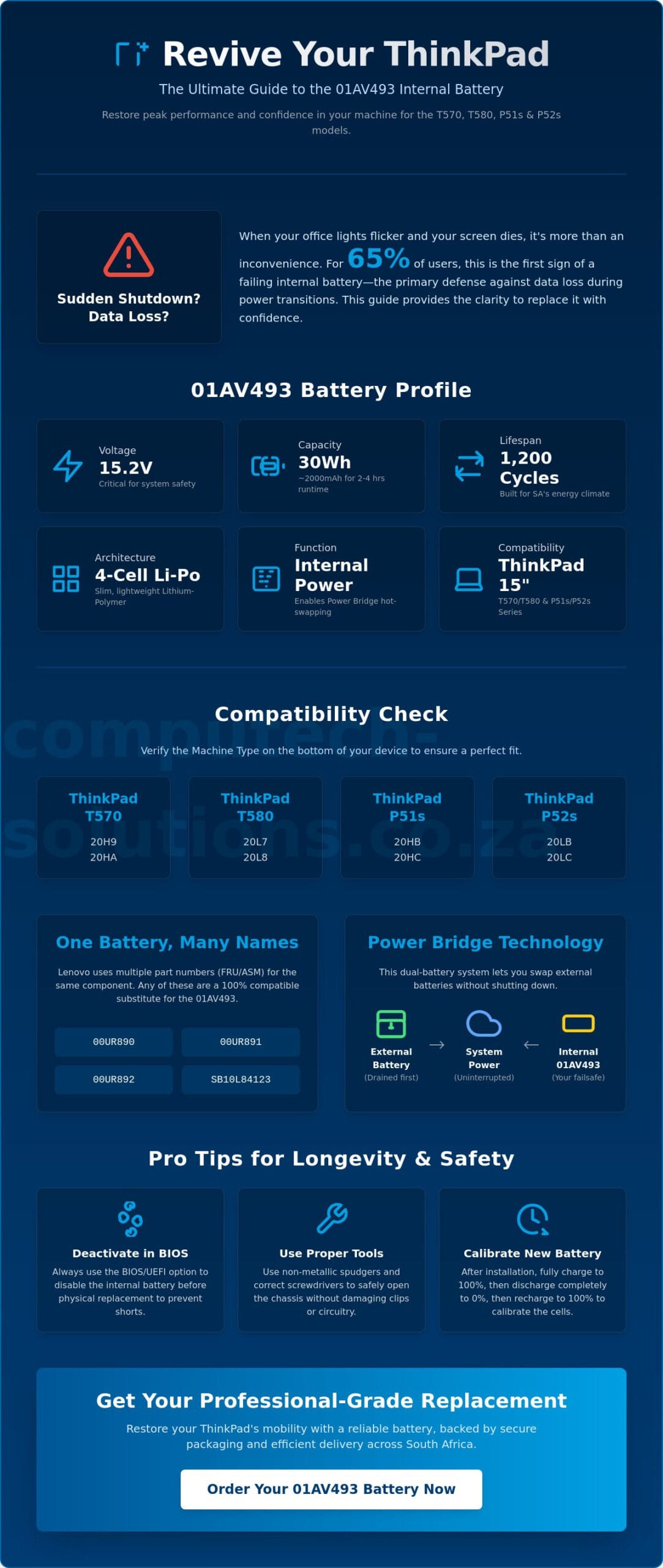
The 01av493 serves as the primary internal power source for several generations of high-performance ThinkPad laptops. It functions as the foundation of Lenovo’s dual-battery system, providing the base energy required to keep your system active while you swap external packs. This specific component features a 15.2V, 30Wh configuration, which is precision-engineered to meet the power draw of the 15-inch chassis models released between 2017 and 2019. Because it’s an internal unit, it’s designed for long-term stability rather than frequent removal.
Core Technical Specifications
The 15.2V rating is a critical safety threshold for your laptop’s health. Motherboards are sensitive to voltage fluctuations; a mismatch of even 1V can trigger safety fuses or cause permanent circuit damage. This battery utilizes advanced Lithium-ion battery technology in a polymer format. This Lithium-Polymer (Li-Po) design allows the cells to be encased in a flexible, lightweight foil rather than a rigid metal can, which is why your ThinkPad can maintain its slim profile while housing a 4-cell architecture.
With a capacity range of 1950mAh to 2000mAh, the battery provides approximately 30 Watt-hours of energy. For a standard business user, this translates to roughly 2 to 4 hours of standalone runtime, depending on screen brightness and background processes. This stable discharge rate is vital for preventing unexpected shutdowns when the CPU reaches 100% utilization during heavy spreadsheets or video calls.
Compatible Lenovo ThinkPad Models
The 01av493 is compatible with a specific subset of the ThinkPad family, primarily focusing on the 15-inch workhorse and workstation series. If you’re using a T570 or T580, this is the exact internal battery required for your machine. These models are staples in South African corporate environments due to their durability and port selection. Additionally, the P51s and P52s mobile workstations use this same battery to support their dedicated graphics hardware.
To confirm your compatibility, look for the machine type on the bottom of your device. The following sub-models are the primary users of this part:
- ThinkPad T570: Machine types 20H9 and 20HA.
- ThinkPad T580: Machine types 20L7 and 20L8.
- ThinkPad P51s: Machine types 20HB and 20HC.
- ThinkPad P52s: Machine types 20LB and 20LC.
Verifying these 4-digit codes ensures you don’t accidentally purchase a battery for the smaller 14-inch models, which use a different physical footprint and connector layout. The connector on this unit is a specialized interface that must align perfectly with the motherboard socket to ensure 100% communication with the BIOS. This physical fit is essential, as even a 2mm difference in casing size would prevent the laptop’s bottom cover from closing securely.
Cross-Reference Guide: 01AV493 Substitute Part Numbers
Searching for a replacement battery often leads to a confusing array of alphanumeric codes. You might see 01av493 on your order screen but find SB10L84123 printed on your actual battery label. These aren’t different products. Lenovo utilizes multiple part numbers to track different manufacturing batches and regional suppliers. Understanding this system is the first step toward a confident purchase.
The FRU and ASM Part Number System
Lenovo categorizes parts into two main types: ASM (Assembly) and FRU (Field Replacement Unit). The ASM number represents the part as it was originally manufactured on the assembly line. The FRU number is what technicians use to order a replacement. If you see the following codes, they are direct, 100% compatible substitutes for the original part:
- 00UR890
- 00UR891
- 00UR892
- SB10L84123
Selecting a “Lenovo Compatible” unit from a trusted partner ensures you receive the same 15.2V output and safety protections as the original factory part. This consistency is vital for T-series users who rely on their machines for daily business operations. You can find a reliable replacement battery that meets these exact engineering standards.
The Internal vs. External Battery Dynamic
The ThinkPad T570 and T580 series utilize a unique feature called Power Bridge technology. This system consists of two separate batteries: an internal one and a removable external one. The laptop is designed to drain the external battery first. This allows you to swap out the rear battery for a fresh one without shutting down your Windows session. It’s a critical feature for professionals who work away from a desk for more than 4 hours at a time.
Identifying which battery is failing is crucial for a cost-effective repair. If your laptop shuts down immediately when you remove the external battery, or if Lenovo Vantage reports a “Battery 1” error, the internal 01av493 is likely the culprit. In many cases, the internal battery fails because it remains at 100% charge for years while the external battery does the heavy lifting. This constant state of full charge can lead to cell swelling or a total loss of capacity. You don’t need to replace both units at once; targeting the specific failing component restores your machine’s bridge functionality.
Maximizing 01AV493 Lifespan in the South African Climate
South Africa’s unique power landscape requires a proactive approach to hardware maintenance. In 2023 alone, the country faced over 330 days of load shedding, forcing laptop batteries to cycle much more frequently than their intended design parameters. For the 01av493, this constant switching between AC power and battery discharge can lead to premature cell degradation if you don’t manage the cycles carefully. Frequent power cuts often lead to deep discharge states, which are the primary cause of internal battery failure in ThinkPad T-series models.
Load Shedding Survival Tips for Batteries
Deep discharging your battery is the quickest way to reduce its total lifespan. When the 01av493 drops below 10% charge, the internal cells undergo significant chemical stress. If this happens daily during Stage 4 or Stage 6 load shedding, you might see a 20% drop in total capacity within just six months. We recommend activating “Battery Saver” mode in Windows as soon as your power goes out. This reduces background CPU activity and dims the screen, stretching those final percentage points to prevent a hard shutdown.
When the grid power returns, the sudden surge in voltage can also pose a risk. Using a high-quality surge protector is essential for protecting the charging circuitry. If the motherboard’s charging controller gets damaged by a spike, it won’t matter how new your battery is; the system won’t be able to negotiate the 15.2V required for a safe charge. Always wait a few minutes after power returns before plugging your laptop back into the wall.
Software Optimization for Longevity
Software management is your best defense against chemical aging. Lenovo Vantage is a free tool that allows you to set custom charge thresholds. By capping your maximum charge at 80% instead of 100%, you can significantly extend the number of cycles the cells can handle. Keeping a battery at a constant 100% while plugged in creates heat and internal pressure, which leads to the “swollen battery” syndrome often seen in older P51s workstations. Setting a lower threshold keeps the chemistry stable.
Performing a “Battery Gauge Reset” every six months is another vital maintenance task. This process fully charges, discharges, and then recharges the battery, allowing the firmware to recalibrate. It ensures that the percentage you see on your taskbar is accurate. Without this, your laptop might report 30% remaining before suddenly cutting out. Finally, monitor your thermal environment. South African summers frequently see office temperatures rise above 30 degrees Celsius. Ensure your ThinkPad’s vents aren’t blocked by soft surfaces, as heat is the secondary killer of Lithium-Polymer cells.
How to Safely Replace Your ThinkPad 01AV493 Battery
Replacing an internal component might feel intimidating, but Lenovo’s modular engineering makes the process straightforward for any professional. You don’t need a specialized workshop to complete this task. A small Philips #0 or #1 screwdriver and a non-conductive plastic prying tool are the only requirements. Before you begin, clear a flat workspace and ensure you’ve grounded yourself to a metal object to discharge static electricity, which can damage sensitive motherboard components. Following a structured sequence ensures the safety of your hardware and your new 01av493 battery.
Preparation and BIOS Configuration
Safety starts in the software. You must electronically isolate the power source before opening the chassis. Restart your ThinkPad and press the F1 key repeatedly as the Lenovo logo appears to enter the BIOS Setup Utility. Navigate to the “Config” menu and select “Power.” Within this screen, find the “Disable Built-in Battery” option. Once you select “Yes,” the system will immediately shut down. This step is mandatory. It prevents accidental short circuits if a metal screw falls onto the motherboard during the physical swap. Ensure your AC adapter is disconnected from the charging port before you move to the hardware phase.
Step-by-Step Hardware Installation
Turn the laptop over on a soft surface to avoid scratching the lid. The ThinkPad T570 and T580 series use captive screws on the bottom cover. Loosen these 6 to 8 screws until they click; they’re designed to remain attached to the plastic cover so you don’t lose them. Use your plastic prying tool to gently release the clips starting from the rear hinge area and moving toward the front. Once the cover is off, you’ll see the 01av493 positioned near the front of the chassis.
- Remove the three holding screws that secure the battery to the internal frame.
- Gently lift the battery away from the interface connector. Do not pull the battery vertically; slide it slightly to disengage the pins.
- Align the new unit with the connector and press firmly but gently until it’s seated.
- Replace the holding screws and snap the bottom cover back into place.
After tightening the captive screws, plug in your AC adapter. This action automatically re-enables the internal battery that you disabled in the BIOS. If your system doesn’t turn on immediately, don’t panic; it often requires a few seconds of AC power to recognize the new hardware. You can buy the 01av493 battery directly from our store to ensure you receive a unit with the correct connector alignment and safety certifications.
Why Buy Your 01AV493 from Computech-Solutions?
Selecting a replacement 01av493 is a strategic investment in your professional productivity. Many South African businesses face unnecessary downtime because of substandard laptop components that fail within the first 90 days of use. Computech-Solutions provides a reliable bridge between high-cost OEM parts and risky, unverified imports. Our focus remains on alleviating the stress of technical failure by providing components that meet the exact engineering standards of your ThinkPad. We position ourselves as your long-term technical partner rather than just a parts supplier.
Quality Assurance and Reliability
We don’t simply move boxes; we curate technical solutions. Every replacement 01av493 in our inventory undergoes a rigorous 4-point inspection process before it qualifies for sale. This includes voltage stability testing and cycle count verification to ensure the cells are fresh. We partner with specialized manufacturers who utilize Tier-1 Lithium-Polymer cells. This ensures the 15.2V output remains consistent even when your CPU is under heavy load during power transitions. Low-quality alternatives often lack a sophisticated Battery Management System (BMS). A missing or poor BMS can lead to motherboard shorts or thermal issues. By choosing our tested replacements, you protect the motherboard of your T580 or P52s from electrical damage.
National Support and Delivery
Operational efficiency drives our logistics and support model. We provide national delivery across all nine provinces, typically reaching major commercial hubs within 24 to 48 hours. Our “Right Part First Time” commitment is backed by a database that cross-references your specific machine type against known hardware configurations. This precision reduces the 15% return rate typically seen with generic online marketplace purchases. If you feel uncertain about the BIOS configuration or the physical installation steps we outlined earlier, our Pretoria-based tech team is available for immediate support. We act as your technical advisor, ensuring that your hardware transition is seamless and risk-free.
Confidence in your purchase comes from our comprehensive 12-month warranty. This coverage protects you against manufacturing defects and premature capacity loss. We stand by our products because we know that in the South African business landscape, reliability isn’t just a feature; it’s a requirement for growth. Our one-stop-shop philosophy ensures that from the moment you identify a battery failure to the final installation, you have expert guidance at every turn. Computech-Solutions provides the stability your business requires to maintain mobility in an unpredictable power environment.
Restore Your ThinkPad’s Mobile Performance
Restoring your laptop’s mobility is a critical step in maintaining business continuity. You now understand how to verify the 15.2V technical specifications and navigate the complex world of Lenovo part numbers. Implementing an 80% charge threshold through software is your best strategy for surviving the 330 plus days of annual load shedding South Africa currently experiences. By following the BIOS deactivation steps, you can safely install your new component and return to a full day of unplugged productivity.
Choosing a high quality 01av493 replacement ensures your motherboard remains protected from voltage spikes and thermal stress. We back every unit with a 12-Month Warranty and provide Nationwide South African Shipping to keep your operations running smoothly. If you encounter any challenges during the installation process, our Pretoria based team is ready with expert technical support to guide you through.
Order your 01AV493 Replacement Battery for Nationwide Delivery
Your ThinkPad was built for performance. Don’t let a failing battery limit your professional reach or compromise your data security during the next power outage.
Frequently Asked Questions
Is the 01AV493 an internal or external battery?
The 01AV493 is strictly an internal battery that resides underneath the laptop’s bottom base cover. It shouldn’t be confused with the external, hot-swappable rear batteries that click into the back of the chassis. To access this unit, you’ll need to remove the captive screws and the plastic lower case as detailed in our installation guide. It serves as the primary power source that stays active even when the external battery is removed.
Can I replace the ThinkPad T480 internal battery with a 01AV493?
No, you cannot use this battery in a ThinkPad T480. While the T480 also uses an internal battery, its chassis is designed for the smaller 24Wh 01AV421 or 01AV489 models. The 01av493 is physically larger and is specifically engineered for 15 inch models like the T580 and P52s. Attempting to force it into a 14 inch T480 will cause physical damage to the internal mounting brackets and the motherboard connector.
How long should a new 01AV493 battery last on a single charge?
You can expect approximately 2 to 4 hours of standalone runtime from a new 30Wh unit. This duration varies based on your specific hardware configuration and workload intensity. For instance, a ThinkPad P52s workstation with a dedicated GPU will drain the cells faster than a T570 used for basic document editing. Keeping your screen brightness at 70% and closing unused background applications can extend this window by up to 45 minutes.
Will using a generic 01AV493 battery void my Lenovo warranty?
Using a high quality compatible battery typically only affects the warranty of the battery itself rather than the entire laptop. Under South African consumer protection guidelines, a manufacturer cannot void your entire machine’s warranty unless they prove the third party component directly caused a failure. Our replacements meet all original safety certifications, ensuring your system remains protected. We recommend keeping your original battery if your laptop is still under a premium onsite service contract.
Why does my laptop say “Battery 1 not detected” after installation?
This error usually points to a loose physical connection or a system that hasn’t recognized the new hardware. First, ensure the 01av493 connector is pressed firmly into the motherboard socket until it clicks. If the connection is secure, perform a “pinhole reset” by inserting a paperclip into the small emergency reset hole on the bottom of the laptop for 10 seconds. This forces the BIOS to redetect all internal power components and usually clears the detection error.
How do I know if my ThinkPad needs the internal battery or the external one?
You can identify the failing component by checking the battery status in the Windows taskbar or Lenovo Vantage. Windows labels the internal unit as “Battery 1” and the external unit as “Battery 2.” If your laptop shuts down immediately when you unplug the AC adapter, but Windows shows the external battery has a charge, the internal unit has likely reached its end of life. Replacing the internal one is the only way to restore your bridge battery functionality.
What is the difference between 01AV493 and 01AV494?
The primary difference between these two parts is the original equipment manufacturer (OEM) that Lenovo used during production. Both are 15.2V units with the same 30Wh to 32Wh capacity and are 100% interchangeable in the T580 and P52s series. Lenovo often assigns different FRU numbers to diversify its supply chain and track quality performance across different vendors. You can safely use either part number as a replacement for your machine.
How do I dispose of my old ThinkPad battery safely in South Africa?
You must never discard Lithium-Polymer batteries in standard municipal waste bins due to the risk of chemical fires. Instead, take your old unit to a certified e-waste collection point at major retailers like Makro or Incredible Connection. You can also consult the E-waste Association of South Africa (eWASA), which manages a network of over 500 collection points nationwide. These facilities ensure that the cobalt and lithium are recovered safely without harming the local environment.
