
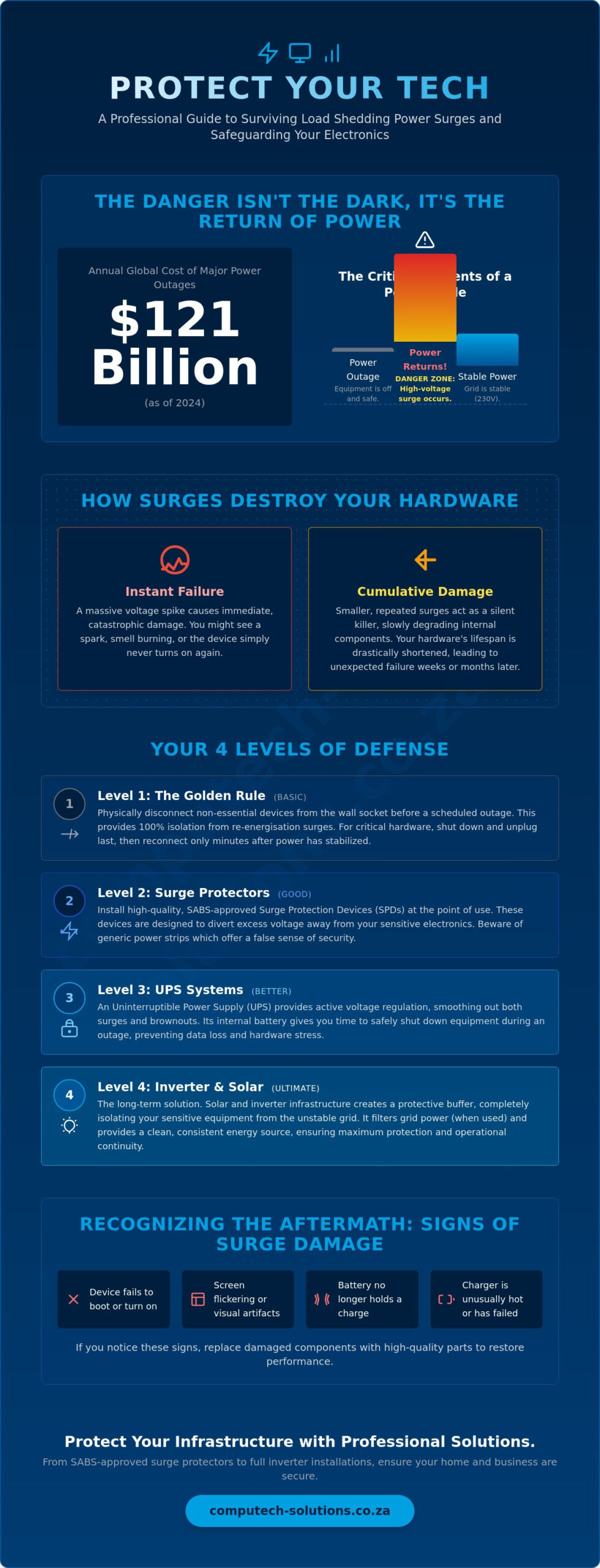
Did you know that the average yearly cost of major power outages reached $121 billion in 2024? While that figure reflects a global crisis, the immediate reality for South Africans is the persistent threat to hardware during grid transitions. Protecting electronics from load shedding power surges is no longer an optional precaution; it’s a fundamental requirement for maintaining operational efficiency. You’ve likely experienced the anxiety of a sudden blackout, but the true damage often occurs when the power returns with a high-voltage spike that standard hardware cannot handle.
We understand that hardware failures and lost productivity are unacceptable risks for your business or home office. This 2026 guide provides a professional framework for safeguarding your IT infrastructure and home electronics from these damaging effects. You’ll learn how to distinguish between basic surge strips and advanced UPS systems to ensure your laptops and desktops remain protected. We’ll provide a comprehensive checklist for selecting the right backup hardware so you can maintain confidence in your infrastructure despite the instability of the national grid.
Key Takeaways
- Identify the specific mechanics of re-energisation surges to understand why the moment power returns is the most dangerous time for your hardware.
- Implement the “Golden Rule” of physical disconnection to ensure you are effectively protecting electronics from load shedding power surges during every scheduled outage.
- Evaluate the technical differences between UPS models to select a system that provides active voltage regulation for your desktop computers and laptops.
- Explore how solar and inverter infrastructure creates a protective buffer that filters unstable grid power into a clean energy source for sensitive components.
- Recognize the warning signs of surge-damaged laptop batteries or chargers and learn how to select high-quality replacements to restore operational efficiency.
Understanding the Threat: How Load Shedding Power Surges Damage Electronics
Grid instability is a constant reality for South African businesses and homeowners. A power surge is a sudden, brief spike in voltage that exceeds the standard 230V supplied to our electrical outlets. While minor fluctuations occur during normal operations, the surges associated with load shedding are far more aggressive. These spikes force a high-energy pulse through sensitive circuitry, often exceeding the thermal limits of the components inside your desktop computers and laptops.
The most dangerous moment for your hardware occurs during the re-energisation phase. When the grid comes back online after an outage, there is a massive rush of current as the utility provider attempts to stabilize the load across the network. This voltage swell is the primary reason why protecting electronics from load shedding power surges is a technical necessity. Without a buffer, this surge hits your equipment with full force, often leading to immediate hardware failure.
Low-voltage events, commonly known as brownouts, are equally hazardous to your operational continuity. When voltage drops below the required threshold, power supply units (PSUs) often struggle to maintain a steady output. This causes components to pull more current to compensate for the lack of voltage, leading to excessive heat and eventual burnout. Your integrated circuits and motherboards are particularly sensitive to these fluctuations, as they require precise voltage levels to function safely.
The Science of Grid Restoration Spikes
Grid restoration is rarely a smooth process. When power returns, large-scale inductive loads from industrial pumps and factory motors across the area kick in simultaneously. This creates massive transient voltages that ripple through the domestic lines. These transients are short bursts of energy that degrade the silicon inside your electronic components over time. Repeated cycles of load shedding accelerate this hardware failure, turning what should be a five-year lifespan for a laptop battery or charger into a much shorter period of reliability.
Cumulative Damage vs. Instant Failure
Surge damage is often a silent killer. While a massive spike might cause a visible spark or a burnt smell, smaller surges weaken internal capacitors without immediate signs of failure. You might only notice the impact weeks later when a device fails to boot or a screen starts flickering. Effective risk management begins with understanding what is a surge protector and how it manages these transients to protect your investment. Clamping voltage is the threshold where protection activates to divert excess electricity away from your hardware. By implementing robust protection strategies, you ensure that protecting electronics from load shedding power surges becomes a proactive part of your maintenance routine.
Practical Steps to Safeguard Your Home and Office Equipment
Effective hardware management begins with a simple, manual habit known as the ‘Golden Rule’. Whenever the load shedding schedule indicates an upcoming outage, physically disconnect your non-essential devices from the wall socket. This provides total isolation from the re-energisation spike mentioned in the previous section. For critical infrastructure like desktop computers and servers, implement a ‘last-off, first-on’ protocol. This means shutting down and unplugging these units last before the power cuts, and only reconnecting them several minutes after the grid has stabilized post-restoration.
While manual disconnection is ideal, it isn’t always practical for every appliance. In these cases, installing high-quality Surge Protection Devices (SPDs) at the point of use is essential for protecting electronics from load shedding power surges. In South Africa, you must prioritize SABS-approved equipment. These devices are specifically tested to withstand local grid conditions and provide a verified level of defense against voltage swells. Relying on uncertified, generic power strips often leads to a false sense of security, as these components frequently fail during the first major spike. For a broader perspective on maintaining equipment health, the National Institute of Standards and Technology offers detailed advice on protecting home appliances from surges that occur both internally and externally.
Choosing the Right Surge Protector
When selecting a protector, look closely at the Joules rating. This number indicates how much energy the device can absorb before it fails. For high-value workstations, aim for a rating of at least 2,000 Joules. It’s also vital to distinguish between standard surge strips and lightning arrestors; the former handles grid fluctuations, while the latter is designed for massive atmospheric discharges. Always monitor the ‘protection active’ indicator light. If this light goes out, the internal Metal Oxide Varistor (MOV) has sacrificed itself to save your equipment, and the unit must be replaced immediately. If your current adapter has already been compromised by a spike, you may need to source high-quality laptop chargers to restore safe power delivery to your device.
Physical Isolation Strategies
Automation can simplify your protection routine. Smart plugs with built-in timers allow you to schedule disconnections five minutes before load shedding starts and reconnections ten minutes after it ends. For a comprehensive solution, consider installing a Type 2 surge arrestor directly into your distribution board (DB board). This provides a primary layer of defense for the entire premises, though point-of-use protectors are still necessary for sensitive electronics. Finally, never daisy-chain surge protectors. Plugging one power strip into another creates resistance and heat, which can bypass the safety mechanisms and increase fire risks.
Moving Beyond Basic Protection: UPS and Backup Power Systems
Basic surge strips provide a barrier, but an Uninterruptible Power Supply (UPS) offers an active defense system. Protecting electronics from load shedding power surges requires more than just blocking spikes; it involves maintaining a consistent voltage level during grid instability. A UPS acts as a filter, sitting between the wall socket and your desktop computer. It provides bridge power, giving you the critical window needed to save work and perform a safe, manual shutdown before the internal battery depletes. This prevents the data corruption and hardware stress that occur during sudden power loss.
There are three primary categories of UPS systems. Standby units are the most basic, switching to battery only when the power fails. Line-interactive systems are more sophisticated, featuring Automatic Voltage Regulation (AVR) to handle swells and brownouts without using the battery. For mission-critical servers, Online Double-Conversion systems provide the highest level of protection by constantly regenerating power, ensuring zero transfer time. When choosing a surge protector or UPS, understanding these technical differences is vital for operational stability.
Why Line-Interactive UPS is the Standard for Home Offices
Line-interactive units have become the standard for professional home offices. The integrated AVR corrects minor voltage fluctuations, which preserves battery life and protects sensitive components. If you use a high-end PC, prioritize units with Pure Sine Wave output. This ensures the power matches the requirements of modern Active PFC power supplies. To calculate the right size, add the wattage of all connected devices and multiply by 1.6 to determine the minimum Volt-Ampere (VA) rating required for your setup.
Maintaining UPS Battery Health
Maintaining battery health is a key part of protecting electronics from load shedding power surges over the long term. Frequent load shedding cycles place immense strain on lead-acid batteries. These traditional units often lose capacity after a few hundred cycles, leading to reduced runtime. For greater resilience, many businesses are transitioning to Lithium Iron Phosphate (LiFePO4) batteries, which offer thousands of cycles and faster recharge times. A UPS is a temporary bridge, not a long-term power source. If you find your laptop battery no longer holds a charge due to these frequent transitions, replacing it with a certified component is the only way to restore your device’s mobility.
The Long-Term Solution: Investing in Solar and Inverter Infrastructure
Transitioning from a temporary UPS to a permanent solar or inverter setup represents the highest level of protection for your digital assets. While a UPS provides a short-term bridge, a professional inverter system creates a sophisticated buffer between the national grid and your sensitive electronics. This infrastructure ensures that your hardware never directly interacts with the volatile re-energisation spikes that occur when power is restored. By reducing your reliance on the grid, you fundamentally minimize the frequency of surge events your equipment must endure.
Clean power is the primary benefit of high-quality solar inverters. These systems generate a stable voltage and frequency, which is essential for the longevity of sensitive components in desktop computers and professional laptops. Unlike the unstable power often found on the grid during restoration, solar-generated electricity is consistent and safe. This setup also positions your home or office for better insurance compliance. Most insurers require professional installation and a valid Certificate of Compliance (CoC) to honor claims related to power damage, making professional commissioning a non-negotiable step for risk management.
Inverters as the Ultimate Surge Barrier
The technical process of double conversion is what makes a high-end inverter an effective surge barrier. The system converts incoming Alternating Current (AC) from the grid into Direct Current (DC) to charge batteries, then back into a regulated AC output for your devices. This conversion naturally filters out grid noise and transient voltages that standard surge strips might miss. Professional commissioning is vital here to ensure correct earthing, which is the foundation of protecting electronics from load shedding power surges. When solar panels are integrated, the system prioritizes stable, locally generated voltage over the fluctuating municipal supply.
Professional Installation and Commissioning
A Certificate of Compliance (CoC) is your guarantee that the surge protection and earthing protocols meet national safety standards. We manage the technical integration of solar inverters to ensure that the transition between grid and battery power is seamless. This prevents the micro-interruptions that can crash servers or damage integrated circuits. A professional installation includes several key steps:
- System Capacity Customization: Tailoring the inverter size to match the specific power draw of your office or home setup.
- Earthing Verification: Ensuring the system has a dedicated path to ground to safely dissipate excess energy.
- Switchover Optimization: Configuring the millisecond-fast transition to prevent hardware reboots during load shedding transitions.
This tailored approach ensures you have sufficient capacity to maintain productivity without overstraining your hardware during extended outages. Investing in professional infrastructure turns a reactive struggle against load shedding into a proactive strategy for operational stability.
Recovering from Power Damage: Replacing Batteries and Components
Even with robust preventative measures, the cumulative stress of grid instability can eventually lead to hardware failure. Identifying the early warning signs of power damage is essential for maintaining your operational continuity. Your laptop charger and internal battery are often the first components to show signs of distress. These parts are designed to manage current flow, but they can only withstand a certain number of high-voltage transients before their internal safety mechanisms fail. While the previous sections focused on prevention, understanding the recovery phase is a vital part of protecting electronics from load shedding power surges over the long term.
The risk of using generic, third-party chargers cannot be overstated. Reputable manufacturers include sophisticated surge suppression circuitry within their adapters. These components are designed to sacrifice themselves to save the more expensive internal motherboard. In contrast, many generic alternatives lack these protective layers. Using a sub-standard charger during load shedding transitions is a gamble that often results in fried integrated circuits or damaged battery cells. Sourcing high-quality replacement parts from a reliable partner ensures that your hardware remains protected against future grid events.
Laptop Battery and Charger Health
Voltage spikes that bypass inferior adapters often target the internal battery cells directly. This chemical and electrical stress leads to premature aging, swelling, or a complete failure to hold a charge. You should inspect your equipment regularly for signs of a compromised charger, such as excessive heat during use, audible buzzing, or intermittent charging cycles. We provide specialized support for sourcing correct replacements for Acer, Apple, ASUS, Dell, HP, Lenovo, Samsung, Sony, and Toshiba models. Ensuring your power supply is within manufacturer specifications is the only way to guarantee the safety of your device.
When to Replace vs. When to Repair
A significant surge can sometimes damage more than just the power supply. Laptop LCD replacement panels and motherboards are also at risk. When faced with these failures, a cost-benefit analysis is required. Replacing a Lenovo or Dell replacement laptop battery is a straightforward, affordable way to restore a machine to full utility. However, if the motherboard has sustained extensive damage, it may be more efficient to browse new desktop computers or laptops. Investing in a new, modern system often provides better energy efficiency and integrated protection features that are better suited for the 2026 electrical environment.
Browse our range of replacement laptop batteries and chargers to ensure your equipment is powered safely and reliably.
Securing Your Digital Future Against Grid Instability
Navigating the technical challenges of the South African energy landscape requires a shift from reactive habits to proactive infrastructure. You’ve learned that the most significant risk occurs during grid re-energisation, where voltage spikes can bypass basic protection. By implementing a layered defense strategy involving high-quality surge protection, line-interactive UPS systems, and professional inverter setups, you create a resilient environment for your hardware. Successfully protecting electronics from load shedding power surges is about managing power quality as much as it is about preventing total failure.
Whether you need to replace a compromised HP or Dell laptop battery or require expert technical support for solar and inverter configurations, we provide the specialized components and guidance needed to maintain your productivity. We offer nationwide delivery across South Africa and remain specialists in replacement batteries and chargers for all major brands. Secure your hardware with professional power solutions from Computech-Solutions. You can maintain operational stability and protect your valuable IT investments even during the most frequent load shedding cycles.
Frequently Asked Questions
Can load shedding actually damage my computer if it’s turned off?
Yes, your computer can be damaged even if it is powered down, provided it remains connected to a live wall socket. The re-energisation surge travels through the power cord directly into the power supply unit. This bypasses the power button entirely. Physically unplugging your device is the only guaranteed way to ensure total isolation and safety during the moment the grid comes back online.
Is a standard multi-plug enough to protect against power surges?
A standard multi-plug is not sufficient because it lacks the internal components required to divert excess voltage. These basic strips are simple extensions of the electrical circuit. You must use SABS-approved surge protectors that contain Metal Oxide Varistors (MOVs). These components specifically clamp down on high-voltage spikes, protecting your internal circuits from the thermal stress caused by sudden grid fluctuations.
What is the difference between a surge protector and a UPS?
A surge protector only blocks voltage spikes, whereas a UPS provides battery backup and active voltage regulation. Protecting electronics from load shedding power surges is more effective with a UPS because it prevents the hard shutdowns that can corrupt your operating system. While a surge strip is a passive defense, a UPS actively manages the power quality flowing into your desktop computer or server.
Why does my laptop battery seem to die faster since load shedding started?
Your laptop battery degrades faster due to the heat generated by voltage fluctuations and the stress of frequent deep-discharge cycles. Load shedding forces the battery to work harder and more often, which depletes its chemical lifespan prematurely. If you notice a significant drop in runtime, we supply high-quality replacement batteries for brands including Acer, ASUS, Dell, HP, and Lenovo to restore your device to full operational capacity.
Are all surge protectors the same, or should I look for specific ratings?
Not all protectors are equal, and you should specifically look for the Joule rating and SABS certification. The Joule rating indicates how much energy the device can absorb before it fails, with higher numbers offering better protection for workstations. You should also check the clamping voltage; a lower clamping voltage means the protector will activate sooner to shield your sensitive integrated circuits from damage.
Does insurance cover electronics damaged by load shedding surges?
Insurance coverage for surge damage often depends on whether you have installed approved protective devices. Many providers require the use of SABS-certified surge plugs or professional inverter systems to honor a claim. It is important to review your specific policy wording regarding power surge exclusions. Some insurers may also require a Certificate of Compliance (CoC) from a qualified electrician for any permanent backup installations.
How do I know if my surge protector is still working?
You can determine if your surge protector is functional by checking the status indicator light. Most professional units feature a “Protected” LED that remains lit while the internal circuitry is intact. If this light goes out, the Metal Oxide Varistor has sacrificed itself to block a previous spike. At this point, the device no longer provides any protection and must be replaced immediately to safeguard your equipment.
What should I do immediately after the power comes back on?
You should wait at least five to ten minutes before switching on your electronics after the power returns. Grid voltage is often unstable during the first few minutes of restoration as local substations balance the load. Protecting electronics from load shedding power surges is most effective when you allow this initial volatility to pass. This simple delay prevents your hardware from absorbing the most aggressive re-energisation spikes.
