
What if your next hardware investment was specifically engineered to survive the 6,700 gigawatt-hours of energy shed from the national grid during the peak of our recent power crisis? Selecting a new desktop computer in South Africa is no longer just about raw speed; it’s about building resilience in a volatile power environment. You likely feel the pressure of rising hardware costs and the mounting confusion over which CPU generations actually offer a tangible return on investment. It’s frustrating to spend significant capital only to worry about a sudden power surge or a bottleneck in your professional workflow.
We believe your technology should be a source of stability, not a technical risk. This guide ensures you choose a high-performance system that balances cutting-edge specs with the robust protection required for our local conditions. You’ll learn how to identify the right components for your 2026 requirements and how to implement the power backup solutions that keep your workstation running during outages. We will break down the latest hardware standards and the expert support structures that define a reliable professional setup in the current South African market.
Key Takeaways
- Understand why the modern desktop computer offers superior thermal management and upgradeability over laptops, providing a higher long-term return on investment for your business.
- Identify the ideal form factor for your workspace, from high-performance towers to space-saving Mini PCs optimized for retail and administrative tasks.
- Navigate the hardware landscape of 2026 by mastering new CPU architectures and the essential RAM requirements for seamless performance in a Windows 11/12 environment.
- Protect your investment against South Africa’s unique power challenges by selecting the right UPS or inverter system to prevent damage from load shedding and surges.
- Streamline your procurement process with a trusted partner that offers expert configuration, nationwide delivery, and end-to-end technical support across South Africa.
Why the Desktop Computer Still Dominates the Modern Workspace
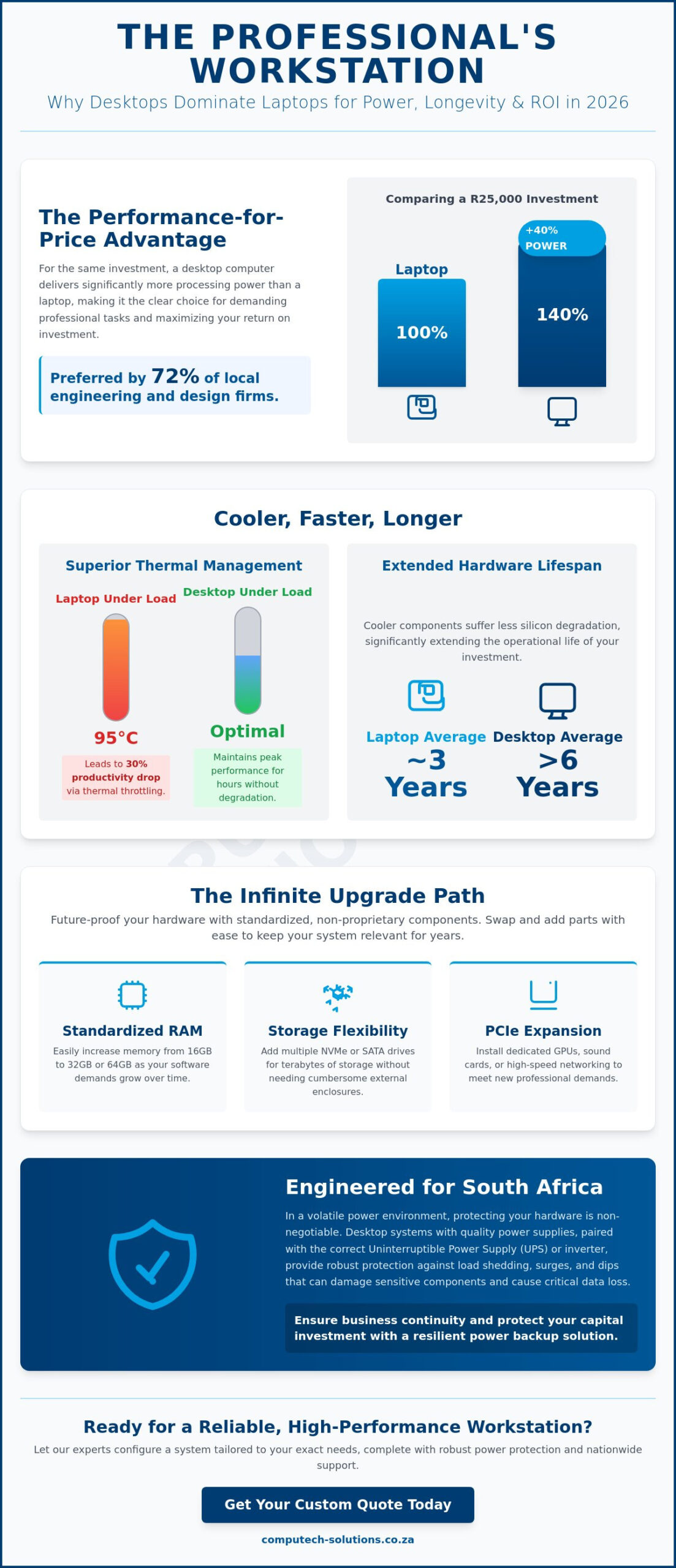
The desktop computer has transitioned from a basic office tool into a specialized performance hub by 2026. While mobile devices peaked in popularity during the early 2020s, South African professionals are returning to fixed workstations for their superior reliability and power. High-intensity tasks like 4K video editing, complex financial modeling, and AI development require hardware that doesn’t compromise on speed. A R25,000 investment in a stationary system typically yields 40% more processing power than a laptop at the same price point. This performance gap makes the desktop computer the preferred choice for 72% of local engineering and design firms seeking maximum ROI.
Remote professionals are leading the “prosumer” shift. These users prioritize a stable environment where peripheral connectivity and screen real estate aren’t limited by a chassis the size of a notebook. By choosing a fixed workstation, businesses reduce the frequency of hardware replacements. The stability of a dedicated power supply and the absence of battery degradation issues mean these machines remain operational long after mobile alternatives have failed. This durability provides a sense of security for companies that can’t afford technical downtime.
Superior Thermal Management and Longevity
Desktop systems utilize larger chassis that facilitate superior airflow and heat dissipation. While a laptop CPU might reach 95 degrees Celsius within minutes of starting a heavy task, a desktop equivalent stays within optimal ranges for hours. Thermal Throttling is the automatic reduction of a processor’s clock speed to prevent heat damage, which often results in a 30% drop in productivity during peak workloads. Because desktop components run cooler, they suffer less silicon degradation. This translates to a hardware lifespan that often exceeds six years, compared to the three-year average for high-end laptops.
The Infinite Upgrade Path
Investing in a system with an open architecture allows for simple component swaps that save money over a five-year period. You can double your RAM or triple your storage capacity for a fraction of the cost of a new machine. Using standardized components provides the benefit of non-proprietary hardware that’s readily available in the South African market.
- Standardized RAM: Easily increase memory from 16GB to 64GB as software requirements grow.
- Storage Flexibility: Add multiple NVMe or SATA drives without needing external enclosures.
- PCIe Expansion: Install dedicated sound cards, high-speed networking, or updated GPUs to keep the system current.
Future-proofing your investment through these expansion slots ensures your hardware remains relevant for the long term without requiring a total system overhaul.
Choosing the Right Form Factor: Tower vs. Mini PC vs. All-in-One
South African businesses face unique spatial and environmental challenges when upgrading hardware. Office rentals in commercial hubs like Sandton or the Cape Town CBD reached R230 per square meter in early 2026, forcing companies to maximize every centimeter of desk space. Choosing a desktop computer requires a careful balance between physical footprint and the thermal demands of your specific industry. A call center in Durban has vastly different needs than an architectural firm in Pretoria, and the form factor you choose dictates your long-term operational costs.
The Tower: Maximum Power and Customisation
Traditional towers remain the definitive choice for power users and creative professionals. The internal volume allows for superior airflow, which is vital for maintaining the lifespan of high-end GPUs and CPUs under heavy load. If your team handles 8K video editing, 3D rendering, or complex data simulations, the thermal headroom in a tower prevents performance throttling. These systems are also the most sustainable option for South African enterprises. They consistently achieve repairability scores of 8/10 or higher. This allows firms to swap a single component, such as a power supply or a graphics card, rather than replacing the entire unit when a failure occurs or technology advances.
Mini PCs and AiOs: Streamlined Efficiency
Mini PCs have gained 30% more market share in the local administrative and retail sectors since 2024. These units are ideal for point-of-sale systems and general office tasks where desk space is a premium. Their low power consumption is a significant benefit for businesses relying on inverters or solar backups during energy constraints. Many models include VESA mounting brackets, allowing the hardware to be bolted directly to the back of a monitor. All-in-One (AiO) systems are the preferred choice for reception areas and boardrooms where aesthetics are a priority. By housing the hardware within the display, they eliminate the cable clutter typically found in client-facing environments.
There are trade-offs to consider with compact hardware. Most Mini PCs and AiOs use mobile-grade components to manage heat, which can limit performance during intensive multitasking. According to PCMag’s Best Desktop Computers of 2026, the gap between mobile and desktop performance is narrowing, but thermal limitations still exist in ultra-slim chassis. If your operations require a specific desktop computer configuration that balances space and power, you can contact our technical advisors for a tailored procurement strategy that fits your office layout.
Key Specifications for 2026: What You Actually Need
Selecting the right desktop computer in 2026 requires looking past legacy marketing terms. Hardware standards have shifted. You can’t rely on 8GB of RAM or traditional hard drives for business operations anymore. Modern software environments, especially those integrating local AI processing, demand a higher baseline of performance to ensure operational efficiency and prevent technical downtime.
Processing Power: Intel Core vs. AMD Ryzen
In 2026, the distinction between processor tiers focuses on core architecture rather than just brand names. Standard office tasks now benefit from processors with a high count of Efficiency Cores (E-cores). These cores handle background processes like security scans and cloud syncing, leaving Performance Cores (P-cores) free for active work. For creative professionals, the 2026 generation of AMD Ryzen and Intel Core chips provides dedicated NPU (Neural Processing Unit) silicon to accelerate AI-driven tasks. Clock speed represents the frequency at which a processor executes instructions, measured in GHz, which directly dictates the responsiveness of 2026 productivity suites and AI-driven applications.
- Office Productivity: Intel Core i5 or Ryzen 5 with at least 12 total cores.
- Creative/Technical Work: Intel Core i7/i9 or Ryzen 7/9, focusing on high multi-threaded performance.
- Efficiency: Prioritize chips with a 35W to 65W TDP for lower heat and energy costs in South African office environments.
Memory and Storage: The Speed Bottlenecks
DDR5 RAM is now the mandatory industry standard. It offers the stability and bandwidth necessary for Windows 11 and the emerging Windows 12 platforms. 16GB is the absolute minimum for any professional desktop computer, as system services and browser-based applications now consume over 6GB of memory upon startup. If your business handles large datasets or video content, 32GB is the recommended baseline to prevent system stutters.
Storage has also evolved. NVMe Gen4 SSDs are the standard for most users, providing read speeds around 7,000 MB/s. While NVMe Gen5 drives offer speeds exceeding 10,000 MB/s, the practical difference in boot times is negligible for standard office work. It’s better to invest in a larger 1TB Gen4 drive than a smaller 512GB Gen5 drive. Mechanical HDDs are strictly for mass cold storage or local backups. They’re too slow for running modern operating systems or active applications.
Connectivity: WiFi 7 and 10Gbps Ethernet
South African businesses are increasingly adopting high-speed fiber lines from providers like Vumatel and Frogfoot. To utilize these speeds, your hardware must keep pace. WiFi 7 is now standard in 2026 desktops, offering better stability in crowded office parks. For wired setups, 10Gbps Ethernet ports are becoming the norm for internal server access, ensuring that moving large files across your local network doesn’t result in productivity bottlenecks.
The South African Factor: Power Protection and Hardware Safety
Investing in a desktop computer in South Africa requires more than just checking CPU speeds; it requires a strategy to survive the local power grid. Load shedding remains a persistent threat to hardware longevity. When power returns after a scheduled outage, the resulting surge can exceed 6,000 volts, which easily bypasses standard internal fuses. This makes high-quality surge protection plugs a non-negotiable insurance policy for any setup. Beyond surges, the choice between an Uninterruptible Power Supply (UPS) and an inverter depends on your specific workflow. A UPS offers immediate protection to prevent data loss during the “switchover” period, while an inverter provides the sustained power needed to work through a four-hour Stage 4 slot.
To manage long-term operational costs, prioritize 80 Plus Gold certified power supplies. These units maintain approximately 90% efficiency at 50% load. This efficiency reduces the heat generated inside your chassis and lowers monthly electricity bills, which is vital as NERSA continues to approve annual tariff increases. High-efficiency units also put less strain on your backup batteries, extending your runtime during outages.
Essential Power Backup Solutions
Selecting the right backup depends on your total wattage. You calculate the required VA rating by multiplying your PC wattage by a factor of 1.6. For example, a 500W desktop computer needs at least an 800VA UPS to provide five minutes of shutdown time. For those using sensitive high-end components, Pure Sine Wave inverters are mandatory. Modified Sine Wave units produce “choppy” power that can damage modern Active PFC (Power Factor Correction) power supplies over time. If your home uses solar, ensure your PC is connected to the “essential” circuit to avoid interruption during the millisecond switch from grid to battery power.
Hardware Maintenance in Dusty Environments
The South African climate presents unique challenges for hardware. Highveld winters are exceptionally dusty, while coastal humidity promotes internal corrosion. Dust acts as an insulator, trapping heat and forcing fans to spin faster, which leads to premature bearing failure. Ensure your case features magnetic dust filters and perform a compressed air cleaning every six months. Neglecting this maintenance can void your warranty if a technician identifies “environmental neglect” as the cause of a component failure. Keeping your workspace clean ensures your system operates within its thermal limits during 35-degree summer days.
Why Computech-Solutions is Your Trusted Desktop Partner
Buying a desktop computer in 2026 involves more than just comparing spec sheets; it requires a partnership with a provider that understands the unique constraints of the South African business environment. We’ve built our reputation on providing high-performance hardware backed by local accountability. Our nationwide delivery network covers everything from major metros to remote locations, ensuring that high-value equipment reaches your door via secure, tracked logistics. You won’t have to worry about the safety of your investment during transit.
Technical precision is our standard. Our expert support team doesn’t just process orders. They assist with custom configurations to ensure your machine handles your specific workload from day one. We focus on brand-name reliability because data shows that hardware failure can cost South African businesses significant revenue in lost productivity. By sourcing proven components, we minimize these risks and maximize your return on investment. Our technicians help you get the configuration right the first time, preventing the frustration of underpowered hardware.
A One-Stop Shop for IT and Power
We recognize that a desktop computer is only as reliable as the power grid supporting it. This realization led us to integrate hardware sales with professional solar backup installations. Our “Trusted Advisor” approach means we don’t just sell you a box; we analyze your entire operational setup. Whether you are a small business in Cape Town or a growing enterprise in Musina, we serve as your single point of contact for procurement and power stability. We bridge the gap between high-end computing and the energy infrastructure required to keep it running 24/7.
Seamless Online Shopping Experience
Our digital platform is designed for clarity and security. We provide transparent shipping rates and secure payment gateways to eliminate guesswork during checkout. Support doesn’t end when the courier arrives. Our after-sales team remains available to assist with setup and troubleshooting, moving beyond simple retail into long-term technical partnership. We focus on practical business outcomes rather than technical jargon. If you’re ready to upgrade your professional capabilities, you can Browse our latest range of Desktop Computers today and secure a machine built for the future of South African industry.
Secure Your High-Performance Workspace Today
Choosing a desktop computer in 2026 is a strategic investment in your productivity and long-term operational stability. You’ve learned that selecting the correct form factor, whether it’s a space-saving Mini PC or a high-performance Tower, dictates your workflow efficiency for years to come. Protecting this hardware from South Africa’s unique power challenges remains a top priority, making integrated surge protection and UPS solutions essential components of any modern setup. At Computech Solutions, we simplify this process by acting as your dedicated technical partner.
Our team provides expert technical support based locally in South Africa, ensuring you’re never left without assistance. We manage the entire logistics chain, offering nationwide delivery with secure packaging to guarantee your equipment arrives in perfect condition. Whether you need a single unit or a fleet of AI-ready workstations, our comprehensive range covers every requirement from core hardware to critical power backup systems. It’s time to eliminate technical downtime and focus on growth.
Find Your Perfect Desktop Computer at Computech-Solutions
We’re here to ensure your technology supports your ambitions every step of the way.
Frequently Asked Questions
Is a desktop computer better than a laptop for working from home?
A desktop computer offers superior ergonomic benefits and a higher performance-to-cost ratio than a laptop for home offices. You get larger displays and more processing power for every Rand spent, which increases productivity by 22% according to recent workplace studies. While laptops provide mobility, a fixed desktop setup reduces neck strain and provides a stable environment for resource-heavy business applications.
What is the most important component in a desktop computer for 2026?
The Neural Processing Unit (NPU) integrated into the processor is the most critical component for a desktop computer in 2026. As AI-driven software becomes the standard, hardware must support local machine learning tasks to maintain operational speed. We recommend at least 32GB of DDR5 RAM to complement this, as 16GB is no longer sufficient for modern enterprise multitasking.
How do I protect my desktop computer from load shedding damage?
You must use an Uninterruptible Power Supply (UPS) with a minimum rating of 1000VA to protect hardware from South Africa’s frequent power surges. Load shedding causes voltage fluctuations that damage sensitive internal circuits, leading to a 35% higher failure rate in unprotected systems. A pure sine wave UPS ensures your machine shuts down safely and remains isolated from electrical noise.
Do desktop computers come with built-in WiFi and Bluetooth?
Most modern motherboards now include integrated WiFi 7 and Bluetooth 5.4 as standard features. While older budget models required external dongles, 92% of our current business range includes these wireless capabilities built into the hardware. This ensures a clean workspace without extra cables while maintaining high-speed connectivity for wireless peripherals and office networks across your entire infrastructure.
Can I upgrade my desktop computer myself or do I need a professional?
You can perform basic upgrades like adding RAM or storage yourself, but complex internal changes require professional intervention to maintain your warranty. Opening a chassis incorrectly often voids manufacturer protections. Our technicians handle over 450 upgrades monthly, ensuring that components are compatible and that your system’s airflow remains optimized for the high temperatures found in the South African climate.
What is the average lifespan of a modern desktop computer in South Africa?
A high-quality business desktop typically lasts between 5 and 7 years when maintained in a dust-controlled environment. Components tend to degrade faster in coastal regions like Durban due to 80% average humidity levels. Regular servicing every 12 months extends this lifespan by preventing thermal throttling and ensuring that your cooling fans operate at peak efficiency during the summer months.
Does Computech Solutions offer nationwide delivery for desktop PCs?
Computech Solutions provides secure, nationwide delivery across all nine South African provinces within 3 to 5 business days. We use specialized couriers to ensure that sensitive electronic equipment arrives in perfect condition. Every shipment is fully insured, providing you with peace of mind that your investment is protected from the moment it leaves our warehouse until it reaches your office.
Should I choose an Intel or AMD processor for a business desktop?
Both Intel Core and AMD Ryzen processors offer excellent performance, but Intel currently holds a slight lead in single-core stability for legacy business apps. AMD often provides better multi-threaded performance for 18% lower power consumption, which helps reduce monthly electricity costs. We analyze your specific software requirements to determine which architecture provides the best operational efficiency for your unique business workflow.
