
With RTX 5080 GPUs starting at R24,199 and DDR5 RAM prices climbing by over 25% since early 2026, choosing a PC is no longer about just picking the flashiest box on the shelf. You likely feel the pressure of selecting a machine that won’t be obsolete by next year, especially when global AI demand is driving component costs to record highs. It’s frustrating to worry about hardware compatibility or whether your new investment can survive a sudden local power reduction event.
This guide clarifies exactly what to look for in a gaming desktop to ensure you secure a high-performance, future-proof system. We provide a definitive roadmap for mastering technical specifications while accounting for the unique environmental requirements of the South African market. You’ll learn which components offer the best value in the current economy, how to avoid overpaying for marketing hype, and the specific hardware needed to protect your machine from electrical instability. We move quickly from identifying these technical challenges to presenting the streamlined, comprehensive solutions required for a stable and elite gaming experience.
Key Takeaways
- Balance GPU visual fidelity with CPU processing power to ensure your system handles modern titles without performance bottlenecks.
- Understand the transition to DDR5 memory and high-speed NVMe storage to maintain system responsiveness during intensive multitasking.
- Prioritize airflow-focused case designs to prevent thermal throttling and extend the lifespan of your components in the South African climate.
- Master what to look for in a gaming desktop regarding power supply efficiency and surge protection to safeguard your investment against local grid instability.
- Identify the point of diminishing returns on the value curve to choose a high-performance machine that fits your budget without overpaying for hype.
Understanding the GPU and CPU: The Engine of Your Gaming Experience
The core of any high-performance build lies in the synergy between the Graphics Processing Unit (GPU) and the Central Processing Unit (CPU). When deciding what to look for in a gaming desktop, you must view these components as a single, unified engine. The GPU acts as the primary driver of visual fidelity. It’s responsible for rendering every pixel, texture, and light source you see on screen. Conversely, the CPU manages the game logic, physics, and background operations. A mismatch between these two leads to “bottlenecking,” a scenario where one component sits idle while waiting for the other to catch up. This inefficiency wastes your budget and caps your system’s true potential.
Choosing the Right GPU for Your Resolution
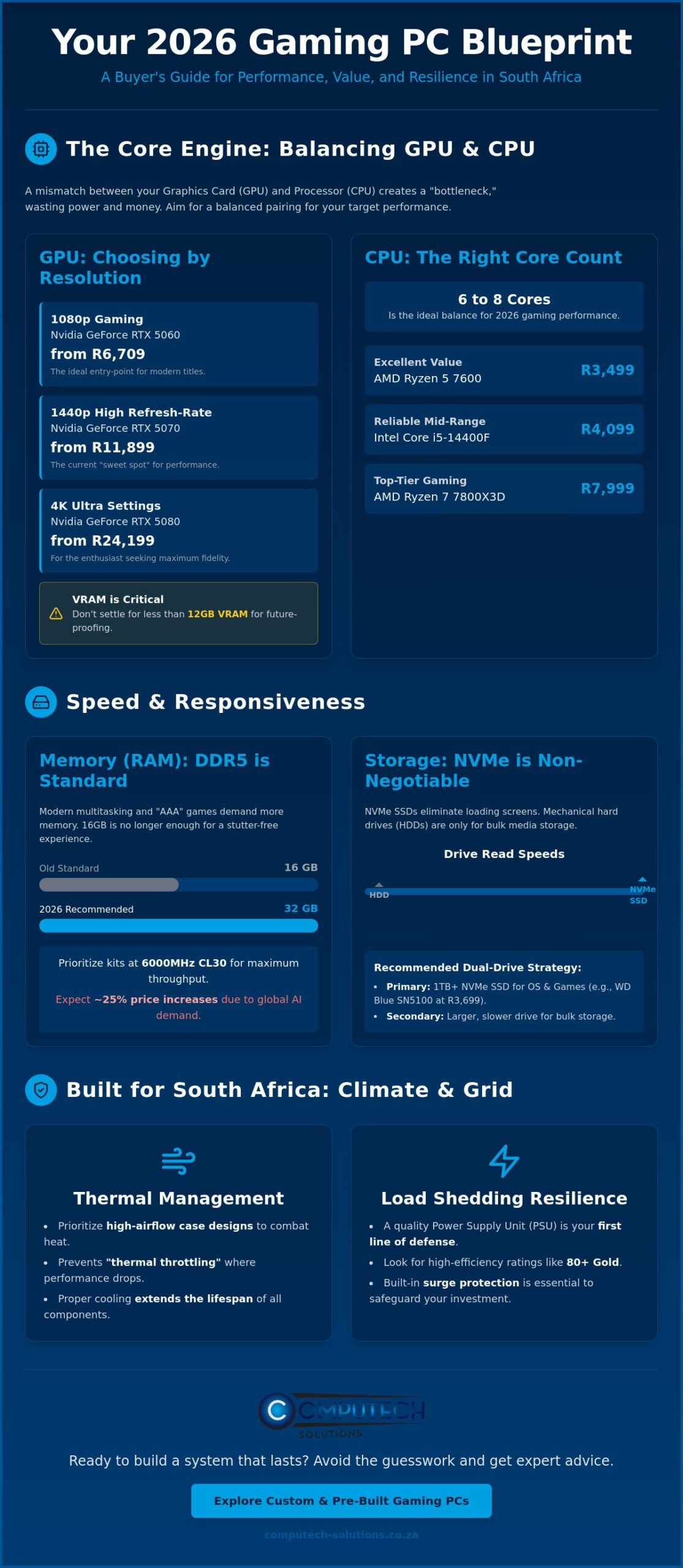
In 2026, resolution dictates your hardware tier. For 1080p gaming, the Nvidia GeForce RTX 5060 starting at R6,709 provides a stable entry point for modern titles. If you target 1440p, the RTX 5070 at R11,899 is the current sweet spot for high refresh rates. Enthusiasts aiming for 4K must consider the RTX 5080 or the flagship RTX 5090, though the latter carries a significant premium. VRAM has become critical for texture-heavy modern titles. You shouldn’t settle for less than 12GB if you plan on keeping the machine for several years. While ray tracing adds immersion, AI upscaling technologies are now essential tools to maintain smooth performance at higher resolutions without requiring a total hardware overhaul.
CPU Core Counts and Clock Speeds
A specialized personal computer requires a processor that can keep pace with rapid data throughput. For 2026 gaming architecture, 6 to 8 cores represent the ideal balance for performance and efficiency. The AMD Ryzen 5 7600 at R3,499 offers excellent value, while the Ryzen 7 7800X3D remains a top-tier choice for competitive gaming at R7,999. Intel’s Core i5-14400F at R4,099 serves as a reliable mid-range alternative. Higher clock speeds allow the processor to execute instructions faster, which directly translates into more stable frame rates and reduced input lag during fast-paced action. Understanding this balance is vital when determining what to look for in a gaming desktop, as it ensures your system remains responsive under heavy loads.
Memory and Storage: Ensuring Speed and System Responsiveness
The shift to DDR5 has officially redefined the national standard for high-performance systems in 2026. When you analyze what to look for in a gaming desktop, you must account for the recent volatility in memory pricing. High-performance 32GB kits, which retailed for approximately R5,499 in late 2025, have seen prices climb toward R6,999 as AI-driven demand impacts global supply. This memory isn’t just for the game itself; it manages the heavy multitasking requirements of modern players who run Discord, streaming tools, and browser tabs simultaneously. Insufficient RAM creates micro-stutters that even the most powerful GPU cannot fix.
How Much RAM Do You Actually Need?
While 16GB was once the baseline, 32GB has become the recommended standard for “AAA” titles in 2026. Modern game engines now utilize larger assets that require immediate access within the system memory. You should prioritize kits with lower latency and higher clock speeds, such as 6000MHz CL30, to maximize throughput. When selecting your machine, ensure the motherboard has four DIMM slots. Populating only two slots now allows for an easy, cost-effective upgrade later without replacing your existing modules. If you’re currently evaluating pre-configured desktop computers, verify that the memory configuration supports dual-channel mode for optimal speed.
Storage Solutions: NVMe vs. Traditional Hard Drives
Mechanical hard drives are now strictly relegated to bulk media storage or cold backups. For gaming, an NVMe M.2 SSD is a non-negotiable requirement. These drives utilize the PCIe 4.0 or 5.0 interface to deliver speeds that traditional SATA drives cannot match. DirectStorage technology now allows the GPU to pull data directly from the SSD, virtually eliminating loading screens in optimized titles. Intel provides a comprehensive, step-by-step guide regarding how these components interact to stabilize system performance.
Managing massive install sizes is a logistical challenge in 2026, with many games exceeding 200GB. A dual-drive strategy remains the most efficient approach for South African buyers. Use a high-speed 1TB drive, like the Western Digital Blue SN5100 at R3,699, for your operating system and most-played games. For your broader library, a larger 2TB NVMe drive at R5,099 offers a better price-per-gigabyte ratio. High-end options like the Samsung 990 PRO 2TB at R8,499 provide peak performance for enthusiasts who refuse to compromise on file transfer speeds. Balancing these storage tiers ensures your system remains responsive without exhausting your budget on premium drives for every single file.
Thermal Management: Protecting Hardware in the South African Climate
South African summers present a unique challenge for high-performance electronics. Ambient temperatures in many regions often exceed 30 degrees Celsius during peak hours. when you evaluate what to look for in a gaming desktop, thermal management must be a priority rather than an afterthought. Excessive heat causes thermal throttling, a safety mechanism where your components automatically reduce their speed to prevent permanent damage. This leads to dropped frame rates and stuttering during intensive play. Over time, consistent high heat degrades the internal circuitry, significantly reducing the lifespan of your motherboard and GPU.
Many international guides suggest that stock cooling is sufficient for entry-level builds. However, these recommendations rarely account for local environmental conditions. A robust cooling strategy is essential for long-term hardware health. While aesthetics often favor closed glass panels, functional “Airflow” cases with mesh front panels are superior for the local market. They allow for a much higher volume of fresh air to reach critical zones. This Gaming PC Components Guide highlights how selecting the right chassis influences the efficiency of every other part in your build.
Case Design and Airflow Dynamics
Positive pressure is the most effective way to manage your internal environment. You achieve this by ensuring more air is pulled into the case through filters than is pushed out by exhaust fans. This creates a pressurized environment that prevents dust from entering through unfiltered gaps and vents. Mid-tower cases are generally sufficient for most builds, but full-tower options provide more air volume and easier cable management for high-end enthusiasts. The ideal configuration for a standard gaming chassis involves three front intake fans and one rear exhaust fan to maintain a consistent, directional flow of cool air across the heat sinks.
Aftermarket Cooling Solutions
Stock coolers often struggle to maintain safe temperatures during a typical February heatwave. Upgrading to a high-performance air tower or an All-In-One (AIO) liquid cooler provides a necessary safety margin. Air cooling is often more reliable for long-term use because it has fewer points of failure, typically only requiring a fan replacement if a motor fails. Liquid cooling offers superior thermal dissipation for high-end CPUs but requires more monitoring for pump health. You should also consider the role of high-quality thermal paste and periodic cleaning. Dust buildup acts as insulation, trapping heat and forcing fans to run at higher RPMs. Balancing fan speeds is crucial. You want to achieve maximum cooling efficiency without creating excessive noise that disrupts your immersion.
Power Supply and Load Shedding Resilience
The Power Supply Unit (PSU) is often the most overlooked component in a high-performance build. When users research what to look for in a gaming desktop, they usually focus on frames per second rather than electrical stability. However, the PSU is the foundation of your entire system. It converts AC power from the wall into the clean DC power your sensitive components require. A low-quality unit doesn’t just fail; it can take your entire motherboard and GPU with it. 80 Plus ratings, such as Bronze, Gold, and Platinum, indicate the unit’s energy efficiency. A Gold-rated PSU is generally the standard for 2026 builds, as it wastes less energy as heat and provides more stable voltage under heavy loads.
Calculating Wattage Requirements
Estimating your power needs requires more than just adding up the TDP of your parts. You should calculate your system’s peak power draw and add a 20% to 30% safety margin. This ensures the PSU operates within its most efficient load range and allows for future component upgrades. A high-quality 650W Gold-rated unit from a reputable manufacturer is significantly better than a generic 850W unit with inconsistent voltage regulation. Choosing a modular power supply is also a practical decision. These allow you to plug in only the cables you need, which improves internal airflow and makes cable management much simpler.
Protecting Your PC from Grid Instability
South Africa’s electrical grid remains unpredictable despite the suspension of national load shedding for over 406 days as of June 2026. Localized load reduction and infrastructure strain still cause sudden outages that can corrupt SSD data or damage PSU capacitors. A standard surge protector is a basic requirement, but it isn’t enough for high-end machines. A true Sine Wave UPS (Uninterruptible Power Supply) provides the clean power signal necessary for modern electronics to shut down safely during a trip. For those seeking a definitive fix, integrating your setup with solar power solutions ensures your gaming remains uninterrupted regardless of grid status. Understanding these local requirements is a vital part of what to look for in a gaming desktop to protect your investment.
Grid instability is a technical disruption you can’t afford to ignore. Protecting your investment requires a comprehensive approach to power management that prioritizes stability. If you’re ready to secure a system built for local conditions, explore our range of resilient desktop computers designed to withstand the rigors of the South African power environment.
The Selection Framework: Making the Right Purchase
Finalizing your choice requires a strategic approach that balances immediate performance with long-term financial sense. When determining what to look for in a gaming desktop, you must look beyond the raw numbers and identify the “Value Curve.” This is the point where spending more money results in smaller performance gains. For most South African users, chasing the absolute flagship components leads to diminishing returns. A realistic budget must also account for essential extras often left out of marketing materials, including high-refresh-rate monitors and the critical power protection hardware discussed in previous sections.
Verifying the upgrade path is equally vital for protecting your investment. You don’t want a system that requires a total motherboard replacement just to install a new processor in two years. Ensure your chosen platform supports modern standards like PCIe 5.0 and has sufficient PSU headroom. This foresight prevents the operational risk of your hardware becoming a “dead-end” system that cannot adapt to future software demands. A sophisticated buyer prioritizes a machine that grows with their needs rather than one that requires a full replacement every cycle.
Tiered Specification Recommendations for 2026
- Entry-Level (1080p): Focus on high frame rates in competitive titles. A combination like the AMD Ryzen 5 5500 (R1,999) paired with an RTX 5060 provides a stable foundation for standard HD gaming without overextending your budget.
- Mid-Range (1440p Sweet Spot): This tier offers the best balance of visual fidelity and cost. Utilizing an RTX 5070 at R11,899 alongside a Ryzen 5 7600 at R3,499 ensures you can handle modern “AAA” titles at high settings while maintaining system responsiveness.
- Enthusiast (4K and Creation): For those who refuse to compromise, the RTX 5080 or 5090 paired with a Ryzen 7 7800X3D (R7,999) delivers elite performance. This configuration is ideal for 4K gaming and intensive content creation tasks.
Why National Support Matters
Importing individual components might seem attractive, but it carries significant hidden costs and risks. You’ll face a mandatory 15% VAT on all imported hardware, and shipping fees for heavy items like cases or PSUs quickly erode any perceived savings. More importantly, international warranties are notoriously difficult to execute from South Africa. Buying from a reputable national retailer ensures that if a component fails, you have access to local support and rapid replacement. This reliability is a cornerstone of our service model, providing you with a definitive, total solution for your gaming needs. Explore our range of desktop computers with expert national support to ensure your system remains operational and protected for years to come.
Secure Your High-Performance Gaming Future
Mastering the technical landscape of 2026 requires balancing raw processing power with environmental resilience. You now understand the necessity of prioritizing high-airflow chassis designs to combat local heat and selecting Gold-rated power supplies to navigate grid instability. By focusing on the value curve rather than marketing hype, you can build a system that remains relevant for years. This framework provides a definitive guide on what to look for in a gaming desktop to ensure your investment is both powerful and protected.
Our team provides expert technical support based in South Africa alongside specialized load shedding and solar power solutions to keep you in the game. We offer a comprehensive range of brand-name IT hardware specifically selected for local conditions. Browse our high-performance desktop computers for nationwide delivery and take the first step toward a resilient setup. It’s time to invest in a machine that delivers peak efficiency without the stress of technical disruptions. Your path to an elite gaming experience is secure.
Frequently Asked Questions
Is it better to build a gaming PC or buy a pre-built one in 2026?
Buying a pre-built system is often more cost-effective in 2026 due to increased tariffs on individual components. Local assemblers can absorb some import taxes through bulk purchasing, which often results in better value than building from scratch. This approach also ensures that the entire system is covered by a single local warranty, providing a streamlined solution for technical support and hardware replacements.
Will a gaming desktop increase my electricity bill significantly?
A high-end gaming desktop will increase your consumption, but modern 80 Plus Gold and Platinum power supplies minimize energy waste. Your actual cost depends on the wattage of your components and how many hours you spend under heavy load. Utilizing energy-efficient hardware helps manage operational costs while ensuring the system remains stable and responsive during long, intensive gaming sessions.
How do I protect my gaming PC from load shedding damage?
You should use a true Sine Wave UPS or a solar inverter system to safeguard your hardware from grid instability. These devices provide the necessary time to shut down the system safely and prevent voltage spikes when power returns. Protecting your investment from electrical surges and sudden outages is a critical part of what to look for in a gaming desktop in the local market.
What is the minimum RAM required for gaming in 2026?
The absolute minimum for modern gaming is 16GB, but 32GB is the recommended standard for “AAA” titles. This higher capacity ensures your system handles memory-intensive game engines and background applications without performance stutters. As DDR5 prices fluctuate, securing a 32GB kit now prevents performance bottlenecks and future-proofs your machine for the next several years of software releases.
Can I use a gaming desktop for work and content creation?
Yes, gaming desktops are excellent for professional tasks like video editing, 3D rendering, and software development. The high core counts and powerful GPUs required for modern gaming translate directly into faster processing times for creative workloads. This versatility makes a high-performance PC a definitive, total solution for both your professional career requirements and your recreational gaming needs.
How often should I clean the dust out of my gaming PC?
You should perform a basic internal cleaning every three to six months to prevent heat buildup. In dusty South African environments, fans and filters can clog quickly, which forces components to run hotter and reduces their operational lifespan. Regular maintenance ensures your thermal management remains efficient and prevents the risk of hardware failure due to overheating during the summer months.
Does the brand of the motherboard matter for gaming performance?
The brand matters less for raw frame rates and more for long-term reliability, BIOS stability, and connectivity features. Reputable brands offer better power delivery components, which are essential for maintaining stable performance under heavy loads. When considering what to look for in a gaming desktop, prioritize motherboard manufacturers that offer strong local support and clear warranty terms within South Africa.
Is liquid cooling safer than air cooling for beginners?
Air cooling is generally safer and more reliable for beginners due to its mechanical simplicity and lack of fluid. Modern tower coolers are highly efficient and have fewer points of failure than All-In-One liquid systems. While liquid cooling offers superior aesthetics and slightly better thermals for high-end chips, air cooling provides a stable, low-maintenance solution that is less prone to pump failures.
