
That burning smell or uncomfortable heat coming from your power brick isn’t just an inconvenience; it’s a potential warning sign that your hardware is failing. It’s natural to feel a surge of anxiety when you touch your power adapter and find it’s hot enough to cause concern. You’ve likely wondered, why is my laptop charger getting so hot, especially during a long work session or after the grid stabilizes following load shedding. Heat is a necessary byproduct of power conversion, but in the South African context of power instability, excessive heat often signals internal component fatigue rather than just ambient temperature.
We’ll help you distinguish between the standard heat generated by normal operation and the dangerous temperatures that indicate a fire risk. You’ll learn exactly how to identify when a charger has reached its limit and what actionable steps you can take to cool it down safely. We also provide expert guidance on choosing reliable replacements that carry the mandatory NRCS Letter of Authority and meet the latest IEC 62368-1 international safety standards. This ensures your hardware remains protected and your operations stay efficient without the worry of electrical damage.
Key Takeaways
- Understand the difference between standard thermal energy loss and hazardous overheating caused by internal component failure.
- Learn how to perform a quick safety audit to answer why is my laptop charger getting so hot and identify warning signs like ozone smells or casing warping.
- Discover how external factors like airflow blockages and high-performance processing tasks contribute to rising adapter temperatures.
- Protect your hardware from the cumulative damage of “dirty power” and electrical surges common during South African load shedding cycles.
- Master the “Wattage Rule” for selecting safe replacement laptop chargers that meet mandatory NRCS safety regulations and international standards.
Understanding the Science: Why Do Laptop Chargers Generate Heat?
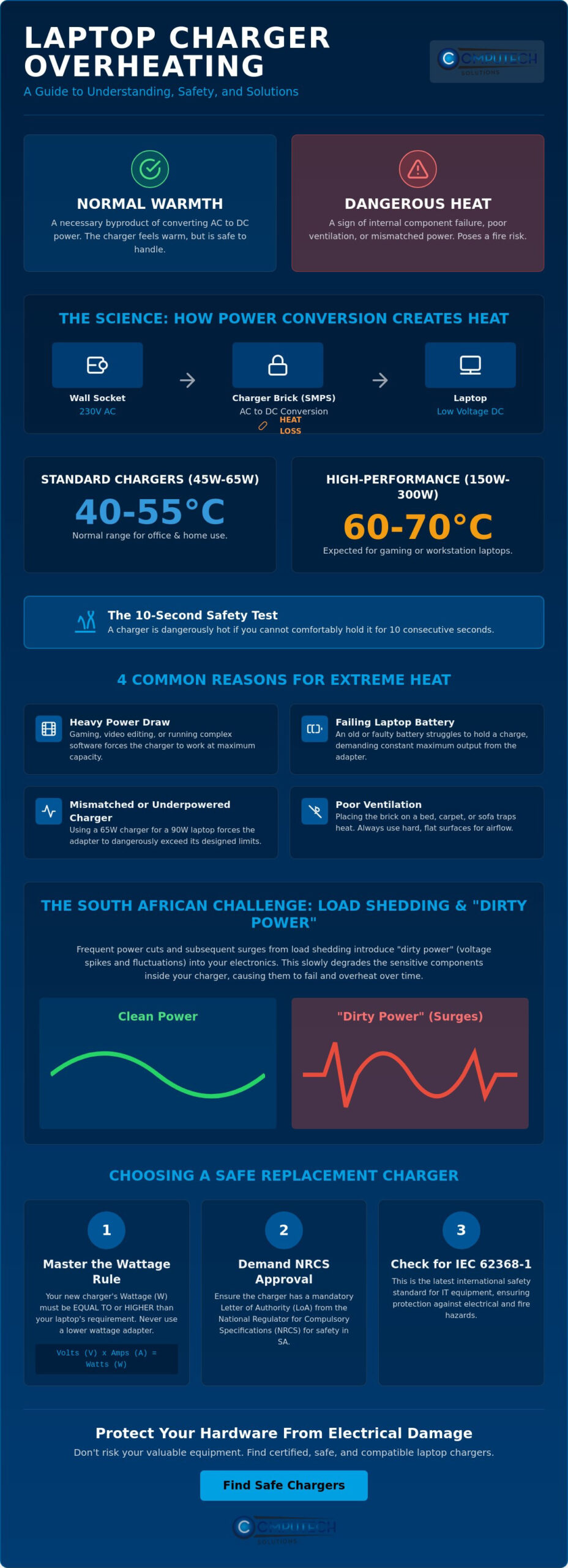
Understanding why is my laptop charger getting so hot begins with the “Efficiency Gap.” No electronic device is perfectly efficient. When your charger draws power from a South African wall socket, it receives 230V of Alternating Current (AC). Your laptop requires a much lower, steady Direct Current (DC) to operate and charge its battery. During this conversion process, a portion of the electrical energy is inevitably lost as thermal energy. This isn’t a defect; it’s a fundamental law of physics where energy transformation results in heat as a byproduct.
AC to DC Conversion: The Work Inside the Brick
Modern laptop adapters rely on a Switch Mode Power Supply (SMPS) as the standard for power regulation. Inside the compact plastic casing, internal components like capacitors and inductors handle high-frequency switching to manage the flow of electricity. You can examine the technical history of how AC adapters work to understand how these designs prioritize portability, even though the dense packing of components makes heat dissipation more challenging. Because these “bricks” lack internal fans, the heat generated by these switching components must escape through the outer shell by natural convection.
Normal Operating Temperatures for High-Performance Adapters
Temperature thresholds vary significantly based on the power rating of your specific hardware. Standard office chargers, typically rated between 45W and 65W, usually operate within a range of 40°C to 55°C. High-performance gaming laptop chargers or mobile workstations require much more energy, often utilizing bricks rated between 150W and 300W. These heavy-duty adapters can safely reach temperatures between 60°C and 70°C when the laptop is under a heavy processing load. South Africa’s ambient environment also dictates the baseline; a charger will naturally feel hotter in a 30°C room than it would in a climate-controlled office.
To determine if your device is functioning correctly, use the 10-second rule. A charger operating within its safe design parameters should feel warm, or even quite hot, but it should never be painful to hold for 10 consecutive seconds. If you find yourself asking why is my laptop charger getting so hot that it’s impossible to touch, you’ve likely moved beyond standard thermal energy loss and into a territory of potential hardware failure or environmental obstruction.
- Standard Chargers (45W-65W): 40°C to 55°C is expected.
- Gaming/Workstation Bricks (150W-300W): 60°C to 70°C is common under load.
- The Safety Threshold: Must be touchable for 10 seconds without discomfort.
For enthusiasts who find the heat of mobile gaming adapters a concern, transitioning to a dedicated desktop build from budgetgamer.ae can offer a more thermally efficient solution for high-performance gaming.
Common Reasons for an Overheating Laptop Adapter
While we’ve established that some warmth is expected, you might still wonder why is my laptop charger getting so hot during specific tasks. The most common culprit is heavy power draw. When you engage in high-intensity activities like gaming, 4K video editing, or running complex simulations, your laptop’s components require significantly more energy. This forces the power brick to operate at its maximum capacity for extended periods. A failing internal battery also exacerbates this issue. As batteries age or develop internal faults, they struggle to hold a charge, causing the adapter to work constantly at 100% output to keep the system running. This continuous strain prevents the internal components from cooling down, which is often why chargers generate heat beyond safe levels.
Poor Ventilation and Surface Placement
The physical environment surrounding your power brick is just as important as the electronics inside it. Laptop adapters rely on natural convection to dissipate heat. When you place a charger on a soft surface like a bed, carpet, or sofa, the fabric acts as an insulator, trapping thermal energy against the plastic casing. This creates a “heat trap” that can quickly lead to overheating. Always use hard, flat surfaces like a desk or floor to allow air to circulate freely. This creates a natural heatsink effect where the surface helps pull heat away from the device. You should also check for dust accumulation in the charging port or around the brick’s seams. Debris acts as an unwanted thermal barrier and prevents the casing from cooling effectively.
Mismatched Specifications and Under-Powering
Using the wrong hardware is a frequent cause of excessive heat. If your laptop requires a 90W power supply but you’re using a 65W unit, the smaller charger must work beyond its intended design limits to meet the demand. This mismatch creates extreme thermal stress and can lead to internal component failure. Universal chargers often struggle with thermal management because they aren’t optimized for your specific laptop’s power profile. A charger works significantly harder when your battery is near 0% than when it’s at 80%. The initial charging phase requires a much higher current flow, which generates more heat. If your current adapter feels dangerously hot or shows signs of physical wear, it’s safer to invest in a high-quality laptop charger that matches your manufacturer’s original specifications perfectly.
Warning Signs: When a Hot Charger Becomes a Safety Hazard
If you’re asking why is my laptop charger getting so hot, you must look beyond the temperature to other sensory signals. While heat is a standard byproduct of power conversion, certain red flags indicate a critical failure. The first line of defense is the “Odor Test.” A healthy charger shouldn’t emit any scent. If you detect the sharp, metallic smell of ozone or the acrid aroma of melting plastic, the internal insulation has likely failed. This is an immediate fire hazard. Disconnect the device from the wall socket immediately to prevent electrical combustion.
Visual inspections often reveal the story of internal stress. Look for discolouration on the plastic casing, particularly yellowing or browning near the cable entry points. Warping or bulging indicates that the internal components have reached temperatures high enough to soften the structural polymer. Audible cues are equally telling. While a faint “coil whine” is sometimes normal in high-wattage units, any persistent clicking, buzzing, or high-pitched screeching suggests that the transformer or capacitors are failing. Finally, apply the “Touch Test.” While we previously noted that 10 seconds of contact is acceptable for normal operation, if you cannot hold the brick for even 5 seconds without intense discomfort, it has transitioned from “hot” to “dangerous.”
Physical Damage: Frayed Cables and Cracked Casings
External wear often creates internal thermal hotspots. “Kinking” the cable, especially where it meets the power brick, causes the internal copper strands to break. This increases electrical resistance and generates localized heat that can melt the outer jacket. Exposed wires are even more severe as they lead to electrical arcing. A cracked casing isn’t just a cosmetic issue; it compromises the internal insulation of the transformer. Following CPSC safety tips for notebook computers ensures you avoid restricted airflow and physical stress that leads to these hazards.
Internal Component Failure
Inside the adapter, components like capacitors have a finite lifespan. Signs of capacitor leakage or excessive “coil whine” indicate that the charger is approaching the end of its functional life. Internal shorts can cause the charger to get hot even when the laptop is off, as the device continues to draw current through a faulted circuit. It’s vital to remember that heat damage is cumulative and degrades the charger’s safety over time. Each instance of extreme overheating slightly weakens the internal insulation, making a catastrophic failure more likely the longer you continue to use the compromised hardware. If you’ve noticed these signs, it’s time to stop wondering why is my laptop charger getting so hot and start looking for a certified replacement.
- Odor: Any smell of burning plastic or ozone is a critical failure.
- Visual: Look for warping, bulging, or brown discolouration.
- Audible: Clicking or buzzing sounds indicate failing internal components.
- Touch: Inability to hold the brick for 5 seconds indicates a fire risk.
South African Power Challenges: Surges and Load Shedding
In South Africa, the external environment and heavy processing tasks aren’t the only factors affecting hardware temperature. Our unique grid instability introduces “dirty power” into the equation. If you’ve wondered why is my laptop charger getting so hot specifically after power restoration, the answer often lies in voltage surges. When the grid reactivates after load shedding, a spike in voltage can hit your adapter with significant force. High-quality chargers are designed with protective circuitry to mitigate these spikes, but the cumulative stress of daily load shedding cycles eventually takes a toll on internal regulation components.
The Impact of Frequent Power Fluctuations
Voltage dips and spikes force the charger’s capacitors and inductors to work much harder to maintain a steady output. When the input voltage is unstable, the Switching Mode Power Supply (SMPS) must switch at higher frequencies to compensate. This increased internal activity generates excess heat. Many chargers fail or overheat immediately after power restoration because their protective components have been weakened by previous surges. Using a high-quality adapter is essential because these units act as a sacrificial barrier. They protect your laptop’s expensive internal motherboard from being destroyed by an electrical surge.
Why Cheap, Non-Regulated Adapters Fail in SA
The market is flooded with low-cost, “no-name” chargers that often retail for a fraction of the price of original equipment. These budget adapters typically omit critical safety features like thermal shutdown circuits and over-voltage protection to save on manufacturing costs. During a South African summer, these components are prone to “thermal runaway.” This is a dangerous state where rising temperatures cause increased current flow, leading to even higher temperatures until the device melts or ignites. Legally, any charger sold in South Africa requires a Letter of Authority (LOA) from the National Regulator for Compulsory Specifications (NRCS). Cheap generic units often bypass these safety standards, making them a significant fire risk in our unstable power environment. To ensure your home and hardware remain safe, always choose laptop chargers that meet these rigorous safety certifications and include built-in surge protection.
- Surge Risk: Power restoration after load shedding can cause immediate overheating.
- Dirty Power: Constant voltage fluctuations degrade internal capacitors over time.
- Regulatory Safety: Only use chargers with a verified NRCS Letter of Authority (LOA).
- Motherboard Protection: A quality charger prevents grid instability from reaching your laptop’s core.
Choosing a Safe Replacement: Compatibility and Standards
Once you have identified that internal failure or insufficient capacity is the reason why is my laptop charger getting so hot, you must select a replacement with precision. The most critical step is reading the “Output” label on your current adapter. This label lists the Voltage (V) and Amperage (A). By multiplying these two figures, you determine the total Wattage (W). For example, a 19.5V adapter providing 3.34A produces approximately 65W of power. Knowing these baseline figures prevents you from purchasing underpowered hardware that will inevitably overheat.
Matching Voltage, Amperage, and Polarity
Precision is non-negotiable when it comes to voltage. Your replacement charger must match the original voltage exactly to prevent damaging the motherboard’s sensitive circuits. However, the “Amperage Rule” is more flexible. A laptop only pulls the amount of current it needs to operate. If your original charger was 3.34A, using a 4.62A replacement is perfectly safe; it simply provides more “headroom” and often runs cooler because it isn’t constantly pushed to its limit. Conversely, using a charger with lower amperage than the original is a primary reason why is my laptop charger getting so hot, as the unit struggles to meet the demand. You must also ensure the connector polarity matches, usually indicated by a diagram showing a positive center pin.
Identifying the Correct Connector
Physical compatibility is the final hurdle. Different manufacturers use proprietary tip sizes to ensure only specific chargers fit their devices. For instance, Dell and HP often use circular tips with a center signal pin, while Lenovo frequently utilizes a rectangular “slim tip” or USB-C. You should verify the inner and outer diameter of the plug, often measured in millimeters (e.g., 4.5mm x 3.0mm), before finalizing your selection. Using a connector that doesn’t fit snugly can cause electrical arcing, which generates intense heat at the charging port.
Generic vs. Brand-Specific Replacement Chargers
While many manufacturers suggest only using original equipment, high-quality generic chargers are a reliable and cost-effective alternative. The key is to avoid “no-name” units found on unverified marketplaces that lack proper safety certifications. A reputable replacement charger must include short-circuit protection and over-temperature shutdown features to handle South Africa’s grid instability. Sourcing from a specialist local retailer ensures you receive a product that complies with NRCS safety standards and includes a valid warranty. If your current adapter is showing signs of physical damage or is becoming dangerously hot, browse our range of high-quality laptop chargers for all major brands to restore your system’s operational safety.
- Voltage: Must match the original exactly.
- Amperage: Can be higher than the original, but never lower.
- Wattage: Higher wattage provides better thermal headroom.
- Certification: Ensure the unit has an NRCS Letter of Authority (LOA) for the South African market.
Securing Your Hardware Against Thermal Risks
Effective thermal management is essential for maintaining your laptop’s longevity and ensuring operational safety. By understanding why is my laptop charger getting so hot, you can accurately distinguish between the standard heat of energy conversion and the hazardous temperatures that signal internal failure. Always prioritize the touch and odor tests to identify red flags before they escalate into fire risks. Given the instability of the local power grid, using certified hardware with robust surge protection is the most reliable way to safeguard your motherboard from cumulative damage.
If your current adapter shows signs of warping or fails the safety tests we’ve discussed, it’s time to upgrade to a regulated power source. You can replace your overheating adapter with a high-quality laptop charger from Computech-Solutions. As specialists in Acer, Dell, HP, and Lenovo replacements, we provide nationwide delivery across South Africa and expert technical support for all power solutions. Investing in high-quality hardware ensures your equipment remains protected and your workflow stays uninterrupted. You can work with total confidence knowing your technology is powered by safe, reliable components.
Frequently Asked Questions
Is it normal for a gaming laptop charger to be too hot to touch?
No, a charger should never be so hot that it causes pain or skin irritation upon contact. While gaming laptop adapters (150W-300W) run significantly hotter than standard office units, you should still be able to hold the brick for at least 10 seconds. If you can’t touch it comfortably, it’s exceeding its thermal design limits and could pose a fire risk.
Can a hot laptop charger damage my laptop battery?
Yes, an overheating charger can negatively impact your laptop’s battery health over time. While the laptop’s internal circuits regulate the incoming voltage, a failing charger may deliver unstable “dirty” power. This thermal stress can cause the battery to degrade faster than usual, leading to a shorter overall lifespan and reduced capacity.
Why does my charger get hot only when the battery is low?
This occurs because the charger draws maximum current when the battery’s charge level is low. During the initial charging phase, the adapter works at 100% capacity to replenish energy quickly. This high energy transfer is a common reason why is my laptop charger getting so hot, but the temperature should drop once the battery reaches 80%.
What is the safe operating temperature for a laptop power brick?
Most laptop power bricks are designed to operate safely between 40°C and 70°C according to international IEC 62368-1 standards. Standard 65W adapters usually stay on the lower end of this range, while high-performance workstation bricks often reach the higher end. If the casing feels soft to the touch or exceeds these temperatures, the unit is failing.
Should I unplug my charger if it gets too hot?
Yes, you must unplug the charger if it becomes hot enough to cause discomfort or smells like burning plastic. While cooling it down on a hard surface might provide a temporary fix, extreme heat usually points to internal component fatigue. Continuing to use a compromised adapter increases the risk of a short circuit or damaging your laptop’s motherboard.
How can I cool down my laptop charger while using it?
You can cool your charger by placing it on a hard, flat surface like a wooden desk or tile floor that allows for natural airflow. Never leave the power brick on soft materials like blankets, carpets, or sofas, as these act as insulators. If your environment is particularly warm, ensuring the charger isn’t covered by other cables will help dissipate heat.
Does a hot charger mean I need a new laptop battery?
A hot charger doesn’t always mean your battery is failing, but the two issues are often linked. If you’ve wondered why is my laptop charger getting so hot lately, a degraded battery might be the cause by forcing the charger to work at maximum output indefinitely. You should test your laptop with a healthy battery to see if the charger temperature stabilizes.
Is a buzzing sound from a hot charger dangerous?
Yes, a distinct buzzing or crackling sound from a hot charger is a dangerous sign of internal failure. While a very faint “coil whine” is common in some high-wattage units, loud buzzing indicates electrical arcing or a failing transformer. This is a significant safety hazard, and you should replace the charger immediately to prevent an electrical fire.
