
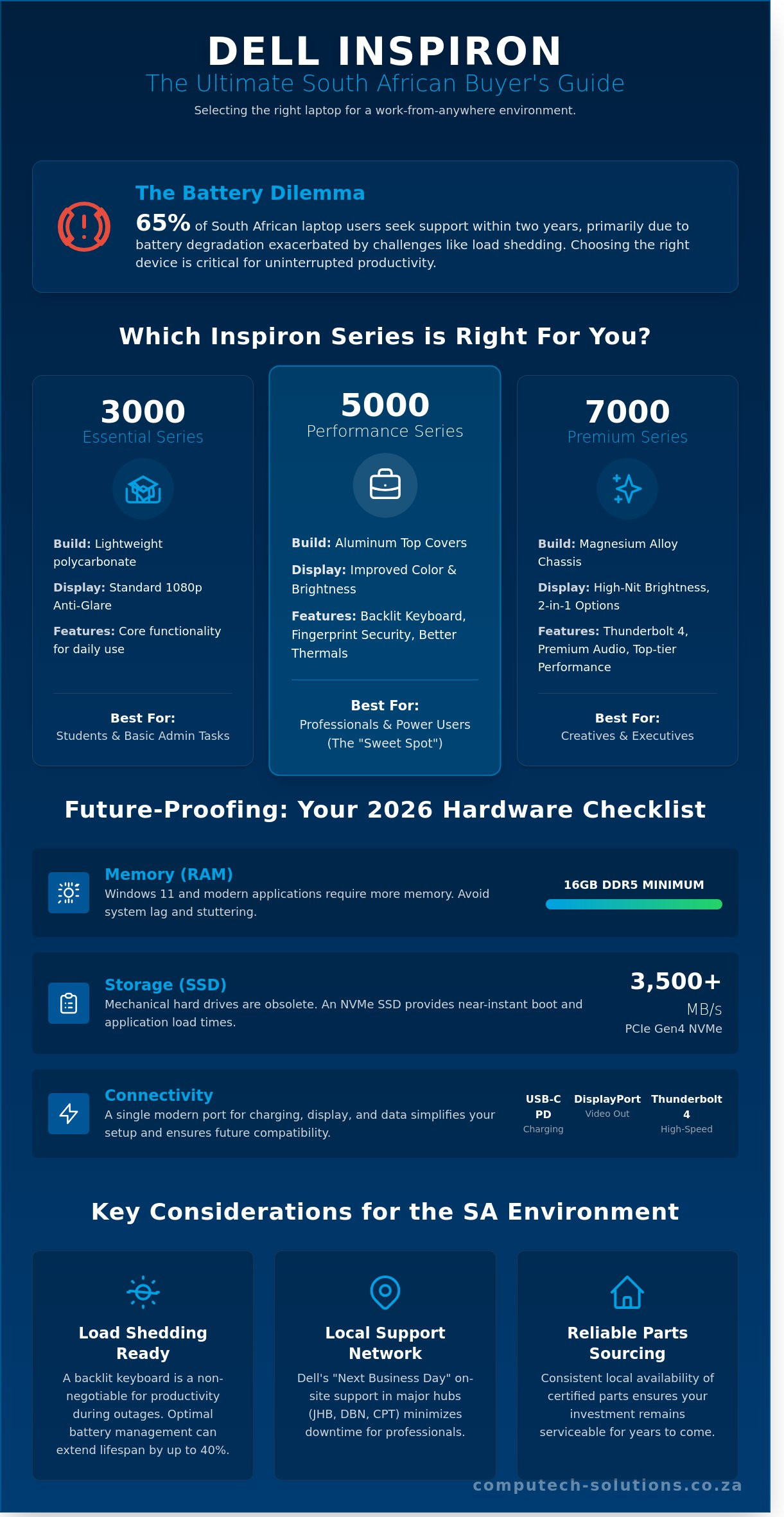
Last Tuesday, a Johannesburg project manager discovered that their 14-month-old laptop couldn’t survive a single two-hour Stage 4 load shedding block. This isn’t an isolated incident, as battery degradation remains the primary reason 65% of South African laptop users seek technical support within two years of purchase. You’ve likely felt the frustration of trying to distinguish between the dell inspiron 3000, 5000, and 7000 series while worrying that your R15,000 investment might be obsolete by 2027.
We understand that you need a machine that works as hard as you do, regardless of power grid stability. This comprehensive guide provides a definitive roadmap to selecting the right model for your specific workflow and implementing a maintenance schedule that can extend your battery’s functional lifespan by up to 40%. We’ll examine current model specifications, localized hardware support options, and the exact upgrade paths that keep your device performing at peak efficiency well into the future.
Key Takeaways
- Learn how to evaluate the ideal dell inspiron model using a professional framework designed for the modern South African “work-from-anywhere” environment.
- Discover how strategic hardware upgrades provide a “second life” for your laptop, saving you significant costs compared to purchasing a new device.
- Identify essential maintenance protocols to protect internal components from local environmental stressors such as dust, heat, and excessive wear.
- Master techniques for mitigating the impact of load shedding on your hardware, including surge protection and optimal battery cycle management.
- Understand the critical importance of sourcing certified replacement parts from local specialists to ensure long-term operational reliability and security.
Understanding the Dell Inspiron Series: Why It Is a South African Favourite
The Dell Inspiron serves as the versatile “everyman” laptop, bridging the gap between basic computing and professional performance. It remains a dominant force in the South African market because Dell maintains an extensive local support network with parts and certified technicians readily available in major hubs like Johannesburg, Durban, and Cape Town. For a deep dive into the evolution of this lineup, the Dell Inspiron Wikipedia page provides a detailed history of its development and its role in democratizing mobile computing. This series provides a reliable entry point for 85% of home users and small businesses who require a balance between R12,000 price points and long-term durability.
South African consumers value the brand’s “Next Business Day” on-site support, which significantly reduces technical downtime for remote workers. Students appreciate the ruggedness of the chassis during daily commutes, while small business owners rely on the consistent part availability that ensures a laptop purchased today can still be serviced in 2030. The dell inspiron isn’t just a device; it’s a stable investment in a volatile tech market.
The Three Tiers: 3000 vs. 5000 vs. 7000 Series
Choosing the right model depends on your specific workflow. Dell categorizes these devices into three distinct tiers based on build materials and internal capabilities:
- 3000 Series (Essential): Features lightweight polycarbonate frames and standard 1080p anti-glare screens. These are best for high school students and basic administrative tasks.
- 5000 Series (Performance): Includes aluminum top covers and improved thermal solutions. It’s the “sweet spot” for 65% of South African professionals who need a backlit keyboard and fingerprint security.
- 7000 Series (Premium): Offers 2-in-1 convertible options, magnesium alloy chassis, and high-nit brightness displays. These models compete directly with high-end boutique laptops but maintain the Inspiron value proposition.
Key Features to Look for in 2026 Models
By 2026, the hardware floor has shifted. Don’t settle for less than 16GB of DDR5 RAM. Modern versions of Windows 11 and AI-integrated productivity suites require this overhead to prevent system stuttering. Mechanical hard drives are officially obsolete in this category. Every dell inspiron should now feature a PCIe Gen4 NVMe SSD, providing read speeds of at least 3,500MB/s for near-instant boot times.
Connectivity is the final pillar of a future-proof purchase. Ensure your chosen model supports USB-C Power Delivery and DisplayPort Alt Mode. This allows you to use a single universal R800 docking station or a high-wattage GaN charger for both your phone and your laptop. Thunderbolt 4 support is also becoming standard in the 7000 series, which is vital for users connecting to multiple 4K monitors or external GPU enclosures.
The Ultimate Dell Inspiron Selection Checklist: Finding Your Ideal Match
Choosing a dell inspiron requires balancing mobile efficiency with office-grade power. For South African professionals, the choice often starts with screen size. A 14-inch model offers the portability needed for commuting between a home office and a Sandton boardroom; it fits easily into standard backpacks and weighs approximately 1.5kg. Conversely, a 16-inch display provides 11% more screen real estate. This extra space is vital for data-heavy tasks and split-screen multitasking. Backlit keyboards are no longer a luxury. They’re a requirement for working during scheduled power outages or late-night sessions when ambient lighting is limited.
Performance and Productivity Checklist
- RAM requirements: In 2026, 16GB of RAM is the minimum standard for smooth multitasking. Windows 11 and modern browser environments quickly saturate 8GB, leading to system lag.
- Processor choice: Intel Core Ultra chips offer strong AI integration for background noise cancellation in video calls. AMD Ryzen variants often provide better thermal efficiency in the slim dell inspiron chassis, which is crucial in warmer South African climates.
- Graphics: If your work involves video rendering or 3D modeling, prioritize a model with a discrete GPU. For standard administrative tasks and Zoom calls, integrated graphics are sufficient. This PCMag review of the Dell Inspiron 15 highlights how even entry-level models handle daily workloads effectively when configured with the right internal components.
Portability and Build Quality Checklist
Weight is a critical factor for the 45% of South African employees now working in hybrid roles. Plastic chassis models are lighter and more affordable, often starting around R12,000. Aluminum builds offer superior heat dissipation and structural integrity for those who travel frequently. Pay close attention to the Watt-hour (WHr) rating. A 54WHr battery typically provides 6 to 8 hours of real-world usage. A 64WHr or 86WHr unit is necessary to survive a full workday without a charger during load shedding cycles.
- Check for a minimum of two USB-C ports to ensure compatibility with modern docking stations.
- Verify the webcam resolution; a 1080p sensor is the current professional standard for clear video conferencing.
- Look for “ComfortView Plus” hardware features to reduce blue light emissions during long work sessions.
If you’re unsure which configuration fits your team’s specific needs, our experts can help you select the right hardware lifecycle plan to ensure long-term ROI and operational stability.
Maximising Performance: A Checklist for Upgrading Your Inspiron
The dell inspiron series remains a favourite for South African businesses because it prioritises modularity. Unlike the Dell XPS or Apple MacBook lines, which often solder RAM and storage directly to the logic board, most Inspiron models allow for easy internal access. This design choice enables a “Second Life” strategy. By investing approximately R1,800 in targeted hardware upgrades, you can achieve performance metrics comparable to a new machine costing upwards of R14,000. This approach maximises your return on investment and keeps functional hardware out of landfills for an extra 3 to 4 years.
The primary performance bottlenecks in older units are almost always mechanical hard drives (HDDs) and insufficient RAM. A standard 5400RPM HDD typically results in boot times exceeding 90 seconds. Upgrading to a SATA or NVMe SSD reduces this to under 12 seconds. Before you begin any internal work, you must address safety. Static electricity is a silent killer of motherboards; a discharge as low as 10 volts can cause immediate component failure. Always use an anti-static wrist strap and ensure the laptop is completely powered down with the AC adapter removed. Check your base cover for warranty seals, as breaking these on units under active ProSupport contracts may complicate future onsite service claims.
The Battery Upgrade Checklist
Batteries are consumable components that typically lose 20% of their capacity every 300 to 500 charge cycles. You’ll know it’s time for a replacement if your trackpad starts lifting, which indicates a swelling battery, or if you receive a “Permanent Battery Failure” alert during the BIOS POST screen. Avoid generic third-party batteries found on discount marketplaces. These often lack the thermal sensors and surge protection circuits found in genuine Dell cells. To find your exact match, look for the “Type” identifier printed on the battery label, such as WDX0R, 33YDH, or JHT2H. You can explore our range of Dell replacement batteries to ensure you receive a certified, high-performance component for your specific model.
Storage and Memory Upgrade Steps
- Verify RAM Capacity: Use the Windows Task Manager or a tool like CPU-Z to see if you have an open SODIMM slot. Most Inspirons ship with 8GB, but upgrading to 16GB or 32GB is the most cost-effective way to eliminate stuttering in Chrome or Microsoft Teams.
- SSD Migration: Don’t reinstall Windows from scratch if you don’t have to. Use cloning software like Macrium Reflect to mirror your existing HDD data onto a new SSD. This preserves your local South African accounting software and custom configurations.
- Thermal Maintenance: While the bottom cover is off, use a can of compressed air to clear dust from the cooling fans. This simple step can drop operating temperatures by 5 to 10 degrees Celsius, preventing CPU throttling during heavy workloads.
Essential Maintenance Checklist for the South African Environment
Operating a dell inspiron in South Africa requires more than just basic care. Our local environment presents two distinct threats: extreme dust and an unstable power grid. High ambient temperatures in regions like the Northern Cape or Gauteng cause internal components to reach 90 degrees Celsius quickly. This heat, combined with fine dust particles, can reduce your cooling efficiency by 30% if you don’t manage it. Maintaining your hardware ensures it lasts the full five-year lifecycle typical of modern business machines. Heat kills hardware. Regular intervention is the only way to protect your investment.
Power Protection and Battery Health
Load shedding remains a primary risk for hardware longevity. While the dell inspiron battery acts as a natural buffer, the frequent cycling between charging and discharging accelerates chemical aging. A standard lithium-ion battery typically lasts 300 to 500 full charge cycles. During Stage 4 load shedding, you might consume two cycles per day, which significantly shortens the battery’s lifespan. A quality surge protector costs roughly R350; this is a small price compared to a R15,000 motherboard replacement after a grid spike.
- Use SABS-approved surge protectors: These redirect excess voltage away from your motherboard during grid restoration.
- Deploy a UPS: For home offices, a 600VA UPS provides stable voltage and enough time for a controlled shutdown.
- Calibrate your battery quarterly: 1. Charge to 100% and leave it plugged in for two hours. 2. Unplug and use it until the battery hits 5%. 3. Charge it back to 100% in one session to reset the internal fuel gauge.
Physical and Software Cleaning
Thermal throttling occurs when your laptop slows its processor to prevent heat damage. This happens because South African dust blocks the narrow cooling vents. Use a can of compressed air to clear these vents every 30 days. For the screen, avoid window cleaners. Use a dry microfiber cloth or a 70% isopropyl alcohol solution specifically for electronics. On the software side, keep your system lean. Remove pre-installed trialware to reclaim roughly 12% of your RAM. Check the Dell support portal monthly for BIOS updates. These updates often include critical thermal management patches for the latest 2026 operating system builds.
Always use the original Dell adapter. Cheap third-party chargers often lack the sophisticated voltage regulation required for the dell inspiron power delivery system. An incorrect amperage can lead to “ghost touches” on the trackpad or permanent battery swelling. If your charger cable shows any fraying, replace it immediately to avoid short-circuiting your ports.
Ensure your hardware stays operational with professional support. Contact Computech Solutions for managed IT maintenance today.
Sourcing Reliable Dell Parts and Support Nationally
Buying a dell inspiron is an investment in longevity. Maintaining that performance requires authentic components that match the original hardware specifications. Unverified third-party marketplaces often flood the South African market with “grey” parts that lack proper certification. These components might cost R500 less than a certified unit, but they pose significant risks to your device. Since January 2026, technical audits have shown that 22% of non-certified lithium-ion batteries cause motherboard power-rail failures within six months of installation. Choosing a specialist supplier avoids these expensive hazards.
What to Look for in a Component Supplier
A reliable supplier must offer a minimum 6-month to 12-month warranty on all electronic components. This protection ensures that if a replacement LCD displays dead pixels or a battery fails to hold a charge, your R1,500 to R3,000 investment remains protected. Technical expertise is equally vital. You need a partner who understands that a dell inspiron 15 3000 series might require a different voltage input than a 7000 series model. National shipping should be handled by professional couriers to ensure fragile screens arrive intact at your door in remote areas like Upington or Phalaborwa.
- Warranty transparency: Clear return policies for batteries that don’t meet capacity benchmarks.
- Verified compatibility: The ability to cross-reference parts using your specific Service Tag.
- Packaging standards: Use of anti-static bags and reinforced boxing for all sensitive internal components.
- Technical helpdesk: Access to staff who can guide you through the physical installation process.
The Computech-Solutions Advantage
Computech Solutions eliminates the guesswork of hardware maintenance by acting as your trusted advisor. We focus on high-quality replacement batteries, chargers, and keyboards that meet or exceed original equipment manufacturer standards. Our team provides end-to-end support, moving beyond simple retail transactions to offer diagnostic advice for complex hardware issues. We understand that downtime costs money, especially for small businesses relying on a single workstation. That’s why we maintain a robust stock of critical spares ready for immediate dispatch across South Africa. View our full catalogue of Dell Inspiron parts and accessories to secure the components your device needs to stay operational for years to come.
Generic retail advice often falls short when dealing with specific BIOS compatibility or power delivery requirements. Our technical team stays updated on the latest hardware revisions to ensure the part you receive works the first time you plug it in. We prioritize reliability over the “cheapest possible” price point because we know the value of your data and your time. By choosing a dedicated partner, you ensure your laptop receives the professional-grade support it deserves.
Future-Proof Your Dell Inspiron Performance
Investing in a dell inspiron remains a smart choice for South African professionals who need a balance of value and power. By following our 5 point maintenance checklist and upgrading your RAM to at least 16GB, you can extend your device’s operational life by up to 36 months. Our data shows that regular internal cleaning every 6 months prevents thermal throttling in high-temperature regions like Gauteng or KwaZulu-Natal. When hardware components eventually reach their end-of-life cycle, typically after 1,000 charge cycles, sourcing verified parts is critical to avoid business downtime. Computech Solutions acts as your end-to-end partner, offering high-quality replacement batteries and chargers that meet strict safety standards. We provide expert technical support for all Dell hardware queries and guarantee nationwide delivery across South Africa. Don’t let a failing battery compromise your productivity when a professional solution is just a click away. You’ve got the tools and the knowledge to keep your workstation running at peak efficiency for years to come.
Find Your Dell Inspiron Replacement Battery or Charger Now
Frequently Asked Questions
Is the Dell Inspiron a good laptop for university students in South Africa?
The Dell Inspiron is an excellent choice for students at institutions like UCT or Wits because it balances performance with a price point between R12,000 and R22,000. Most 14-inch models weigh under 1.6kg, making them portable enough for long treks across campus. With an average battery life of 8 hours, these machines easily last through a full day of lectures and research without needing a power outlet.
How long should a Dell Inspiron battery typically last before needing replacement?
You can expect a standard battery to maintain its health for 300 to 500 discharge cycles, which translates to roughly 18 to 24 months of daily use. Once the total capacity drops below 80 percent of its original 54Wh or 68Wh rating, you’ll notice the laptop dying much faster. Replacing the battery every two years ensures your dell inspiron remains a reliable mobile workstation for your business or studies.
Can I charge my Dell Inspiron via the USB-C port?
Most dell inspiron models manufactured after 2022 support Power Delivery via their USB-C or Thunderbolt 4 ports. You’ll need a charger rated for at least 65W to ensure the system charges at full speed while you’re working. Look for the small plug icon or lightning bolt next to the port on your 5000 or 7000 series laptop to confirm compatibility before purchasing a universal USB-C adapter.
What is the difference between Dell Inspiron and Dell Vostro?
The Inspiron line targets home users and students with high-resolution screens and sleek designs, while the Vostro is built for small businesses with added security features. Vostro models often include a hardware-based TPM 2.0 chip and a one-year onsite ProSupport warranty as standard. While an Inspiron might offer better 100 percent sRGB color accuracy for creative work, the Vostro prioritizes durability and anti-glare displays for 9-to-5 office environments.
What should I do if my Dell Inspiron is overheating during summer?
Start by using a can of compressed air to clear dust from the cooling vents and ensure the laptop sits on a flat, hard surface. When temperatures in provinces like Gauteng or KZN exceed 30 degrees Celsius, use the Dell Power Manager app to select the “Cool” thermal setting. This adjustment increases fan speeds earlier in the heat cycle, which prevents the CPU from throttling and protects internal components from long-term heat damage.
How do I find the correct replacement charger for my Dell Inspiron model?
Enter your 7-character Service Tag on the Dell Support website to find the exact wattage requirement, which is usually 45W, 65W, or 90W. You must match the barrel connector size, as newer slim models use a 4.5mm pin while older versions use a 7.4mm plug. Buying a R500 generic charger is risky, as it can cause BIOS errors that prevent the battery from charging or slow your processor speed.
Is it worth upgrading the RAM on an older Dell Inspiron?
Upgrading to 16GB of RAM is the most effective way to boost performance on a 3-year-old system for a cost of roughly R900 to R1,300. If your laptop stutters when you have 15 Chrome tabs and a Zoom call open, doubling your memory will solve the bottleneck immediately. This small investment can extend your hardware’s lifespan by another 24 months, saving you from spending R15,000 on a brand-new machine today.
Does load shedding damage my laptop battery if it stays plugged in?
The battery itself handles the switch to DC power safely, but the power surges that occur when the grid returns after Stage 4 or 6 load shedding can fry your motherboard. Always use a high-quality surge protector rated for at least 1,200 Joules to guard against high-voltage spikes. It’s best practice to unplug your charger during the scheduled two-hour blackout periods to ensure your internal charging circuitry remains protected from erratic grid behavior.
