
On 14 November, a Cape Town project manager discovered that her 45W phone adapter didn’t just charge her laptop slowly; it actually caused her device to lose power during a critical Zoom call. It’s frustrating when a single cable is supposed to work for everything, yet you’re left staring at a “Plugged in, not charging” notification or worrying about your hardware overheating. You likely bought a device with a modern port to simplify your life, but the technical jargon surrounding a usb c laptop charger often creates more confusion than convenience.
We understand that protecting your technology investment is your top priority. You don’t have to guess whether a 65W or 100W unit is right for your hardware. This guide provides the clarity you need to master the technicalities of USB-C Power Delivery (PD) and choose a safe, PD-compliant power source for the top 5 laptop brands in South Africa. We’ll break down the exact wattage requirements for these manufacturers and show you how to find a reliable local supplier that offers nationwide shipping. By the end of this article, you’ll know exactly how to keep your workstation powered safely and efficiently.
Key Takeaways
- Learn why a physical USB-C port does not guarantee charging compatibility and how to navigate the transition from legacy barrel pins to universal standards.
- Master the technicalities of Power Delivery (PD) to accurately match a high-performance usb c laptop charger to your device’s specific wattage requirements.
- Compare the reliability of original OEM units against high-quality generic replacements currently available to South African businesses and consumers.
- Protect your hardware by identifying the safety red flags of unbranded adapters that lead to overheating and long-term battery degradation.
- Follow our streamlined two-step guide to verifying “DC IN” specifications, ensuring you choose a safe and efficient power solution every time.
Understanding USB-C Laptop Charging: More Than Just a Connector
The era of the proprietary barrel pin is ending. For years, South African IT departments managed bins of tangled, brand-specific cables that created unnecessary electronic waste. The shift to the USB Type-C connector standardizes power delivery across diverse hardware fleets. This transition isn’t just about a smaller plug. It represents a fundamental change in how devices negotiate power. A single usb c laptop charger can now potentially power your phone, tablet, and workstation, provided the internal protocols align.
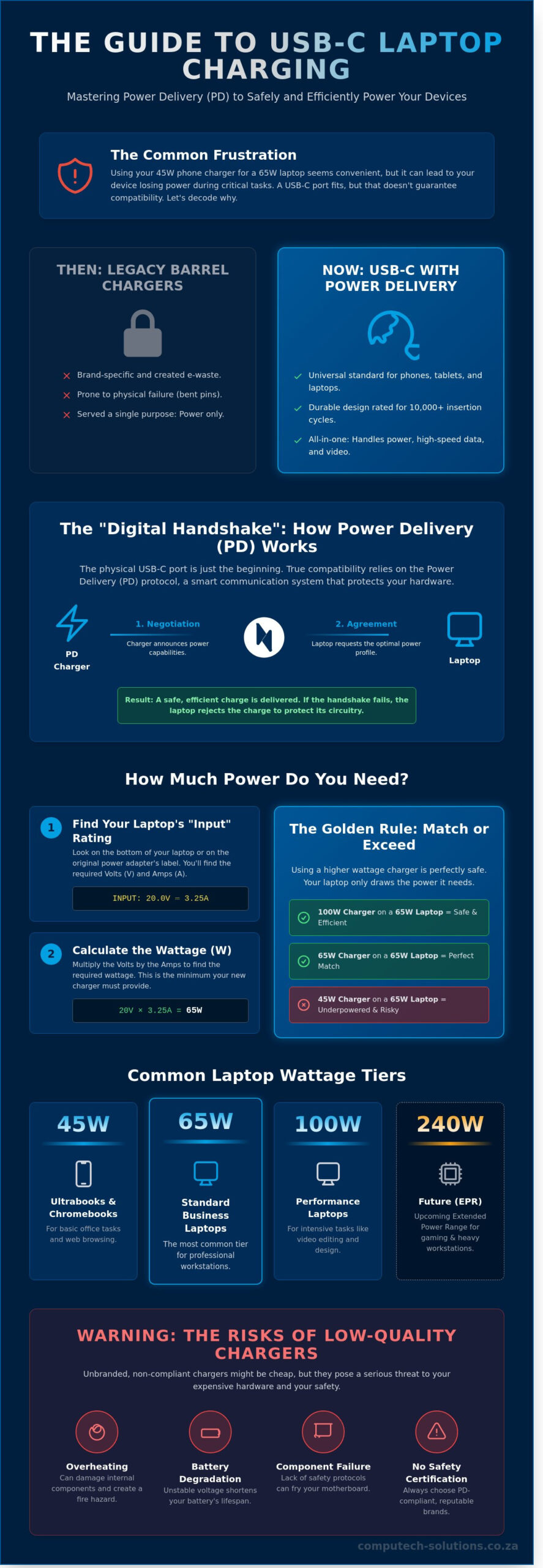
The physical shape of the port doesn’t guarantee compatibility. This is a common point of confusion for many users. While the plug fits, the charging process relies on a sophisticated digital handshake between the charger and the laptop motherboard. They communicate using the Power Delivery (PD) protocol to determine the exact voltage and amperage required. If this handshake fails or the charger cannot provide the requested profile, the laptop will likely refuse the charge to protect its internal circuitry. This safety mechanism is vital for maintaining hardware longevity in professional environments.
Adopting this standard simplifies the “one-stop-shop” approach for modern workspaces. It allows businesses to streamline their procurement by sourcing universal adapters rather than brand-locked spares. This efficiency reduces technical downtime. When a consultant moves between offices in Johannesburg or Cape Town, they no longer need to carry a specific power brick for every device. One high-quality usb c laptop charger handles the entire mobile office setup.
USB-C vs. Traditional Barrel Chargers
Traditional barrel chargers were prone to physical failure. The pins often bent or snapped after a few hundred uses. Modern Type-C connectors are designed for durability, with most rated for 10,000 insertion cycles. They also serve a dual purpose. Unlike the old power-only pins, these ports handle high-speed data and video output simultaneously. This eliminates the need for multiple cables, allowing a single connection to power a laptop while driving an external 4K monitor.
Can You Charge a Laptop with a Phone Charger?
It is a common myth that any Type-C cable provides a sufficient charge. Most mobile phone blocks output 5V or 9V. A standard business laptop typically requires 20V to wake the motherboard and charge the battery. If you use an underpowered 15W phone adapter on a 65W laptop, the device might display a “slow charging” warning or show no reaction at all. Continuous use of underpowered adapters can lead to heat stress and battery degradation over time. Always match the wattage specified by the manufacturer to ensure operational stability.
Power Delivery (PD) and Wattage: How Much Power Do You Need?
USB Power Delivery is the universal protocol that allows a single cable to charge everything from a smartphone to a high-end workstation. It works through a digital “handshake” where the device and the charger negotiate the highest safe power level. This standard is governed by the USB Power Delivery (PD) Specification, which ensures that your hardware remains protected from over-voltage. Without this smart communication, the high currents required for modern laptops would pose a significant fire risk.
Finding your laptop’s specific power requirement is straightforward. Look at the “Input” rating printed on the bottom of your chassis or the original power brick. It’s usually expressed as a calculation of Volts and Amps; for example, 20V multiplied by 3.25A equals 65W. When you select a usb c laptop charger, you must meet or exceed this wattage. Using a 100W charger for a laptop that only requires 65W is perfectly safe. This is known as downward compatibility. The laptop’s internal controller acts as a gatekeeper, drawing only the 65W it needs while the charger remains cool and efficient.
The industry is currently shifting toward the Extended Power Range (EPR) standard. While current models often cap at 100W, the EPR standard will push this limit to 240W. By 2026, most high-performance South African business laptops will likely rely on these high-wattage EPR chargers to eliminate the need for bulky, proprietary power pins.
Common Wattage Tiers for Laptops
- 45W: This is the standard for entry-level Ultrabooks and Chromebooks. It provides enough power for basic office tasks and web browsing but might struggle to charge the battery quickly while the device is under heavy load.
- 65W: This is the “sweet spot” for the majority of professional hardware, including the Dell Latitude and HP EliteBook series. It offers a balance of fast charging and portability.
- 90W to 140W: These tiers are reserved for mobile workstations and gaming rigs. If your staff handles video editing or CAD software, they will require this extra overhead to maintain performance.
The Importance of the USB-C Cable
A common mistake is assuming any USB-C cable can handle high power loads. The cable is just as critical as the wall brick itself. To support anything above 60W, a cable must include an E-Marker chip. This tiny integrated circuit communicates the cable’s current-carrying capacity to the charger. Standard cables are often limited to 3A of current, which caps your charging at 60W regardless of how powerful your brick is. For higher requirements, you need a 5A-rated cable. If you are unsure which cables your department needs, you can consult with our technical team to ensure your infrastructure supports your hardware’s full potential.
Universal vs. Brand-Specific USB-C Chargers
Original Equipment Manufacturer (OEM) chargers are often viewed as the safest bet for hardware longevity. While these branded units offer guaranteed compatibility, they frequently carry a price premium in the South African market, sometimes costing upwards of R1,200 for a standard 65W unit. This cost factor has driven a 35% increase in the demand for high-quality generic replacements among local businesses over the last 24 months. Computech Solutions mitigates the risks of low-quality chargers by subjecting every replacement usb c laptop charger to a rigorous 48-hour load test. This vetting process ensures that the voltage ripple remains within a 50mV tolerance, protecting sensitive internal components from premature failure.
South African consumers often encounter “slow charger” warnings when using third-party bricks. This isn’t always a sign of a faulty product. Instead, it’s often a result of proprietary communication protocols. Brands like Dell and HP use a specific handshake at the BIOS level to verify the charger’s authenticity. If the charger doesn’t provide the correct signal, the laptop may throttle performance or refuse to charge the battery while the system is powered on. Our technical team identifies these nuances to ensure the hardware we distribute bypasses these restrictions safely.
Charging Nuances for Major Brands
Dell and HP systems are notorious for their strict power requirements. Using a non-compliant usb c laptop charger on a Dell Latitude can trigger a BIOS warning that limits the CPU speed to its base frequency. Apple MacBooks offer more flexibility. While the 2021 and newer models feature MagSafe 3 for fast charging, they remain fully compatible with standard USB-C Power Delivery (PD) sources. Lenovo and ASUS have led the way in standardization. By the start of 2024, nearly 90% of their mid-range and premium business laptops adopted the universal PD 3.0 standard, making them the most compatible options for mixed-device environments.
The Benefits of a Universal PD Charger
Adopting universal Power Delivery (PD) chargers offers immediate operational advantages. You can reduce electronic waste by using a single high-wattage adapter to power a laptop, a tablet, and a smartphone simultaneously. This is particularly useful for South African professionals who travel between provinces; one 100W GaN (Gallium Nitride) brick replaces three bulky chargers in a laptop bag. Multi-port GaN chargers are also 40% more energy-efficient than traditional silicon-based adapters. This efficiency translates to less heat generation and a longer lifespan for the charger itself. For a business managing a fleet of 50 or more laptops, switching to standardized universal chargers can reduce procurement costs by approximately 25% over a three-year refresh cycle.
Safety and Longevity: The Risks of Low-Quality Chargers
Choosing a budget-friendly usb c laptop charger often seems like a quick win for your procurement budget. However, unbranded adapters frequently skip essential safety certifications like SABS or ICASA. These units lack the internal shielding and high-quality filtering capacitors found in OEM-grade hardware. Without these components, the charger cannot provide a steady flow of electricity. This leads to dirty power that causes your cursor to jump or your touchscreen to malfunction while charging.
Efficiency is the biggest differentiator. A high-quality adapter operates at 90% efficiency or higher. Cheap alternatives often struggle to hit 75%. This means a quarter of the electricity pulled from your wall socket turns into raw heat. This thermal stress doesn’t just shorten the charger’s life; it poses a genuine fire risk to your office environment. When internal temperatures exceed 105 degrees Celsius, the plastic casing can warp or ignite. Stable current delivery is also vital for battery health. Irregular amperage causes lithium-ion cells to degrade up to 40% faster over a 12 month period compared to chargers with clean output.
Voltage spikes are equally dangerous. A sudden surge can bypass poor-quality regulators and hit your laptop’s motherboard directly. This often results in a dead device where the LCD controller or the CPU itself is fried beyond repair. Replacing a motherboard on a modern laptop can cost between R8,000 and R15,000. That cheap usb c laptop charger becomes an expensive mistake very quickly.
Circuit Protection Features to Look For
Top-tier chargers include Over-Voltage Protection (OVP) and Over-Current Protection (OCP) to shut down the unit if power levels exceed safe thresholds. Short-Circuit Protection (SCP) acts as the final line of defense to prevent sparks. Modern Gallium Nitride (GaN) technology is a game-changer here. GaN components are 20% more efficient than traditional silicon, allowing chargers to stay cool even during rapid charging cycles. This technology ensures your hardware remains safe during high-performance tasks.
Load Shedding and Power Surges in South Africa
South African businesses face unique challenges with the national grid. Load shedding causes frequent power cycles that strain internal electronic components. When the power returns, it often comes with a transient voltage surge that can overwhelm standard adapters. Computech Solutions prioritizes sourcing hardware with built-in surge suppression designed specifically for the 230V South African standard. We ensure every unit can withstand the repetitive on-off cycles common in local business hubs. This approach minimizes hardware failure rates and protects your long-term IT investment.
How to Select the Perfect USB-C Charger for Your Laptop
Finding the correct replacement power supply requires more than just matching the connector shape. To ensure your hardware remains safe and operates at peak performance, you must follow a methodical verification process. Start by inspecting the “DC IN” or “Input” specifications usually found on the bottom casing of your laptop. These numbers, expressed in Volts (V) and Amps (A), dictate the exact power draw your device requires. For example, a laptop labeled 20V 3.25A needs a 65W power supply to charge efficiently while under heavy processing loads. You calculate wattage by multiplying Volts by Amps.
Verify that your replacement usb c laptop charger supports the Power Delivery (PD) protocol. This technology allows the charger and the laptop to communicate; it ensures the brick only sends the specific voltage the device can handle. A charger without proper PD certification might default to a lower wattage, leading to a “plugged in, not charging” error. Always match or exceed the original wattage. Using a 100W charger on a 65W laptop is perfectly safe. The laptop will only pull the 65W it needs, and the charger will likely run cooler because it isn’t working at its maximum capacity.
Don’t overlook the cable. A high-quality usb c laptop charger is only as effective as the wire connecting it to your PC. Cables are rated for specific current levels. A standard cable might only support 60W (3A), while high-performance laptops require 100W (5A) cables. Using an underrated cable can lead to heat buildup or throttled charging speeds. Sourcing your equipment from a reputable South African supplier ensures the product meets local safety regulations and provides a clear path for technical support if issues arise.
The Computech-Solutions Advantage
We provide expert technical support to verify compatibility before you commit to a purchase. This proactive approach eliminates the frustration of ordering the wrong part. Our logistics network offers nationwide delivery across South Africa, ensuring that businesses in Gauteng, KwaZulu-Natal, and the Western Cape receive their components promptly. Every unit we sell carries a comprehensive warranty, giving you peace of mind that your infrastructure is backed by professional-grade reliability and local support.
Final Checklist Before Checkout
- Verify the physical port: Confirm your device uses a standard USB-C port rather than a proprietary MagSafe or barrel-style connector.
- Future-proof your setup: Selecting a higher wattage adapter now allows you to use the same charger for more powerful future hardware.
- Check the source: Review our full range in the Laptop Chargers Category to find your specific model match.
Power Your Device with Confidence and Precision
Choosing the correct usb c laptop charger is a critical decision for your device’s longevity. You must prioritize Power Delivery (PD) standards and precise wattage matching to prevent long-term motherboard damage or battery degradation. Since 2018, Computech Solutions has served as a specialist in replacement batteries and adapters, ensuring South African professionals stay connected with hardware that meets strict safety specifications. We understand that technical compatibility can be complex, so our team provides expert technical support to verify every charger against your specific laptop model before you commit to a purchase.
We manage the entire process from verification to your doorstep with reliable nationwide shipping across South Africa. You don’t have to navigate technical specifications alone or risk expensive downtime from inferior power supplies. Browse our range of high-quality USB-C laptop chargers with nationwide delivery to ensure your laptop receives the stable, efficient power it deserves. We’re ready to help you find the perfect power solution for your hardware today.
Frequently Asked Questions
Is it safe to use a higher wattage USB-C charger than my laptop requires?
Yes, it’s completely safe to use a higher wattage usb c laptop charger because of the Power Delivery (PD) protocol. Your laptop and charger communicate instantly to negotiate the exact voltage required for your specific hardware. If you plug a 100W charger into a laptop that only needs 45W, the device will only draw 45W. This intelligent handshake prevents overheating and protects your battery’s 1,000-cycle lifespan.
Why is my laptop charging slowly with a USB-C cable?
Slow charging usually happens because your cable or power brick lacks the necessary wattage rating for your device. Standard phone cables often only support 60W, while high-performance laptops require 100W or 240W via a specialized 5A rated cable. If your charger provides only 15W, your battery might even drain while plugged in during heavy tasks. Always match your cable’s amp rating to your laptop’s power specifications for optimal performance.
Can I use my MacBook charger for my Windows laptop?
You can use a MacBook charger for a Windows laptop as long as both devices follow the universal USB-PD standard. Most modern laptops from Dell, HP, and Lenovo utilize this same protocol for power management. A 96W Apple power adapter will safely charge a Windows machine, though it won’t always enable proprietary fast-charging features found in specific manufacturer ecosystems. This interoperability reduces electronic waste and simplifies your mobile office setup.
What is a GaN charger and do I need one for my laptop?
A GaN charger uses Gallium Nitride instead of traditional silicon to conduct electricity more efficiently. These units are often 40 percent smaller than standard bricks while generating significantly less heat during operation. While you don’t strictly need one, a GaN-based usb c laptop charger is ideal for South African professionals who travel frequently. They provide high power output in a compact form factor that fits easily into slim laptop bags.
How do I know if my USB-C port supports charging?
Check the side of your laptop for a small icon printed next to the USB-C port. A lightning bolt indicates a Thunderbolt 3 or 4 port, which always supports power delivery and data transfer. A plug icon or a “D” symbol for DisplayPort often signifies charging capability as well. If no icon exists, consult your technical manual to confirm if the port supports the USB-PD 3.0 standard or a newer version.
Does using a third-party USB-C charger void my laptop warranty?
Using a high-quality third-party charger doesn’t void your warranty in South Africa. The Consumer Protection Act 68 of 2008 protects your right to choose compatible accessories for your electronic devices. Manufacturers can’t legally penalize you for using a non-branded charger unless they prove that specific accessory caused the hardware failure. Ensure your charger is NRCS approved to guarantee it meets South African safety standards and provides stable power to your motherboard.
