
Last Tuesday, a local business owner in Sandton watched their productivity vanish when a mechanical drive failed during a sudden Stage 6 power cut. You’ve likely felt that same anxiety as your PC takes three minutes to boot or stutters during critical tasks. We agree that waiting for slow hardware is a drain on your time and your budget. By upgrading to a high-performance ssd hard drive, you can achieve data transfer speeds up to 7,500 MB/s and ensure your files remain safe during unexpected shutdowns.
This guide provides the technical clarity you need to choose between NVMe and SATA connectors while maximizing your hardware’s lifespan. You’ll learn how a single component swap can deliver a 500% performance boost and provide the reliability your South African business demands in 2026. We’ll walk you through the exact specifications required to eliminate frustrating load times and secure your data against the unique challenges of our local infrastructure.
Key Takeaways
- Understand why replacing a mechanical HDD with a high-performance ssd hard drive is the most cost-effective way to eliminate system bottlenecks and boost boot speeds.
- Learn to distinguish between SATA and NVMe technologies to ensure you select the correct interface for your motherboard’s specific compatibility and performance requirements.
- Discover how a strategic R1,000 component upgrade can often outperform a R10,000+ new laptop purchase, significantly extending your hardware’s operational lifespan.
- Master the planning process by identifying your available drive slots and selecting the optimal storage capacity tailored to your specific workload in the South African market.
- Access premium brands like Samsung and WD with reliable nationwide delivery, ensuring your business benefits from a one-stop-shop approach to IT infrastructure.
What is an SSD Hard Drive and Why Does Your PC Need One?
An ssd hard drive is the single most effective hardware upgrade you can implement to revitalize a sluggish workstation in 2026. Unlike traditional Hard Disk Drives (HDD) that rely on physical spinning platters and moving read/write heads, a Solid State Drive uses non-volatile flash memory to store data. This technology is similar to what you find in a USB flash drive but is significantly faster and more reliable. To understand the underlying architecture and history of this technology, you can explore the technical foundations of What is a Solid-State Drive through Wikipedia’s comprehensive overview. Because there are no moving parts, the drive accesses information near-instantaneously, allowing your operating system to function without the mechanical delays of the past.
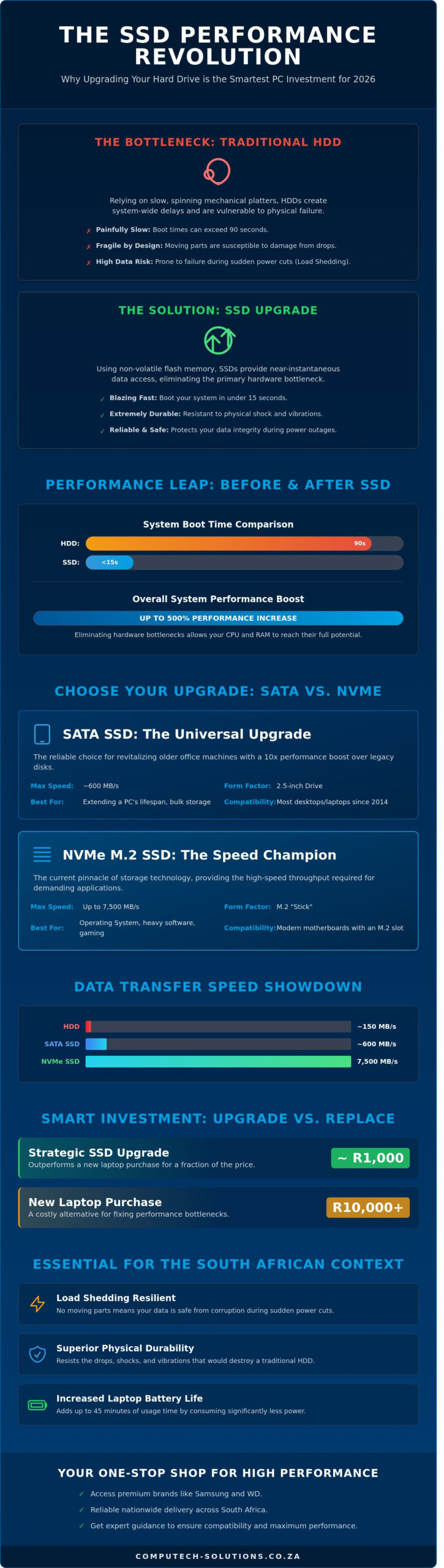
The primary benefit of switching to an ssd hard drive is a massive reduction in system latency. You’ll see boot times drop from 90 seconds on an old mechanical drive to under 15 seconds on a modern NVMe unit. This transition isn’t just about speed; it’s about eliminating the primary hardware bottleneck that prevents your processor from reaching its full potential. Beyond performance, these drives offer superior durability. They’re resistant to physical shocks and power fluctuations, making them the preferred choice for both mobile professionals and stationary office setups.
The End of the “Spinning Disk” Era
Mechanical drives have reached a physical ceiling that they cannot cross. A standard 7,200 RPM HDD can only move its physical arm so quickly across a magnetic disk. This creates a delay known as seek time. SSDs eliminate this physical movement entirely. They access data across the entire storage grid simultaneously. Data from 2024 performance benchmarks showed that even entry-level SSDs outperform high-end HDDs by a factor of 10 in random read/write tasks. This means software like Microsoft Teams or heavy ERP systems launch in seconds rather than minutes.
Reliability in the South African Context
South African businesses face unique infrastructure challenges that make SSD technology a necessity rather than a luxury. Load shedding remains a critical risk to data integrity for older systems. When power cuts occur suddenly, the physical heads of an HDD can crash onto the spinning platter, causing permanent data loss or “bad sectors.” SSDs don’t have this vulnerability. They safely park data electronically without mechanical risk during a blackout.
- Durability: SSDs can survive drops and vibrations that would shatter the internal components of a mechanical drive.
- Efficiency: Laptops equipped with SSDs see battery life improvements of up to 45 minutes because they don’t have to power a physical motor.
- Cost-effectiveness: While a 1TB SSD might cost roughly R1,200 in the current market, the reduction in downtime and hardware replacement costs provides a clear return on investment.
Computech Solutions recommends moving all primary OS partitions to solid-state storage to ensure operational continuity. The stability provided by flash-based storage reduces the stress on your IT support desk and keeps your team productive through the most demanding South African business cycles.
NVMe vs. SATA: Choosing the Right SSD Technology
Selecting the correct ssd hard drive interface depends on your hardware’s age and your specific performance requirements. In the South African market, we primarily see two standards: SATA and NVMe. SATA remains the reliable choice for revitalizing older office machines; however, NVMe drives provide the high-speed throughput required for 2026’s demanding software applications. Understanding these physical and logical differences prevents costly purchasing errors and ensures your system operates at its peak potential.
SATA SSDs: The Universal Upgrade
SATA (Serial ATA) SSDs typically use a 2.5-inch form factor that mimics traditional mechanical hard drives. This design ensures compatibility with nearly every desktop and laptop manufactured since 2014. While SATA technology is capped at a theoretical speed of 600MB/s, these drives offer a 10x performance boost over legacy mechanical disks. They eliminate the mechanical latency that causes system hang-ups during boot-up or file searches. For a budget-friendly R550 to R950, a 500GB SATA drive can extend a workstation’s lifecycle by three years. It’s the practical choice for secondary storage or bulk data archives where cost per gigabyte matters more than extreme speed.
NVMe M.2 SSDs: The Speed Champions
NVMe (Non-Volatile Memory Express) represents the current pinnacle of storage performance. These drives use the M.2 form factor, which looks like a small stick of gum, and connect directly to the CPU via PCIe lanes. This direct path allows for a technical comparison of NVMe vs. SATA SSDs, showing that modern NVMe units can reach speeds exceeding 3500MB/s on Gen3 or 7500MB/s on Gen4. For South African creative professionals and gamers, this translates to 40% faster load times in heavy applications like Adobe Premiere or high-end simulation software. If you’re building a new PC in 2026, an NVMe ssd hard drive should be your primary boot drive to ensure the operating system stays responsive.
Compatibility checks are essential before you buy. Most modern motherboards feature at least one M.2 slot, but older hardware might only support SATA connections. You should consult your manual or check the physical board for a small horizontal slot with a single screw hole. If your business needs help identifying the right hardware path for a fleet upgrade, our team at Computech Solutions can perform a full infrastructure audit to ensure complete compatibility. Don’t risk purchasing a drive that doesn’t fit your physical slot or power requirements.
- SATA: Best for older laptops, budget builds, and 2.5-inch drive bays.
- NVMe: Best for modern gaming, video editing, and high-performance workstations.
- Form Factor: Check if your device requires a 2.5-inch casing or an M.2 stick.
- Keying: Ensure your M.2 slot supports “M-key” or “B+M key” configurations.
Calculating the ROI: SSD Upgrade vs. New Laptop Purchase
For most South African businesses, budget efficiency drives every IT decision. Replacing a fleet of laptops costs upwards of R10,000 per unit for mid-range models. In contrast, a high-performance ssd hard drive upgrade typically costs around R1,000. This 90% cost saving allows companies to redirect capital toward growth initiatives while extending the lifecycle of existing hardware by three to five years. Beyond the balance sheet, this approach significantly reduces e-waste. By keeping functional machines out of landfills, you support sustainable corporate governance and meet modern environmental standards.
Performance Gains You Can Feel
Upgrading your storage transforms the daily user experience immediately. You’ll see boot times drop from a sluggish 90 seconds to under 15 seconds. An ssd hard drive eliminates the common “100% disk usage” errors that plague older Windows systems; this ensures that applications like Microsoft Excel or Google Chrome load instantly. For remote workers in busy hubs like Sandton or Century City, this means less time waiting for system responses and more time hitting deadlines. If you’re wondering about the technical process, Seagate provides a comprehensive guide on how to install an SSD to ensure a seamless transition for your hardware.
Reliability and Data Safety
Reliability is a core metric for mobile professionals across South Africa. Unlike traditional mechanical drives, SSDs have no moving parts. This makes them resistant to the physical shocks common during daily commutes or site visits. We measure longevity through Terabytes Written (TBW). A standard 500GB drive often features a 300 TBW rating. This means a user could write 60GB of data every single day for over 13 years before the drive reaches its theoretical limit. Because SSDs generate less heat, they also protect surrounding components like the motherboard and battery from thermal degradation. This stability is vital for maintaining uptime in high-pressure business environments where technical downtime equates to lost revenue.
- Cost Efficiency: Save up to R9,000 per workstation compared to buying new.
- Speed: Reduce system latency by up to 400% in daily tasks.
- Durability: Eliminate mechanical failure risks during travel.
- Sustainability: Extend hardware life to 7 or 8 years total.
It’s clear that the financial argument for an upgrade is compelling. You don’t need a new machine to get modern performance; you just need to replace the bottleneck. This simple hardware swap ensures your team stays productive without the heavy capital expenditure of a full hardware refresh.
A Step-by-Step Guide to Planning Your SSD Installation
Upgrading to a new ssd hard drive requires more than just a purchase; it demands a strategic approach to ensure your hardware investment delivers the expected performance gains. Follow these four essential steps to prepare your system for a seamless transition. A well-planned installation prevents downtime and protects your valuable business data.
- Step 1: Identify your hardware compatibility. Open your Task Manager or check your motherboard manual to see if you have an available M.2 NVMe slot or a standard 2.5-inch SATA bay. Most South African business laptops manufactured after 2022 include at least one M.2 slot.
- Step 2: Determine your capacity requirements. A 250GB drive is the absolute minimum for a Windows 11 or Windows 12 boot drive. We recommend a 500GB or 1TB ssd hard drive for general professional use. In the 2026 market, a high-quality 1TB NVMe drive typically retails between R1,200 and R1,750.
- Step 3: Choose your deployment method. You’ll need to decide whether to clone your existing drive for convenience or perform a clean installation for maximum speed.
- Step 4: Secure your data. Statistics from 2025 indicate that 14% of DIY hardware upgrades result in some form of data loss due to unforeseen errors. Back up your files to a cloud service like OneDrive or an external physical drive before you touch any hardware.
Data Migration Made Easy
Cloning software like Acronis Cyber Protect or Macrium Reflect allows you to mirror your entire system onto the new drive. This is the fastest way to get back to work. However, a clean install of Windows provides a significant advantage. It removes years of accumulated registry bloat and background processes, often resulting in boot times that are 25% faster than a cloned drive. Once the new drive is the primary boot device, you can format your old HDD and use it as a secondary storage volume for large, non-essential files.
Installation Safety Tips
Static electricity is the primary silent killer of PC components. Always use an anti-static wrist strap or frequently touch a grounded metal object to discharge yourself. For desktop installations, you’ll generally only need a Phillips #1 screwdriver. Laptops often require specialized Torx bits and plastic prying tools to avoid cracking the chassis. If your device has a non-removable internal battery, you must disconnect it from the motherboard before inserting the new drive. If you feel uncomfortable opening a high-end workstation, seeking professional technical support is a cost-effective way to avoid R5,000 plus in accidental damage repairs.
If you want to ensure your office hardware is upgraded without any risk of data loss, book a professional installation service with our expert technicians today.
Why Buy Your SSD from Computech-Solutions?
Choosing the right ssd hard drive requires more than just picking a brand. You need a partner that understands the technical specifications required for 2026 hardware standards. Computech-Solutions provides an extensive inventory of high-performance components from industry leaders like Samsung, Crucial, and Western Digital (WD). Whether you’re looking for the lightning-fast speeds of Gen5 NVMe drives or reliable SATA replacements for older workstations, our stock reflects the latest in storage technology. We don’t just sell parts. We provide the technical clarity needed to ensure your chosen drive is compatible with your motherboard’s specific M.2 or PCIe interface.
Our one-stop-shop model eliminates the frustration of sourcing components from multiple vendors. We offer competitive pricing across our entire range, ensuring that individual users and large enterprises access the same high-tier hardware without inflated margins. Every order includes the benefit of our nationwide delivery network. We ship to all nine provinces, from Gauteng to the Western Cape, ensuring your hardware arrives safely and promptly. If you’re unsure which interface suits your current build, our expert technical support team is available to guide your selection. We focus on practical outcomes, helping you reduce boot times and eliminate system bottlenecks.
Trusted IT Expertise
Computech-Solutions has spent over 8 years establishing itself as a pillar of the South African IT sector. This experience translates into a curated selection of hardware that meets strict quality benchmarks. We back our products with reliable local warranties, giving you peace of mind that your investment is protected. Our team handles everything from single-unit upgrades for home PCs to bulk procurement for corporate server rooms. This versatility makes us the preferred choice for over 1,500 active clients across the country. We understand that downtime is costly. By maintaining a robust supply chain, we ensure that the latest ssd hard drive models are available when you need them most. Our commitment to end-to-end support means we assist with post-purchase technical queries, ensuring your migration to faster storage is successful.
Seamless Online Shopping Experience
Efficiency defines our digital storefront. We’ve integrated multiple payment gateways to accommodate your preferred method, whether it’s via secure credit card transaction or instant EFT. Shipping speeds are prioritized; most orders reach major metropolitan hubs within 48 to 72 hours. You can track your package from our warehouse to your doorstep with total transparency. We aim to alleviate the stress of technical procurement by providing a stable, reliable platform for all your hardware needs. Our internal logistics team double-checks every order for accuracy before dispatch, maintaining our 99% fulfillment rate. Browse our full range of SSDs and speed up your PC today!
Future-Proof Your PC Performance Today
Upgrading your hardware shouldn’t be a guessing game. By transitioning to a modern ssd hard drive, you’ll extend your current machine’s lifespan by 3 to 5 years while avoiding the R15,000 average cost of a mid-range replacement laptop. Whether you choose the lightning-fast speeds of NVMe or the reliable compatibility of SATA, the performance gains are immediate and measurable. Since 2018, Computech Solutions has served as a trusted South African IT partner. We provide the technical expertise needed to navigate complex compatibility across Acer, Dell, and HP systems. We’ve built our reputation on ensuring your hardware investment delivers operational efficiency from day one. Our team provides end-to-end support to eliminate technical downtime and keep your business moving forward. It’s time to stop letting aging hardware throttle your daily productivity. Take control of your system’s speed with a professional-grade upgrade designed specifically for the South African market. We’re ready to help you select the perfect component for your specific business requirements.
Shop High-Performance SSDs with Nationwide SA Delivery
Frequently Asked Questions
Will an SSD make my internet faster?
An SSD won’t increase your raw internet bandwidth or fibre speed. It does reduce the time your browser takes to open and load cached files from the disk. If you’re on a 100Mbps Vumatel line, your download speed stays the same, but your PC processes that data faster. This creates a smoother browsing experience because the hardware no longer bottlenecks the network stream.
Can I put an SSD in any old laptop?
Most laptops manufactured after 2012 support an upgrade to an ssd hard drive. Older machines typically use a 2.5-inch SATA interface, which is a universal standard. You can replace a mechanical drive with a SATA SSD in about 10 minutes. Some ultra-thin models from 2018 onwards might have soldered storage, so we recommend checking your specific model’s service manual first.
Is a 256GB SSD enough for Windows 11?
A 256GB drive is the absolute minimum for Windows 11, but it’s rarely enough for long-term business use. While the OS itself occupies roughly 27GB, system updates and temporary files quickly consume another 40GB. After installing basic office suites and a few local databases, you’ll likely have less than 100GB of free space. We suggest a 512GB unit to maintain system stability and performance.
How much faster is an SSD compared to a normal hard drive?
A standard ssd hard drive is roughly 5 to 10 times faster than a traditional 7,200 RPM mechanical disk. While a hard drive averages 150MB/s read speeds, a SATA SSD reaches 550MB/s. If you upgrade to an NVMe Gen4 drive, speeds jump to 7,500MB/s. This reduces your Windows boot time from 90 seconds down to less than 15 seconds, significantly improving daily productivity.
Do SSDs fail suddenly without warning?
SSDs can fail without physical noise, unlike mechanical drives that click or grind before dying. Most modern flash storage includes S.M.A.R.T. monitoring technology to track its health. You can monitor the Terabytes Written (TBW) metric to see how much life remains. Statistically, high-quality drives show a 0.5% annual failure rate, making them more reliable than older spinning disks over a five-year period.
What happens to my data if the power goes out during an SSD write?
A sudden power cut during a write operation can cause data corruption or file system errors. This is a common risk during South African load shedding stages if you aren’t using a UPS. Enterprise-grade drives often include Power Loss Protection (PLP) capacitors to finish writing data. For home users, we recommend a small 650VA UPS to prevent hardware-level file corruption during unexpected outages.
Is it difficult to install an SSD myself?
Installing an SSD is a simple task that usually requires only a small Philips head screwdriver. Desktop installations take approximately 5 minutes because you just plug in two cables. Laptops are slightly more complex and might take 20 minutes to open the chassis. You’ll need to clone your data using software like Acronis, which we provide as part of our managed technical support packages.
Which SSD brand is the most reliable in South Africa?
Samsung and Western Digital are currently the most reliable brands available in the South African market. The Samsung 990 Pro series offers a 5-year warranty and high endurance ratings for professional workloads. Western Digital’s Blue and Black ranges are also popular for their local support and distribution networks. These brands consistently outperform generic alternatives in both speed tests and long-term durability assessments.
